




Understanding Ethernet frames makes wired networking easier to troubleshoot and design. The frame carries data across your local network and gives switches the information they need to deliver traffic correctly. This guide covers everything you need to know about the Ethernet frame and how it works.
Table of contents
- Ethernet frame explained clearly
- Why Ethernet uses frames to move data
- Components of an Ethernet frame
- Common Ethernet frame types
- Maximum transmission unit and frame sizes
- How switches process Ethernet frames
- Real-world examples of Ethernet frames
- How to inspect an Ethernet frame in Wireshark
- Common problems revealed by frame analysis
- Ethernet frame vs packet vs segment
- FAQs
- Summary
Ethernet frame explained clearly
An Ethernet frame is the basic unit of data sent across a wired local network. It contains addressing, protocol information, payload data, and an error-checking value that ensures reliable delivery.
Why Ethernet uses frames to move data
Frames give Ethernet devices a predictable structure that improves compatibility and performance. This structure allows hardware to identify devices, detect errors, and move traffic efficiently across switches.
Components of an Ethernet frame
Each field inside the frame plays a specific role in delivery and reliability. Understanding these parts helps you read packet captures and diagnose network issues.

Preamble and start-of-frame delimiter
These fields synchronize communication between devices. They ensure both endpoints read the frame correctly from the first byte.
Destination and source MAC addresses
These destination and source MAC addresses tell the switch where the frame goes and where it originated. They enable efficient, hardware-level delivery across the LAN.
EtherType or length field
This field identifies the protocol inside the payload, such as IPv4, IPv6, or ARP. Switches and operating systems use it to understand how to process the data.
Payload
The payload contains the actual data carried inside the frame. This includes common protocols like ARP messages, DHCP requests, or full IPv4 packets.
Frame check sequence (FCS)
The FCS detects physical-layer errors during transmission. Devices drop the frame if the FCS value fails, which helps maintain network stability.
Common Ethernet frame types
Different frame formats appear across networks based on compatibility needs. You may encounter several versions depending on hardware and configuration.
Ethernet II
Ethernet II is the most widely used modern frame format. It uses an EtherType field to specify which protocol the payload contains.
IEEE 802.3
IEEE 802.3 frames rely on a length field instead of EtherType. Some legacy systems and specialized networks still use this format.

VLAN and 802.1Q tagged frames
Tagged frames include an extra header that identifies VLAN membership or priority settings. Switches use this tag to keep traffic separated and organized.

Maximum transmission unit and frame sizes
The MTU determines how much data a frame can carry in the payload. Larger MTUs reduce overhead in high-bandwidth networks, while mismatched MTUs lead to dropped traffic.
How switches process Ethernet frames
Switches read the destination MAC address and forward frames through the correct port based on their internal MAC tables. This method keeps network traffic fast and highly efficient.
Real-world examples of Ethernet frames
Common examples include ARP requests identifying local devices or IPv4 packets carrying web traffic. Each follows the same frame format regardless of the protocol inside.
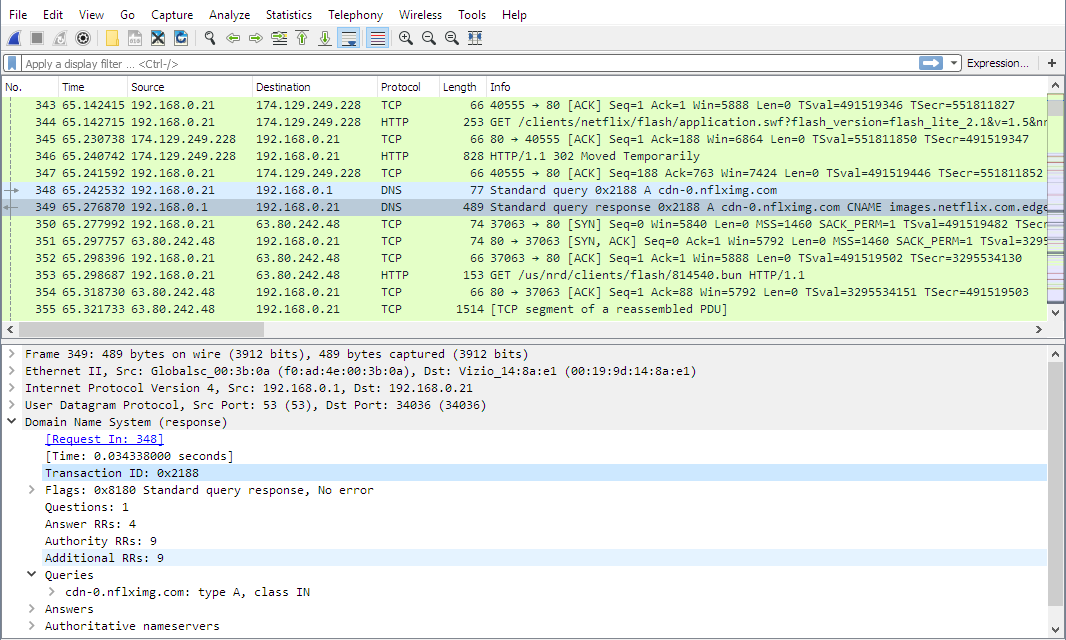
How to inspect an Ethernet frame in Wireshark
Open Wireshark, start a capture, and stop it after a few packets appear. Select any frame to expand each field and examine the structure from MAC addresses to FCS.
Common problems revealed by frame analysis
Frame-level issues often point to cabling, configuration, or switch problems. Identifying the pattern helps narrow down the root cause quickly.
- CRC and FCS mismatches: A high number of FCS errors typically points to cable damage or interference. Replace or test the cable to confirm the issue.
- Jumbo frame misconfiguration: If one device uses jumbo frames and another does not, frames may drop silently. Align MTU settings across all devices to fix the problem.
- VLAN tag problems: Incorrect or missing tags cause connectivity issues in segmented networks. Check switch port settings when you see unexpected traffic behavior.
Ethernet frame vs packet vs segment
A frame carries a packet, and a packet carries a segment. Understanding the relationship helps new learners distinguish between data units across OSI layers.
FAQs
What changed in Ethernet frames over time? Modern Ethernet uses more flexible tagging and higher MTU options compared to early versions.
Do Wi-Fi networks use Ethernet frames? Wi-Fi uses 802.11 frames that serve a similar purpose but use different fields and addressing rules.
How large can an Ethernet frame be? Standard frames support a 1500-byte MTU, while jumbo frames allow much larger payloads on compatible hardware.
Do regular users need to change MTU settings? Most users leave MTU at default values unless optimizing high-speed transfers.
Summary
- An Ethernet frame carries data across your local network and includes addressing and error-checking.
- Frames contain fields like MAC addresses, EtherType, payload, and FCS.
- Ethernet II dominates modern networks, though tagged and 802.3 frames still appear.
- MTU size affects performance, reliability, and compatibility.
- Wireshark helps you inspect frames and diagnose issues like CRC errors or VLAN problems.
Understanding these details improves your ability to troubleshoot networks and read packet captures effectively. When you know how Ethernet frames work, you can interpret traffic more accurately and resolve connectivity issues faster.


Discussion (0)
Be the first to comment.