



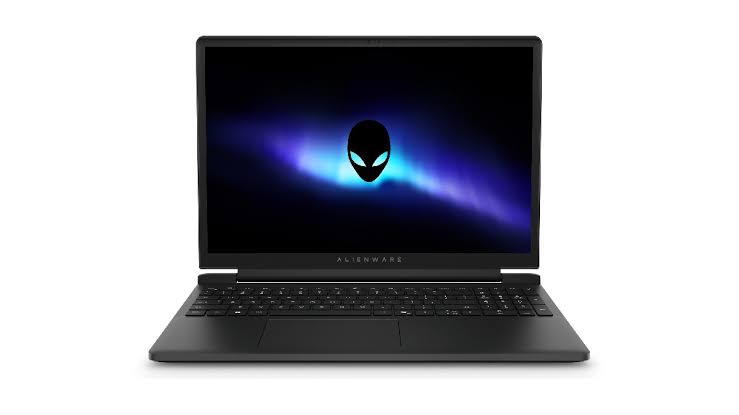
The Alienware 15 offers solid gaming performance through NVIDIA’s GeForce RTX 5050 laptop GPU, but its loud cooling system, warm keyboard, heavy design, and small 512GB SSD make it difficult to recommend without careful consideration.
The tested configuration combines an AMD Ryzen 7 260 processor with an RTX 5050, 16GB of DDR5 memory, and a 15.3 inch display running at 1920 by 1200 with a 165Hz refresh rate. It costs $1,459.99 in the United States, placing it above many affordable gaming laptops despite being positioned as an entry level Alienware model.
Its graphics performance is strong enough for modern games at the display’s native resolution. NVIDIA’s DLSS technology also helps the laptop reach much higher frame rates in supported titles, especially when multi frame generation is enabled.
However, the RTX 5050 does most of the important work. The Ryzen 7 260 delivers weaker processor performance than expected, while storage limitations become noticeable almost immediately.
RTX 5050 handles modern games well with help from DLSS
Counter Strike 2 ran close to the screen’s 165 frames per second target at high settings while the laptop was connected to power and using its performance profile.
Cyberpunk 2077 also produced a native frame rate of around 60 frames per second at high settings without ray tracing or upscaling. Enabling low ray tracing, balanced DLSS Super Resolution, and four times multi frame generation increased the displayed result from roughly 42 frames per second to 171.
That large increase shows the value of NVIDIA’s latest upscaling and frame generation systems. The experience will depend on how comfortable you are with generated frames, as they do not replace the need for a stable native frame rate.
PUBG remained above 60 frames per second at high settings and could approach the display’s refresh rate after lowering some options. Apex Legends also reached 165 frames per second with additional adjustment.
| Component | Tested specification |
|---|---|
| Processor | AMD Ryzen 7 260 |
| Graphics | NVIDIA GeForce RTX 5050 with 8GB memory |
| Memory | 16GB DDR5 5600 |
| Display | 15.3 inch, 1920 by 1200, 165Hz |
| Storage | 512GB PCIe 4.0 SSD |
| Battery | 68Wh |
| Weight | 2.22kg |
| Tested price | $1,459.99 |
The RTX 5050 performs better than the older RTX 4050 laptop GPU, although it remains behind the RTX 4060. Its main advantage is access to newer DLSS features, which can help demanding games run more smoothly.
A 512GB SSD is not enough for a gaming laptop at this price
The most serious limitation is storage. Although the laptop is advertised with a 512GB drive, Windows reports around 477GB of usable capacity.
Only 332GB remained free after Windows 11 and the included applications were installed. That space disappeared quickly after adding four games.
Modern releases regularly require more than 100GB, so you may need to remove and reinstall games frequently. An external drive can store backups, but current Xbox and PC games generally perform better when installed on a fast internal SSD.
The drive itself is not slow. It reached read speeds of around 7,023MB per second and write speeds near 5,962MB per second. Capacity is the problem rather than performance.
Alienware promotes the laptop as upgradeable, but replacing or expanding storage adds more expense to an already costly entry level system. A 1TB drive should have been the starting point at this price.
Loud fans and keyboard heat reduce everyday comfort
The Alienware 15 uses an aggressive cooling system to control temperatures. During gaming, the fans reached approximately 58 decibels, making headphones almost essential.
Switching to the quieter profile reduced fan speed but did not make the laptop discreet while running games. The cooling noise may also disturb anyone sitting nearby.
Despite the strong airflow, the keyboard became warm during extended play. Thermal testing recorded a temperature of around 46 degrees Celsius near the WASD area. This is not unusual for a gaming laptop, but it may become uncomfortable during longer sessions.
The laptop weighs 2.22kg and uses a large 180W power adapter, so it is better suited to moving between desks than regular travel. USB C charging at up to 100W is available, but full gaming performance still requires the main charger.
Port selection is one of its stronger areas. The system includes two USB C ports, two USB A ports, HDMI 2.1, Gigabit Ethernet, and a 3.5mm audio connection. This makes it easy to connect external storage, monitors, a mouse, and other accessories.
The Alienware 15 can run modern games well, particularly when DLSS is available. However, its price, restricted storage, loud fans, and warm keyboard prevent it from feeling like a complete entry level package.
It makes the most sense as a mostly stationary gaming computer for someone who values NVIDIA’s latest graphics features and is prepared to upgrade the storage. Buyers seeking quiet operation, strong portability, or better value may find more balanced options elsewhere.


Discussion (0)
Be the first to comment.