




SIM card failures usually appear as No SIM, Invalid SIM, or sudden drops in cellular service. These issues can come from physical damage, software glitches, or a carrier-side provisioning error. This guide explains why SIM cards fail and gives quick steps to fix the problem on any modern device.
1) What SIM card failure mean
A SIM failure happens when your phone cannot read or authenticate the card. This might be due to poor contact with the tray, outdated carrier files, or a damaged SIM. Understanding which category your issue fits helps you avoid unnecessary replacements.
2) Symptoms of SIM card failure
You might see No SIM, SIM not provisioned, or Emergency calls only. Some devices show intermittent signal drops or ask you to restart. These symptoms help confirm the issue sits with the SIM rather than Wi-Fi or Bluetooth.
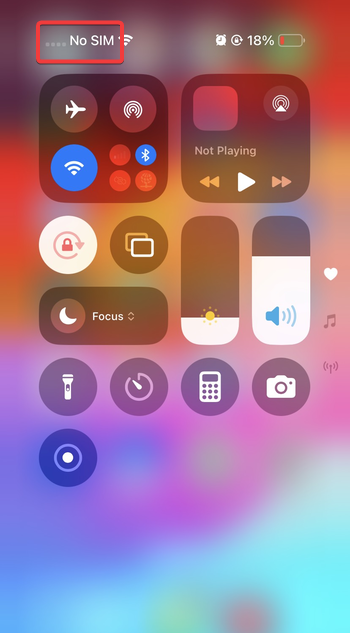
3) Common reasons for a SIM card to stop working
SIM card failure can come from hardware wear, dust inside the tray, software bugs, or carrier updates. Identifying the root cause makes the troubleshooting process faster.
Physical damage or SIM wear
Scratched gold contacts or moisture exposure interrupt communication. Older SIMs also degrade after years of use.
SIM tray alignment and debris
Dust or a slightly bent tray prevents the SIM from seating properly. Even minor misalignment can trigger repeated failures.
Software or carrier configuration errors
A network update or activation glitch can make a valid SIM appear invalid. A quick settings reset often resolves this.
Device or firmware issues
Outdated radio firmware might fail to read the SIM correctly. Installing the latest device update can restore normal behavior.

eSIM activation or transfer problems
Digital profiles can fail during eSIM activation or phone transfers. Removing, re-adding, and activating the SIM usually fixes these interruptions.
4) Quick diagnostic checks to identify the real cause
- Test the SIM in another phone
- Test a known-good SIM in your device
- Check carrier status and outages
5) Step-by-step fixes for SIM card failure
Clean the SIM card and tray
Use a microfiber cloth to wipe the gold contacts on the SIM card. Remove any dust inside the tray to improve contact.
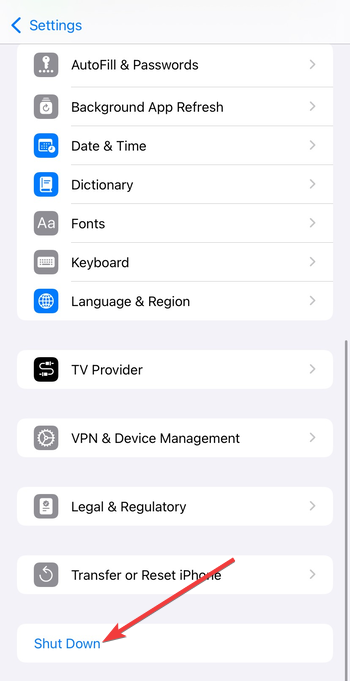
Restart the device and reinsert the SIM
Turn the phone off, remove the SIM, and place it firmly back into the tray. Turn the phone back on to force the device to reinitialize SIM authentication.
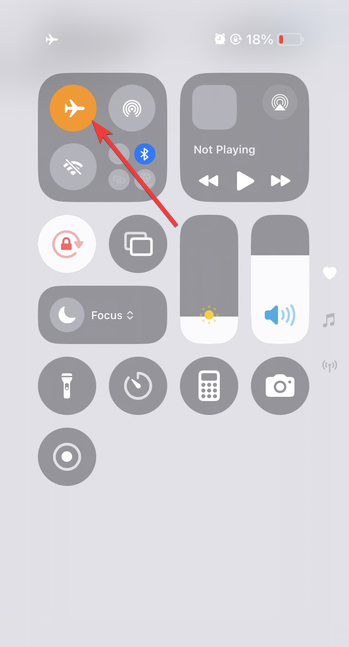
Toggle airplane mode and reset network settings
Turn airplane mode on and then off to refresh the radio connection. If the issue continues, run a network settings reset to remove corrupted carrier files.
Update device software and carrier settings
Install available system updates and carrier configuration files. Updated firmware often includes modem fixes that restore SIM detection.
Re-activate or re-add your eSIM
Delete the eSIM profile and add it back using the carrier QR code or app. This often resolves activation failures after switching phones.
Replace the SIM card
If the card is physically worn or several years old, getting a new SIM is the most reliable fix. Most carriers offer free or low-cost replacement cards.
6) Special cases that cause SIM card failure
Travel SIMs and roaming restrictions
International SIMs may fail if roaming permissions or supported bands do not match your region. Reactivating the SIM with the provider helps resolve this.
Dual-SIM conflicts
Some phones prioritize one SIM over another, causing one line to drop. Adjusting slot priority or disabling one SIM temporarily often resolves the conflict.
Carrier locks and unsupported phones
If your phone is carrier-locked, it can reject SIMs from other networks. Unlocking the device or using a supported SIM usually fixes this issue.
Tips: How to prevent SIM card failure
- Reduce frequent SIM swapping
- Protect the SIM from moisture and heat
- Handle the SIM tray carefully
FAQs
Why does my phone say No SIM after an update? Updates can reload radio firmware or carrier files, causing a temporary detection error. Restarting the device usually resolves it.
Can a SIM card go bad over time? Yes, SIMs degrade after years of use, especially if they are often removed from the tray.
Do eSIMs fail the same way physical SIMs do? eSIMs avoid physical wear but can fail due to activation errors or corrupted profiles. Removing and re-adding the profile usually fixes these issues.
How do I know when to replace my SIM? Replace the SIM when it fails in every device or shows visible damage such as deep scratches or cracks.
Summary
- Confirm the symptoms match SIM failure rather than Wi-Fi or general network issues.
- Run quick diagnostic swaps to identify whether the SIM, device, or carrier is at fault.
- Clean and reseat the SIM, restart the device, and install available updates.
- Reset network settings or re-activate eSIM profiles if connection problems persist.
- Replace the SIM or contact support when hardware damage or repeated failures appear.
Most SIM failures resolve with cleaning, reseating, or refreshing network settings. Persistent issues often point to a worn card or faulty tray. Replacing the SIM or visiting a repair service gives you the fastest and most reliable resolution.



Discussion (0)
Be the first to comment.