




Voicemail helps you capture missed calls, but many users struggle to find the correct Samsung S20 settings. This guide shows every reliable way to set up voicemail and helps you fix common issues quickly.
But before you start, confirm your carrier supports voicemail on your line and that your S20 connects to the network normally. This avoids errors when you open the voicemail menu.
Table of contents
- Set up voicemail on the Samsung S20 using the Phone app
- Set up visual voicemail on the Samsung S20
- Set up voicemail for Verizon, AT&T, T-Mobile, and Google Fi
- Use Google Voice as an alternative voicemail
- Set up voicemail on dual-SIM Samsung S20 models
- Troubleshoot voicemail not working on Samsung S20
- FAQs about Samsung S20 voicemail
- Summary
Set up voicemail on the Samsung S20 using the Phone app
Open the Phone app and tap Settings. Tap Voicemail and verify the voicemail service and number so your S20 routes calls to the correct inbox.

Next, press and hold 1 to call voicemail. Most carriers ask you to set a password or record a greeting on your first call.
Set up visual voicemail on the Samsung S20
Open the Phone app and tap the Voicemail tab if your carrier supports it. Check for the Visual Voicemail option and select it if it is available. Now, follow the onscreen instructions to complete the setup.
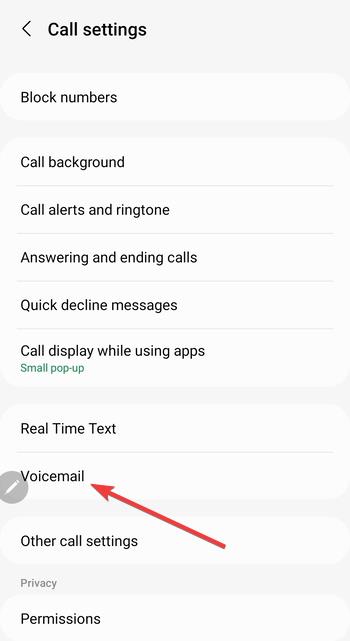
Note that some carriers require you to install their Visual Voicemail app from the Play Store.
Set up voicemail for Verizon, AT&T, T-Mobile, and Google Fi
While the process of setting up voicemail on Android remains largely the same, each carrier uses its own voicemail number and setup process. Follow the steps that match your provider.
Verizon voicemail setup steps
Press and hold 1 to call *86 and complete initial setup. Verizon Visual Voicemail downloads automatically on many Samsung S20 devices.
AT&T voicemail setup steps
Press and hold 1 and follow the prompts to create a password. AT&T may require you to set security questions before you record a greeting.

T-Mobile voicemail setup steps
Hold 1 to call 123, then follow the spoken instructions. If Visual Voicemail fails to appear, install the T-Mobile Visual Voicemail app.
Google Fi voicemail setup steps
Open the Google Fi app and select Phone settings. You can customize greetings and enable transcription directly from the Fi interface.
Use Google Voice as an alternative voicemail
Google Voice gives you cloud-based voicemail with strong transcriptions. You can route missed calls to Google Voice instead of your carrier inbox.
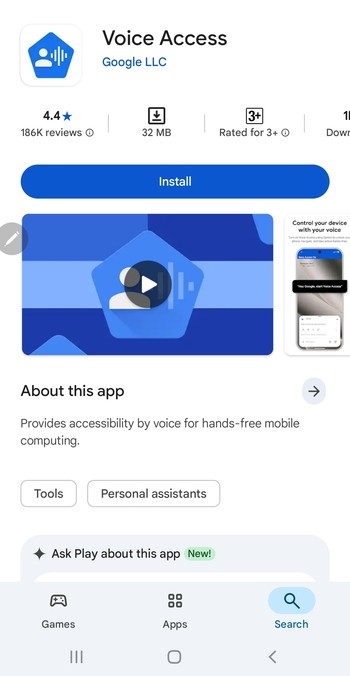
Activate Google Voice voicemail routing
Open the Google Voice app and go to Settings. Enable Voicemail via Google Voice to redirect unanswered calls to your Google Voice mailbox.
Turn off Google Voice if you want to return to carrier voicemail
Disable call forwarding inside Google Voice and restart your S20. This restores your original carrier voicemail routing.
Set up voicemail on dual-SIM Samsung S20 models
Dual-SIM and eSIM devices route voicemail differently. You must select which SIM handles calls before voicemail works correctly.
Choose the correct SIM for voicemail
Open Settings and select SIM manager, then set the default calling line. Your S20 attaches voicemail to whichever SIM handles outgoing calls.
Understand limitations of voicemail on travel or secondary SIMs
Some prepaid or travel SIMs do not support Visual Voicemail. You may need to rely on basic voicemail dialing instead.
Troubleshoot voicemail not working on Samsung S20
If voicemail does not activate or fails to receive messages, a few quick fixes usually restore it.
- Check and reset the voicemail number: Open the Phone app settings and confirm the voicemail number matches your carrier. Resetting it helps if messages fail to load.
- Disable call forwarding conflicts: Call forwarding often overrides voicemail. Open the Phone app’s Call settings and turn off unconditional and busy call forwarding.
- Give the Phone app permission to access voicemail: Go to Settings > Apps > Phone and enable permissions such as Call logs and Notifications. Visual Voicemail depends on these permissions.
- Reset network settings if voicemail cannot activate: Go to Settings > General management > Reset > Reset network settings. This restores carrier defaults and often fixes voicemail routing problems.
FAQs about Samsung S20 voicemail
Why can’t I access my voicemail on the S20? This usually happens when the voicemail number is missing or your carrier has not activated voicemail.
Why is my Visual Voicemail not showing messages? Visual Voicemail fails when the app loses permissions or the network connection drops.
Does the Samsung S20 support Visual Voicemail on every carrier? Support depends on the carrier and your software version.
How do I change my voicemail greeting on the S20? Call voicemail by holding 1, then follow the greeting menu options.
Summary
- Confirm voicemail is active on your carrier line.
- Use the Phone app to check or set the voicemail number.
- Call voicemail by holding 1 to record your greeting.
- Enable Visual Voicemail if your carrier supports it.
- Fix issues by resetting voicemail settings, permissions, or network settings.
Voicemail usually works after you verify your line, set the voicemail number, and call the mailbox for the first time. Most issues come from incorrect call forwarding or network settings, and you can resolve them with a few quick adjustments.


Discussion (0)
Be the first to comment.