




Picking the right plug matters. The wrong connector can mute your mic, drop a channel, or add noise. This guide explains the main audio jack connector types, when you need TRS vs TRRS, and how to match your gear without guesswork.
Quick Answer
Most consumer headsets use a 3.5mm audio jack. Studio gear often uses a 6.35mm audio jack. Headsets with a mic use TRRS. Headphones without a mic use TRS. Phones and many laptops moved to digital ports, so a USB-C audio jack or Lightning jack dongle may be required.
Core Sizes You’ll See

3.5mm audio jack. This is the standard on laptops, handhelds, and controllers. You’ll see it on most consumer headsets and earbuds.
6.35mm audio jack. Also called quarter inch. Pro headphones, amps, interfaces, and mixers use it for durability and a secure fit.
2.5mm audio jack. Compact legacy plug for small electronics and some two-way radios. You’ll rarely need it for modern headsets.
TRS vs TRRS: Know Your Rings

TRS. Tip Ring Sleeve gives you left and right audio plus ground. Use TRS for headphones with no mic.
TRRS. Tip Ring Ring Sleeve adds a mic channel on a fourth contact. Use TRRS for a headphone jack for headset with mic.
Match the plug to the jack. A TRRS plug in a TRS jack can break the mic. A TRS plug in a TRRS jack can mute calls. If your PC has separate mic and headphone ports, you need a TRRS to dual TRS splitter.
Digital and Specialty Connectors
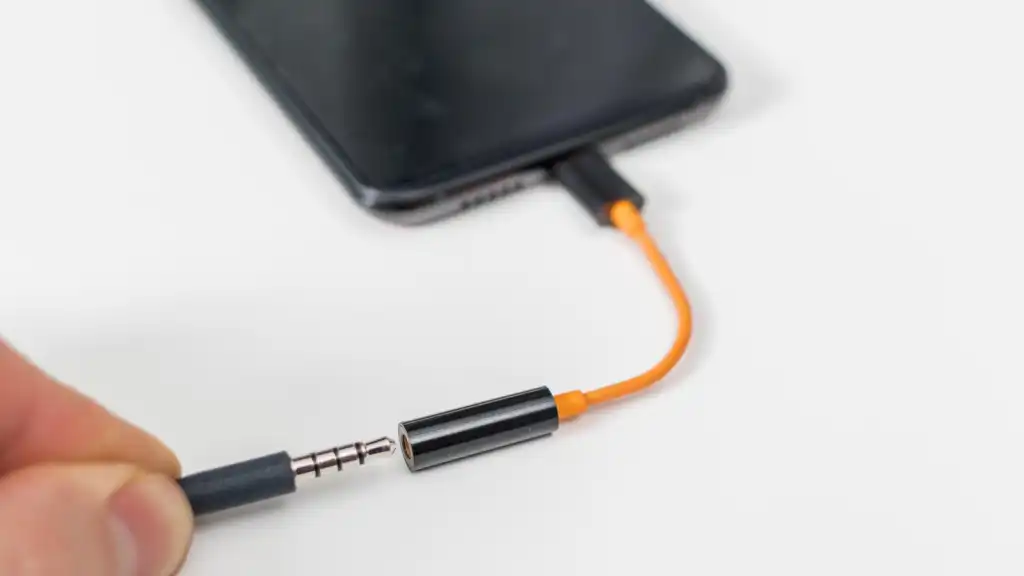
USB-C audio jack. Many Android phones, some tablets, and modern laptops output audio digitally over USB-C. Use the manufacturer’s dongle or a DAC that supports headsets with TRRS if you need a mic.
Lightning jack. iPhone uses Lightning for wired audio. Use Apple’s adapter or a certified DAC if you need inline mics and controls.
Optical audio jack. An optical audio jack (TOSLINK) sends digital audio for home theater gear. It does not drive headsets directly.
How To Identify What You Need
- Check the port icon on your device. A headset icon usually means TRRS. A headphone icon means TRS only.
- Look at your plug. Count the metal segments. Three contacts indicate TRS. Four indicate TRRS.
- Confirm size by measuring the shaft near the tip. 3.5 mm fits most consumer devices. 6.35 mm fits studio gear.
- For phones without analog ports, plan on a USB-C audio jack or Lightning jack adapter.
- For consoles or controllers, verify whether the controller’s type of 3.5mm audio jack supports a mic.
Common Scenarios and Fixes
Gaming laptop with one combo jack, PC headset with two plugs. Use a TRRS to a dual TRS splitter. Plug green into the headphones and pink into the mic.
Audio interface with 6.35 mm input, consumer headphones. Use a 3.5 mm female to 6.35 mm male adapter to fit your cans.
Phone with USB-C only, wired headset with mic. Use a dongle that supports TRRS for mic and remote. Data only adapters won’t pass the mic channel.
Studio headphones on a laptop. Use a 6.35 to 3.5 adapter. If volume sounds low, add a small headphone amp or interface.
Step-by-Step: Connect Any Headset Correctly
- Identify the port type and size of your device. Note TRS vs TRRS and 3.5 vs 6.35.
- Inspect your headset plug. Confirm TRS or TRRS and match the size.
- Add the right adapter only if the sizes or ring counts differ.
- Seat the plug fully. A partial insert can mute one channel or the mic.
- Open system sound settings. Choose the correct input and output, then test.
FAQ
What size jack do most headsets use? Most use a 3.5mm audio jack. Studio headphones often add a screw-on 6.35 mm adapter.
Do I need TRS or TRRS? Use TRS for headphones without a mic. Use TRRS for headsets with a mic and inline controls.
Can I plug TRRS into TRS? You can, but you may lose the mic. Use a proper splitter or the correct jack.
What about audio jack 6.35mm on mixers? Use a 6.35 mm to 3.5 mm adapter for consumer headphones, or plug studio headphones straight in.
Where does the 2.5mm audio jack fit? Older handhelds and radios used it. You’ll rarely need it for modern headsets.
Summary
The safest match starts with size, then ring count. A 3.5mm audio jack covers most headsets. A 6.35mm audio jack serves pro gear. Pick TRRS when you need a mic. Use a USB-C audio jack or Lightning jack adapter when your device drops analog ports.
Conclusion
You now have a clear checklist for selecting audio jacks for your headset. Confirm size, count the rings, and add adapters only when required. That simple process keeps audio clean, your mic live, and your setup compatible across phones, laptops, consoles, and studio gear.

Discussion (0)
Be the first to comment.