



TP-Link is famous for its affordably priced home networking products. They manufacture not only wireless routers but also mesh WiFi systems. Their top-selling product in this niche is Deco M5, which now has a new v2 variant, which brings several quality-of-life improvements compared to the first model. We very much enjoyed testing TP-Link Deco M5 v1, and we were curious to see whether v2 is an even better model. Read this review and find out whether TP-Link Deco M5 is a great choice for your smart home:
TP-Link Deco M5 v2: Who is it good for?
This whole-home mesh WiFi system is a suitable choice for:
- Homes where design matters and people need discreet networking equipment that does not get in the way
- Flexible home networks where you often add or remove devices and/or coverage areas
- People who want to remote control their mesh WiFi system from a mobile app
- Secure smart homes with built-in anti-malware protection and intrusion prevention systems
- Owners of Alexa powered devices who want to voice control their home network
- Parents who desire excellent parental controls to protect their children online
Pros and cons
TP-Link Deco M5 has the following strengths:
- Excellent speed on the 2.4 GHz wireless band
- Competitive pricing
- Well thought out design that combines simplicity and elegance
- Easy to set up through the TP-Link Deco mobile app
- Excellent antivirus protection
- Useful parental controls that are easy to use
- It is integrated with Amazon Alexa and IFTTT (If This Then That)
There are also some weak spots to consider:
- After three years of use, you have to pay for the built-in antivirus
- It is not able to fully utilize 1 Gbps internet connections
- It does not offer a web-based interface for administration

Verdict
TP-Link Deco M5 is a balanced mesh WiFi system. It looks great, and it offers excellent performance on the 2.4 GHz wireless band. The design of the devices that make up the system is elegant and minimalistic, and its pricing is competitive when compared to other similar systems. TP-Link Deco M5 also includes top-notch security and parental controls that are effective and easy to configure. Version two of the TP-Link Deco M5 mesh WiFi system is one of the best systems of this type, and we recommend it to everyone interested in an affordable solution.
Unboxing the TP-Link Deco M5 v2 whole-home mesh WiFi system
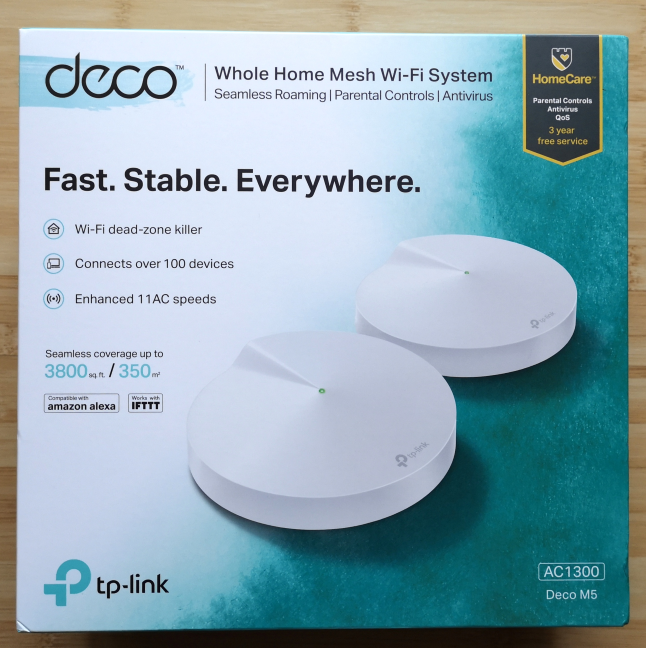
TP-Link Deco M5 is sold in packs of one, two, and three devices. We received the two-pack variant for testing. The system is packaged in a beautiful cardboard box with white and green as the main colors. On the top side, you can see a picture of the devices that make up the kit, and mentions of its most important features.
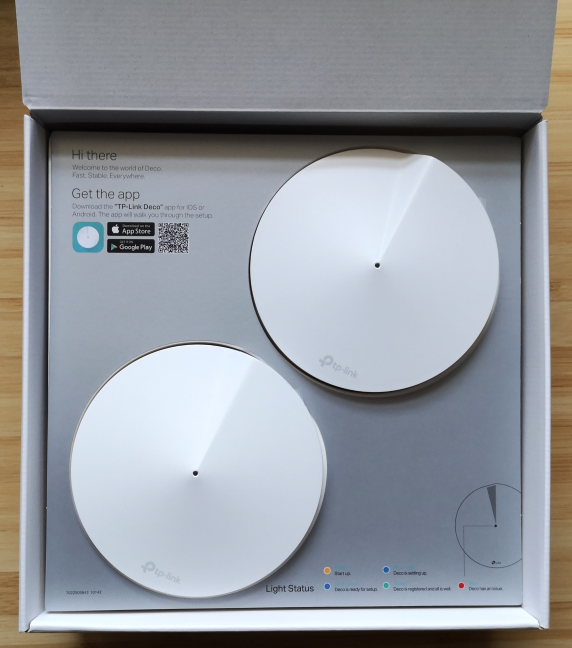
When you take the cover off, you see another white box. Inside you see the devices that make up the TP-Link Deco M5 mesh WiFi system.
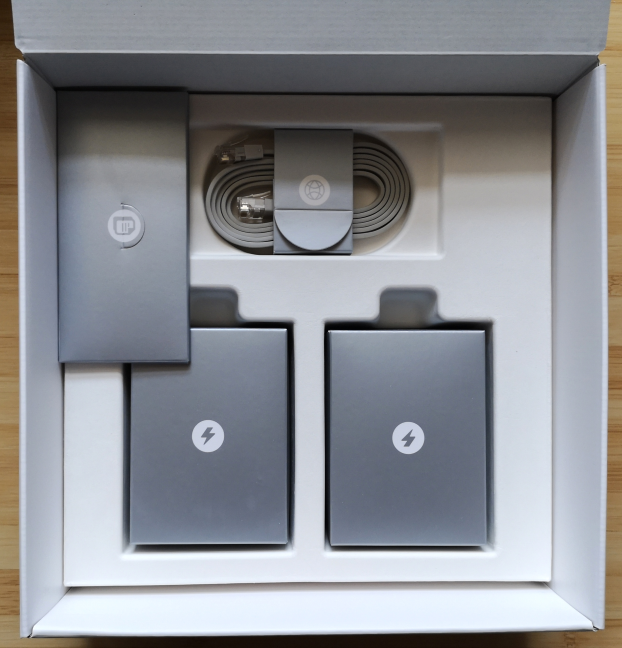
Beneath them, there are several small, nicely packaged boxes with accessories.
When you unbox everything, you get the following items: the Deco M5 stations, their power adapters, an Ethernet cable, the warranty, the license for the firmware, and the quick setup guide.
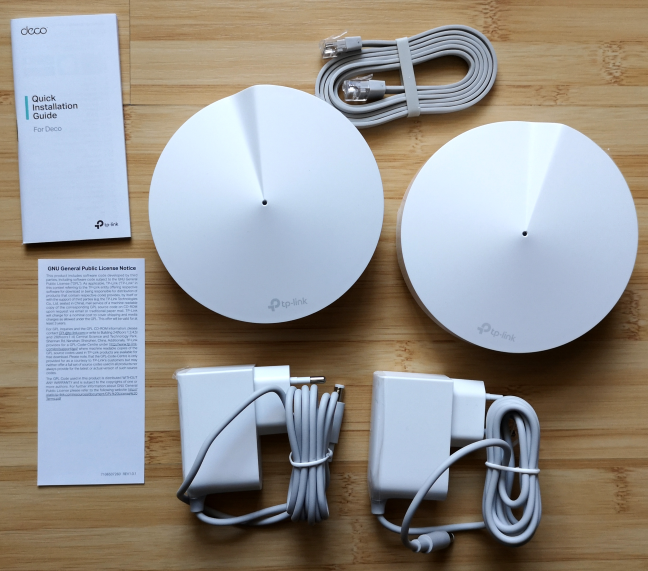
The unboxing experience offered by TP-Link Deco M5 is worthy of a premium device. Everything looks great, and the whole experience is pleasant.
Hardware specifications and design
The differences between the v2 variant of TP-Link Deco M5 and v1, are almost invisible: they use a different power connector (USB Type C for v1 vs. a traditional power jack for v2), and v2 has slightly improved firmware which offers a larger coverage area (510 square meters for v2 vs. 418 square meters for v1). The differences end here. The looks are the same and so is the hardware. Each TP-Link Deco M5 device has a Qualcomm IPQ4019 quad-core processor, running at 638 MHz, with 32 MB of flash storage space for the firmware, and 256MB of RAM. Each Deco M5 has a diameter of 4.7 inches or 120 mm and a height of 1.3 inches or 38 mm. There are four internal antennas per unit, two Ethernet ports at 1 Gbps, and the power connector.
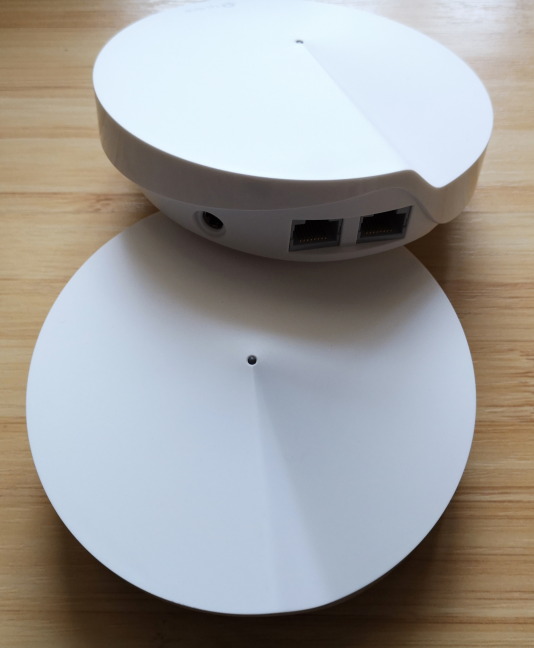
TP-Link Deco M5 offers support for all the modern networking standards, including the latest 802.11ac Wave 2. It has a 2x2 MU-MIMO implementation, and it offers a maximum theoretical bandwidth of 400 Mbps for the 2.4 GHz band and 867 Mbps for the 5GHz band. To connect to your smartphone and other mobile devices, TP-Link Deco M5 uses a Bluetooth 4.2 chip.
On the bottom of each Deco M5, you have the Reset jack, the ventilation grids, and four rubber feet, for placing them on flat horizontal surfaces. Unfortunately, they cannot be mounted on walls.
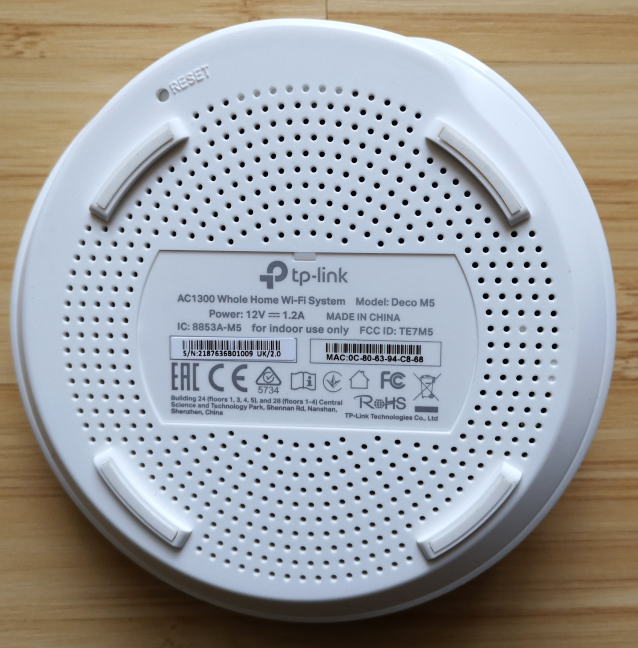
We like the design of each Deco M5 device. The looks are discreet and elegant. You can place them in a modern living room without making it ugly. On the contrary, their pleasant looks are going to be admired by your guests.
If you want to know more about the official specifications of this whole-home WiFi system, go to this page: TP-Link Deco Specs.
Setting up and using the TP-Link Deco M5 whole-home mesh WiFi system
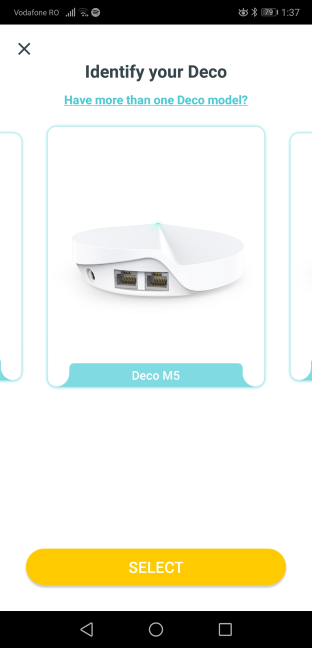
The setup and administration of the TP-Link Deco M5 mesh system are done only using the TP-Link Deco mobile app for Android and iOS. You also need a TP-Link Cloud account, which you can create here or from the app. One downside is the lack of two-factor authentication, to increase the security of your account. We hope that TP-Link will add this security feature in the future. After you register or log in with your TP-Link Cloud account, you can start the setup process. The setup wizard is easy to use, and it starts with choosing the Deco model that you own.
You then get all the necessary setup instructions, and you are asked to set the following elements: the location of the Deco M5 that you are setting up, the details of your internet connection, and the name and the password for the wireless network that it is going to be broadcast.
TP-Link Deco M5 works with the following types of internet connections: Dynamic IP, Static IP, and PPPoE.
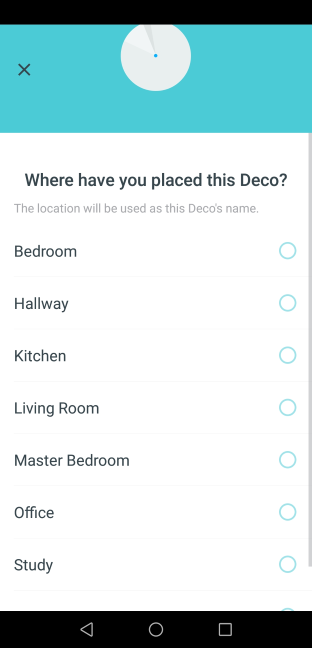
Once the first station is set up, you can add the remaining devices. All you have to do is choose where they are placed. The app helps them copy the settings you have made for the first device. One thing to keep in mind is that the discovery of Deco M5 stations is done using Bluetooth. Therefore, you need to keep Bluetooth turned on on your smartphone or tablet. Otherwise, the setup process does not work.
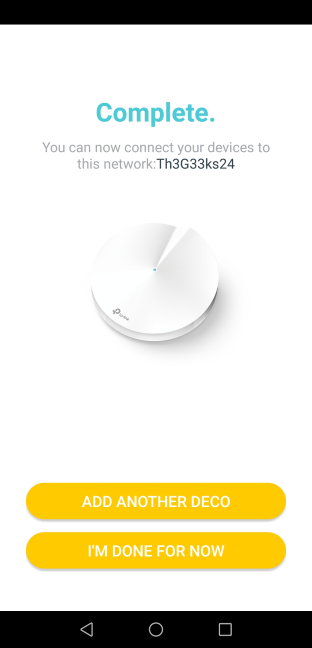
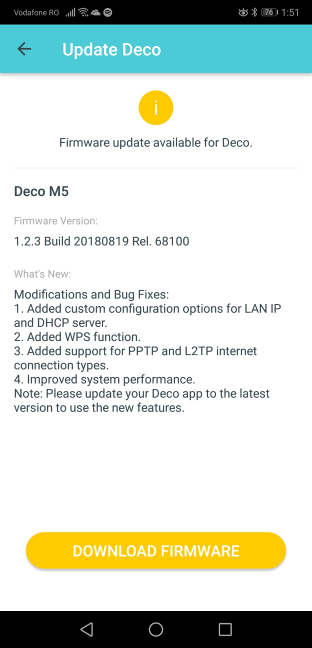
When you are done setting up the TP-Link Deco M5 mesh system, the mobile app automatically checks for firmware updates and, if any are found, it asks you to download and install the latest version. You should perform the update, as newer versions of firmware improve performance, fix stability problems and security vulnerabilities. The firmware updates take some time and involve a restart of all the stations in the mesh system.
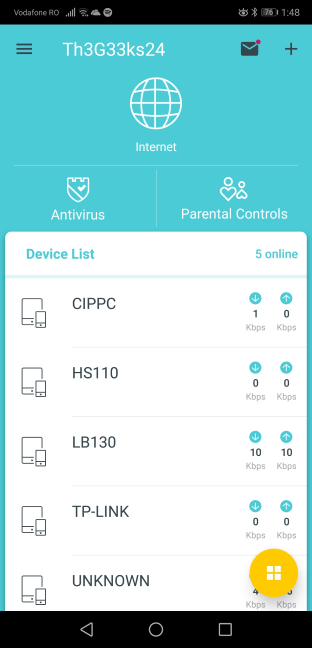
Then, you can finally use the TP-Link Deco mobile app to view and configure all settings. On the main screen of the app, you see the list of devices that are connected to the network. You also have a couple of shortcuts and menus. In the bottom-right corner of the screen, there is also a yellow button with four white squares in the middle.
When you tap on it, you get access to all the main features and configuration options. There are not many advanced settings available, and everything can be set up with ease. You can set features like port forwarding, DDNS, LED control, notifications, WPS, QoS, the Parental Controls, the Antivirus, and the operating mode.
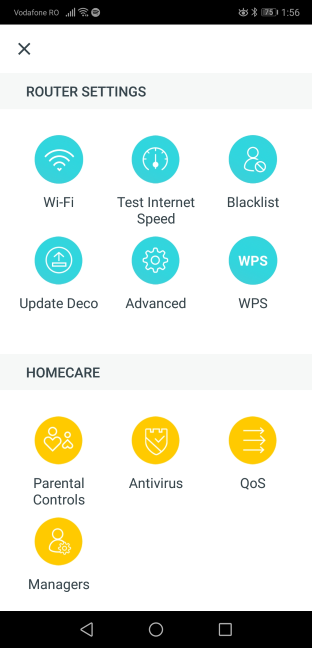
All the settings are nicely explained so you should have no issues in setting up the TP-Link Deco M5 mesh WiFi system. We connected about twenty devices to the network, and we enjoyed a stable signal and good speeds in all the rooms of our test apartment. We connected desktop PCs, laptops, tablets, smartphones, smart plugs, smart bulbs, an Xbox One console, and a wireless printer. All of them connected to the network without problems. We were also able to share content through the network, without issues.
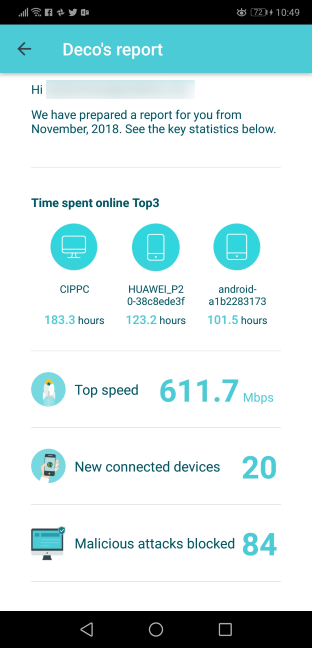
At the beginning of each month, the TP-Link Deco mobile app offers a report. It includes useful statistics like the devices from your network with the most time spent online, the top internet speed achieved in your network, the number of new devices connected to the network, the malicious attacks blocked, and the internet history of your child if Parental Controls are set up.
One downside that is not going to be appreciated by advanced users is the fact that TP-Link does not offer access to a web administration user interface, as is the case with other mesh systems. This means that you are stuck with only the basic settings offered by the mobile app.
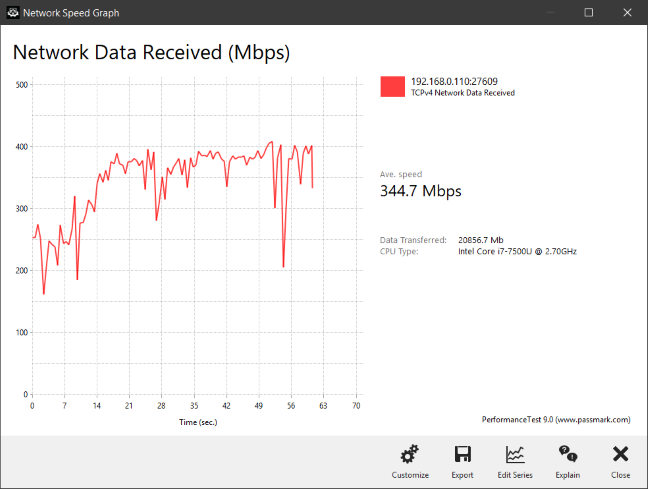
When transferring data through the network, we also looked at the variability of network transfers. Below you can see how a network transfer was made when we used the 5 GHz wireless network, on a laptop, in a room that was separated from the central Deco M5 station by one wall. We got a fast average speed and variability that was slightly higher than that of other mesh systems.
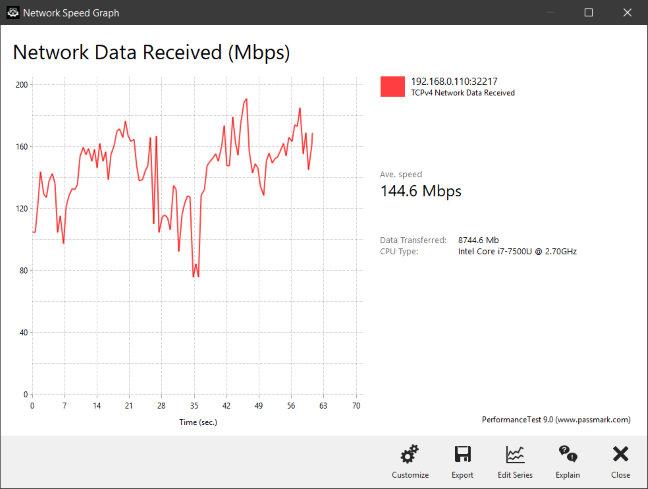
When we moved to a room separated by two walls from the main station, the average speed dropped, and the variability increased a bit. However, the speed never fell close to zero, which is what we expected from this mesh WiFi system.
Similar trends were noticed when using the WiFi on the 2.4 GHz band.
Overall, we are pleased with TP-Link Deco M5 and what it has to offer. We enjoyed how easy it was to set up, how well it worked, how it looks and the features it offers through its mobile app. There are a few negatives, but most users are not going to be affected by them. The only important issue that may raise some eyebrows is the fact that you need to pay for the antivirus service after three years of use. Also, it is not clear how much this service is going to cost after its expiration date.
If you want to know more about the speed of TP-Link Deco M5 v2, how it fared in benchmarks and what extra features it bundles, go to the second page of this review.
Wireless network performance
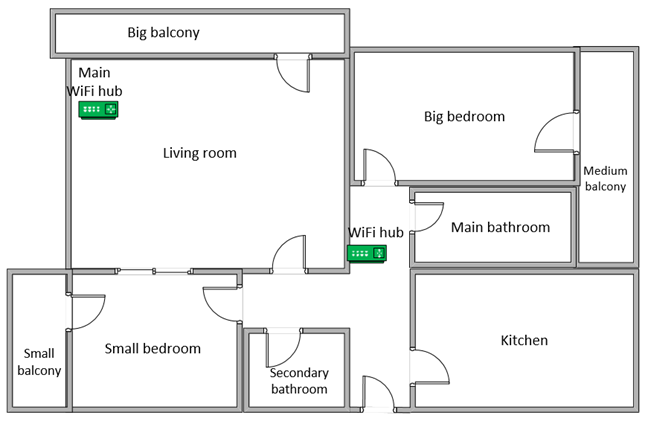
First, let's take a look at the apartment that was used in our testing and how it is set up. You can see that the central TP-Link Deco M5 hub is placed in the living room. When using wireless routers, the signal strength is not that high in rooms like the Kitchen and the Medium balcony. To improve the coverage of the network, we placed the second Deco M5 hub in the hallway, close to the entrance to the Kitchen.
Our testing was done using a fast 1 Gigabit Internet connection that is capable of uploads on the internet of up to 500 Mbps. We used an HP Spectre 13 laptop for our measurements.
We decided to compare the TP-Link Deco M5 with Linksys Velop WHW01 and Tenda nova MW6.
NOTE: If you want to learn more about AC notations in networking devices, read this tutorial: What does AC1200, AC1900, AC3200 or more, mean and what's the difference?
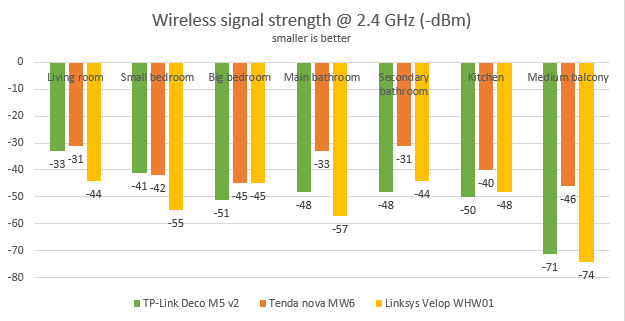
We started by evaluating the 2.4 GHz wireless network and measured the signal strength offered in each room, using a tool named NetSpot Pro. As you can see in the graph below, the signal strength offered by TP-Link Deco M5 followed similar trends to that offered by Linksys Velop WHW01, but it managed to be slightly better in most rooms.
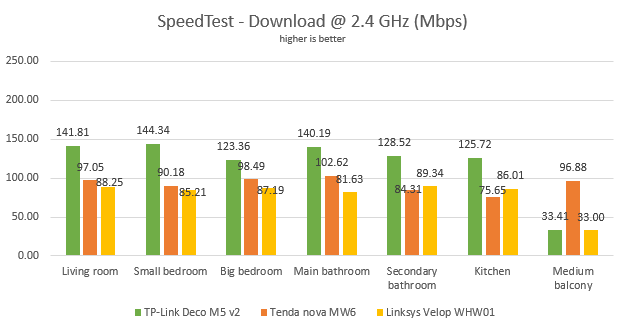
Then, we used SpeedTest to see how fast the internet connection is when using the 2.4 GHz wireless frequency. TP-Link Deco M5 v2 was the fastest in our comparison, almost in all the rooms. The reason why Tenda nova MW6 managed to outperform it in the Medium balcony is because Tenda has three nodes instead of two, so it offered better WiFi coverage in our test apartment.
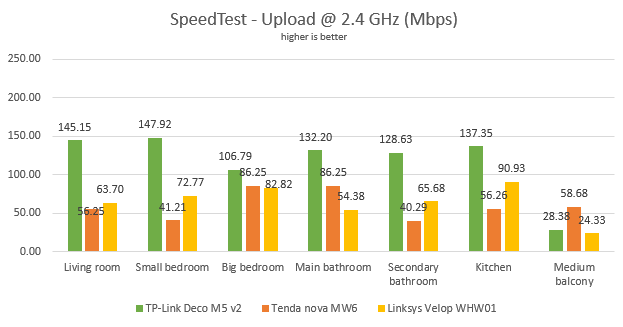
The upload speed followed a similar trend, with TP-Link Deco M5 v2 being the fastest almost in all rooms.
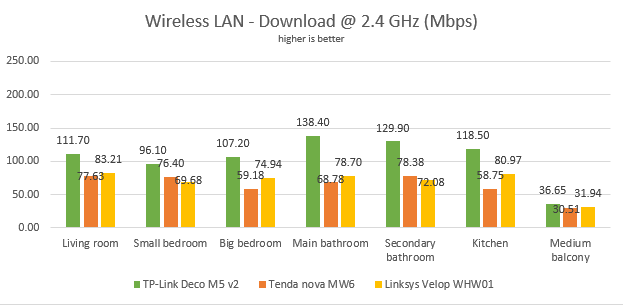
Continuing our measurements on the 2.4 GHz wireless network, we used the PassMark Performance test to transfer data between two computers connected to the network. TP-Link Deco M5 v2 had excellent performance.
The same was true when looking at the upload speed. TP-Link Deco M5 was the fastest device in our comparison.
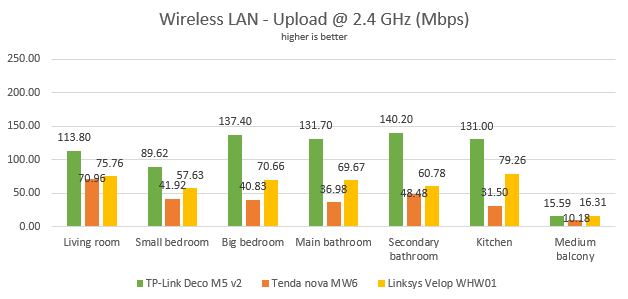
TP-Link Deco M5 offers good WiFi coverage on the 2.4 GHz band and excellent transfer speeds.
Next, we analyzed the performance offered by the 5GHz wireless network. First, we looked at the evolution of the signal strength, from room to room. The signal strength delivered by TP-Link Deco M5 v2 was OK without being the best.
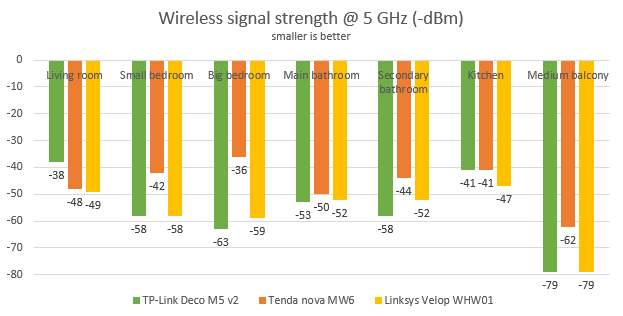
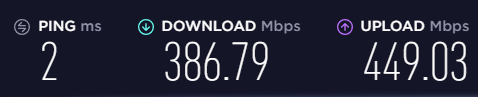
Next, we ran SpeedTest to see how fast the internet connection is on the 5GHz band. To see the maximum potential of TP-Link Deco M5 v2, we used the world's only PCI-E network card with support for 4x4 MU-MIMO. When we used this network card, we obtained a maximum speed of 386.79 Mbps for the download, and 449.03 Mbps for the upload. These speeds are decent, but other mesh systems are faster in this measurement.
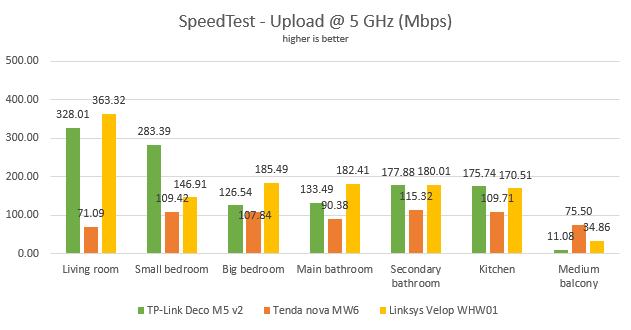
For more down-to-earth results, we also measured the download speed with SpeedTest, in every room of our test apartment, using our HP Spectre 13 test laptop. TP-Link Deco M5 had good performance, without being the fastest mesh WiFi system that we tested.
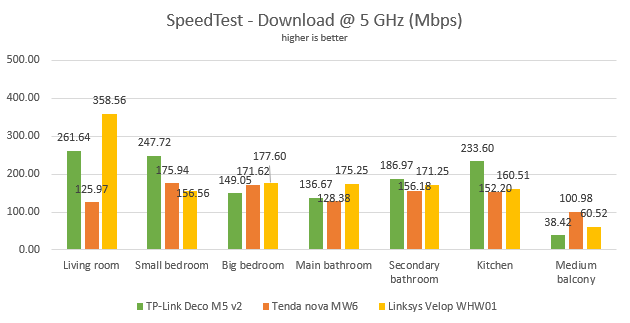
The same trend was noticed when we measured the upload speed.
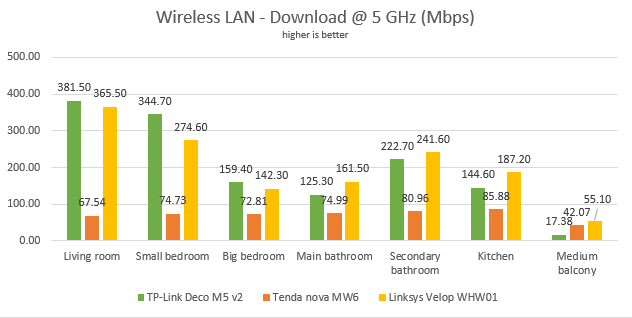
For the last measurements on the 5GHz wireless network, we used the PassMark Performance test to transfer data between two computers connected to the network. The performance delivered by TP-Link Deco M5 was better in this test, being close to that of the Linksys Velop WHW01.
A similar trend was noticed when we looked at the upload speed. However, in this situation, Linksys Velop WHW01 was the winner in all the rooms.
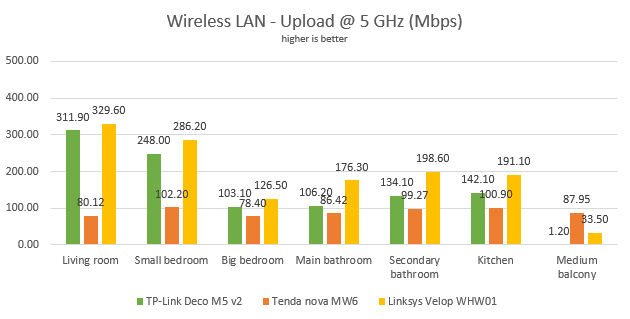
On the 5 GHz wireless band, TP-Link Deco M5 v2 delivers balanced performance, that is close to what you get from other top performing mesh WiFi systems.
Wired network performance
To test the quality of the wired Ethernet connection, we used a desktop PC equipped with an AMD Ryzen 5 1600 processor, running at 3.20GHz, 16GB of RAM, a fast Samsung 850 Pro 512GB SSD, and a Lenovo IdeaCentre 610s mini PC.
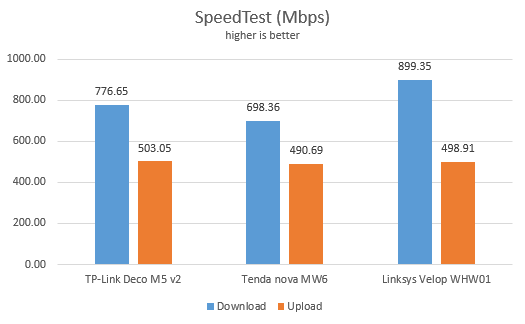
We measured the speed of the internet connection when using a 1 Gbps Ethernet cable, using SpeedTest. TP-Link Deco M5 v2 delivered good performance, without being the fastest in our testing. As you can see, this mesh WiFi system cannot take full advantage of 1 Gbps internet connections. However, for most people that is not an issue.
Then, we ran a network transfer between the two computers, each connected with an Ethernet cable to a different TP-Link Deco M5. Since the stations were connected wirelessly, the transfer was mediated through WiFi. We used PassMark Performance test for this measurements. Again, Deco M5 delivered good performance, without being the fastest in our testing.
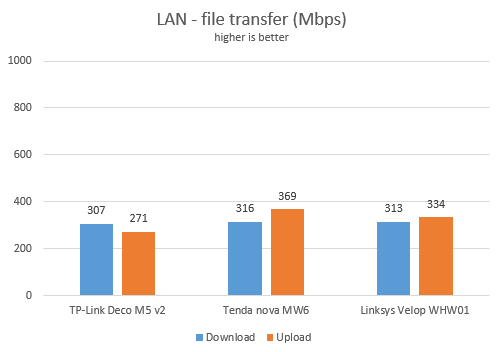
The Ethernet connections offered by TP-Link Deco M5 are not a strength of this mesh WiFi system. Other competing systems tend to perform better.
Extra features
TP-Link bundles some advanced features that are not found on mesh systems from other brands like Linksys or Tenda:
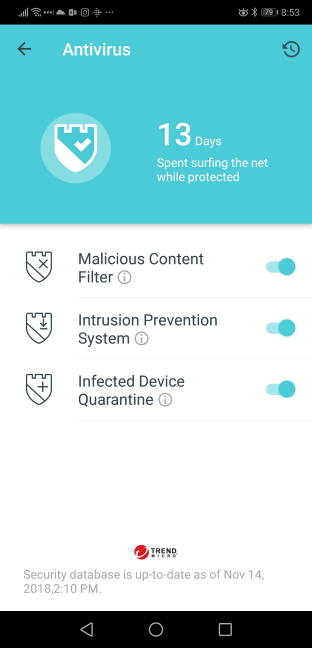
- An antivirus module powered by Trend Micro. It filters malicious content, quarantines infected devices, and it also has an intrusion prevention system that is useful in smart homes. This module works well, but the downside is that you have to pay for it after three years of use. Other devices of this kind offer this feature for the entire life of the device.
- Cloud-based parental controls that are effective and easy to configure. They are useful for setting time limits, schedules, and protecting your children from inappropriate content online.
- You can set managers for your TP-Link Deco M5 mesh, through the TP-Link Cloud accounts. For example, in a family, both the husband and the wife can manage the system from their smartphones and tablets. Again, another useful feature that will be appreciated by some users.
- Integration with Alexa and IFTTT (If This Then That) - you can remote control the Deco M5 using Alexa and voice commands, and set your automation system.
- TP-Link also bundled an easy to configure QoS feature (Quality of Service), that helps you prioritize network traffic based on its type. For example, you can prioritize streaming over downloading files.
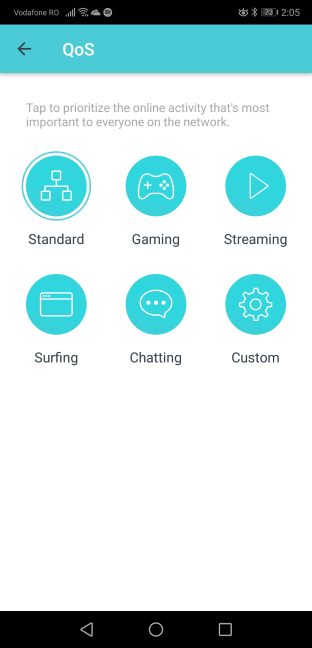
The list of features that are bundled with TP-Link Deco M5 is not large. However, what is bundled is useful and works well.
What is your opinion about TP-Link Deco M5?
Now you know our opinion about the TP-Link Deco M5 v2 whole home mesh WiFi system, and how it performed in our testing. Before closing this review, share with us your view of this system. Is it something that you would like to purchase? Would it be useful in your home or workplace? Comment below and let's discuss.
Discussion (5)
Very nice review.
But I was wondering if I have to choose between Tp link deco m5 and m4, which one offers better internet performance?
I know that Deco m5 has more features (antivirus etc) but if we leave that and focus only at internet performance which one would you recommend? I’ve seen that in your comparison between both, Deco m4 seems to have better performance, or maybe I’m wrong!
I would be glad if you reply
Choose the one that best suits your needs/budget. If you don’t plan to use the more advanced features of the Deco M5, why spend more on it?
Thanks for the reply.
If Deco M5 offers better internet performance I don’t have a problem to spent more, so does it offer better performance or it’s same?
will they ever come out with a mesh router suitable for speed of a 1Gbps connection ?
We don’t know but we will test v2 of Deco soon. Stay tuned. 😉