



Edimax is a company that's known for its affordable networking devices. They build all kinds of devices: from wireless routers to range extenders, network switches and network cameras. We had the chance to test our first Edimax device - an affordable range extender: Edimax N300 Smart Wi-Fi, model number EW-7438RPn Air. We tested for about a week, made lots of measurements and today we are ready to share our conclusions.
Unboxing the Edimax N300 Smart Wi-Fi Extender
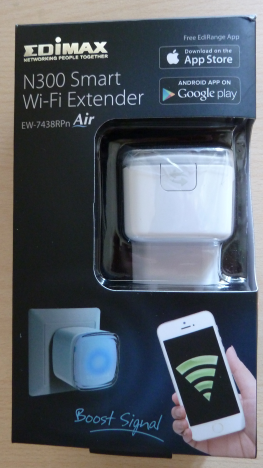
If you look on the Edimax website you will notice that all their modern range extenders have N300 in their name. To be more exact, we have tested EW-7438RPn Air model. You can see its packaging in the picture below.
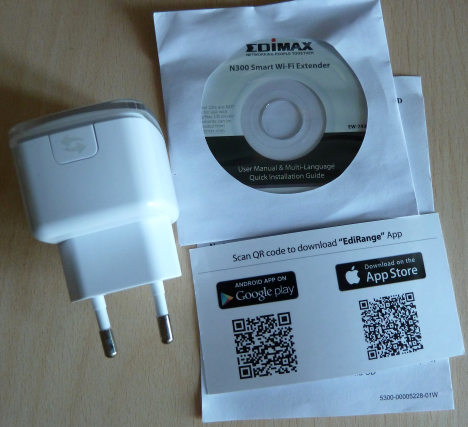
Inside the box you will find the range extender, a mini-disc with the user manual and the setup guide in multiple languages, plus a card with details about how to access the device on one side and with QR codes for the EdiRange app for Android and iOS.
As you can see, this range extender is a compact device. It has a WPS button on one side and a LED on top, which changes its color depending on what is going on with the device.
Hardware Specifications
Edimax N300 Smart Wi-Fi Extender is a single band range extender with support for the 2.4 Ghz wireless frequency. It supports the modern 802.11n wireless networking standard. As mentioned before it has WPS support and it comes with two internal antennas.
In terms of software, it offers the EdiRange app for Android and iOS which allows users to remote control this device when they are in its coverage area.
You can find its full set of specifications here.
Setting Up & Using the Edimax N300 Smart Wi-Fi Extender
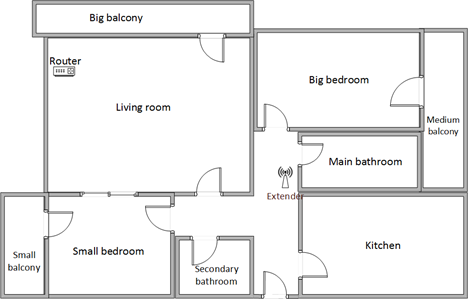
Below you have a diagram of how our test apartment is set up. It is a reasonably large apartment and, if you don't have very good router, the wireless coverage can get rather weak in rooms like the kitchen or the medium balcony which are far away from it. You can see that we have placed the router in the living room and the range extender in the hallway. The router that we used is ASUS RT-AC56U.
There are many ways for setting up this range extender and they are all documented in the user manual that's provided in its packaging. The fastest is to use the WPS feature on your router and the range extender.
Once you connect the range extender to your wireless network, you should start setting it up. The stock firmware on this device was version 1.14. We read several user reviews before testing this device and some said that they had issues with the stock firmware. We upgraded to the latest version that was available for download (1.17) and everything went smoothly. We recommend that you do the same.
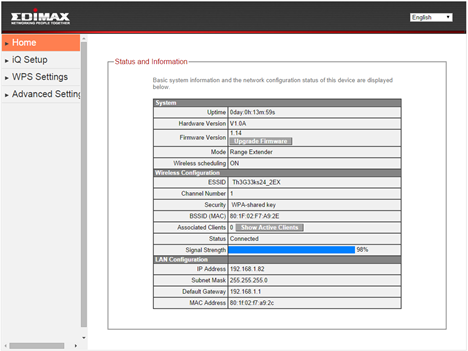
The firmware on this device is available in 15 languages, which you can see below.
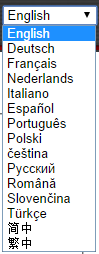
As you can see in our screenshots, the firmware offered by Edimax is rather basic and not exactly elegant looking. However, it does offer access to the configuration options you would expect and setting things up is not a complicated task for anyone.
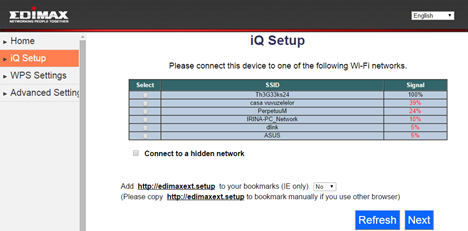
The only downside we noticed is that the range extender requires a restart each time you change its configuration. This might be frustrating the first time you set it up.
The LED on top of the range extender is colored depending on its status. Also, each color can be always on or flashing.
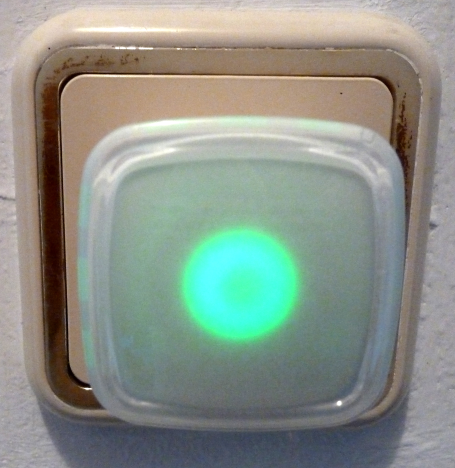
Here's what each color means:
- Red - if the red light is always on, the device is disconnected; if the red light flashes, the device is starting up.
- Green - when it is on, it means that Edimax N300 has successfully connected to the wireless network through WPS. When it is flashing, it means that the WPS connection is in progress.
- Blue - when it is on, it means that Edimax N300 has a good signal strength to work with. When it is flashing, it means that the signal strength is rather average.
- Amber - this color is used only when flashing and it signals that you have poor wireless signal strength in the area where you have placed the range extender. You should consider moving it to another location in order to get better results.
We have connected different types of devices to the wireless network provided by the range extender and we did not encounter any issues. Also, we were able to use networking features like the Homegroup and be able to share and download files over the network.
Performance in Benchmarks
In our test setup we have used an ASUS RT-AC56U router. We compared Edimax N300 Smart Wi-Fi Extender with ASUS RP-N14, a single-band range extender that is one of its direct competitors, both in terms of price and features. All our measurements were performed using a Surface Pro 2 device.
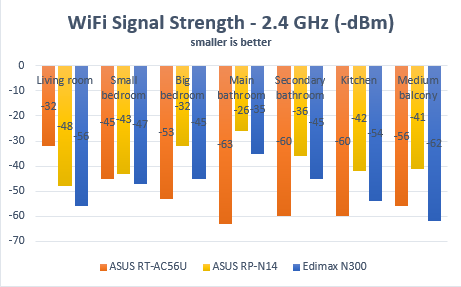
We started by measuring the wireless signal strength in all the rooms where we use our wireless devices. For this task we have used a tool named inSSIDer.
Below you can see the signal strength in each room of our test apartment for the 2.4 Ghz wireless network. As you can see, Edimax N300 was not able to beat ASUS RP-N14 in any of the rooms in our apartment.
For the next set of measurements, we have used PingTest. It is a test that evaluates the quality of your network. It measures packet loss (which was 0% in all of our tests), the average ping and the jitter, which is the variance in measuring successive ping tests. Having a jitter that's low is great as it signals that your network connection is constant.
First, let's take a look at the ping reply measurements. As you can see from the graph below, Edimax N300 performed better than ASUS RP-N14 in almost every room in our apartment.
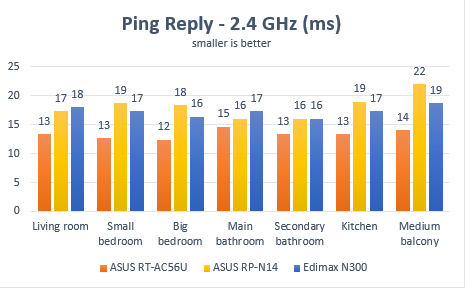
The same remained true in terms of jitter - Edimax N300 outperformed ASUS RP-N14 in almost every room in our apartment.
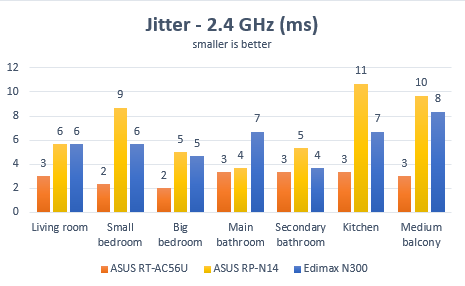
Then, we have used SpeedTest to measure the download and upload speeds that were obtained when using this range extender.
As you can see in the chart below, Edimax N300 outperformed ASUS RP-N14 in almost every room in our apartment and in some rooms, the differences were quite significant.
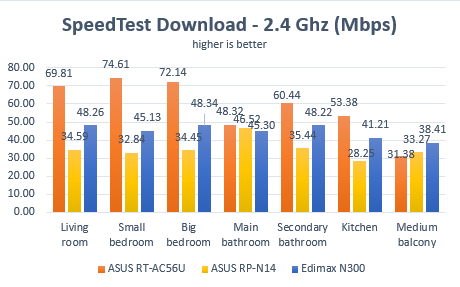
The same story was repeated when measuring the upload speed. Edimax N300 was again faster than ASUS RP-N14.
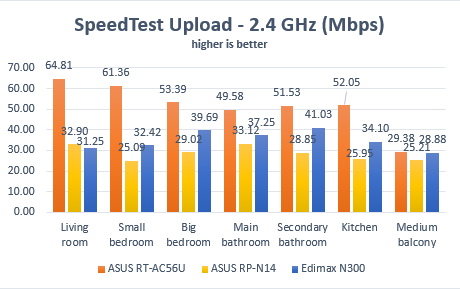
Edimax N300 Smart Wi-Fi might not deliver the best wireless signals strength we've seen but it does deliver fast downloads and uploads.
Special Features
Edimax N300 Smart Wi-Fi Extender doesn't offer any special thrills or extras. It's an affordable range extender that does what it is supposed to do - extend the coverage of your wireless network.
It does promise some Parental Control features but they are not found in the standard firmware. You have to download the EdiRange app for Android and iOS in order to access them. Unfortunately, there is no app available for Windows Phone.
In terms of advanced features, you can adjust transmission power used for the wireless signal, enable guest network access and turn off the range extender according to a given schedule.
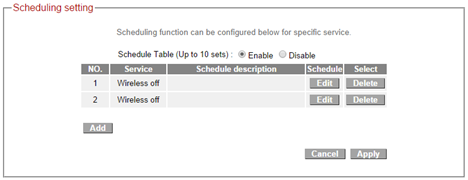
Unfortunately, you cannot set this range extender to turn off only the LED indicators during the night. You can only turn off both the wireless network and the LED indicators. Hopefully, future firmware upgrades will provide the option to turn off just the LED during the night, while keeping the wireless network active.

Verdict
Edimax N300 Smart Wi-Fi Extender is an affordable device that delivers good performance when extending the coverage of your wireless network. It doesn't have any bells and whistles as other devices do but it does its job well and reliably. If you don't need to extend the coverage of a dual-band wireless network and you don't want any special features from a range extender, then Edimax N300 is a great choice. It will deliver very good performance at a very reasonable price.
Discussion (0)
Comments are closed.