On April 30th, 2018, Microsoft releases the next major update to Windows 10: April 2018 Update, which has the codename Redstone 4. The upgrade brings several new features and many quality-of-life improvements to the previous Fall Creators Update. If you want to know what is new, and whether it is worth installing, for free, on your Windows 10 computers and devices, read this article:
What is Windows 10 April 2018 Update (formerly known as Spring Creators Update)?
Windows 10 April 2018 Update (formerly known as Spring Creators Update) is the latest major update to Windows 10. It has the version 1803, the build 17133.1, and the codename used while developing it was Redstone 4. This update continues the work done by Microsoft with Fall Creators Update. Read on to see what is new in this release:
1. The Timeline shows and syncs activities on all your Windows 10 devices
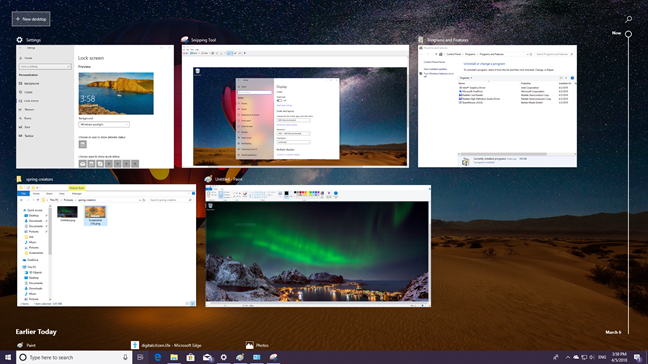
The Timeline feature logs, syncs and displays the history of your activities, on all Windows 10 devices that are set to sync their Timeline. Press Windows+Tab or the Task View button on the taskbar and you see your activities from earlier today, yesterday, and so on. Click on any of these activities, and you can resume them from where you left off. As a result, Timeline makes it easy to continue your work, when using multiple Windows 10 devices.
It syncs only your Windows 10 computers and devices, and it works for apps that have support for this feature: Microsoft Edge, Microsoft Office apps, Photos, News, and so on.
Windows 10 April 2018 Update, Spring Creators Update
Microsoft plans to integrate Timeline with mobile apps so that it increases the usefulness of this feature, and you can sync your PC(s) with your smartphone and your tablet.
2. Nearby sharing makes it easy to send and receive content using WiFi or Bluetooth
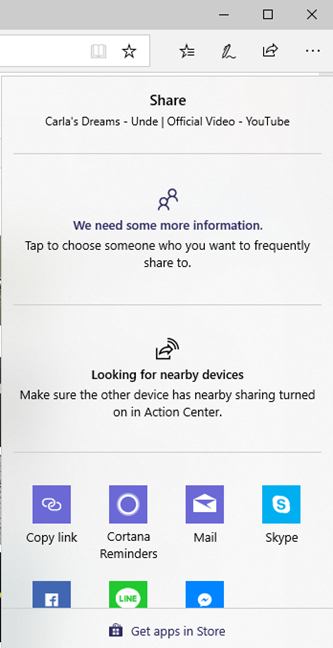
Windows 10 April 2018 Update includes a new Nearby Share feature. With it, you can share content (photos, videos), links, and files with other computer and devices that are nearby, using Bluetooth or WiFi.
Windows 10 April 2018 Update, Spring Creators Update
There is also some bad news related to this feature: the Homegroup gets discontinued and replaced by this feature.
3. Quiet Hours is renamed Focus Assist and becomes more useful
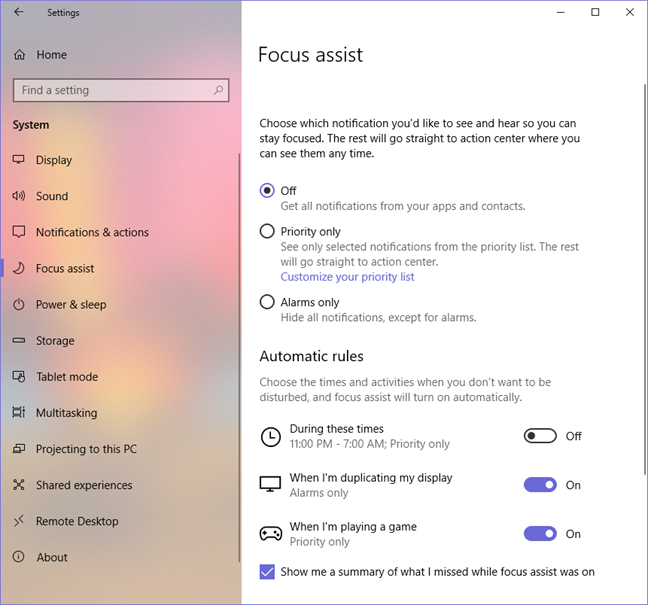
Quiet Hours was used in the past to mute notifications during a specific time interval. This feature is now renamed to Focus Assist, and it can automatically turn itself on during presentations, or when playing games.
Windows 10 April 2018 Update, Spring Creators Update
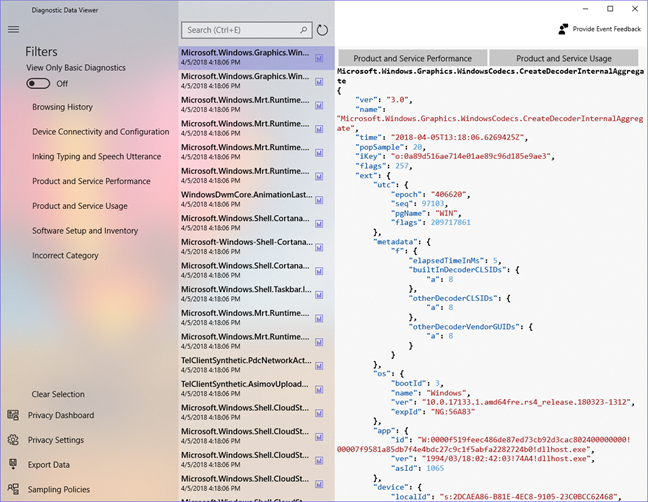
4. With Diagnostic Data Viewer you can view the data that Windows 10 sends to Microsoft
After all the controversy about Windows 10 data collection systems, Microsoft decided to improve its approach and offer as much transparency as possible. As a result, with Windows 10 April 2018 Update, we have a new Diagnostic Data Viewer app, that shows you, in plain text, all the diagnostic information Windows 10 sends to Microsoft. You can also delete the diagnostic data collected from Windows 10.
Windows 10 April 2018 Update, Spring Creators Update
To complement this new feature, Microsoft has also enhanced the Privacy controls in the Settings app, so that you get more control and transparency of your privacy when using Windows 10.
5. Microsoft Edge becomes a better web browser
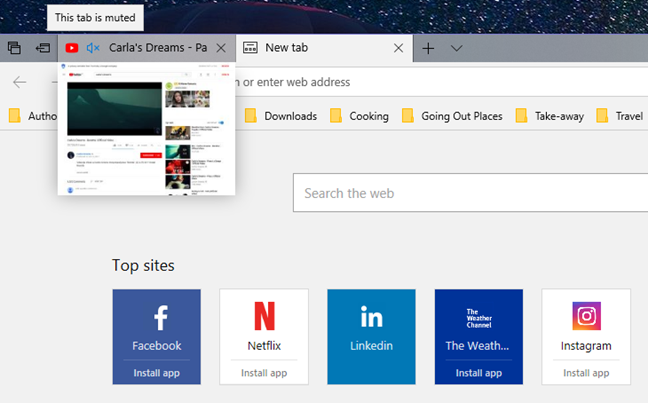
Microsoft Edge has received a very long list of improvements and bug fixes, becoming an even better browser than in previous versions of Windows 10. Some of the most notable improvements are:
The possibility of muting tabs with a click on their sound icon
The favorites bar is now shown when opening a new tab
It can sync information across devices, making it more useful to use Microsoft Edge both on your PC and your mobile devices
It offers a "clutter-free" printing mode that removes ads and other unnecessary items.
It offers a better bookmark management system, as well as an improved experience for reading e-books.
It has touchpad gestures that are useful to users that have a precision touchpad.
Windows 10 April 2018 Update, Spring Creators Update
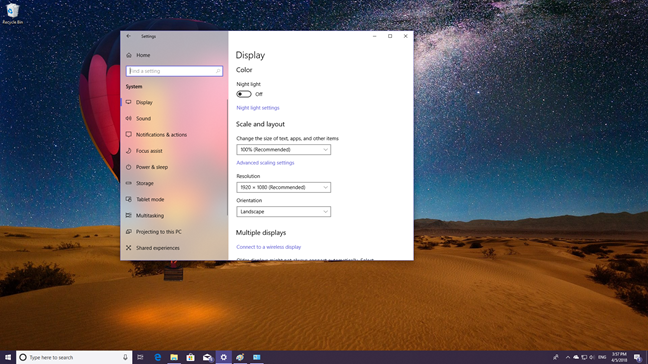
6. Improved looks, transparency and reveal effects with Fluent Design
Fluent Design is an acrylic-style user interface, with reveal effects that are showcased in many areas. As a result, many elements in Windows 10 April 2018 Update look better than they used to: the Start Menu, the Action Center, the Settings app, the Calendar, the taskbar, the People app, the Game Bar, the touch keyboard and a few other elements.
Windows 10 April 2018 Update, Spring Creators Update
Microsoft is slowing upgrading the user interface so that more and more of it uses Fluent Design.
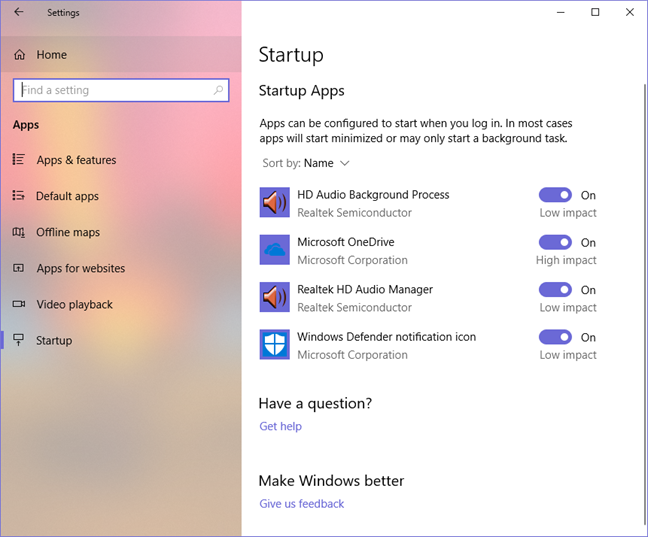
7. The Settings app has been expanded to include more controls and settings
The Settings app is slowly replacing the old Control Panel, as the central place for personalizing and administering Windows. In Windows 10 April 2018 Update, it receives an improved look, with more Fluent Design elements, as well as new tools and features. For example, you can now set your Startup apps from Settings, get access to improved audio controls, improved Ease of Access settings, an upgrade to Storage Sense that includes Disk Cleanup functions, and so on.
Windows 10 April 2018 Update, Spring Creators Update
The management of language packs has also been improved, as well the delivery of Windows updates.
8. Cortana gets smarter with Windows 10 April 2018 Update
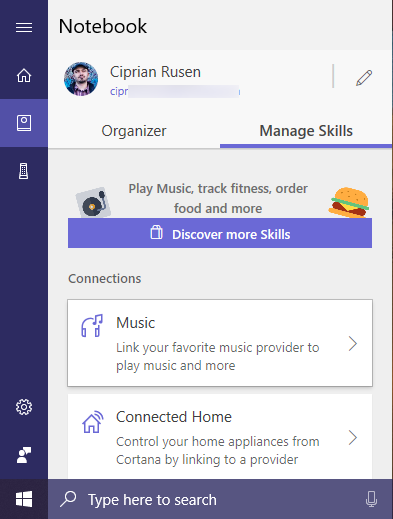
Cortana has received several welcome improvements, including an improved user interface.
You can now use her to create lists that sync across devices; it is easier to view your reminders, see Cortana's full list of skills and use them. You can also use her to play music on Spotify.
Windows 10 April 2018 Update, Spring Creators Update
9. An improved Game bar with better looks and more options
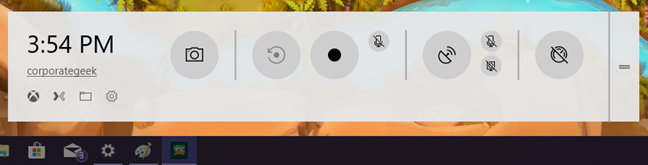
The Game Bar has been redesigned. It looks better, it is more personalizable, and it includes access to new options, like muting your microphone while recording a gaming session. Also, you can now reset your Game Mode settings to their defaults.
Windows 10 April 2018 Update, Spring Creators Update
Another useful feature is that your notifications, while gaming, are automatically stored for you by Cortana so that you are not bothered. You can review them later when you are done playing.
10. It is easier to recover user accounts when you forget their password
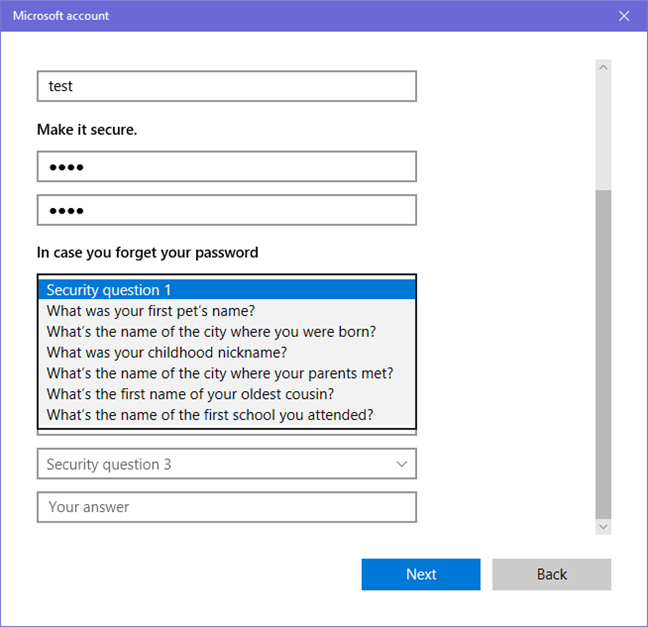
A big issue with previous versions of Windows and local user accounts was when you forgot your password. If you did not have a password reset disk, it was complicated to reset your user's password and access Windows. Now, when you create a new user account in Windows 10 April 2018 Update, you are asked to enter the answer to three security questions. Then, when you forget that user's password, you can answer these questions correctly and reset the password..
Windows 10 April 2018 Update, Spring Creators Update
11. Windows Defender Security Center is more useful
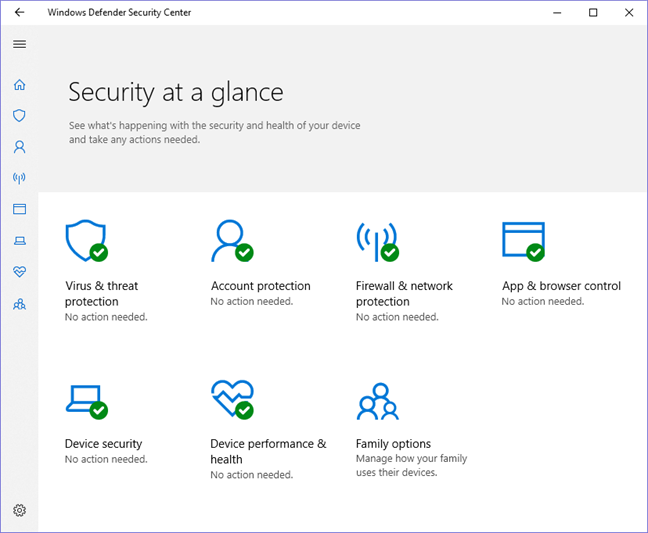
The Windows Defender Security Center has been updated to include more security tools and controls. It contains new protection areas, like account protection, device security, as well as device performance and health.
Windows 10 April 2018 Update, Spring Creators Update
12. HDR video support
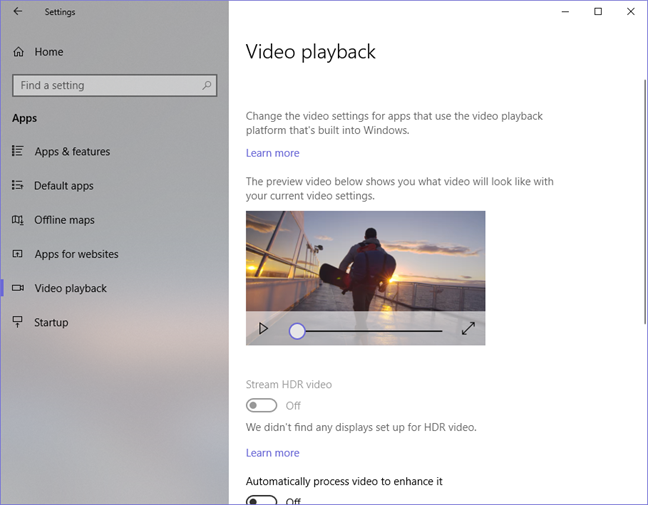
Microsoft has decided to improve its HDR video support in Windows 10. If your PC or device has a screen able to display 300 nits or more, with a graphics card that supports PlayReady hardware digital rights management (for protected content), and your PC is capable of 10-bit video decoding, then you can enable HDR video in Windows 10 April 2018 Update. You also need to calibrate your display to use this feature.
Windows 10 April 2018 Update, Spring Creators Update
Other changes and improvements that affect a lower number of users
The official list of changes is long, and ours includes the major features that affect the most users. However, there are many other features and changes coming with Windows 10 April 2018 Update:
Some Bluetooth peripherals like the Surface Precision Mouse can now be paired with one click. The Bluetooth pairing experience has received quality improvements in general.
Improved DPI scaling support for high-resolution displays, and more controls to override the DPI scaling behavior of the operating system and the apps that you are using.
You get individual graphics settings on systems with two or more video cards. The end user can now control which video card gets used for which game (or app), straight from Settings.
Windows Update can prevent your PC from going into Sleep mode when you are not using it, and it has an update to complete. As a result, it increases the chances of updates getting completed while you are not using your PC.
Improved controls for background data transfers, data usage, and data limits. Very useful when you are on a cellular data connection.
Easier setup for Windows Hello, including straight from the sign-in screen.
Fonts are now managed from the Settings app and can be installed from the Microsoft Store.
The Microsoft Store can now host Progressive Web Apps (PWA) that exist on Android and iOS. This is a big deal mostly to Microsoft and app developers, as this move can increase the number of apps available in the Store.
Windows 10 S becomes a mode of Windows. From now on, any edition of Windows 10 can run in S mode. More details can be found here.
There are also many small improvements for the Windows Subsystem for Linux, as well as for some advanced system administration tools like Windows Defender Application Guard, native UNIX sockets, Hyper-V, and more.
Will you install Windows 10 April 2018 Update as soon as it is available?
Now you know most of the novelties that are introduced by April 2018 Update. Before closing this article, share with us in a comment whether you plan to install it or not, as soon as it is available. Or, you prefer to wait for a few months? Comment below and let's discuss.
The update screwed up my bluetooth audio connection to my headphones. I have to reboot the computer every time I want to turn my headset off and on. If the headphones are turned off, they won’t work again unless the PC is rebooted. If you use bluetooth headphones, you might want to wait on the update till microsoft fixes this.
J Carlin ·
To be honest I didn’t want this update and would have liked the opportunity to refuse it.
Mike B. ·
Why I DON’T want the Windows 10 Spring Creators Update:
1) I won’t use Timeline. I have only one Windows 10 device.
2) I already share my files with nearby bluetooth devices.
3) When I’m gaming, I already don’t get notifications (Focus Assistant)
4) Like I could understand what I’m viewing in the diagnostic data viewer anyway.
5) I don’t use Edge. I don’t use Edge. I don’t use Edge.
6) Like I want to use more & more system resources for Fluent Design. What I see works just fine, I don’t need anything fancier.
7) Ok, so more features are being added to the Settings App. I already know how to use the control panel.
8) I don’t use Cortana. Cortana let’s Microsoft know EVERYTHING about you. Cortana is turned off. I don’t use Cortana.
9) I have no need whatsoever for the Game Bar.
10) I suppose it’s nice to have another easier way to recover your password though. I have not had that problem – I don’t forget my password.
11) True, it’s nice to have added security, but how many users out there are truly going to understand how to use it. Most users I know are too scared to click on anything other than email or browsing.
12) HDR support. Ha! Most users will not have a clue as to what this means nor how to use it.
Rhonda S. Pfaff-Eaves ·
yes i will update as soon as i get it
Lorenz Mayer ·
Windows 1803 does not have HomeGroup facility. Please write a tutorial on alternatives from Microsoft and others. Thanks.
Ciprian Adrian Rusen ·
We will write one in the next couple of weeks.
Bobbity ·
Installing ASAP, appreciate all hard work done behind the scenes for us.
Thankyou Microsoft ?
Michael Wells ·
Yes I will install as soon as it is available, hoping for improvements to Edge
Larry Crider ·
I am going to install it as soon as it is available. I am anxious for the procedure for sharing files. That has been a disaster!
Steve Cook ·
Definitely installing when it’s available
Larry Rydel ·
Yes, I plan on installing as soon as it becomes available.
Charles Fair ·
After analyzing your article I don’t think there is anything in it worth getting excited about.
An increase in reliability – an increase in security – an increase in general speed would be the only things that will interest me.
The remainder are just surface dressing, or “fluff” as we would say.
Ciprian Adrian Rusen ·
You get increased security with each small security update. Major updates are here to introduce new features. The same with reliability – minor updates tend to improve it, while big updates may make it worse for the first few weeks after they are launched. Reliability is improved by smaller updates that come after these major updates.















Discussion (13)
The update screwed up my bluetooth audio connection to my headphones. I have to reboot the computer every time I want to turn my headset off and on. If the headphones are turned off, they won’t work again unless the PC is rebooted. If you use bluetooth headphones, you might want to wait on the update till microsoft fixes this.
To be honest I didn’t want this update and would have liked the opportunity to refuse it.
Why I DON’T want the Windows 10 Spring Creators Update:
1) I won’t use Timeline. I have only one Windows 10 device.
2) I already share my files with nearby bluetooth devices.
3) When I’m gaming, I already don’t get notifications (Focus Assistant)
4) Like I could understand what I’m viewing in the diagnostic data viewer anyway.
5) I don’t use Edge. I don’t use Edge. I don’t use Edge.
6) Like I want to use more & more system resources for Fluent Design. What I see works just fine, I don’t need anything fancier.
7) Ok, so more features are being added to the Settings App. I already know how to use the control panel.
8) I don’t use Cortana. Cortana let’s Microsoft know EVERYTHING about you. Cortana is turned off. I don’t use Cortana.
9) I have no need whatsoever for the Game Bar.
10) I suppose it’s nice to have another easier way to recover your password though. I have not had that problem – I don’t forget my password.
11) True, it’s nice to have added security, but how many users out there are truly going to understand how to use it. Most users I know are too scared to click on anything other than email or browsing.
12) HDR support. Ha! Most users will not have a clue as to what this means nor how to use it.
yes i will update as soon as i get it
Windows 1803 does not have HomeGroup facility. Please write a tutorial on alternatives from Microsoft and others. Thanks.
We will write one in the next couple of weeks.
Installing ASAP, appreciate all hard work done behind the scenes for us.
Thankyou Microsoft ?
Yes I will install as soon as it is available, hoping for improvements to Edge
I am going to install it as soon as it is available. I am anxious for the procedure for sharing files. That has been a disaster!
Definitely installing when it’s available
Yes, I plan on installing as soon as it becomes available.
After analyzing your article I don’t think there is anything in it worth getting excited about.
An increase in reliability – an increase in security – an increase in general speed would be the only things that will interest me.
The remainder are just surface dressing, or “fluff” as we would say.
You get increased security with each small security update. Major updates are here to introduce new features. The same with reliability – minor updates tend to improve it, while big updates may make it worse for the first few weeks after they are launched. Reliability is improved by smaller updates that come after these major updates.