




Managing App Store subscriptions on an iPhone or iPad helps you avoid unwanted charges, track renewals, and stay in control of your Apple ID purchases. At the time of writing, Apple centralizes subscriptions, free trials, and purchase history inside iOS settings, making it easier to review and adjust everything from one place.
Whether you want to cancel an App Store subscription, renew an expired plan, or check your App Store purchase history, the steps below walk you through each option clearly and safely.
How To View App Store Subscriptions On iPhone Or iPad
iOS lists all active and expired App Store subscriptions under your Apple ID settings. This includes auto-renewing plans, canceled subscriptions, and free trials tied to your account.
- Open the Settings app
- Tap your Apple ID name at the top
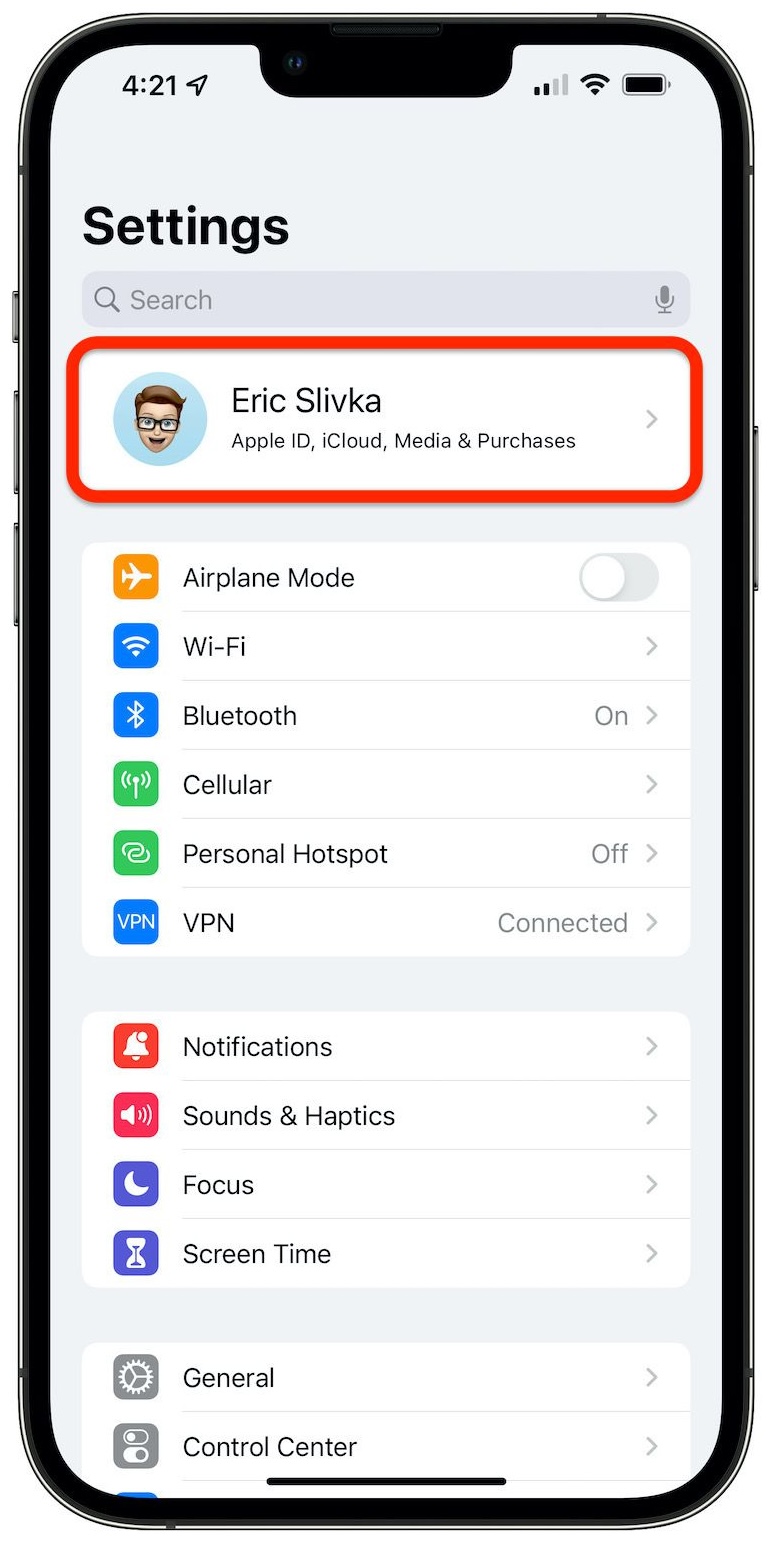
- Select Subscriptions

- Review subscriptions under Active and Inactive
Each subscription entry shows the renewal date, price, and billing frequency. Expired subscriptions remain visible for reference and cannot be manually removed.
How To View App Store Purchase History
App Store purchase history includes apps, subscriptions, books, and other digital content billed through Apple. This section shows pricing details that the App Store app itself does not display.
- Open Settings and tap your Apple ID
- Select Media & Purchases
- Tap View Account and authenticate
- Choose Purchase History
By default, Apple shows purchases from the last 90 days. You can filter results by date range, purchase type, or cost to review older App Store transactions.
How To Cancel Or Change An App Store Subscription
Canceling an App Store subscription stops future billing while allowing access until the current billing period ends. You can also switch plans if the service offers multiple tiers.
- Go to Settings and tap your Apple ID
- Select Subscriptions
- Tap the subscription you want to manage
- Choose Cancel Subscription or See All Plans
Once canceled, the subscription moves to the Inactive section and will not renew automatically.
How To Renew An Expired Subscription
If a subscription expires, Apple allows renewal as long as the service still supports reactivation.
- Open Settings and tap your Apple ID
- Select Subscriptions
- Scroll to Inactive subscriptions
- Tap the subscription and choose Renew
Renewed subscriptions begin billing immediately and appear again under Active subscriptions.
How To Share App Store Subscriptions With Family Sharing
Family Sharing lets you share eligible App Store subscriptions and purchases with up to five family members using one Apple ID group.
- Open Settings and tap your Apple ID
- Select Family Sharing
- Invite family members and follow on-screen steps
- Enable Share With Family for supported subscriptions
Only subscriptions marked as Family Sharing-eligible can be shared, and some services require a family plan.
Troubleshooting Common Problems
If subscriptions do not appear, confirm you are signed in with the correct Apple ID. Purchases tied to another Apple ID will not show up.
If a subscription will not cancel, check for an active billing period. Cancellations take effect after the current cycle ends.
Missing purchase history may result from applied date filters. Adjust filters to view older App Store transactions.
Tips
- Review subscriptions monthly to avoid unused renewals
- Cancel free trials at least 24 hours before renewal
- Use Family Sharing to reduce duplicate subscriptions
- Check purchase history if you see unexpected charges
- Keep Screen Time enabled for additional purchase controls
FAQ
Can you delete App Store purchase history?
No. Apple does not allow deletion of App Store purchase history from an Apple ID.
Does canceling a subscription delete the app?
No. Canceling stops billing, but the app remains installed unless you delete it manually.
Why does an expired subscription still show?
Expired subscriptions remain visible for up to one year for account records.
Can subscriptions renew automatically after cancellation?
No. Once canceled, a subscription will not renew unless you manually reactivate it.
Summary
- All App Store subscriptions are managed through Apple ID settings
- Purchase history shows detailed pricing and transaction records
- Subscriptions can be canceled, changed, or renewed anytime
- Family Sharing allows eligible subscriptions to be shared
Conclusion
Managing App Store subscriptions and purchases on an iPhone or iPad gives you full visibility into recurring charges and past transactions. By reviewing subscriptions regularly and canceling unused plans, you can keep your Apple ID clean, organized, and cost-efficient.



Discussion (0)
Be the first to comment.