



- Detect AI text and humanize it in one platform.
- Detailed, sentence-by-sentence results and scoring.
- Instantly check against leading AI detectors.
If you generate text with AI, there’s nothing worse than being hit with AI detection. But how can you easily get around this, especially when there are so many different AI models and detectors?
One platform that looks promising is Lynote AI. Not only does it offer advanced AI detection, which recognizes different model-specific characteristics. It also humanizes text to bypass all the other leading AI detectors.
I recently got hands-on with Lynote to see exactly how it works and compares to other tools.
How to detect and humanize AI-generated text
AI Detector
First things first, you’ll want to check just how obvious it is that your text was generated by AI.
While there are many detectors out there, Lynote produces actionable feedback that goes far beyond a simple percentage score.
Paste in your text or upload a larger document, and it will quickly return three scores as part of an overall chart. These are the probability that the text is 100% AI-generated, a mix of AI and human content, or majority human written.
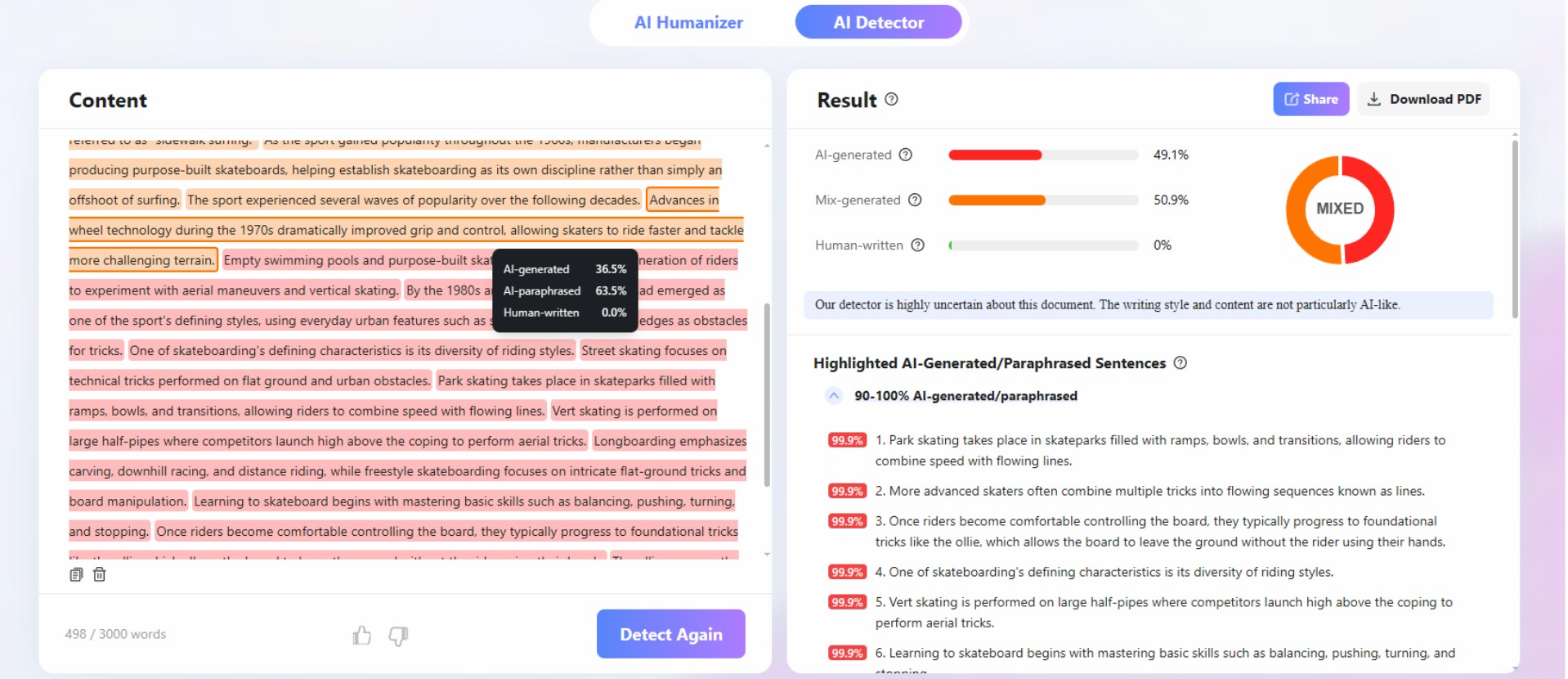
Unlike other AI detectors, it also combines model-specific detection signals for ChatGPT, GPT-5, Gemini, Claude LLaMA, Mistral, and more. This way you can be sure that nothing is being overlooked, and you know exactly what AI models are being flagged.
I especially like that every sentence is analyzed and highlighted with a score, so you can methodically work through the content and make necessary edits. It also helps you understand what it is about AI that’s easily detectable, so you can become better at using it and refining your work.
One layer that other tools often miss is when AI text has been paraphrased or poorly humanized. Lynote catches this, along with more obvious AI writing patterns.
You can use this tool for free for passages up to 300 words, and it performs more free checks than GPTZero, ZeroGPT, QuillBot, and other popular AI detectors. Moreover, it supports over 50 languages, including English, Spanish, French, German, Portuguese, Chinese, Arabic, and Japanese.
AI Humanizer
So, your text has been flagged as partly or completely AI-generated? You could make the edits manually, but Lynote also offers an AI Humanizer tool that promises to transform your text to be 99% undetectable by GPTZero, Copyleaks, Originality, Quillbot, Grammarly, and Sapling.
This isn’t just marketing either. I was pleasantly surprised to see the scores from all the detectors displayed after each humanized result.
The process is simple and you don’t need to mess with any settings to get good results. Just paste or upload your text and it will be rendered undetectable in seconds.
You can also click Humanize at the bottom of any AI detection result.
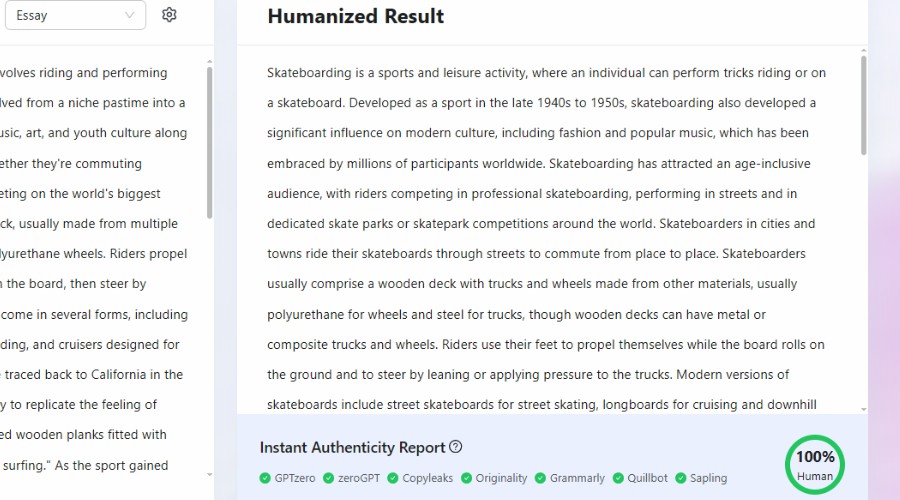
Unlike old fashioned spinners or basic AI re-writing tools, the results are very readable and often more human-like than the initial text.
Nonetheless, for those that want more control over the output, you can select a reading level to match your target audience and a purpose, to ensure the best style and tone.
For example, readability can vary between standard and PHD level. Purpose includes options such as academic, marketing, essay, and legal.
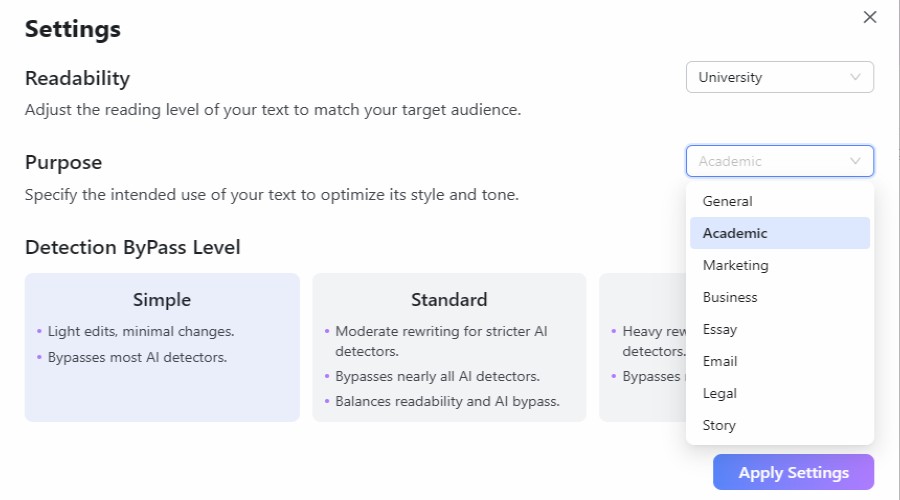
You can even fine-tune the detection bypass strength. I.e., Simple (modest edits), Standard (well balanced), Enhanced (guaranteed to bypass the strictest detectors like GPTZero).
As well as bypassing AI detectors, the output is also plagiarism free in terms of bypassing Copyscape. It also does a good job of recognizing important keywords for SEO purposes and keeping them intact.
Like the detector, the AI Humanizer is free to use for texts below 300 words.
Lynote AI Free vs Premium
As mentioned, Lynote AI maintains a free forever plan, of which you don’t even have to register an account. The drawback is that you’re limited to 300 words when using the AI detector or humanizer. However, the good news is no features are restricted.
If you want the ability to run up to 3,000 words through these tools, you must get the Pro plan.
This starts at $1.95 for 3 days before being renewed at $29.99 a month. Alternatively, committing to a $99.99 yearly plan works out to be the equivalent of $8.33/mo.
The Pro plan also comes with 1,000 study credits a month, unlimited YouTube transcripts, up to 300 pages of document translations.
Extra AI Tools
While the AI Detector and AI Humanizer are Lynote’s most notable features, the suite includes other useful tools including:
YouTube Transcript Generator
Fully transcribe up to 10 YouTube videos at once, including linked timestamps to jump to different sections. You can export transcripts as TXT files, perform multiple language translations, or send them over to the summarizer.
YouTube Summarizer
Summarizes the topic and content of any YouTube video, giving a full overview and chapter-by-chapter synopsis. Quickly extract core concepts and action points for learning and repurposing content.
AI Image Detector
The AI image detector lets you upload or link to an image to determine whether it was generated or altered with AI. Get simple explanations for C2PA, EXIF, AI watermark, and other data, and export a PDF report explaining the evidence.
Conclusion
Overall, Lynote AI has done a great job of combining detection and humanization features, while ensuring all major AI models and detection tools are included. Furthermore, you can use it entirely for free for smaller passages.
Its YouTube transcription and summary tools, along with the AI image detector are just the icing on the cake.



Discussion (0)
Be the first to comment.