



Unroll Me promises to clean up your email inbox by helping you unsubscribe from newsletters and bundle your subscriptions into a single daily email. On the surface, it sounds ideal if you wake up to dozens of marketing emails every day. The real question many users ask now is simple and important: Is Unroll Me safe to use for your privacy?
Unroll Me does what it advertises in terms of email cleanup, but its business model and data practices raise serious concerns. This review explains how Unroll Me works, how it uses your inbox data, what happened in its past privacy controversy, what has changed since then, and which privacy-friendly alternatives you should consider instead.
What Is Unroll Me And How It Works
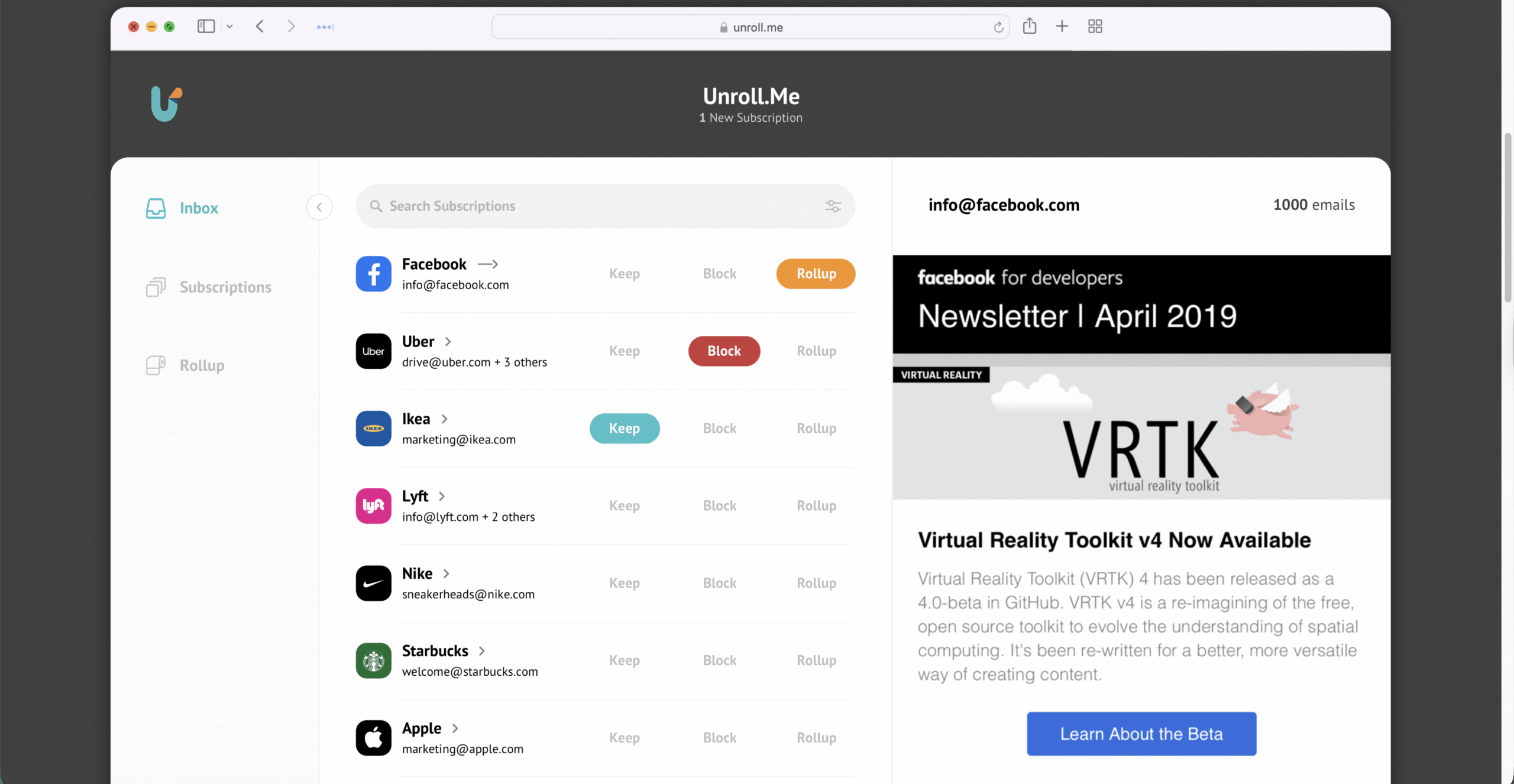
Unroll Me is an email management service that connects to your inbox, scans your messages for subscription emails, and lets you unsubscribe from mailing lists with a few clicks. It also offers a Rollup feature that combines selected subscriptions into a single daily digest, keeping your primary inbox cleaner.
To provide these features, Unroll Me needs wide access to your email account. When you sign up, you typically grant permission to read messages in supported email services like Gmail, Outlook, Yahoo, or iCloud. That access allows Unroll Me to detect newsletters, unsubscribe on your behalf, and route selected emails to the Rollup digest.
From a convenience standpoint, Unroll Me works well and can remove a large volume of junk in a few minutes. The concern arises when you consider how the company uses the data it gathers from those same messages.
How Unroll Me Makes Money

When a powerful inbox tool charges nothing, you should always ask how it pays its bills. In this case, Unroll Me has been clear that data, not subscriptions, funds the product.
Unroll Me belongs to Rakuten Intelligence, a company that analyzes e-commerce and consumer behavior. To generate that analysis, Rakuten needs large amounts of purchase, travel, and subscription data from real inboxes. When you sign up, Unroll Me can scan certain transactional emails and send anonymized or aggregated data to Rakuten Intelligence for market research.
According to its privacy statements, Unroll Me focuses on commercial messages such as receipts, order confirmations, shipping notices, travel bookings, and subscription emails. It states that personal emails are ignored and that identifying information is removed before analysis. Even with those limits, this model still means your inbox data helps power third-party commercial analytics.
The 2017 Privacy Controversy Explained
The debate around whether Unroll Me is safe to use intensified after a high-profile incident in 2017. Reports revealed that the company had sold anonymized data about ride receipts from users’ inboxes to Uber so Uber could study how often customers used its competitor Lyft. Many users felt this data-sharing was not clearly disclosed or understood.
As a result, Unroll Me faced legal and reputational fallout. The company reached a settlement over misleading marketing and agreed to be more transparent about its data collection and resale practices. This event still appears in many privacy discussions and explains why security experts and privacy communities treat Unroll Me with caution.
Since then, Unroll Me has updated its privacy policy, clarified what data it collects, and highlighted its security controls. However, the core business model that relies on mining inbox data for market intelligence remains in place at the time of writing.
What Data Unroll Me Collects Today
If you still wonder if Unroll Me is safe to use in its current form, you need to understand the scope of data collection. Based on its policies and independent reviews, the service generally looks for:
- Newsletter and marketing subscriptions.
- Purchase receipts from online stores.
- Travel bookings and reservation confirmations.
- Shipping and delivery confirmations.
- Other commercial or transactional emails that reveal spending habits.
Unroll Me states that it anonymizes and aggregates this information before using it inside Rakuten Intelligence reports. Names and direct personal identifiers are supposed to be stripped. Even so, the service still builds a detailed picture of where you shop, what you buy, and which services you use, and shares that insight with brands and analysts.
For many privacy-conscious users, that level of inbox scanning goes far beyond what feels necessary for a simple unsubscribe tool.
Is Unroll Me Secure But Not Private
There is an important difference between security and privacy. From a technical security standpoint, Unroll Me claims to use encryption, access controls, and regular security audits. The service is not known for installing malware, hijacking accounts, or stealing passwords. In that limited sense, you can say that using the app is not likely to infect your device.
However, when users ask if Unroll Me is safe to use, they usually care more about privacy than just basic security. The core trade-off here is that you give a third-party service ongoing permission to scan your inbox and extract commercial data in exchange for a free email cleanup tool. If you handle sensitive work communication, client data, or confidential contracts in your email, that trade-off can feel unacceptable.
If you simply want fewer newsletters and do not mind your shopping patterns being used for marketing analytics, you may decide the service is good enough for your needs. If you prefer strict control over who sees your inbox contents, then Unroll me might not be worth it.
When Using Unroll Me Is A Bad Idea
There are specific situations where you should avoid Unroll Me or similar services entirely, even if the convenience is appealing. In these cases, privacy risks can impact more than just your own account.
Avoid Unroll Me if any of the following apply:
- You use that inbox for work in healthcare, finance, law, or other regulated industries.
- Your mailbox holds confidential client information, legal documents, or non-disclosure agreements.
- You manage shared inboxes for a team, company, or organization.
- You handle trade secrets, internal roadmaps, or unreleased product information.
- You are particularly concerned about data mining, behavior tracking, or profiling.
In these contexts, the answer is very clear. You should not allow a marketing analytics company to scan your professional or sensitive email, even if it promises anonymization and security controls.
How To Reduce Risk If You Still Use Unroll Me
If you decide to use Unroll Me anyway, treat it as a tool for a limited, non-critical inbox rather than your main account. You can lower your exposure by following a few simple precautions.
Use these guidelines if you insist on trying the service:
- Create a separate email address for marketing and newsletters, then use Unroll Me only on that account.
- Move important work and personal accounts to a different email you never connect to Unroll Me.
- Review the current Unroll Me privacy policy before granting access and watch for any updates.
- Limit how long you keep the app connected; clean up, then revoke its access in your email account settings.
- Regularly audit third-party app access in Gmail, Outlook, or other providers to remove services you no longer use.
Even with these protections, a privacy-focused user will usually prefer alternatives that do not monetize inbox data at all. That is why many people searching for Unroll Me are quickly moving on to privacy-first email cleanup tools.
Privacy-Friendly Alternatives To Unroll Me
If you like the concept of bulk unsubscribing but dislike the data-sharing model, several services and approaches offer a better balance between convenience and privacy. When evaluating alternatives, always check how each service handles your messages and whether it sells your data.
Here are common options often recommended:
- Clean Email: A paid service that focuses on privacy, bulk unsubscribe tools, and smart filters for newsletters, social updates, and promotions. It states that it does not sell or read user data for marketing clients.
- Leave Me Alone: A privacy-first subscription management tool that charges per unsubscribe or via credits instead of monetizing inbox data. It focuses on transparency and minimal data retention.
- Cleanfox: A tool that helps remove old newsletters and reduce inbox clutter. It reads newsletters to identify senders but focuses on anonymized statistics and offers an eco-friendly marketing angle.
- SaneBox: An inbox management service that uses AI to sort messages into folders. It is often used by business users who want better filtering without selling data to advertisers.
- Manual Unsubscribe: The slowest but most private method is manually using the built-in “Unsubscribe” links in email clients. It requires more time but keeps your data with your provider instead of third-party analytics companies.
For most users who care about privacy, a combination of manual unsubscribes and a privacy-focused service like Clean Email or Leave Me Alone will feel safer than granting Unroll Me full access.
How To Remove Unroll Me Access From Your Email
If you previously used Unroll Me and now want to revoke its access, you should remove permissions from both your email provider and the Unroll Me account itself. This helps ensure the app can no longer scan new messages going forward.
Typical steps for disconnecting Unroll Me from a Google account look like this:
- Open your Google Account settings in a web browser.
- Go to the Security section and scroll to find Third-Party Access or Third-Party Apps With Account Access.
- Locate the Unroll Me entry in the list of connected apps.
- Select Unroll Me and choose the option to Remove Access or Revoke Access.
- Visit the Unroll Me website or app, sign in, and look for account or mailbox settings.
- Delete your Unroll Me account or remove your mailbox from the service to stop further processing.
Other email providers offer similar third-party access pages where you can revoke permissions. After you disconnect Unroll Me, it will no longer receive new message data, although any previously collected information may still appear in aggregated analytics.
So, Is Unroll Me Safe To Use
The short answer depends on what you mean by safe. If you only worry about malware or immediate account compromise, Unroll Me is not known for that kind of behavior. You can install the app, and your computer will likely remain technically secure.
However, if your main concern is email privacy and control over your data, becomes “no, not really.” The service relies on scanning inbox contents and feeding commercial data into Rakuten Intelligence analytics. Even with anonymization, you give up significant insight into your shopping and subscription habits in exchange for a free tool.
For privacy-conscious users, professionals handling sensitive information, or anyone uncomfortable with data mining, a privacy-first alternative or manual unsubscribe process is the better route. If you still use Unroll Me, keep it away from your most important inboxes, limit its access, and regularly review your connected apps.
In the end, inbox cleanup is helpful, but your privacy should not be the price. Now that you understand how Unroll Me works and what it does with your data, you can decide whether the convenience is worth the trade-off, or if a more private approach better suits you.


Discussion (0)
Be the first to comment.