



HTTP Error 429 means “Too Many Requests.” It appears when a website or server blocks your request because too many requests were sent in a short period of time. This is a rate-limiting response designed to protect servers from overload or abuse.
This guide explains what HTTP Error 429 is, why it happens, and how to fix it on browsers, apps, APIs, and websites.
What Is HTTP Error 429
HTTP Error 429 is a standard HTTP response code that tells the client to slow down. It means the server has detected too many requests from your IP address, account, or application within a short time frame.
The error is temporary and usually resolves once the request limit resets.
Why HTTP Error 429 Occurs
This error happens when rate limits are exceeded.
Common causes include:
- Refreshing a page too frequently
- Automated scripts or bots
- Browser extensions making repeated requests
- Too many API calls in a short time
- Shared IP addresses hitting limits
- Misconfigured applications
Websites use this error to prevent spam, scraping, and server overload.
How Long Does HTTP 429 Last
The duration depends on the server’s rate limit policy.
Typical reset times:
- A few seconds
- Several minutes
- Up to an hour
Some servers include a Retry-After header that tells you when requests are allowed again.
Fix HTTP Error 429 in a Web Browser
If you see HTTP Error 429 while browsing a website, try these steps.
Wait and Refresh Later
The simplest fix is to wait. Once the rate limit resets, the site usually loads normally.
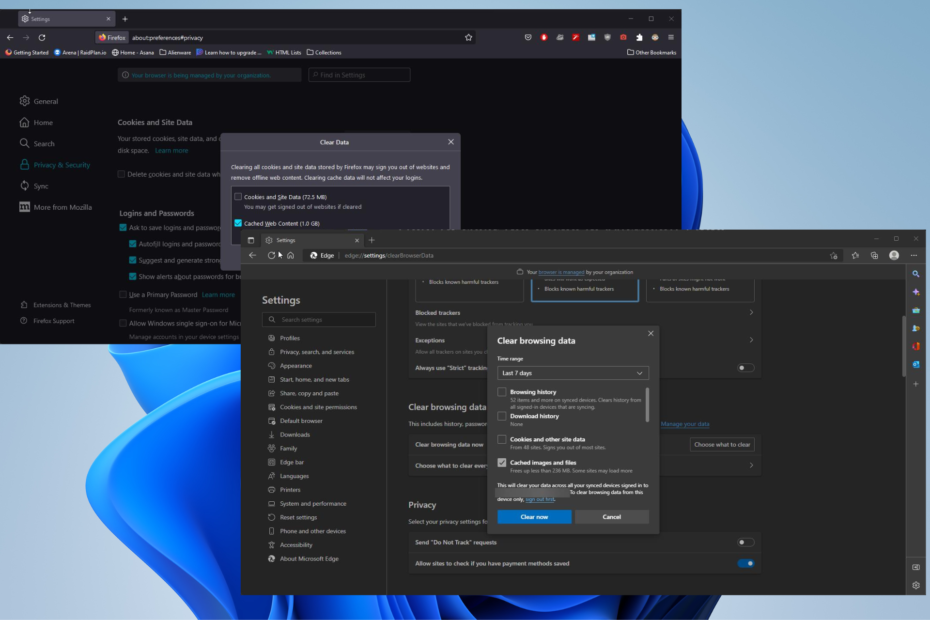
Clear Browser Cache and Cookies
Steps:
- Open browser settings
- Clear cache and cookies
- Restart the browser
- Try loading the page again
Disable Browser Extensions
Some extensions send background requests.
Fix:
- Disable ad blockers or automation extensions
- Reload the page
Change Network or IP Address
Fix:
- Restart your router
- Switch from Wi-Fi to mobile data
- Turn off VPN or proxy services
Fix HTTP 429 When Using Apps or APIs
Developers and advanced users may encounter this error when using APIs.
Reduce Request Frequency
Fix:
- Add delays between requests
- Use batching where possible
Check API Rate Limits
Fix:
- Review API documentation
- Monitor usage quotas
- Upgrade API plan if available
Handle Retry-After Header
Fix:
- Configure your app to wait before retrying
- Avoid automatic rapid retries
Fix HTTP Error 429 as a Website Owner
If visitors see this error on your site, server-side changes are needed.
Adjust Rate Limiting Rules
Fix:
- Increase rate limits carefully
- Exclude trusted IPs
- Configure firewall or CDN settings
Use Caching and CDN
Fix:
- Enable page caching
- Use a content delivery network
- Reduce server load
Block Bad Bots
Fix:
- Identify abusive IPs
- Block malicious bots
- Enable bot protection
How to Prevent HTTP 429 Errors
Best practices include:
- Avoid excessive refreshes
- Limit automated requests
- Respect API rate limits
- Use caching wherever possible
- Monitor traffic patterns
Prevention is easier than recovery.
Final Thoughts
HTTP Error 429 is a protective measure used by websites and APIs to manage traffic and prevent abuse. While it can be frustrating, it usually resolves on its own once request limits reset.
Whether you are a user or a site owner, reducing request frequency and following best practices prevents this error from appearing again.
FAQs
Is HTTP Error 429 permanent
No, it is temporary and resolves after the limit resets.
Can HTTP 429 mean I am blocked
Not permanently. It is usually a short-term restriction.
Does HTTP 429 mean the site is down
No, it means the server is limiting requests.
Should I keep refreshing the page
No, that can extend the block duration.


Discussion (0)
Be the first to comment.