




Showtime brings hit series and blockbuster movies straight to your living room. Today, the easiest way to stream Showtime is through the Paramount+ with Showtime app. You can install it directly on your smart TV or use a compatible streaming device. This guide explains every method in clear, step-by-step instructions.
1) Check if your smart TV supports Showtime
First, confirm your TV supports the Paramount+ with Showtime app. Most newer Samsung, LG, Roku, Fire, and Android TVs include it in their app stores. If your TV is older, use a Roku Stick, Fire Stick, or Apple TV.
2) Install the Showtime app on your smart TV
For Samsung smart TVs
Press Home and open Apps. Search for Paramount+, select Install, then open the app. Sign in with your Showtime or Paramount+ account and start watching.

For LG smart TVs
Open the LG Content Store from your home screen. Search for Paramount+ and install it. Launch the app, then sign in or start a trial if available.
For Roku TVs and players
Press Home, open Streaming Channels, and search Paramount+. Add the channel, open it, and sign in. Find Showtime titles in the Showtime hub.
For Fire TV and Firestick
From the Fire TV home screen, choose Find > Search, type Paramount+, and select Get. Open the app and sign in with your Paramount+ account to view Showtime content.
For Android TV and Google TV
Open the Google Play Store, search for Paramount+, and install it. Launch the app and sign in to unlock Showtime series and movies.
3) Activate Showtime on your smart TV
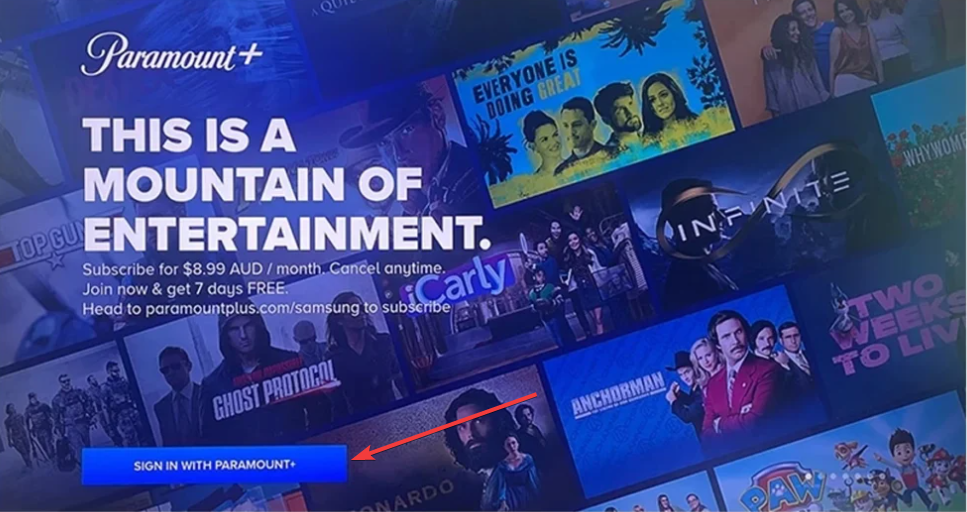
Open the app and select Sign In with Paramount+. If an activation code appears, visit paramountplus.com/activate on your phone or computer, enter the code, and confirm. Your TV links to your account and loads Showtime titles.
4) Watch Showtime through a streaming device

If your TV doesn’t support the app, connect a Roku Stick, Fire Stick, Apple TV, or Chromecast. Install Paramount+ on the device, sign in, and stream Showtime without replacing your TV.
5) Use screen mirroring or casting
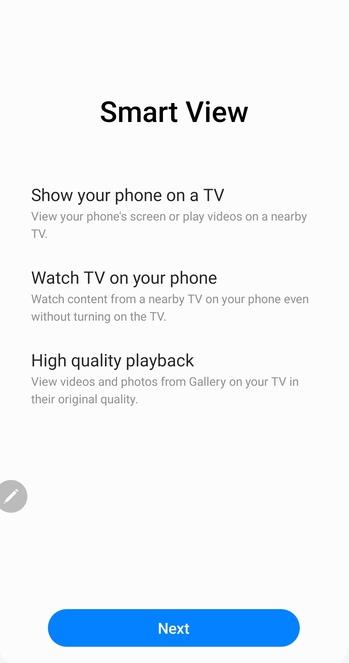
When your TV lacks the app, mirror or cast from your phone or tablet. Use AirPlay on iPhone or Chromecast/Smart view on Android. This method lets you watch quickly without native app support.
6) Subscribe or link your Showtime plan
Subscribe to Paramount+ Premium (with Showtime) or link an existing Showtime plan if your provider allows it. Confirm the Premium tier so the full Showtime catalog appears.
Troubleshoot Showtime not working on smart TV
- Restart your TV and app: Power off your TV, wait ten seconds, and turn it back on. Reopen the app and test playback.
- Update your TV firmware: Outdated firmware breaks app compatibility. Check your TV’s settings for updates and install the latest version.
- Reinstall the app: Uninstall Paramount+, restart the TV, and reinstall it. This clears corrupted cache and installs a fresh build.
- Check your internet connection: Slow internet causes buffering and errors. Aim for 25 Mbps or higher for HD and prefer Ethernet or a 5 GHz Wi-Fi band.
- Reset Smart Hub (Samsung only): Go to Settings > Support > Self Diagnosis and select Reset Smart Hub. Reinstall the app and sign in again.
Tips for better streaming
- Keep internet speeds at 25 Mbps or higher for HD.
- Update your TV firmware and apps regularly.
- Enable captions or Dolby Audio for a better experience.
FAQs
Is Showtime now part of Paramount+? Yes. Showtime merged into Paramount+ under the Premium plan.
Can I still use the Showtime Anytime app? No. Most platforms retired the app; use Paramount+ instead.
Do I need a cable subscription? No. You can subscribe directly through Paramount+.
Can I download episodes on a TV? No. Downloads work on mobile devices only.
Summary
- Confirm your TV supports the Paramount+ with Showtime app.
- Install and activate the app with your subscription.
- Use a streaming device if your TV is incompatible.
- Fix playback with updates, reinstalls, or a hub reset.
- Use a VPN, such as Private Internet Access (PIA), while abroad to access the U.S. catalog.
Conclusion
You can watch Showtime on almost any modern smart TV with the Paramount+ app or a streaming device. Set up the correct plan, keep your connection stable, and enjoy Showtime’s originals and movies on the big screen.


Discussion (0)
Be the first to comment.