



Playing iMessage games on iPhone lets you compete with friends directly inside the Messages app, without downloading full standalone games. You install lightweight game apps, start a match in any conversation, and take turns by sending moves as messages.
Once set up, iMessage games feel as simple and fast as texting, which makes them ideal for quick, casual play.
Table of contents
- How iMessage games work on iPhone
- How to install iMessage games on iPhone
- How to start playing an iMessage game
- Popular iMessage games you can play
- How to manage notifications and alerts for iMessage games
- Fix common iMessage games problems on iPhone
- Tips for a better iMessage gaming experience
- FAQs
- Summary
How iMessage games work on iPhone
iMessage games run as app extensions inside the Messages app. Each move appears as a message, which makes most games turn-based rather than real-time.
Requirements to play iMessage games
You need an active iMessage account, a signed-in Apple ID, and a stable internet connection. Both players must install the same game to play together.
How to install iMessage games on iPhone
Installing games happens inside Messages, not the regular App Store. This step solves most “I can’t find games” problems.
Download games from the iMessage App Store
- Open the Messages app.
- Open any conversation.
- Tap the App Store icon next to the text field.
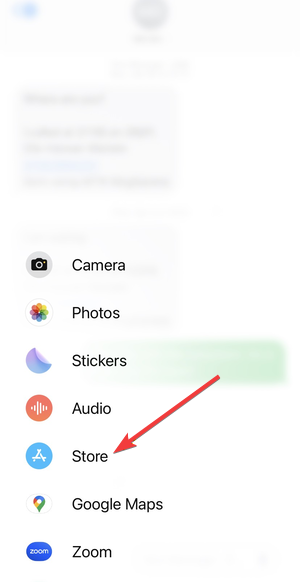

- Browse or search for a game, then tap Get.
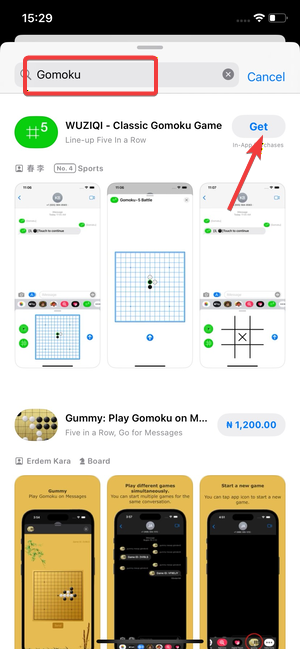

The game installs instantly and attaches to Messages.
Enable installed games in the iMessage app drawer
- Open the app drawer in Messages.
- Swipe left to the More button.
- Turn on the game toggle if it appears disabled.
This ensures the game shows up when you want to start playing.
How to start playing an iMessage game
Starting a game always begins inside a chat thread.
Start a new game with a contact
- Open a conversation with a friend.
- Tap the game icon from the app drawer.
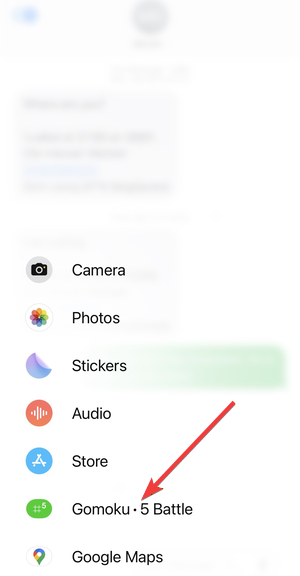

- Start a new match and send your first move.
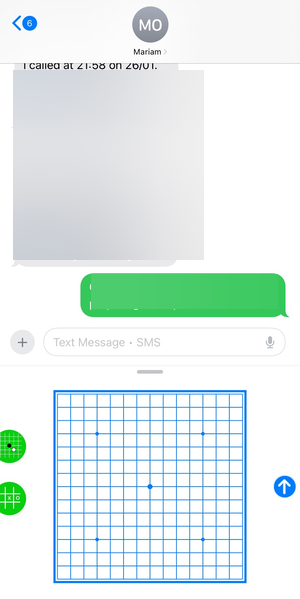

Your friend receives the game as a message and plays their turn.
Take turns and continue a game
Each move appears in the conversation as a tappable message. iMessage sends notifications when it becomes your turn.
Popular iMessage games you can play
Trying a few well-known games helps you understand how the system works.
Best casual games for beginners
You can play games like Gomoku on iMessage, while games like cup-style pool or word challenges work well for short sessions. They finish quickly and require little setup.
Best competitive and multiplayer games
Strategy and trivia games suit longer matches. Some support multiple players in the same conversation.
How to manage notifications and alerts for iMessage games
Game alerts use standard iMessage notifications. You can mute a specific conversation without disabling messages entirely.
- Open the conversation.
- Tap the contact name.
- Enable Hide Alerts.
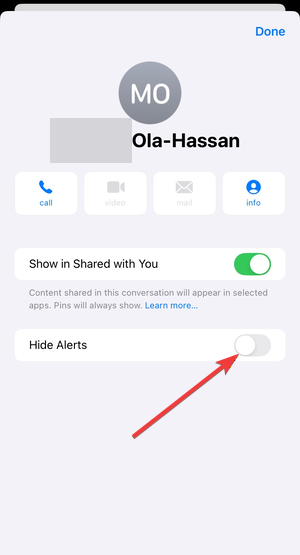

This keeps games playable without constant interruptions.
Fix common iMessage games problems on iPhone
These fixes address the most common issues users face.
Games not showing in Messages
- Open Messages and open any conversation.
- Swipe through the app drawer and tap More.
- Turn the game app On if it appears disabled.
- Open Settings > General > Software Update and install any available iOS update.
After you enable the app and update iOS, reopen the conversation and try again.
Friend not receiving game invites
- Confirm the chat shows iMessage in the text field, not Text Message.
- Ask your friend to install the same iMessage game from the in-app App Store.
- Send a new game invite from the game app inside the conversation.
If the thread switched to SMS, iMessage games will not send correctly.
Games stuck or not updating turns
- Turn Airplane Mode on, wait 10 seconds, then turn it off.
- Force close Messages, then reopen it.
- Switch between Wi-Fi and Cellular to refresh the connection.
- Update the game from the iMessage App Store if an update is available.
Most syncing issues come from a slow connection or an outdated game build.
Tips for a better iMessage gaming experience
- Keep iOS updated to avoid compatibility issues.
- Remove unused iMessage apps to declutter the drawer.
- Use Wi-Fi for smoother turn syncing.
- Mute noisy group chats instead of leaving games.
FAQs
Can you play iMessage games alone?
Most iMessage games require at least one other player, since they rely on turn-based messaging.
Do iMessage games cost money?
Many games are free, but some include ads or optional purchases.
Do iMessage games work between iPhone and iPad?
Yes, as long as both devices use the same Apple ID and iMessage account.
Are iMessage games private?
Game data stays inside your message thread and follows normal iMessage privacy rules.
Summary
- Enable iMessage and open the app drawer in Messages.
- Install games from the iMessage App Store.
- Start a game inside a conversation and take turns.
- Adjust alerts and troubleshoot issues if needed.
iMessage games turn everyday chats into quick, interactive competitions. Once you install a game and start a match, playing feels as simple as sending a message.


Discussion (0)
Be the first to comment.