




If you want instant access to news, weather, and Outlook each time you open Firefox, setting MSN as your homepage is an easy solution. The process takes only a few clicks and works on both desktop and mobile browsers. In this guide, we walk you through the steps you need to follow to make MSN your Homepage on Firefox and fix related issues.
1) Set MSN as your homepage on Firefox (Desktop)
Firefox lets you customize what opens when the browser starts or when you click the Home icon. Here’s how to make MSN your default homepage.

Click the three horizontal lines in the top-right corner of Firefox and select Settings to open the main preferences window. Now, select Home in the left sidebar. Here, you can review controls for the homepage, new tab page, and startup behavior.
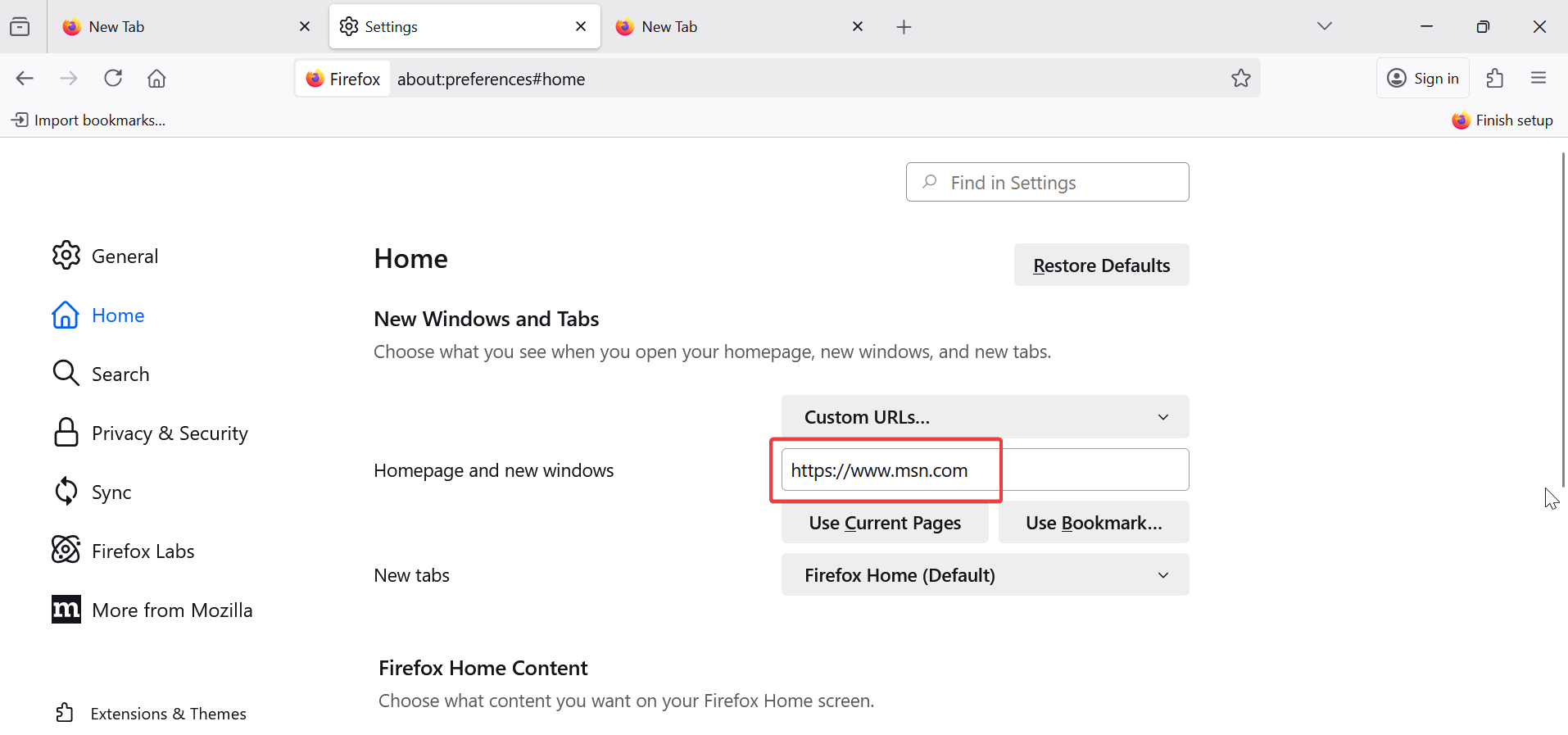
From here, click the dropdown under Homepage and new windows and select Custom URLs. Finally, type https://www.msn.com into the text field, then close and reopen Firefox, or click the Home icon on the toolbar. You should now see MSN as your homepage.

2) Set MSN as the homepage using drag-and-drop
Go to www.msn.com in Firefox, drag the tab, and drop it onto the Home icon on your toolbar. When prompted, click Yes to make MSN your homepage.
That’s it - MSN will open automatically every time you launch Firefox.
3) Make MSN your homepage on Firefox for Android or iPhone
On Android, tap the three dots (⋮) and select Settings. Next, choose Homepage and select Custom URL. Finally, enter https://www.msn.com and confirm your choice.
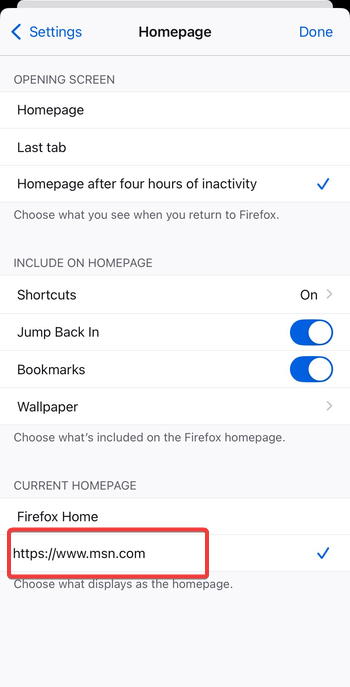
On iPhone or iPad, open Settings from the Firefox menu and select Homepage and, if available on your iPhone, set a Custom URL to MSN. If not available, bookmark MSN and add it to your Top Sites for one-tap access.
4) Troubleshoot when the MSN homepage doesn’t stick
- Disable conflicting extensions: Go to Add-ons and Themes → Extensions. Disable any unfamiliar or suspicious add-ons, especially those related to search or homepage customization.
- Check Firefox policies or profiles: Type about:policies into the address bar. If you see that Firefox is managed by your organization, homepage changes might be locked by an admin or system policy.
- Reset Firefox settings: If nothing else works, open Help → More Troubleshooting Information → Refresh Firefox. This restores Firefox to its default state without deleting your bookmarks.
Tips for MSN users on Firefox
- Sign in with your Microsoft account to personalize news and widgets.
- Pin MSN to your bookmarks toolbar for quick access.
- Try the MSN News extension for one-click headlines on your toolbar.
FAQs
Why does Firefox revert to a different homepage? This usually happens when extensions or antivirus programs reset your homepage. Disable them or refresh Firefox to fix it.
Can I make MSN my homepage on all devices? Yes. If you use Firefox Sync, your homepage preference carries across devices linked to your account.
Is MSN safe to use as a homepage? Absolutely. MSN is a secure Microsoft service with an encrypted connection and no additional setup required.
Summary
- Open Settings → Home.
- Select Custom URLs under Homepage.
- Type
https://www.msn.com. - Restart Firefox and verify.
Conclusion
Setting MSN as your homepage on Firefox is a quick way to access personalized news, weather, and Microsoft services every time you open your browser. Whether you use the desktop or mobile version, the process is simple and takes less than a minute.
If MSN doesn’t stay as your homepage, a quick extension or settings check usually resolves the issue. Once configured, Firefox will open directly to MSN, keeping you informed and connected from the moment you launch your browser.
Discussion (0)
Be the first to comment.