



YouTube Premium removes ads, unlocks background play, offline downloads, and includes YouTube Music Premium. The catch is the monthly price, which can feel steep if you subscribe on the standard plan. If you want to know how to get a discount on YouTube Premium without sketchy tricks, you have several legit options at the time of writing.
This guide explains how to use a YouTube Premium student discount, a YouTube Premium family plan, annual billing, promo codes, bundles, and regional pricing to pay less. You will also see practical tips to avoid overpaying and stay within YouTube’s terms of service.
Why YouTube Premium Is Worth Considering
Before you search for a YouTube Premium discount, it helps to understand what you get. The regular individual plan removes ads from most videos, allows background play on mobile, and lets you download videos and playlists for offline viewing. It also unlocks YouTube Music Premium for ad-free music streaming.
For heavy YouTube users, these features can save time and mobile data, especially if you commute, work out with playlists, or use tutorials all day. That makes finding how to get YouTube Premium cheaper a smart move, not just a nice extra.
Check For A YouTube Premium Student Discount
If you are currently enrolled in an eligible college or university, a YouTube Premium student discount usually offers one of the best prices. You pay less than the standard individual plan, while still getting ad-free videos and YouTube Music Premium.
To apply for the student plan, follow these steps:
- Open the official YouTube Premium Student page in your browser.
- Sign in with the Google account you want to use for YouTube Premium.
- Choose the student plan and start the free trial if available.
- Enter your school on the SheerID form and confirm that your institution appears in the list.
- Upload any requested proof of enrollment, such as a student ID or registration document.
- Wait for verification, then confirm the YouTube Premium student discount pricing before you accept billing.
YouTube requires you to re-verify your student status periodically. If you no longer qualify, your account usually switches back to the regular price.
Share Costs With A YouTube Premium Family Plan
A YouTube Premium family plan can reduce the cost per person dramatically if everyone lives in the same household. At the time of writing, you can share one membership with up to five additional family members, so six people total use the same subscription benefits.
To set up a YouTube Premium family plan, use these steps:
- Open YouTube in a browser and sign in with the Google account that will pay for the subscription.
- Go to the YouTube Premium page and select the family plan option.
- Create or confirm your Google family group, including your home address.
- Invite up to five household members using their Google email addresses.
- Ask each person to accept the invitation from their email or YouTube account.
- Confirm that everyone appears under your family group and has YouTube Premium access.
YouTube now enforces household rules more strictly and may check locations for family members periodically. Everyone in the YouTube Premium family plan should actually live at the same address to avoid losing access.
Save More With A YouTube Premium Annual Plan
If you already know you will keep the service for at least a year, a YouTube Premium annual plan can cut your yearly cost compared to paying month to month. You pay once in advance and lock in a lower effective monthly rate.
To switch to an annual plan, follow these steps:
- Visit the official YouTube Premium page while signed in to your Google account.
- Check whether the annual option appears for your region and currency.
- Compare the annual price to twelve months of the regular monthly plan.
- Select the annual plan, review the terms, and confirm the one-time payment.
- Verify that your next billing date reflects one full year instead of one month.
Annual billing usually applies only to the individual plan, but YouTube can adjust offers over time. Always confirm current pricing before you switch.
Use A Free Trial
New users often receive a YouTube Premium free trial lasting about 1 month.
- Go to the official YouTube Premium page while signed in to your Google account. Click "Try 1 month for $0" or the currency of the region you're in.
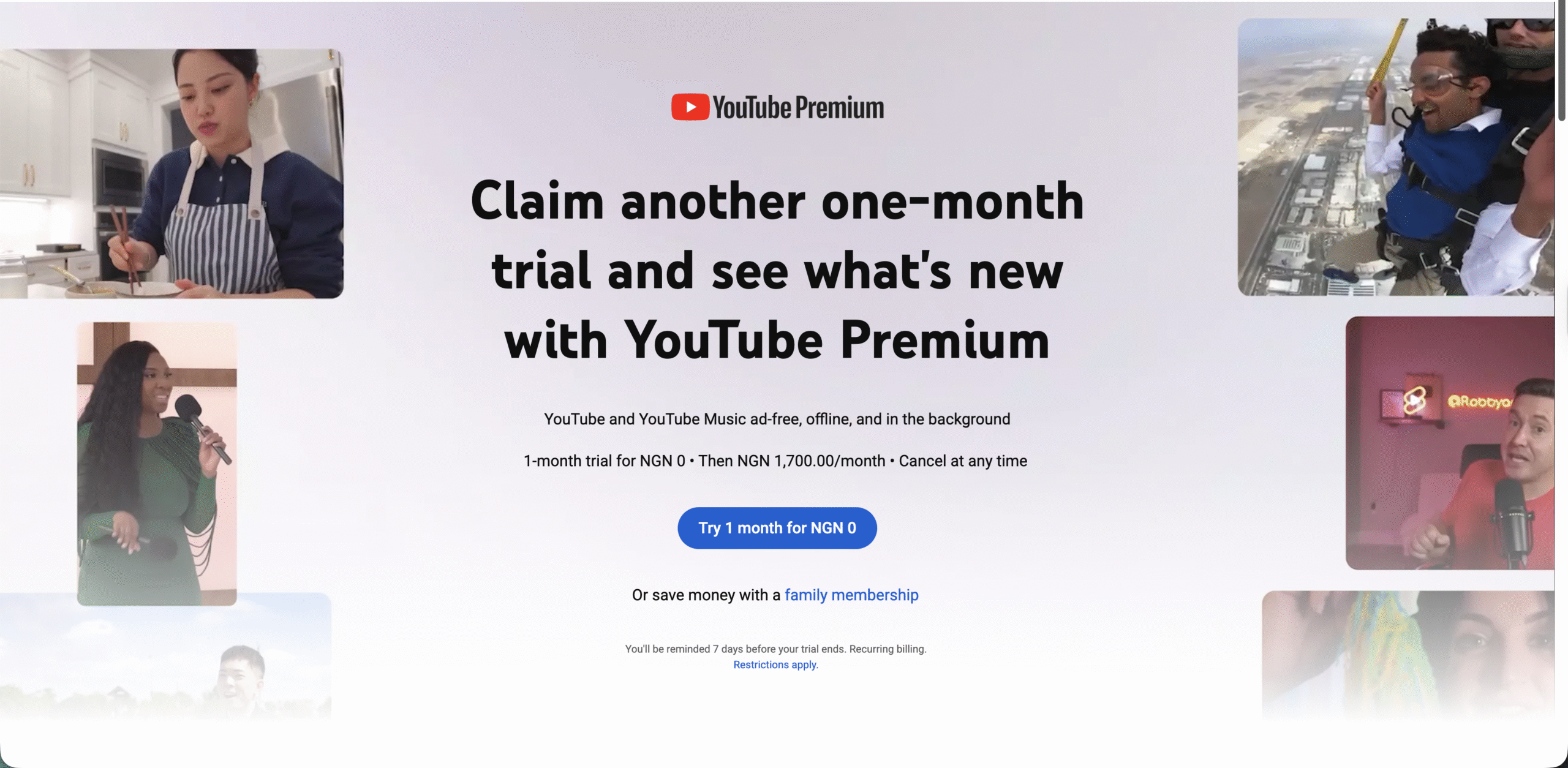
- Click "Try 1 month."
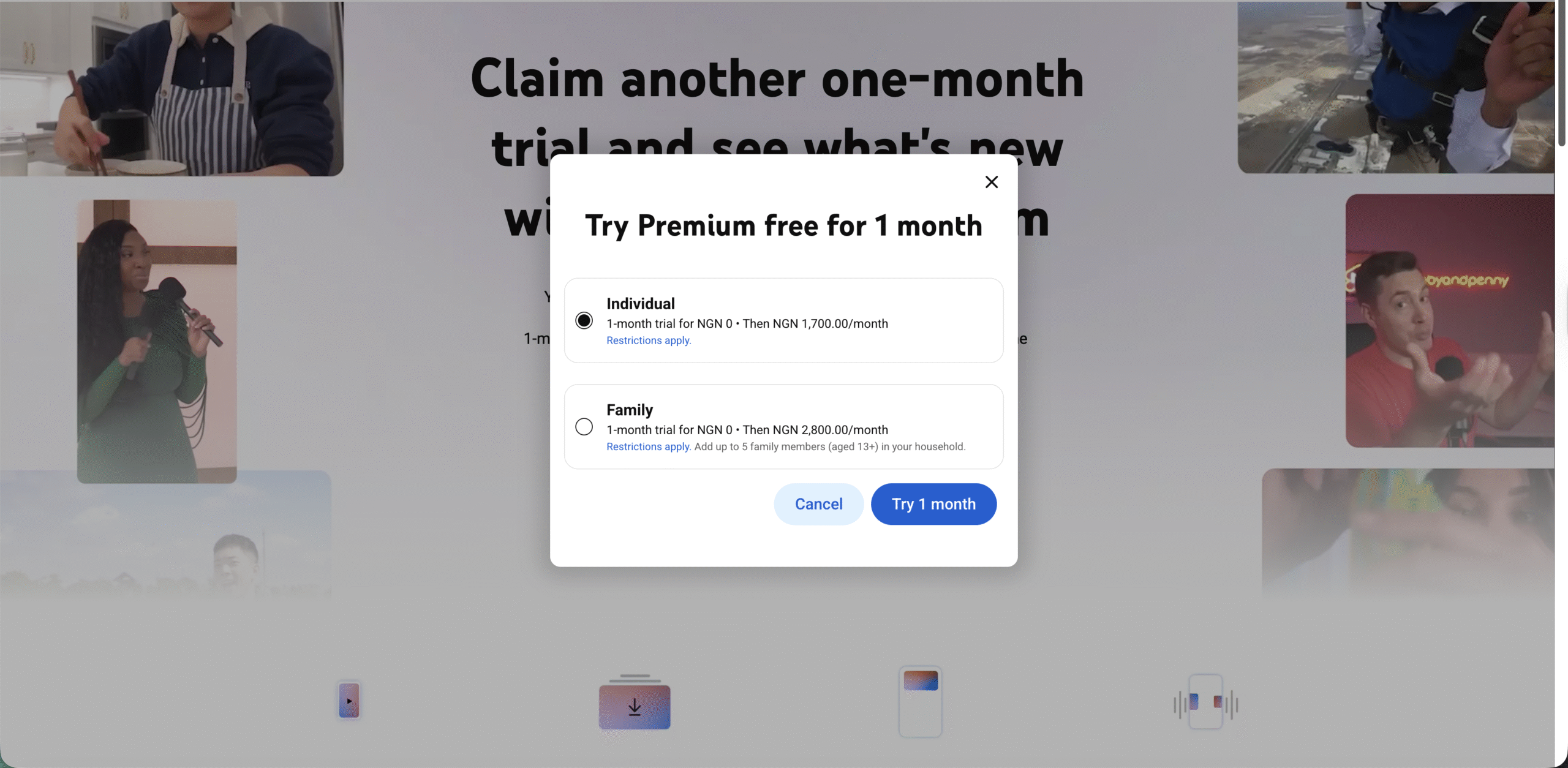
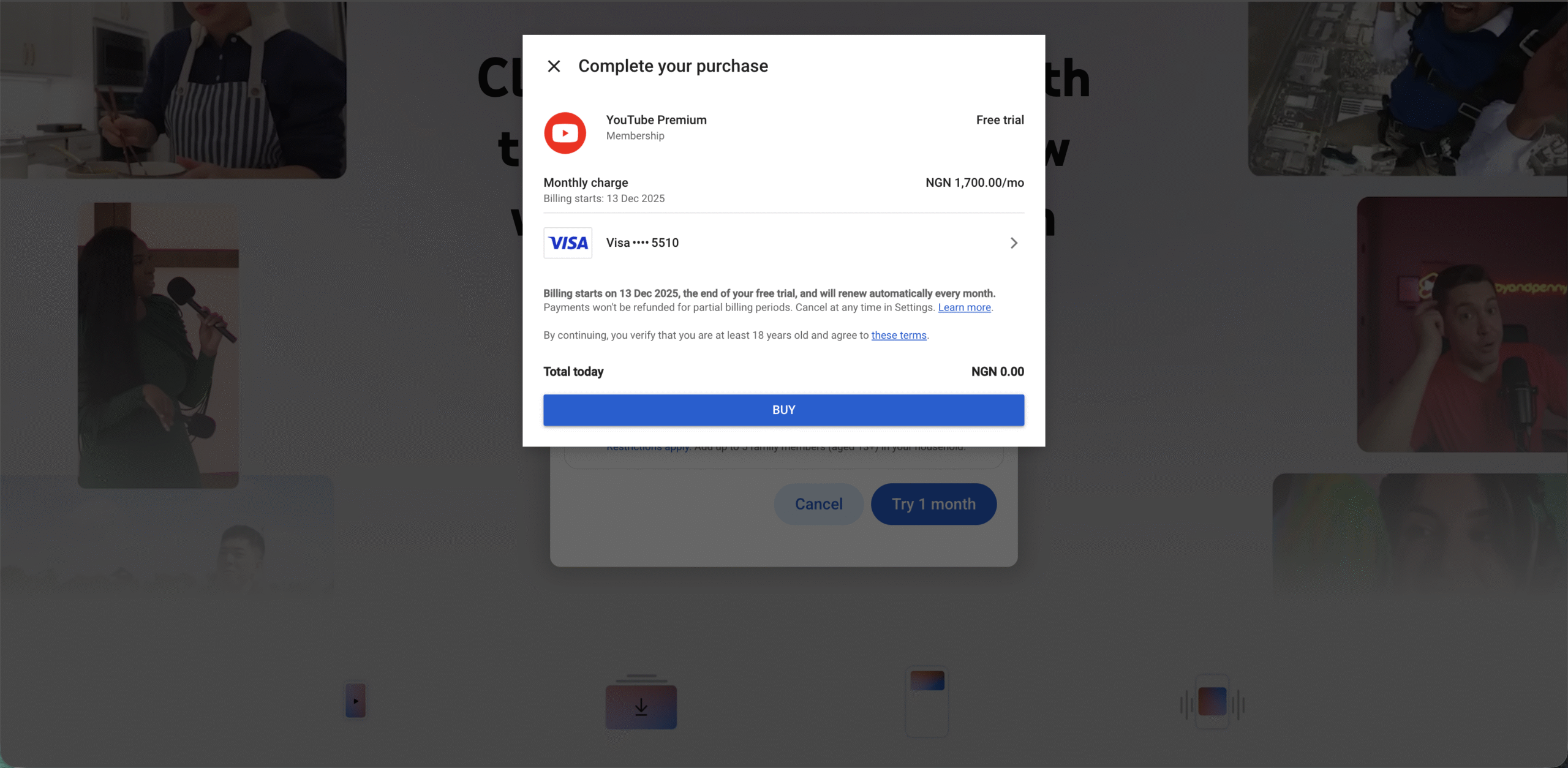
- If your card details are already there, click "BUY."
Lower Your Cost With Regional YouTube Premium Pricing
YouTube Premium prices vary by country. Some users lower their subscription cost by signing up while connected through a VPN to a region where pricing is cheaper. This approach relies on regional pricing differences rather than hidden tricks, but it can conflict with YouTube’s terms of service if you do not actually live there.
If you research this method, keep these points in mind:
- Read YouTube Premium terms about location and eligible countries before you try any VPN approach.
- Understand that paying from a region where you do not reside can risk cancellation if YouTube detects a mismatch.
- Use only reputable VPN providers that clearly explain privacy and billing policies.
- Never buy pre-made accounts or logins from marketplaces that resell discounted YouTube Premium access.
If you prefer to stay completely within YouTube’s intended pricing rules, focus instead on a YouTube Premium student discount, a YouTube Premium family plan, and annual billing in your actual country.
Use Bundles And Partner Deals For Extra Savings
In some regions, you can get a YouTube Premium discount through bundles with other Google services or partner plans. At the time of writing, examples include YouTube Premium with some Google One tiers, phone carrier promotions, or device purchase bonuses.
To find these YouTube Premium discount opportunities, try the following:
- Check your Google One benefits if you pay for extra Drive storage and see whether any YouTube Premium offers appear.
- Review your mobile plan perks, especially if your carrier advertises streaming bundles or entertainment packs.
- Look at promotions from new phones, smart TVs, or media devices that include free YouTube Premium months.
- Follow YouTube’s official blog and announcements for limited-time discount campaigns.
These partner deals change frequently and can differ by country, so you should always check the current terms in your own region.
Avoid Overpaying For YouTube Premium
When you learn how to get a discount on YouTube Premium, you also need to avoid mistakes that quietly raise your bill. A few small choices can change your final price more than you expect.
Use these tips to keep costs down:
- Subscribe through the YouTube website instead of in-app purchases on iOS to avoid extra platform fees.
- Choose an individual plan only if you truly do not need a YouTube Premium family plan or student pricing.
- Cancel old or duplicate subscriptions tied to different Google accounts to prevent double billing.
- Review your billing currency and country settings to make sure they match your real location.
- Set calendar reminders for free trials and discount periods so you can switch plans or cancel on time.
These simple checks ensure you actually keep the savings you gain from any YouTube Premium discount strategy.
Is A YouTube Premium Discount Worth The Effort
If you spend hours every day on YouTube, a lower price can make YouTube Premium feel like a straightforward upgrade instead of a luxury. A YouTube Premium student discount and a YouTube Premium family plan usually deliver the biggest savings for most people.
Annual billing, promo codes, partner bundles, and regional pricing can bring the cost down even further when you manage them carefully. Just remember to respect YouTube’s rules, avoid shady resellers, and always confirm prices on the official site before you commit.
Now that you know how to get a discount on YouTube Premium in several legitimate ways, you can pick the option that fits your situation and budget, then enjoy ad-free videos and music without overpaying every month.



Discussion (0)
Be the first to comment.