




Downloading SVG files from Etsy looks confusing if you use the app or expect the files to arrive by email. Etsy only delivers SVGs through your account, and you must use a desktop browser to access them.
This guide shows clear steps for Windows and Mac, explains how to unzip downloaded bundles, and helps you import your SVGs into Cricut and Silhouette.
However, you delve into the download steps below, note that a desktop browser is your best bet for downloading your SVG files from Etsy. The Etsy mobile app blocks all digital file downloads, including SVG and ZIP files. Also, Use Chrome, Edge, Firefox, or Safari for reliable downloads. and skip in-app browsers from Facebook, Pinterest, or Instagram because downloads often break.
1) How to download SVG files from Etsy
Open Chrome or Edge, visit Etsy, and sign in with your account details. Next, click your profile icon and select Purchases & reviews. Now, find the order that includes the digital item and click Download Files next to the product name.
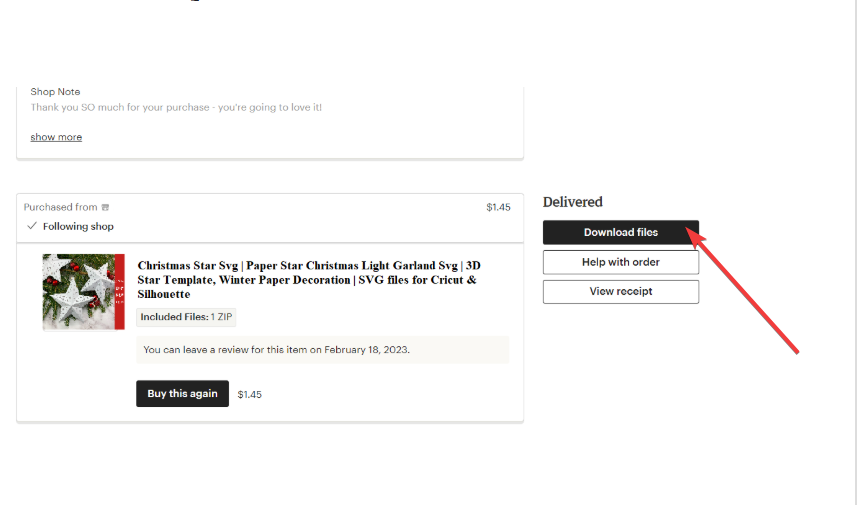
Save the SVG or ZIP file in the default Downloads folder. From here, go to your computer's Downloads folder (File Explorer > Downloads on Windows, Finder > Downloads on Mac). If the file is zipped, right-click it and select Extract All > Extract on Windows or just double-click it on Mac.

Finally, check the unzipped folder for your SVG files
2) Using your downloaded SVG in Cricut Design Space
Cricut only accepts SVGs, not ZIPs or folders. Open Design Space, select Upload, choose Browse, and pick the SVG inside the extracted folder.

Tip: If the design appears blank or tiny, ungroup layers and adjust object scale. Check the bundle for multiple SVG files because sellers sometimes include variations.
3) Using your downloaded SVG in Silhouette Studio
Drag the SVG into Silhouette Studio or use File → Open. Studio reads SVG files only when you use the Designer Edition or higher.
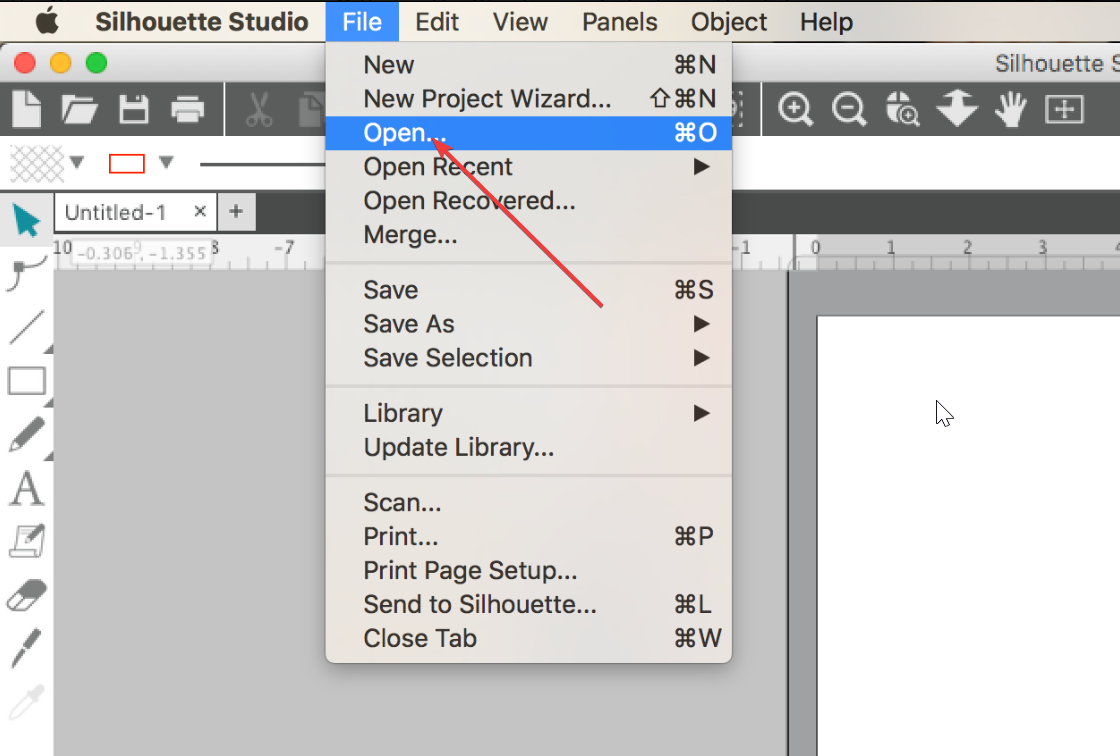
If you use the Basic Edition, open the DXF version included in the bundle. DXF files look more complex, but allow you to cut without upgrading.
4) Understanding Etsy's external download links
Sellers prefer to use external links because Etsy limits file sizes. So large SVG bundles exceed the platform’s limit. Sellers use cloud storage links to deliver oversized packs.
To make sure your download is safe, open only full URLs from trusted domains. Avoid shortened links and download buttons that look unrelated to your purchase.
6) Fix common download problems
- Etsy shows no download button: Etsy hides the download button for custom items, made-to-order listings, and unpaid orders. Contact the seller through Etsy Messages if you need the file delivered again.
- File downloads but won’t open: Most download problems occur because the file remains zipped. Extract the ZIP and open the SVG inside the folder.
- Browser blocks downloads: Pop-up blockers and antivirus tools sometimes stop Etsy downloads. Try Chrome or Edge, disable strict blocking, or re-download the file.
- Wrong file type downloaded: Bundles often include PNG, SVG, DXF, PDF, and EPS. Look inside the extracted folder to find the correct SVG file.
Licensing and usage tips for Etsy SVGs
- Personal vs commercial licenses: Most Etsy SVGs include personal-use rights. Commercial use often requires a paid upgrade from the seller.
- Keep license files: Save PDF or TXT license files included in the ZIP. You may need them if you sell finished products.
- Create a project folder: Create folders named after themes, holidays, or each project. Organized folders help you reuse designs easily.
- Backup recommendations: Store copies on cloud drives or external storage. SVG files use little space, so backups protect your purchases long-term.
FAQs
Can I download Etsy SVGs on a phone? No. The Etsy app blocks file downloads. Use a desktop browser instead.
Can I re-download my SVG later? Yes. Your files remain in Purchases & reviews as long as the listing stays active.
Why do I only see a PNG or PDF? Some bundles organize SVG files in subfolders. Extract the ZIP fully and look for the SVG.
Why is my ZIP empty or corrupted? The download may have failed. Re-download or switch to a different browser.
Summary
- Sign in to Etsy on a computer browser.
- Open Purchases & reviews.
- Download the SVG or ZIP file.
- Extract ZIP files before importing.
- Upload the SVG into Cricut or Silhouette.
- Fix common issues like blocked downloads or missing files.
Conclusion
You can download SVG files from Etsy easily when you work from a desktop browser and know where to find your purchases. Windows and Mac handle ZIP files differently, but both let you extract bundles and access the SVGs inside.
Once you import your files into Cricut or Silhouette, you can finish your project without problems.


Discussion (0)
Be the first to comment.