




Downloading music from YouTube on Windows 10 requires the right tools and safe methods. You can use online converters, desktop apps, or VLC to extract audio quickly. This guide walks you through the safest and most reliable options.
But before you start, you need to understand the legal rules, file types, and risks of downloading YouTube audio. Personal offline use is allowed, but distribution is not. Unsafe converters or extensions can expose your PC to malware, so stick to trusted tools. So, be careful and ensure to respect copyright rules.
Use an online YouTube-to-MP3 converter
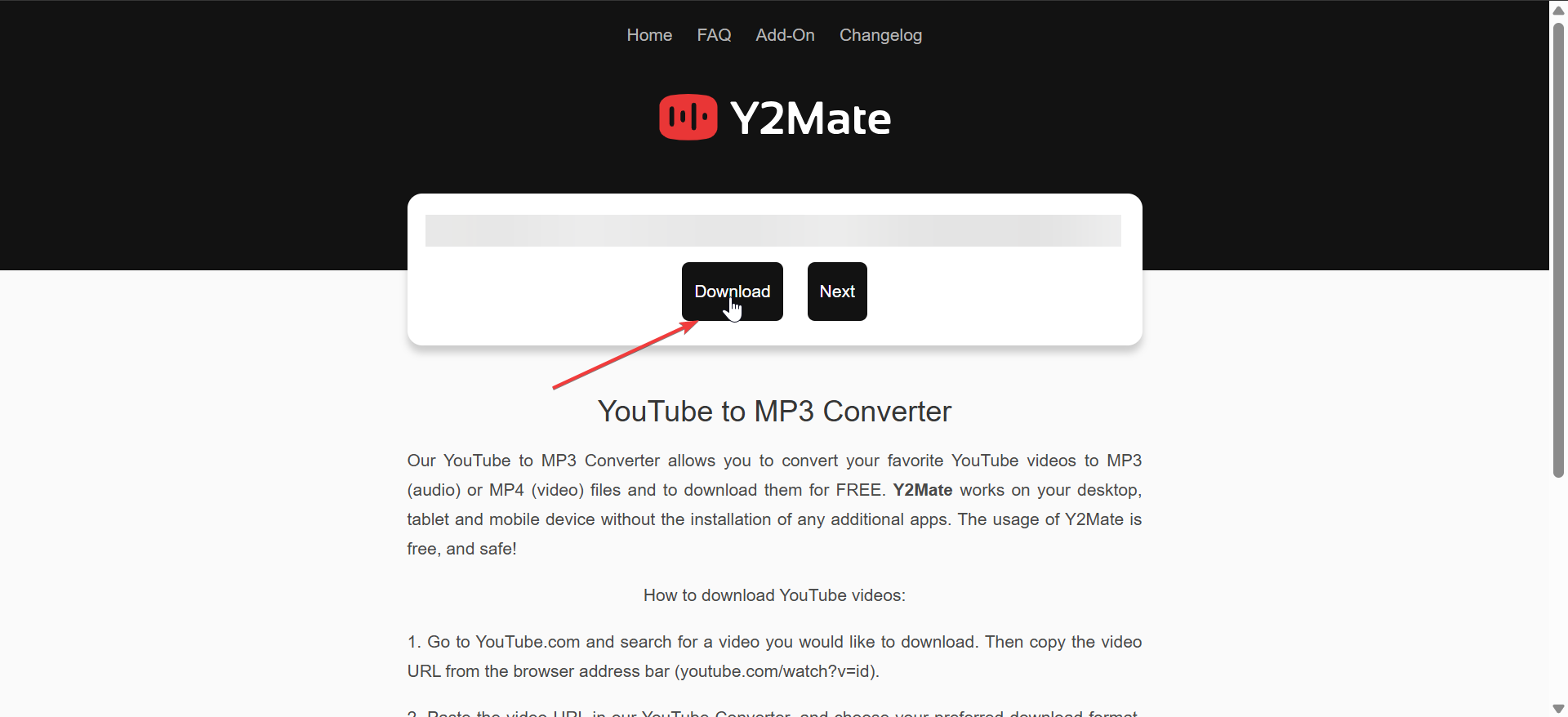
Online converters offer the fastest way to extract audio without installing anything. They work well for occasionally downloading music from any site, though reliability varies between different sites. Follow the steps below to use this method:
- Open YouTube and copy the link of the video you want.
- Visit a reputable YouTube-to-MP3 website.
- Paste the link into the converter field.


- Select the audio quality, usually 128 kbps or 320 kbps.
- Click Convert and then download the MP3 to your Downloads folder.
- Open File Explorer to confirm the file saved correctly.
Use a desktop downloader for high-quality MP3s
Tools like 4K Video Downloader or a YouTube-dl GUI provide safer, more stable downloads than many online tools. Windows 10 may show a SmartScreen prompt during installation, so always confirm the app comes from a trusted source.
Below is a general demo for using desktop downloader apps:
- Download and install your chosen downloader.

- Launch the app and paste the YouTube link.
- Choose MP3 or another audio-only format.
- Select a save location such as Music or Downloads.
- Click Download and wait for the conversion to finish.
Extract audio with VLC media player
VLC includes a built-in converter that extracts audio from third-party websites. It offers better security and full control over output formats.
Below is how to use VLC to extract audio from your YouTube video:
- Open VLC media player.
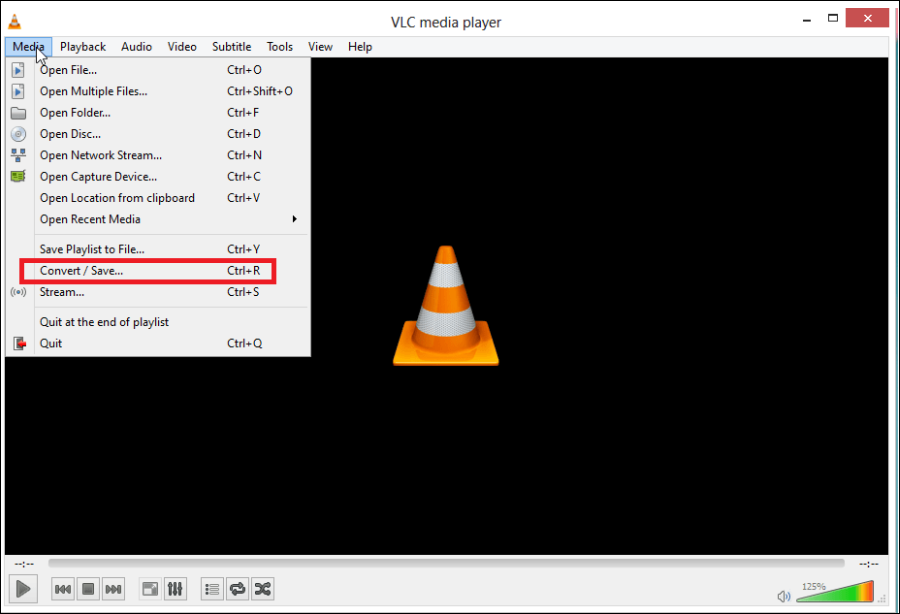
- Click Media and choose Convert/Save.

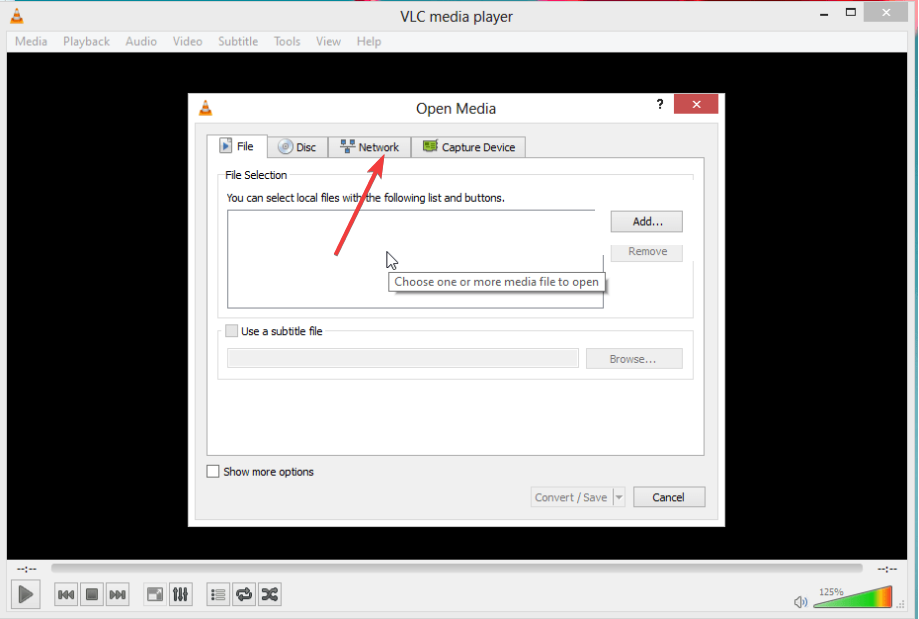
- Paste the YouTube URL into the Network tab.

- Select Convert and choose an MP3 profile.
- Pick a destination file name and click Start.
Download your own YouTube uploads
Creators can download their videos directly from YouTube Studio. This gives you the highest quality files and avoids any need for converters.

You just need to open YouTube Studio in a browser and go to Content. Next, select the video you want to download and click the options menu. Lastly, choose Download.
Where Windows 10 saves downloaded music
Windows stores most files in the Downloads folder by default. You can move MP3 files into your Music library or another folder for easier access.
How to change your browser’s default folder
Chrome, Edge, and Firefox allow you to choose a new download path so you can keep music separate from other files.
- Open your browser settings.
- Go to the Downloads section.
- Select Change and choose your preferred folder.
Safe alternatives to downloading
YouTube Music Premium allows legal offline listening without conversions. You can also buy DRM-free MP3 files from digital music stores. These options avoid converter risks and keep your library organized.
Troublehoot common problems when downloading YouTube music
- Problems with online converters: If a converter stalls, switch to another server or a different website. Disable aggressive ad blockers temporarily when pages fail to load. Try a private browsing window to avoid cached errors.
- Software download errors on Windows 10: If Windows blocks a downloader EXE, use SmartScreen’s More info option to run it when you trust the tool. Check Windows Security for quarantined items if the installer disappears. Reinstall the app if it fails to detect the YouTube URL or stops responding.
- MP3 files not playing: Corrupted or incomplete files usually require a fresh download. If playback still fails, try VLC or install a modern codec pack. Adjust metadata if the file shows up with the wrong title or artist in your music library.
Tips for safer downloading
- Scan every downloaded file with Windows Security.
- Avoid converter sites with too many pop-ups or fake buttons.
- Check file extensions and avoid unknown formats.
- Choose higher bitrates for better audio quality.
- Keep downloads organized in your Music library.
FAQs
How can I get the best audio quality? Pick 320 kbps MP3 or use a desktop downloader that supports high bitrates for your audio files.
Are online converters safe? Some online converters are safe, but many contain misleading ads. Stick to well-known tools and avoid anything that triggers extra downloads.
Why will my MP3 not play on Windows 10? The file may be corrupted or missing metadata. Try opening it in VLC or download the track again.
Can I download age-restricted videos? Most converters fail on age-restricted content. Desktop apps sometimes work, but your account may require sign-in and additional verification.
Summary
- Online converters offer the quickest method to download single tracks.
- Desktop apps deliver stable, high-quality MP3 downloads for larger libraries.
- VLC provides a safe, built-in conversion tool that avoids third-party sites.
- Windows 10 saves files in the Downloads folder unless you change the path.
- Use legal and secure practices whenever you download music from YouTube.
Downloading safely helps you avoid malware and keep your PC clean. Organize your music in Windows 10 and consider legal streaming or purchase options when you want long-term access to your favorite tracks.


Discussion (0)
Be the first to comment.