




Changing your mobile number in Telegram does not mean losing chats, groups, or media. Telegram links your account to a phone number, but it stores your data separately, which makes switching numbers safe when you follow the correct steps.
You only need access to your Telegram account and the new phone number you want to use. The process takes a few minutes and works the same way on Android, iPhone, and desktop.
Table of contents
- Change your mobile number in Telegram (Android, iPhone, desktop)
- What happens after you change your Telegram number
- Control who can see your new number
- Change number without access to the old SIM
- Fix common Telegram number change problems
- Change number vs creating a new Telegram account
- Tips before changing your Telegram number
- FAQs
- Summary
Change your mobile number in Telegram (Android, iPhone, desktop)
Telegram includes a built-in option that lets you replace your old number while keeping your account intact. The setting lives inside your profile and works across all platforms.
On Android
Open Telegram and tap the three-line menu, then go to Settings. Tap your phone number, choose Change number, enter the new number, and confirm it with the SMS code. Telegram keeps all chats and groups unchanged.

On iPhone
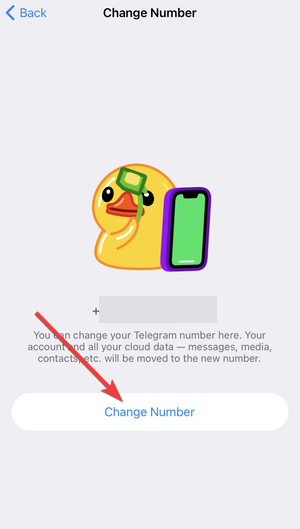
Open Telegram and go to Settings from the bottom bar. Next, tap the Edit option in the top right corner.

Now, tap your phone number, select Change number, then enter and verify the new number. The iOS version uses slightly different labels, but the flow remains the same.
On Telegram desktop
Telegram Desktop cannot change numbers by itself. Open the mobile app linked to your account, change the number there, and the desktop app updates automatically after sync.
What happens after you change your Telegram number
Telegram migrates your account to the new number instantly. Your data remains exactly where it was.
Will you lose chats, groups, or media
Telegram keeps all private chats, group conversations, channels, and saved media. Nothing resets or disappears during the number change.
Will contacts see your new number
Telegram may notify contacts who already have your number saved. You control this behavior through privacy settings, which you can adjust before or after switching.
What happens to your old number
Telegram fully disconnects the old number from your account. Anyone trying to register that number will not gain access to your chats or data.
Control who can see your new number
Telegram gives you full control over phone number visibility. You should review these settings before changing numbers.
Hide your number from contacts
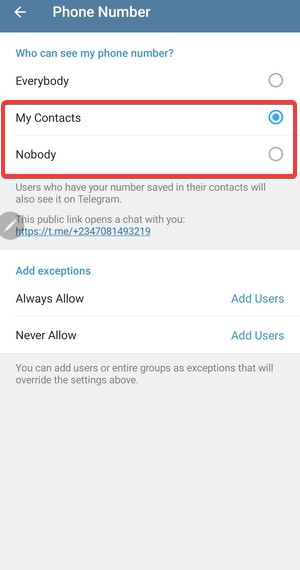
Go to Settings → Privacy and Security → Phone Number. Choose Nobody or My Contacts to limit who can see your new number.
Prevent contact sync notifications
Disable contact syncing if you want fewer people notified. You can also restrict who can find you by your phone number.
Change number without access to the old SIM
Many users switch numbers after losing access to the old SIM card. Telegram handles this case with limitations.
When you no longer receive the old verification code
If you still have access to your Telegram account on a logged-in device, Telegram usually allows the number change without confirming the old SIM. The app only verifies the new number.
When account recovery is required
If you lost both the old number and all logged-in devices, Telegram may block changes temporarily. In this case, waiting for the account timeout or starting a new account may be the only option.
Fix common Telegram number change problems
Verification issues remain the most common obstacle. These fixes usually resolve them.
SMS code not arriving
Wait a few minutes before retrying. Check spam filters, signal strength, and carrier blocks that may delay automated messages.
Verification call not working
Telegram may offer a call if SMS fails. Some regions block automated calls, so waiting and retrying later often helps.
Too many attempts error
Telegram enforces cooldown periods after repeated attempts. Stop retrying and wait several hours before trying again.
Change number vs creating a new Telegram account
Not every situation calls for changing numbers. Some users benefit more from a fresh account.
When changing your number makes sense
Switch numbers if you changed carriers, moved countries, or want to keep chats and groups intact.
When a new account is the better option
Create a new account if you lost all access, want a clean privacy reset, or no longer need old conversations.
Tips before changing your Telegram number
- Update Telegram to the latest version
- Review phone number privacy settings
- Keep your old SIM active during the switch
- Back up important chats if needed
FAQs
Will Telegram delete my chats when I change my number?
No. Telegram keeps your chats, groups, channels, and media linked to your account. The phone number change only updates the number used for login and identification.
Do I need my old SIM to change my Telegram number?
Usually, no. If you still have Telegram logged in on a device, Telegram typically lets you switch numbers by verifying the new number. If you lost access to your account entirely, you may need to recover access first.
Will my contacts get notified when I switch numbers?
Telegram may notify some contacts, especially those who already have your number saved. Your privacy settings affect how visible the change becomes.
Can I change my number on Telegram Desktop only?
No. You need the Telegram mobile app to change your number. After you switch on mobile, Telegram Desktop syncs automatically.
Summary
- Telegram lets you change your mobile number without losing data.
- Chats, groups, and media remain fully intact.
- Privacy settings control who sees your new number.
- Most verification issues resolve with patience and retries.
If you signed up for Telegram without using your real phone number, changing to your number in Telegram stays safe and straightforward if you follow the steps in this guide. Review privacy settings, follow the correct steps, and your account will continue working normally with the new number.


Discussion (0)
Be the first to comment.