




If Telegram shows the message “This group can’t be displayed”, the app blocks access for a specific reason. The fix depends on whether the group contains restricted content, uses a private invite, or faces moderation or account limits. Some cases are fixable in seconds, while others have no workaround.
This guide covers everything you need to fix the error for good and join your desired group.
Table of contents
Quick decision guide before trying fixes
Use this section to avoid wasting time on the wrong solution.
You see the error after tapping a public link
This usually points to sensitive content filtering, regional restrictions, or account limitations.
You see the error after joining via invite
This often means the invite expired, the group became private, or an admin removed you.
You could open the group before
In most cases, the group changed settings, received a restriction, or Telegram updated its moderation rules.
Common causes and what each one means
Sensitive or restricted content
Telegram hides groups flagged for adult or sensitive content unless you explicitly allow it. This affects Android and desktop users, but not iOS.
Group removed or banned by Telegram
Telegram sometimes deletes or blocks groups that violate its terms. No user-side fix exists in this situation.
Private group or expired invite link
Private groups only open through valid invite links. Once a link expires or reaches its limit, Telegram blocks access.
Account-level or regional restrictions
Telegram may restrict certain content based on your phone number region or account trust level.
Fixes that work on Android
Enable sensitive content visibility
- Open Telegram.
- Tap Settings.
- Go to Chat Settings.
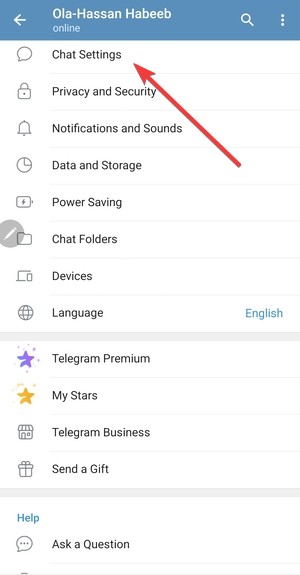

- Enable Show 18+ Content.
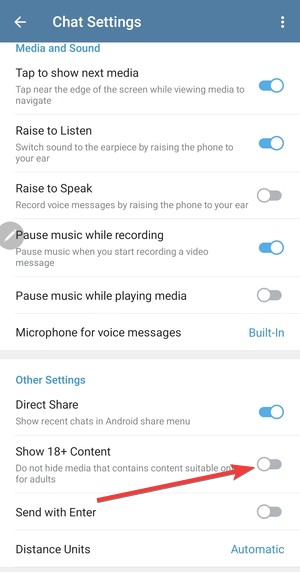

- Restart Telegram and reopen the group link.
This fix resolves most public-group display errors on Android.
Open the group using Telegram Web as a workaround
If the Android app still blocks the group, open the link in a browser and choose Telegram Web. This often bypasses app-level filters.
Fixes that work on iPhone and iPad
Why iOS blocks certain Telegram groups
Apple enforces strict App Store rules. Telegram cannot show sensitive groups on iOS, even if your account allows them.
Use Telegram Web or Desktop instead
Install Telegram Desktop on a computer or open Telegram Web in a browser. Log in with the same account and open the group link there.
Fixes for Windows, macOS, and Linux
Update and reopen the group in Telegram Desktop
- Open Telegram Desktop.
- Check for updates and install the latest version.
- Paste the group link directly into the search bar.
Older clients sometimes fail to load restricted groups correctly.
Access the group directly via public username links
If the group has a public @username, type it directly into Telegram instead of using preview links.
Fixes for Telegram Web
When Telegram Web works and apps don’t
Telegram Web often ignores mobile content filters. If your account allows access, the group usually opens there without extra steps.
However, you can still click the three vertical lines at the top left corner and go to Settings > Privacy and security. Now, scroll down and uncheck the for Disable filtering under the Sensitive Content section.

What does not work (and why)
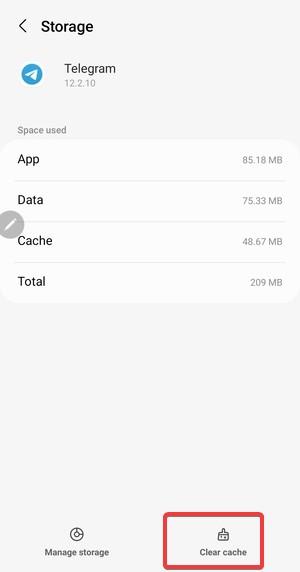
Clearing cache or reinstalling Telegram
These actions only reset local files. Telegram enforces group visibility on its servers, not on your device.
Using random VPNs
VPNs rarely help unless Telegram restricts the group by country. Even then, results vary.
When the issue cannot be fixed
Permanently banned or deleted groups
Once Telegram removes a group, it stays inaccessible forever.
Account-level enforcement by Telegram
If Telegram restricts your account, only time or official review can restore access.
Tips
- Try opening the same group on Telegram Desktop or Telegram Web when mobile apps block access.
- Check whether the group uses a public @username
- Avoid third-party Telegram mods, as they often trigger account-level restrictions.
- If you manage groups, verify invite link limits and expiration settings regularly.
FAQs
Why does the group open for others but not for me?
Telegram applies account-based and regional restrictions. If your account has limits or uses iOS, the group may stay hidden while others can still access it.
Can a group admin unblock me from seeing the group?
Admins can only re-invite you if the group still exists and you are not permanently banned by Telegram itself.
Does changing my phone number fix the issue?
A new phone number or signing up for Telegram without your phone number may help in rare account-restriction cases, but it does not restore access to banned or deleted groups.
Will the group become visible again after a Telegram update?
Groups hidden due to sensitive content may reappear after settings changes, but deleted or banned groups never return.
Summary
- Identify whether the group uses sensitive content, private access, or moderation limits.
- Enable sensitive content on Android or use Telegram Desktop or Web.
- Avoid reinstalling or clearing cache, since those steps do not help.
- Accept that banned or deleted groups cannot be recovered.
The “This group can’t be displayed” message usually appears because Telegram blocks access by design. Android and desktop users can often fix the issue by enabling sensitive content or switching platforms. If the group no longer exists or Telegram restricted it permanently, no workaround can restore access, and moving on remains the only option.


Discussion (0)
Be the first to comment.