




You can access iCloud on Android using a web browser. The experience works well for email, files, and basic photo access, but it comes with clear limits compared to iPhone or iPad.
Android does not support a native iCloud app. Apple provides browser access instead, which works reliably when you know where features stop.
Table of contents
- The fastest way to access iCloud on Android
- Access iCloud using a web browser on Android
- What iCloud features work on Android and which do not
- Use iCloud email on Android without the browser
- Security tips when using iCloud on Android
- Common problems and quick fixes
- Best alternatives if you need full sync on Android
- Tips for using iCloud efficiently on Android
- FAQs
- Summary
The fastest way to access iCloud on Android
The quickest way to access your iCloud email and other features on Android is to use the iCloud website in a mobile browser. This method requires no apps, works on any Android phone, and keeps your data official and secure through Apple.
Access iCloud using a web browser on Android
This is the primary and most reliable method.
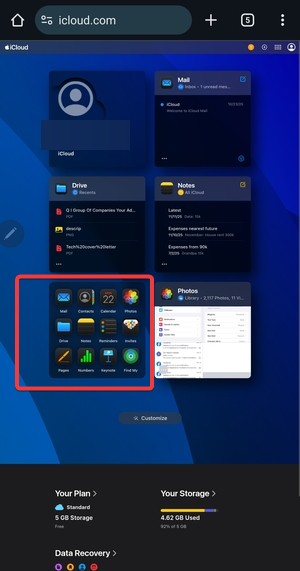
Sign in to iCloud.com on Android
- Open Chrome or another modern browser.
- Go to icloud.com.


- Sign in using your Apple ID and complete two-factor verification.
You land on the iCloud web dashboard with access to supported services.
Switch to desktop view if features do not load
Some sections load better in desktop mode.
- Tap the browser menu.
- Enable the Desktop site.


- Reload the page.
Desktop mode improves access to Photos and Drive.
Add iCloud to your Android home screen
- Open the browser menu.
- Tap Add to Home screen.


- Confirm the shortcut.
This creates app-like access without installing anything.
What iCloud features work on Android and which do not
Understanding limits saves time and frustration.
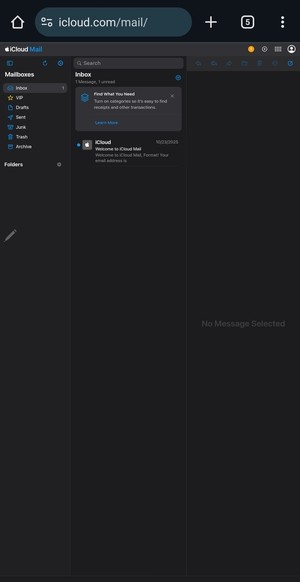
iCloud Mail
iCloud Mail works well in the browser. You can read, send, and manage messages, but push notifications are limited.
iCloud Photos
You can view and download photos. Uploading and advanced album management remain limited.
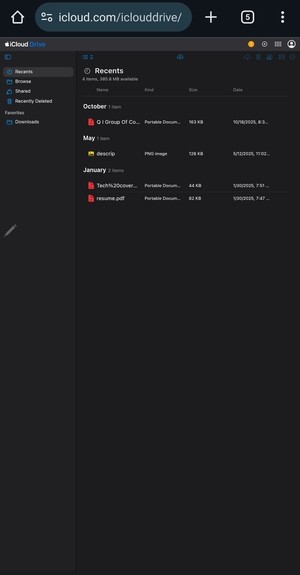
iCloud Drive
You can browse files and download documents. Editing and syncing stay browser-based only.
Notes, Contacts, and Reminders
You can view and edit basic data. Sync feels slower compared to Apple devices.
Find My and device management
Find My offers very limited functionality. Android cannot manage Apple devices fully.
Use iCloud email on Android without the browser
This option suits users who only need email.
Set up iCloud Mail in Gmail or other apps
- Create an app-specific password in your Apple ID settings.
- Add a new IMAP account in your email app.
- Enter the iCloud Mail server details.
Mail syncs normally after setup, but contacts and calendars stay separate.
Security tips when using iCloud on Android
Good habits protect your account.
Use app-specific passwords
Apple requires these for third-party apps. They prevent full account exposure.
Sign out on shared devices
Always log out when using a public or borrowed phone.
Common problems and quick fixes
Most issues come from browser behavior.
iCloud pages not loading correctly
- Switch to desktop mode.
- Try a different browser.
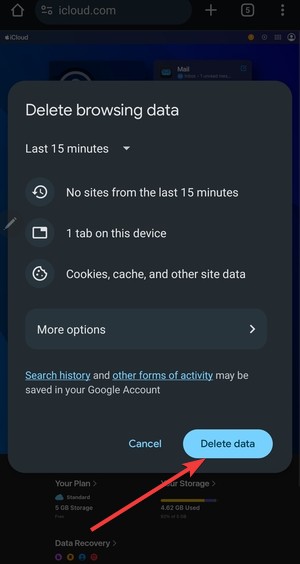
- Clear browser cache and reload.

Two-factor authentication issues
- Check your trusted Apple device.
- Wait for the verification prompt.
- Use SMS verification if available.
Best alternatives if you need full sync on Android
Some users need deeper integration.
Move data from iCloud to Google services
You can export contacts, photos, and files into Google services for better Android sync.
Use cross-platform apps instead of iCloud
Services like cloud storage and note apps work better across Android and Apple devices.
Tips for using iCloud efficiently on Android
- Keep desktop mode enabled for Photos and Drive
- Use Chrome for the best compatibility
- Bookmark specific iCloud sections instead of the homepage
FAQs
Can you fully sync iCloud with Android?
No, Android only supports browser-based access with limited syncing.
Do you need an iPhone to access iCloud?
No, but two-factor verification often requires a trusted Apple device.
Is iCloud safe to use on Android?
Yes, when accessed through the official website and secured with two-factor authentication.
Can you upload photos to iCloud from Android?
Uploads remain limited and inconsistent compared to Apple devices.
Summary
- Use iCloud.com in a browser for official access.
- Enable desktop mode for better feature support.
- Add a home screen shortcut for faster access.
- Use IMAP for iCloud Mail in Android apps.
Using iCloud on Android works best for occasional access. If you rely on constant syncing, moving your data to cross-platform services delivers a smoother experience and fewer limits.

Discussion (0)
Be the first to comment.