




YouTube recommendations drift when everyday actions send mixed signals to the algorithm. Shorts, autoplay, shared devices, and curiosity clicks slowly reshape your feed. The steps below fix YouTube recommendations by correcting those signals and retraining the system in a controlled way.
Table of contents
- Why YouTube recommendations get worse over time
- Quick fixes that improve recommendations immediately
- How to reset YouTube recommendations safely
- Fix YouTube recommendations on mobile, desktop, and TV
- Retrain the YouTube algorithm step by step
- How long it takes for YouTube recommendations to recover
- Common mistakes that keep recommendations broken
- When nothing works: last-resort options
- Summary
Why YouTube recommendations get worse over time
YouTube builds recommendations from behavior, not preferences you set manually. Small habits compound and eventually overpower what you actually want to watch.
Watch history sends the strongest signal
Partial views, background playback, and autoplay all count as interest. Even a few seconds of a video can influence future recommendations.
Shorts and long videos train separate systems
Shorts use a faster feedback loop than long-form videos. Scrolling through random Shorts often derails recommendations even if long videos stay relevant.
Multiple users on one account break personalization
TV apps and shared devices mix viewing habits. The algorithm cannot separate interests on a single account.
Quick fixes that improve recommendations immediately
These actions produce visible changes within hours, not weeks.
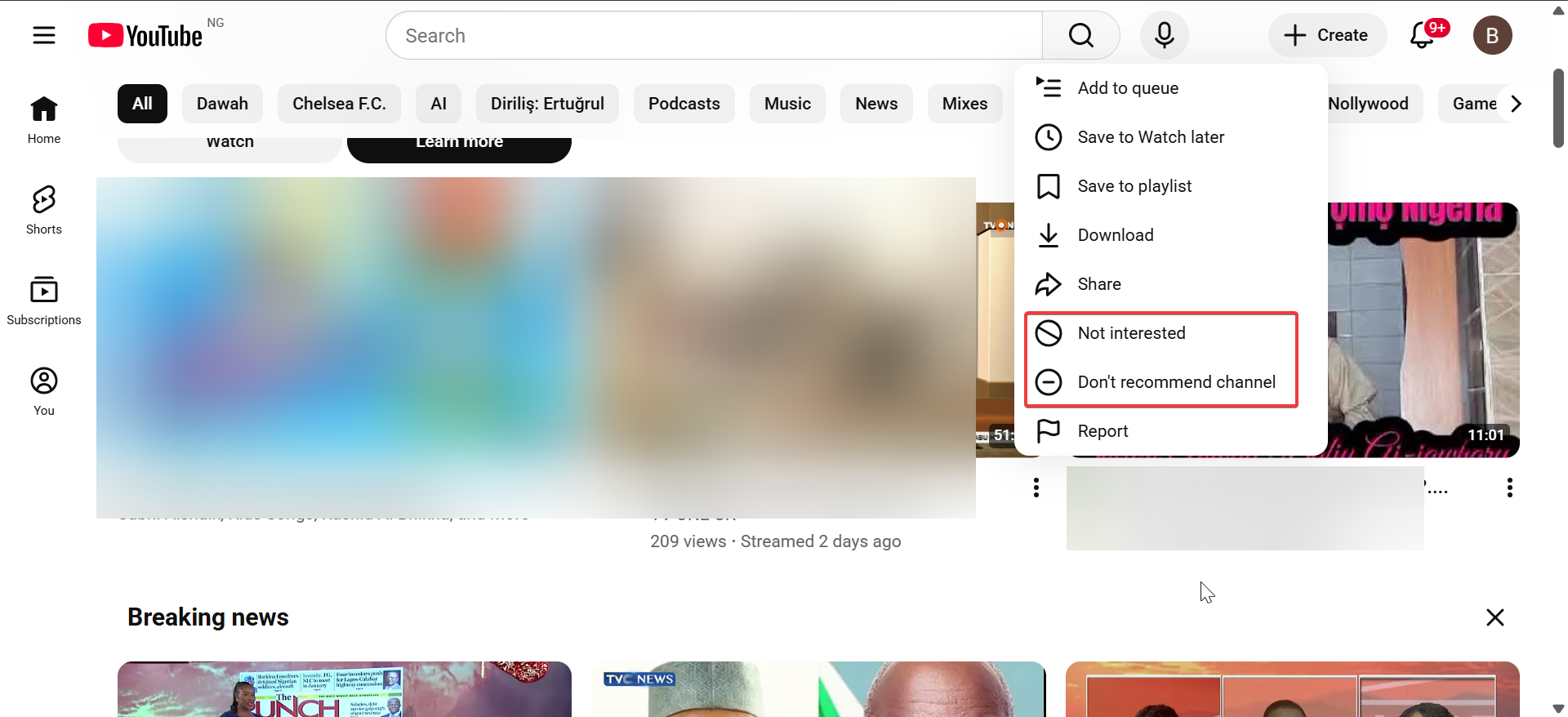
Use “Not interested” and “Don’t recommend channel” correctly
Use “Not interested” for one-off videos. Use “Don’t recommend channel” only when you never want content from that creator.
Clear search history without deleting watch history
Search history affects recommendations more than most users expect. Removing searches keeps watch history intact while stopping unwanted topic suggestions.
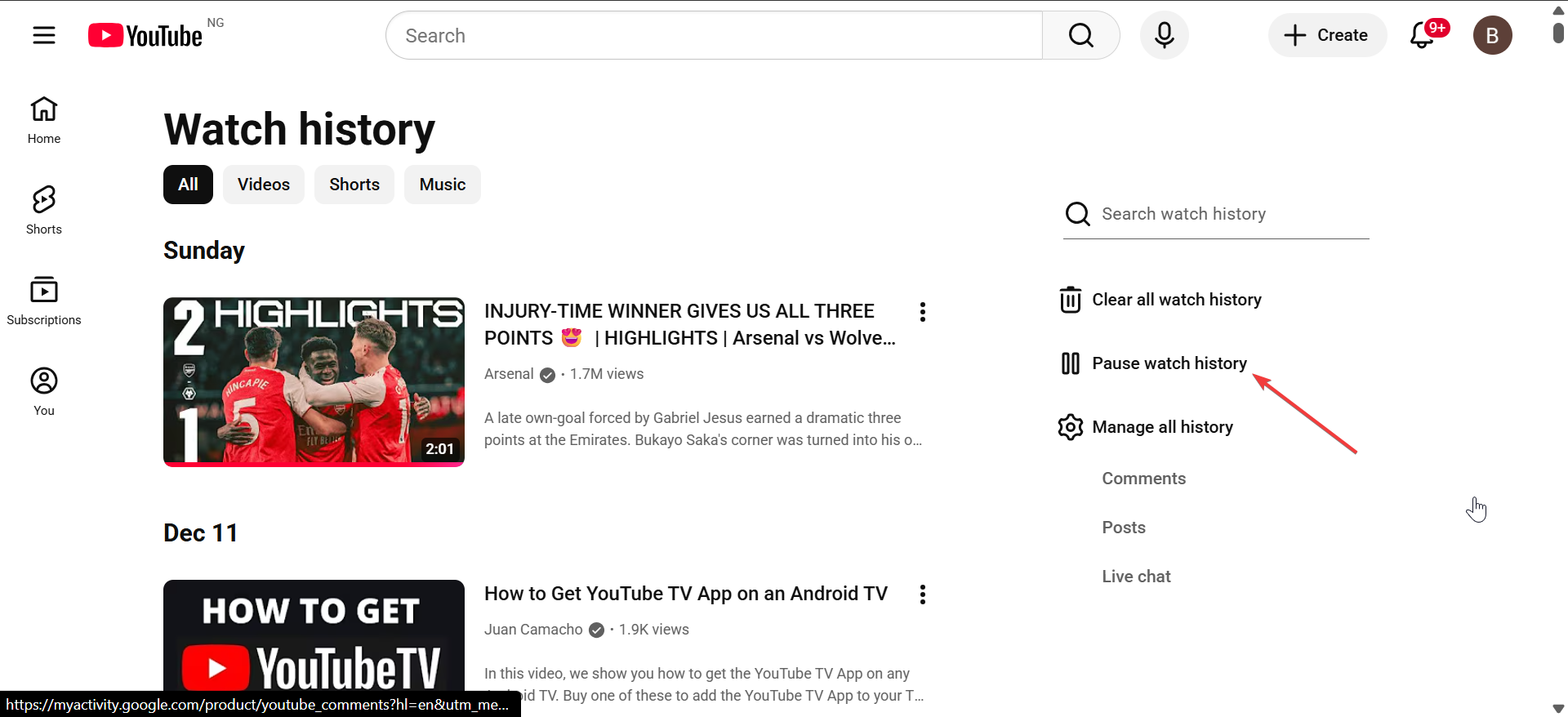
Pause watch history temporarily
Pause history when lending your device or browsing randomly. Resume it once you return to intentional viewing.
You only need to click the You tab and select Pause watch history under the Watch history section.
How to reset YouTube recommendations safely
A full reset often causes more harm than improvement. Targeted cleanup works better.
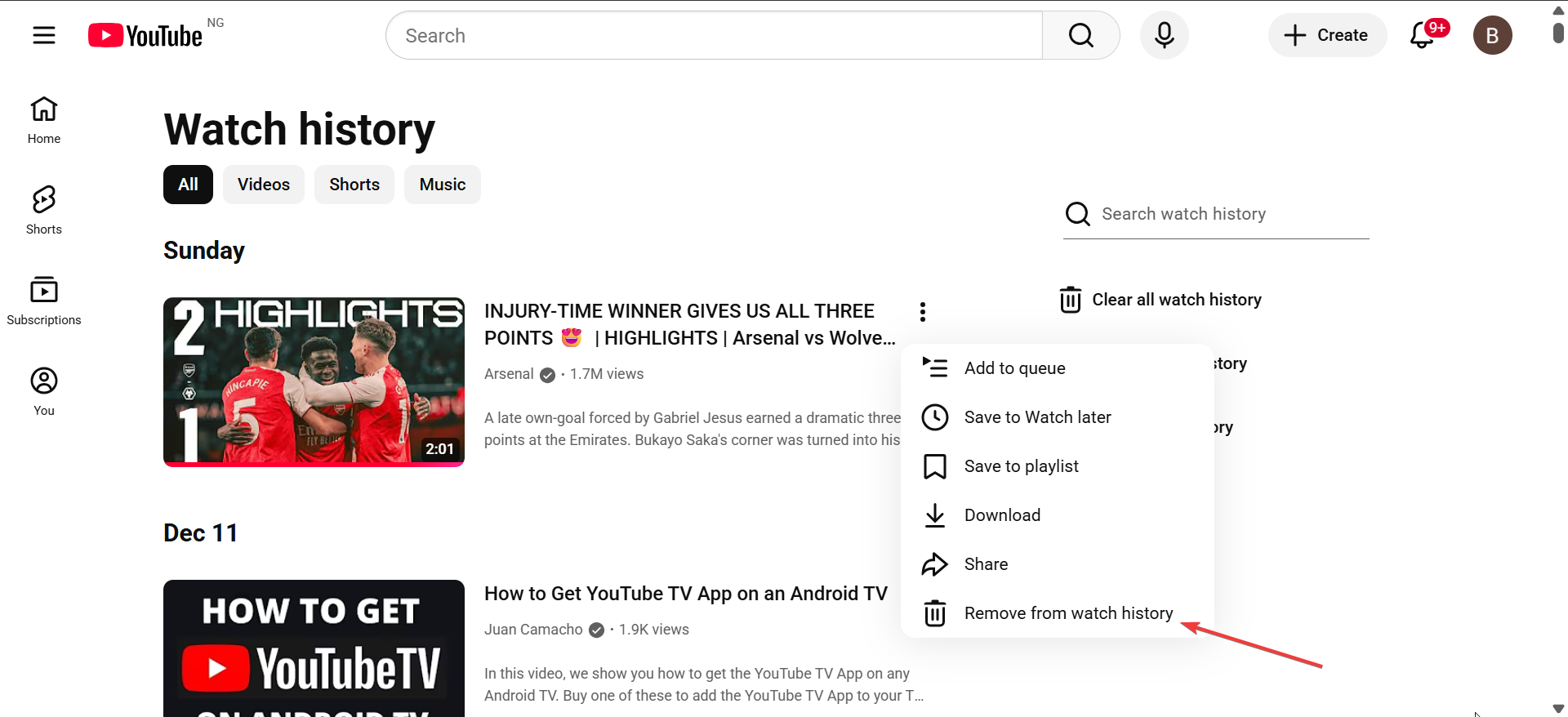
Remove specific videos from watch history
Delete videos you did not finish or never intended to watch. This step corrects false signals without wiping useful data.
Click the three dots under the video in the Watch history section and select Remove from watch history.
Unsubscribe from inactive or outdated channels
Click the Subscription option in the left pane and select All subscriptions on the new page. Now, click the Subscribed dropdown in front of the account you want to remove and select Unsubscribe.
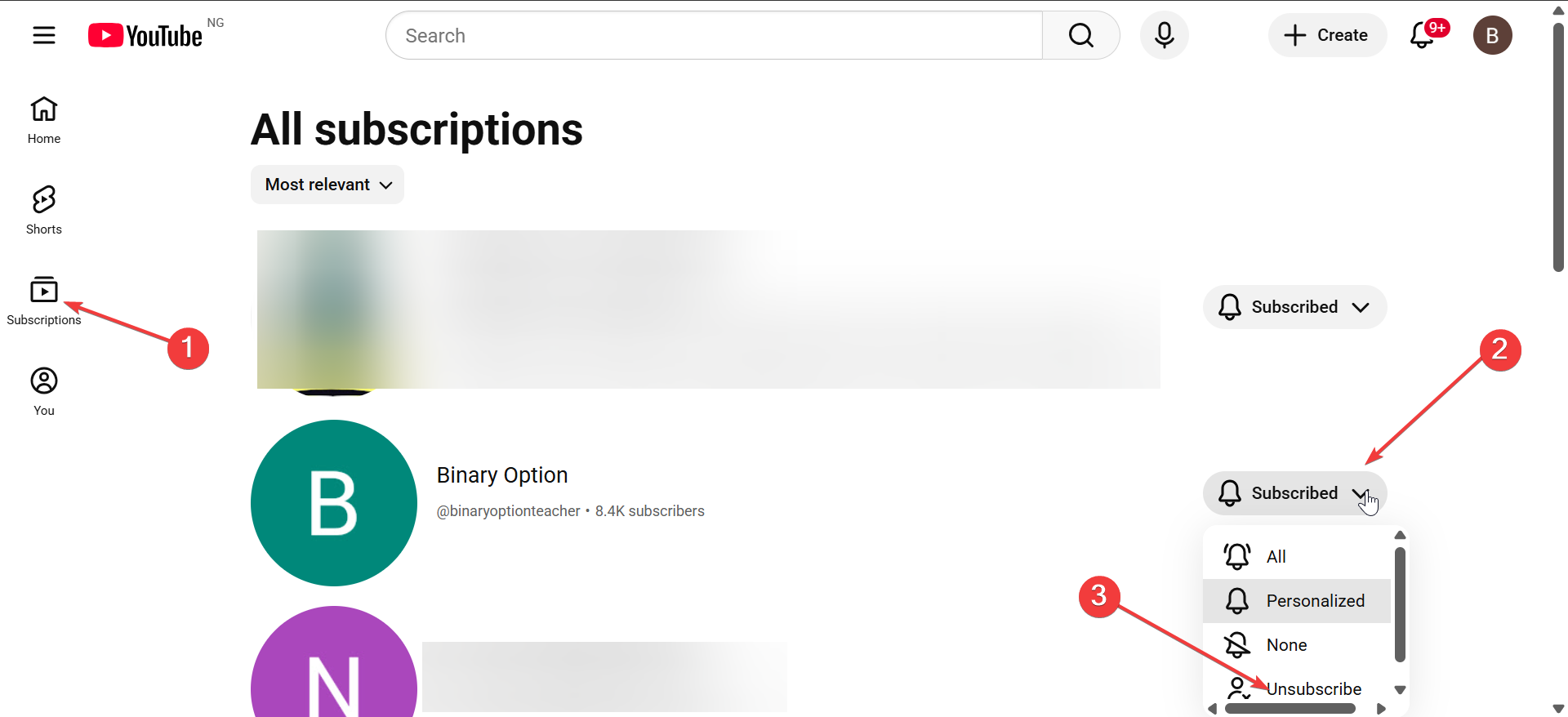
Old subscriptions still influence recommendations. Removing inactive channels reduces noise in your feed.
Avoid full history deletion unless starting over
Deleting all history removes years of personalization. Only do this when you want a completely fresh account.
Fix YouTube recommendations on mobile, desktop, and TV
Each platform affects recommendations differently.
YouTube app on Android and iPhone
Shorts dominate mobile signals. Limit Shorts scrolling and interact more with long-form videos to rebalance recommendations.
YouTube in desktop browsers
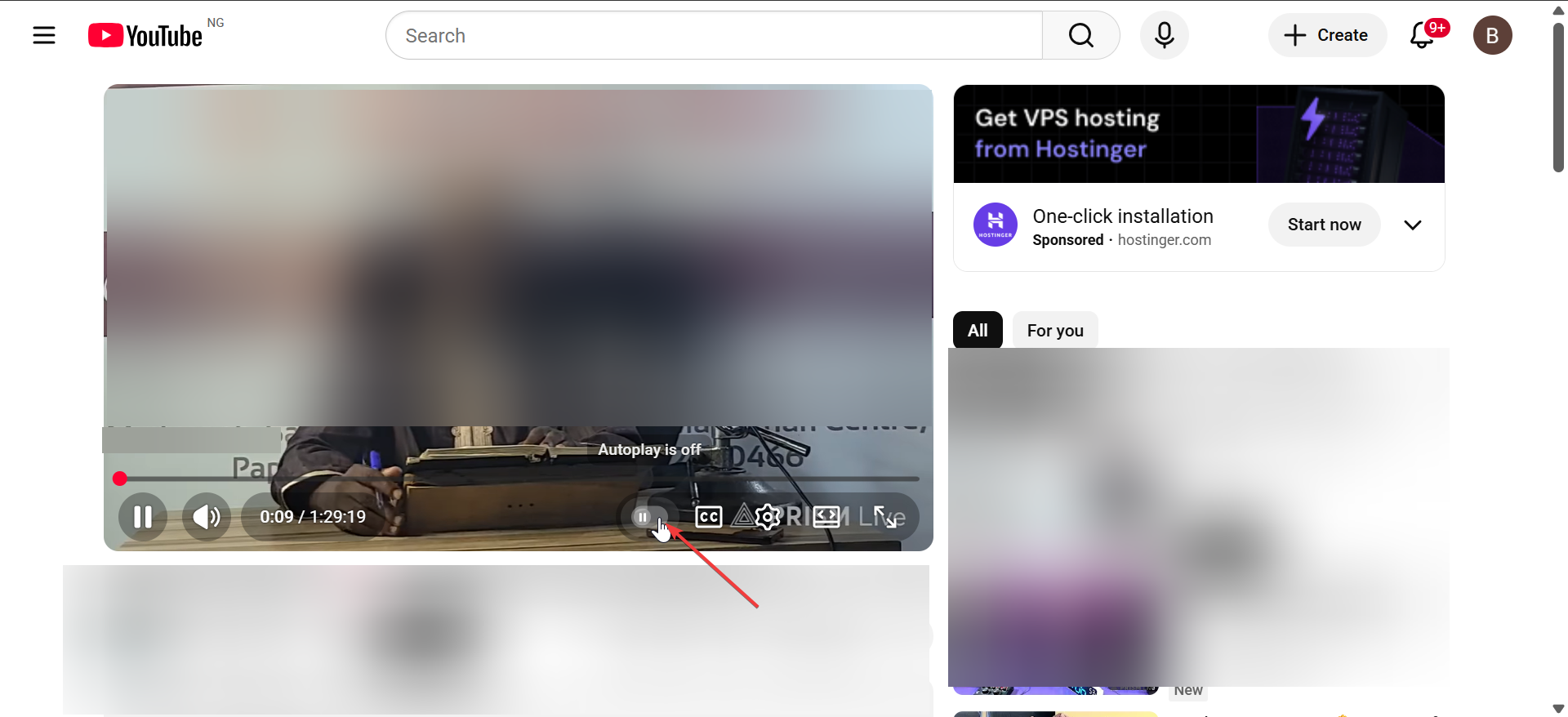
Autoplay and background tabs inflate watch signals. Click a video to play and turn autoplay off. With this, you can avoid letting videos run unattended.
YouTube on Smart TVs and consoles
TV viewing skews recommendations fast due to long sessions. Use a separate profile or pause watch history during shared use.
Retrain the YouTube algorithm step by step
After cleanup, actively teach the algorithm what you want.
Watch videos fully from trusted channels
Completion rate matters more than likes. Finish videos that match your interests to reinforce strong signals.
Like and save videos selectively
Likes and saves amplify signals. Use them sparingly on content you truly want more of. Also, you should only download YouTube videos for offline viewing when there is a need for, as this can also affect your recommendations.
Search intentionally for your target topics
Direct searches accelerate retraining. Repeated searches for the same topics guide recommendations faster than browsing.
How long it takes for YouTube recommendations to recover
Results appear gradually, not instantly.
What changes in hours vs days
Negative signals apply quickly. Positive retraining usually takes two to three days of consistent viewing.
When results stabilize
After one to two weeks, recommendations stabilize if behavior stays consistent.
Common mistakes that keep recommendations broken
Avoid these habits after fixing your feed.
- Mindless scrolling and autoplay: Passive watching reinforces unwanted content. Stop videos you do not want recommended.
- Overusing “Not interested”: Too many negative signals flatten recommendations. Balance removal with positive engagement.
When nothing works: last-resort options
Some setups require structural changes.
Separate account for Shorts or TV viewing
Splitting usage prevents Shorts or family viewing from polluting your main feed.
New account vs clean retraining
A new account works faster but loses history. Clean retraining preserves subscriptions and preferences.
Summary
- Clean watch and search history selectively to remove false signals.
- Control Shorts, autoplay, and shared-device usage.
- Retrain recommendations with intentional searches and full video views.
- Avoid overusing negative feedback tools.
YouTube recommendations improve when actions stay deliberate and consistent. Small adjustments often fix the problem without drastic resets. After cleanup and retraining, maintain intentional viewing habits to keep your feed relevant long-term.

Discussion (0)
Be the first to comment.