




Firefox offers a clearer way to understand site security when you browse the web, so you don’t have to decode padlocks or technical labels to know what’s going on.
The shield icon in the address bar lets users check whether a site is safe and see how Firefox protects them. Mozilla is testing this new way to show site security and privacy details in Firefox Nightly.
Firefox Unified Trust Panel
After you visit a website, clicking the shield icon opens a panel with a fox illustration and a clear message about the site’s security status. Mozilla refers to this view as the "Firefox Unified Trust Panel".
“Firefox is on guard. You’re protected. If we spot something, we’ll let you know.”
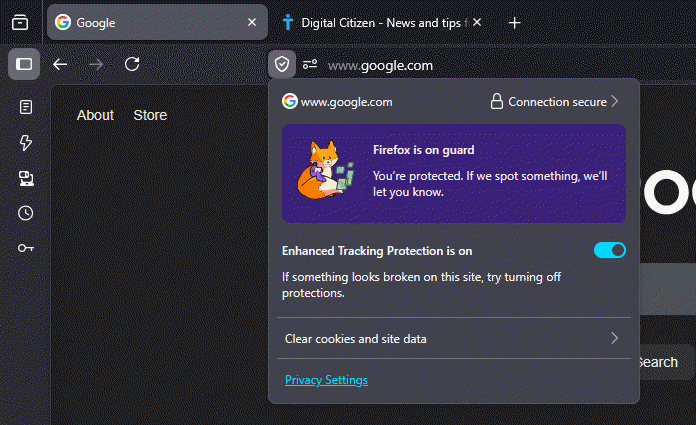
Instead of technical labels or security warnings, Firefox starts by answering a single question: does this site look safe?
Below that message, Firefox shows whether Enhanced Tracking Protection is active and offers quick access to site data and privacy controls.
When Firefox blocks trackers on a site, it explains what happened in everyday language instead of security jargon.
For example, the panel says:
“Firefox thinks companies should follow you less. So we block as many as we can.”
Firefox shows how many trackers it blocked on the current site, with a “See All” option for anyone who wants more detail.
If Firefox doesn’t find trackers, it says so clearly:
“No trackers known to Firefox were detected on this page.”
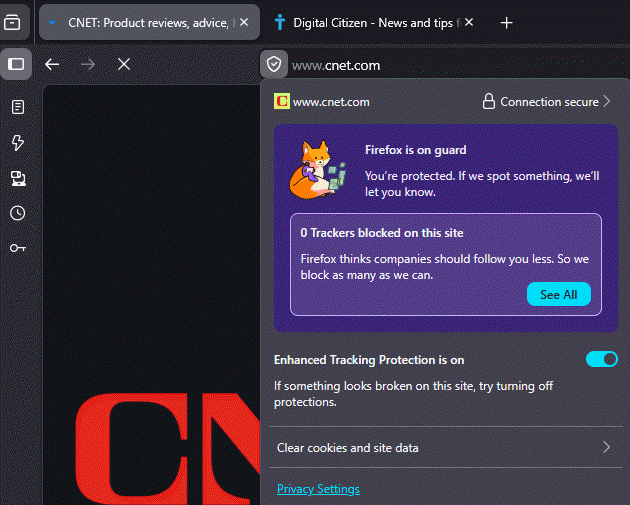
The same panel handles unsafe situations.
If a site uses HTTP or has an insecure connection, Firefox switches from reassurance to a clear warning. It tells you to be careful, highlights anything suspicious, and warns when the connection isn’t secure.
Firefox explains the risk in simple terms, saying that data sent to the site isn’t encrypted and could be viewed, stolen, or altered.
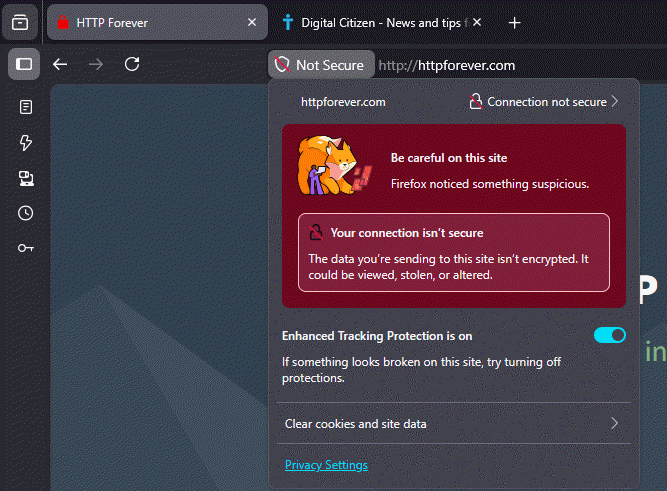
Earlier versions of Firefox scattered site information across several indicators and technical categories. The new Trust Panel brings everything into one shield icon and explains it in plain language.
You don’t need to know what a certificate is or how tracking works. The panel tells you whether the connection looks safe and what Firefox did on the page, with deeper details available only if you go looking.
Mozilla has enabled this panel by default in Firefox Nightly. The design and wording may change before it reaches other Firefox versions.



Discussion (0)
Be the first to comment.