




Windows XP continues to serve specific legacy use cases, including older business software, retro gaming, and hardware that no longer supports modern versions of Windows. While Microsoft officially ended support, many users still rely on Windows XP ISO files for controlled environments.
Since Microsoft no longer provides Windows XP downloads, ISO files must be obtained from third-party archival sources. This guide explains what to know before downloading, how to create a bootable USB,
What To Know Before Downloading Windows XP ISO Files
Windows XP is an end-of-life operating system and no longer receives security updates. Running it on an internet-connected system exposes serious risks.
For safety, Windows XP should only be used offline, for legacy software, or inside a virtual machine.
How To Download Windows XP ISO Files
Microsoft no longer hosts Windows XP ISO files, so users rely on community-maintained archives. When downloading, confirm whether you need the 32-bit or 64-bit version, as most legacy systems require the 32-bit edition.
Always verify file integrity and avoid using XP for modern workloads.
Create A Bootable USB Using Rufus
Rufus is one of the most reliable tools for creating bootable USB drives for Windows XP. It loads quickly, works on modern Windows versions, and supports legacy boot configurations required by XP.
- Insert a USB flash drive into your computer.
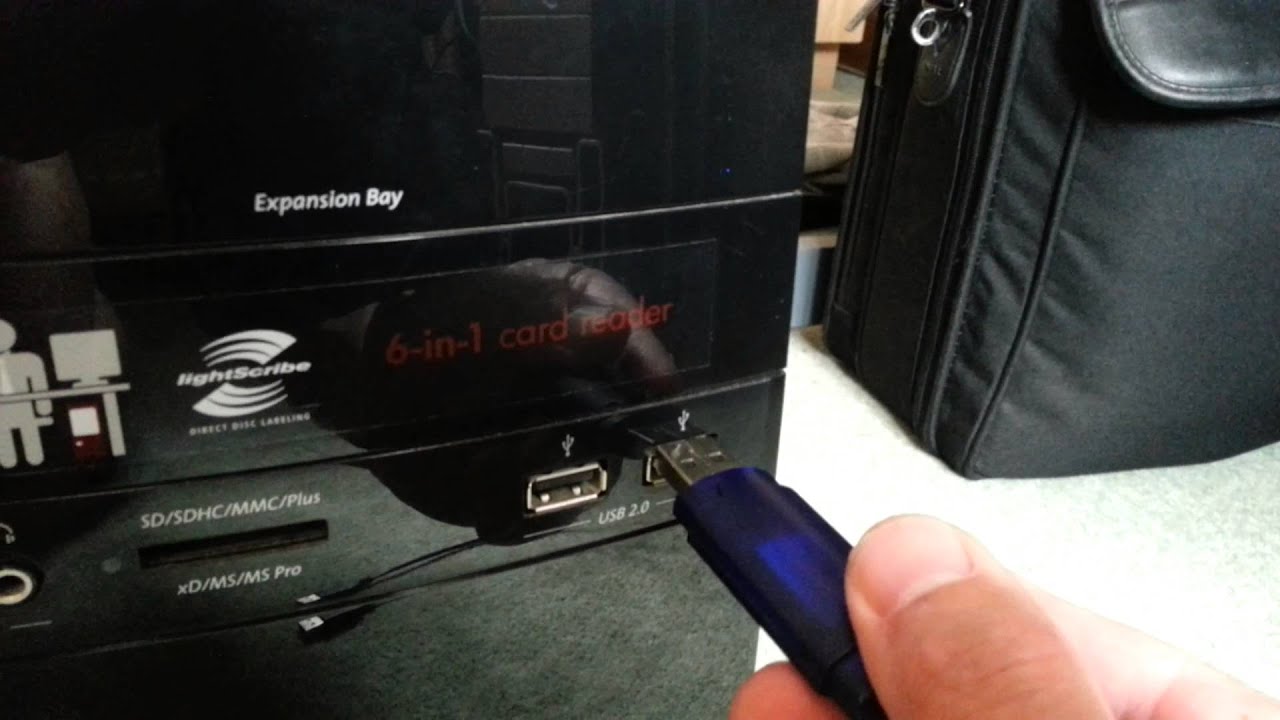
- Open Rufus and select the USB drive under Device.
- Set the file system to NTFS.
- Select MBR as the partition scheme for Windows XP.
- Click the ISO selection button and choose the Windows XP ISO file.
- Click Start and confirm data erasure when prompted.
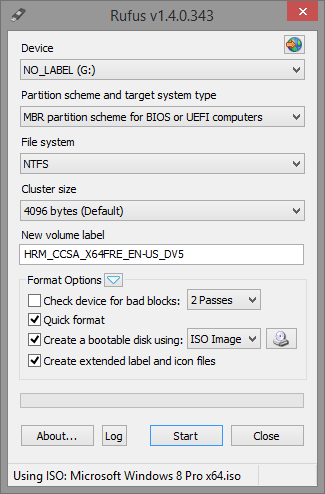
Rufus formats the drive before writing the ISO, so back up any important data beforehand.
Create A Bootable USB Using UNetbootin
UNetbootin is widely known for Linux boot media but can also write Windows ISOs. However, it does not fully support creating bootable Windows XP installers in all cases.
- Insert a USB flash drive.
- Open UNetbootin and select the target drive.
- Click the browse button and select the Windows XP ISO.
- Click OK to begin the process.
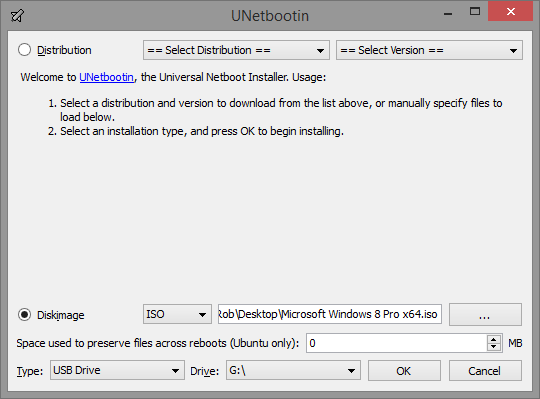
Unlike Rufus, UNetbootin does not automatically erase the drive. While this preserves existing files, formatting the drive afterward is recommended to avoid leftover data.
How To Install Windows XP On Your Device
Before installing Windows XP, ensure your system supports legacy boot mode and older storage controllers.
- Enter BIOS or UEFI settings.
- Enable Legacy Boot or Compatibility Mode.
- Set USB or DVD as the first boot device.
- Restart with the Windows XP bootable media connected.
The Windows XP installer uses a text-based setup interface, so all actions are performed using the keyboard.
Initial Setup After Installation
After installation completes, Windows XP prompts for region, language, computer name, and product key. Driver installation may be required to enable proper display, audio, and network support.
Your system may restart multiple times during this process.
Troubleshooting Common Problems
Installing Windows XP on newer hardware can trigger compatibility issues.
- Blue screen errors often indicate missing storage drivers.
- USB devices may fail without proper drivers.
- Low display resolution usually means graphics drivers are missing.
- Boot failures often relate to disabled legacy mode.
Tips
- Use Windows XP only for offline or isolated tasks.
- Prefer Rufus over UNetbootin for XP installations.
- Install Service Pack 3 if available.
- Consider virtual machines for safer usage.
FAQ
Is downloading Windows XP ISO files legal?
Licensing terms still apply even though Microsoft no longer distributes XP.
Can Windows XP run on modern hardware?
Support is limited due to missing drivers and hardware compatibility.
Why does Windows XP not detect my hard drive?
This usually happens because SATA or AHCI drivers are missing.
Is Windows XP safe to use today?
It is unsafe for internet-connected use and should remain isolated.
Summary
- Windows XP ISO files are no longer provided by Microsoft.
- Rufus is the most reliable tool for bootable USB creation.
- Legacy boot settings are required for installation.
- Windows XP should be used only in controlled environments.
Conclusion
Downloading and installing Windows XP ISO files remains possible for legacy needs, but it requires careful preparation. By using the right tools, enabling proper boot settings, and keeping the system isolated, you can safely run Windows XP where modern operating systems are not an option.


Discussion (0)
Be the first to comment.