



Facebook makes it easy to save videos inside the app, but it does not offer a built-in way to download videos directly to your device. If you want offline access or need to store a video locally, you must use alternative methods. The steps below explain how to download Facebook videos on iPhone, iPad, and desktop using approaches that still work at the time of writing.
Before downloading any video, make sure you have permission to save or reuse the content. Downloading copyrighted videos without consent may violate Facebook’s terms or local laws.
Things To Consider Before Downloading Facebook Videos
Downloading videos from Facebook comes with a few important limitations. Keeping these in mind helps avoid legal, privacy, or compatibility issues.
- Only download videos you own or have permission to use.
- Avoid suspicious apps or websites that request unnecessary permissions.
- Large or high-resolution videos may take longer to download and use more storage.
- Some downloaded formats may not play correctly on all devices.
How To Download Facebook Videos On iPhone Or iPad Using Shortcuts
The iOS Shortcuts app offers one of the safest ways to download Facebook videos without installing full third-party downloader apps. This method works best for public Facebook videos.
- Install a trusted Facebook video downloader shortcut in the Shortcuts app.
- Install any required companion app the shortcut depends on.
- Open the Facebook app and copy the link of the video you want to download.
- Run the shortcut and allow requested permissions when prompted.
- Save the processed video to the Photos app once the download completes.
This method avoids ads and limits exposure to tracking, making it a preferred option for many iPhone and iPad users.
How To Download Facebook Videos On iPhone Using Third-Party Apps
If Shortcuts are not working for you, third-party video downloader apps can also save Facebook videos to your camera roll. These apps often simplify the process but may display ads or request additional permissions.
- Install a Facebook video downloader app from the App Store.
- Log in or paste the Facebook video link inside the app.
- Allow access to Photos when prompted.
- Save the video to your device using the app’s download option.
Use caution with these apps, as some may collect usage data or misuse account information.
How To Download Facebook Videos On Desktop Or Laptop
Downloading Facebook videos on a desktop browser is often easier than on mobile devices. This method works on both Mac and Windows systems.
- Open Facebook in a browser and copy the link to the video.
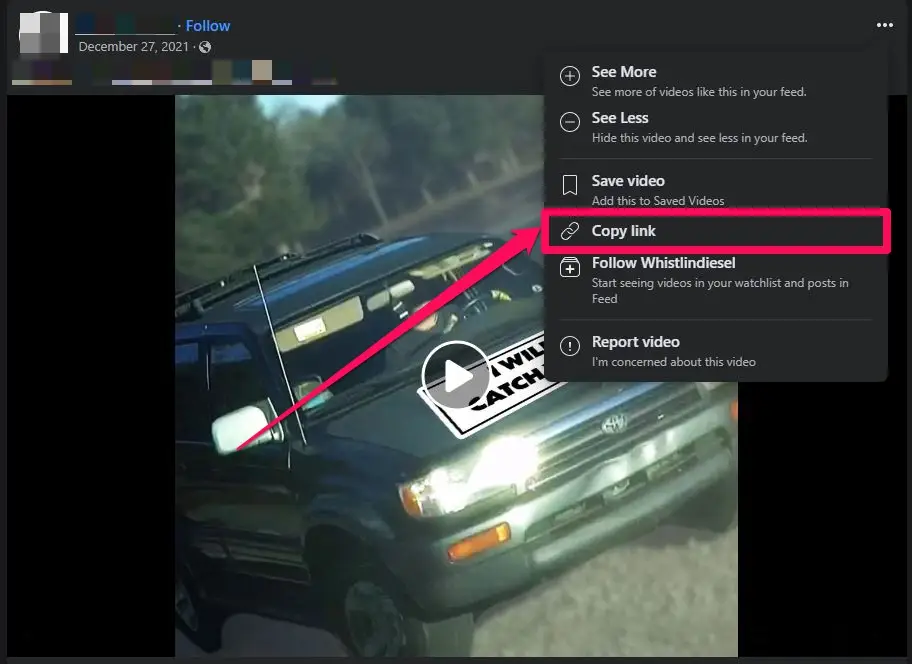
- Paste the link into a new tab.
- Modify the URL to load the mobile version of the page.
- Play the video and use the browser’s save or download option.
The downloaded file will save directly to your computer’s default downloads folder.
How To Save Facebook Videos To Watch Later Without Downloading
If you only want quick access without storing files locally, Facebook’s built-in Save Video feature may be the better option. Saved videos remain accessible inside your Facebook account across devices.
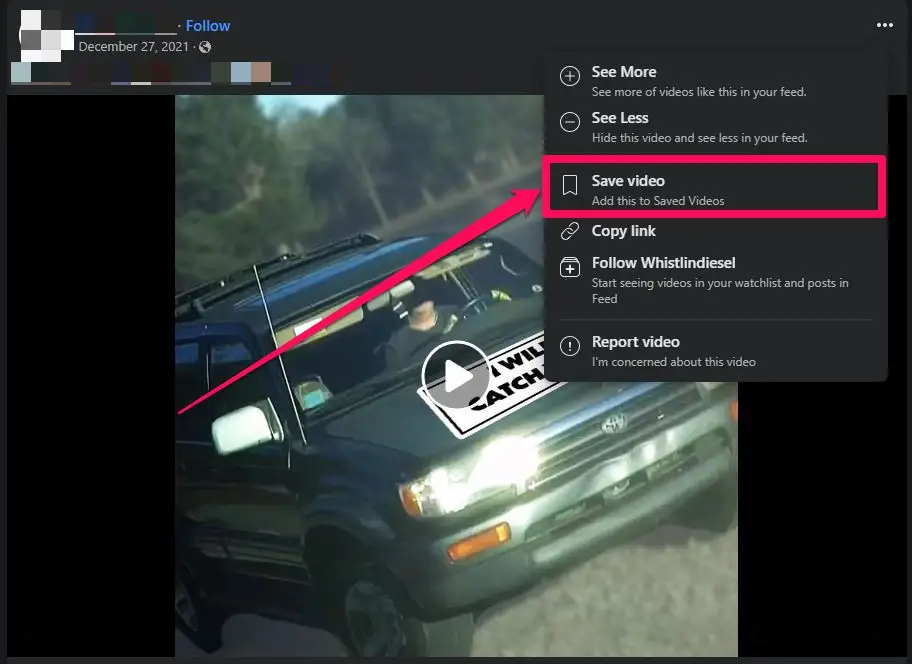
- Tap the menu icon on the video post.
- Select Save Video.
- Access saved videos later from the Facebook app or website.
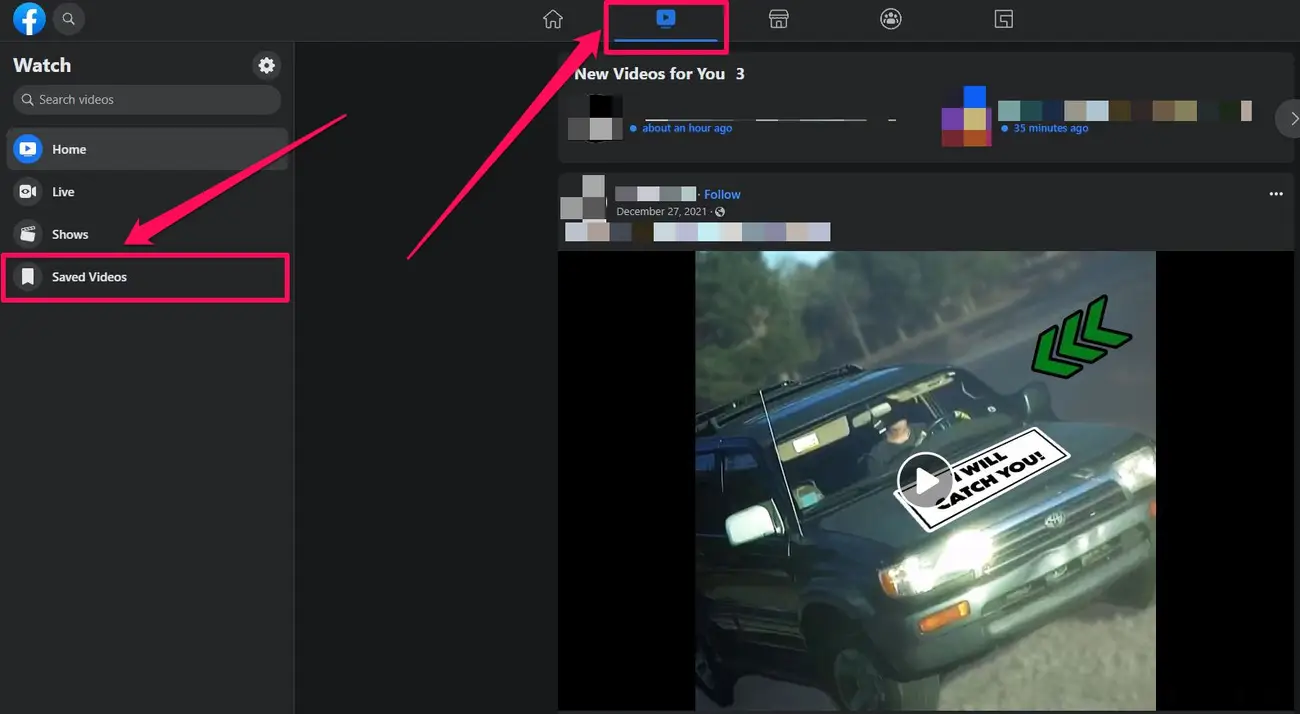
This option avoids storage issues and copyright risks but requires an active internet connection.
Troubleshooting Common Problems
If a Facebook video fails to download, the issue often relates to permissions, video privacy settings, or unsupported formats. Make sure the video is public and that required permissions are enabled.
For Shortcuts, reinstalling dependencies or restarting your device may resolve errors.
Tips
- Prefer Shortcuts over third-party apps for better privacy.
- Check available storage before downloading long videos.
- Keep iOS updated to avoid compatibility issues.
- Use desktop methods for higher-quality video files.
FAQ
Can you download Facebook videos directly from the app?
No, Facebook only allows saving videos for in-app viewing, not direct downloads.
Is it legal to download Facebook videos?
You should only download videos you own or have permission to use.
Why won’t a Facebook video download on my iPhone?
The video may be private, restricted, or blocked by app permissions.
Can you download live Facebook videos?
Live videos usually cannot be downloaded until the stream ends and becomes available as a regular post.
Summary
- Facebook does not offer direct video downloads on iPhone or iPad.
- iOS Shortcuts provide a safer way to download public videos.
- Desktop browsers allow easier video saving.
- Saved Videos offer a legal, storage-free alternative.
Conclusion
Downloading Facebook videos on iPhone, iPad, or desktop requires workarounds, but reliable options still exist. Shortcuts offer the safest mobile solution, while desktop browsers provide the simplest experience overall. If offline access is not essential, saving videos inside Facebook remains the most convenient choice.


Discussion (0)
Be the first to comment.