



Chrome Canary now shows early work on a "Summarize" button inside the native PDF viewer. The button sends the open document to Gemini and prepares Chrome to offer quick overviews and follow-up insights without leaving the browser tab.
The PDF summarize button appears in the top-right toolbar as a pill-shaped control. When active, a click will send the PDF to Gemini and open results in the Gemini panel in Chrome. Users will be able to read short summaries, key points, or answers about the file without downloading or uploading it elsewhere.
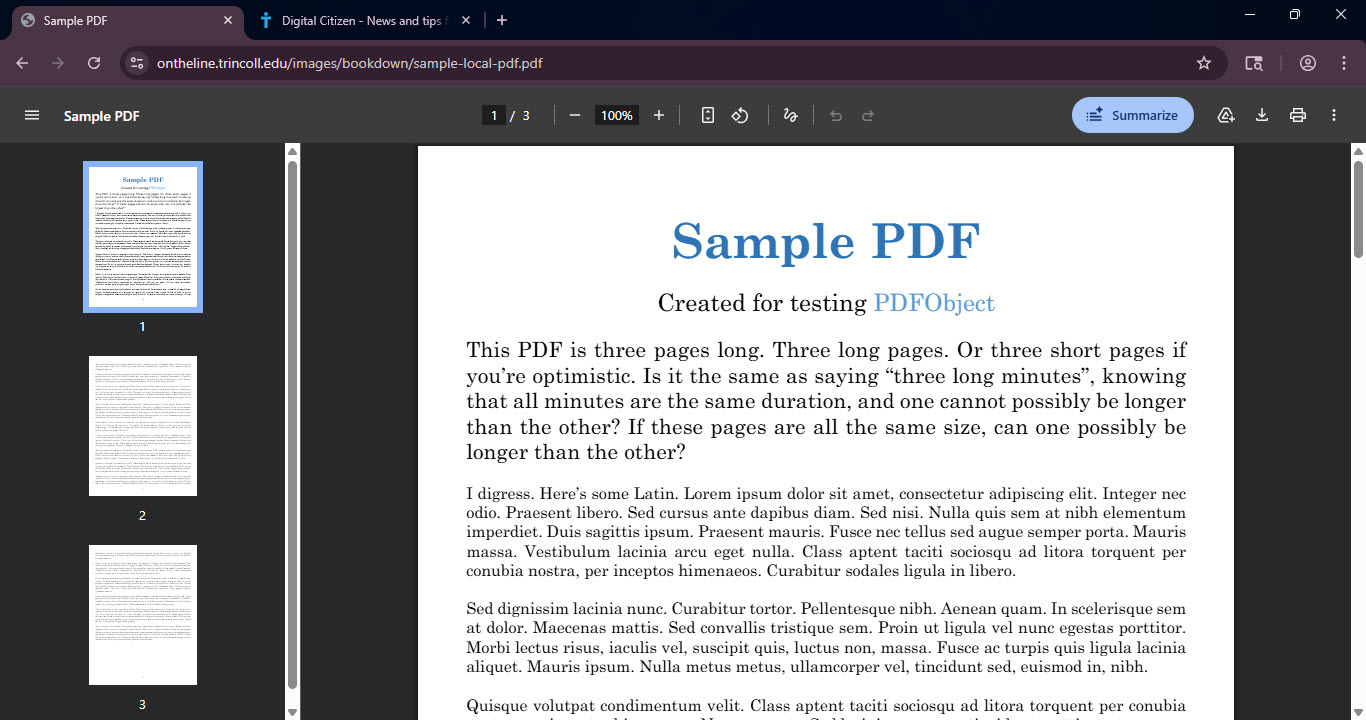
This behavior is different from opening a PDF inside Gemini. The request begins directly from the PDF viewer in Chrome. Today, users typically copy text or upload files to external AI tools to receive summaries. Recent Chromium work connects this Summarize control to Chrome’s internal Gemini system, known as Glic.
The button showed up in a recent Chrome Canary desktop build during early testing. In current Canary versions, it is visible but does not work yet. Feature flags and server‑side controls likely limit who can see it, which explains why some Canary users do not see it and why stable Chrome does not include it. The test may also require a signed‑in Google account with Gemini in Chrome enabled.
The feature uses Chrome’s built-in Gemini integration instead of an extension or a separate upload step. Responses stay connected to the exact document open in the viewer. PDF files are among the most commonly opened document types in Chrome, so a built-in summary tool could help readers review long reports faster and rely less on separate AI services once the feature becomes available.
Discussion (0)
Be the first to comment.