




Attention Aware features are built into modern iPhones to help the device respond intelligently when you’re looking at the screen. Using Face ID and the TrueDepth camera system, your iPhone can adjust screen behavior, alert volume, and notification visibility based on your attention.
If you have ever noticed your screen staying awake while reading or alerts sounding quieter when you are already looking at your phone, Attention Aware features are likely responsible. Below is a clear explanation of what these features do, how they work, and how to control them.
What Are Attention Aware Features On iPhone
Attention Aware features allow your iPhone to detect whether you are actively looking at the screen. The system relies on Face ID sensors to check for eye contact and facial orientation without storing or sharing facial data.
When enabled, these features help your iPhone behave more naturally by responding to your presence instead of relying only on touch input or timers.
How Attention Aware Features Work
Your iPhone briefly checks whether you are looking at the display using the same hardware that powers Face ID. If it detects attention, the system adjusts certain behaviors in real time.
All processing happens on the device, and the camera activates only when necessary.
What Attention Aware Features Do In Daily Use
Attention Aware features affect several parts of the iPhone experience, often without drawing attention to themselves.
- Keeps the screen from dimming or locking while you are reading or viewing content
- Lowers alert and notification volume when you are already looking at the phone
- Shows full notification previews on the Lock Screen only when you are looking
- Helps prevent accidental taps when the phone is not being actively used
Devices That Support Attention Aware Features
Attention Aware features are available only on devices with Face ID hardware.
- iPhone X and newer Face ID models
- Selected iPad Pro models with Face ID
Devices with Touch ID or no biometric sensors do not support these features.
How To Turn Attention Aware Features On Or Off
Attention Aware features are enabled by default on supported devices, but you can disable them at any time.
- Open Settings

- Tap Face ID & Passcode
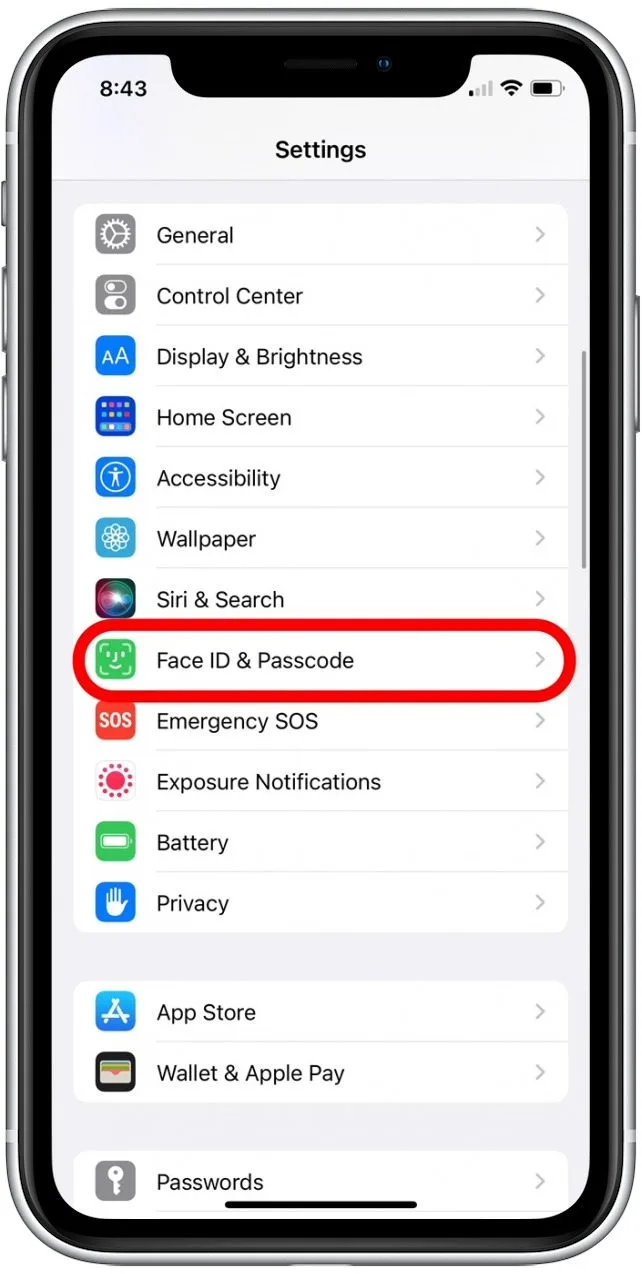
- Enter your device passcode
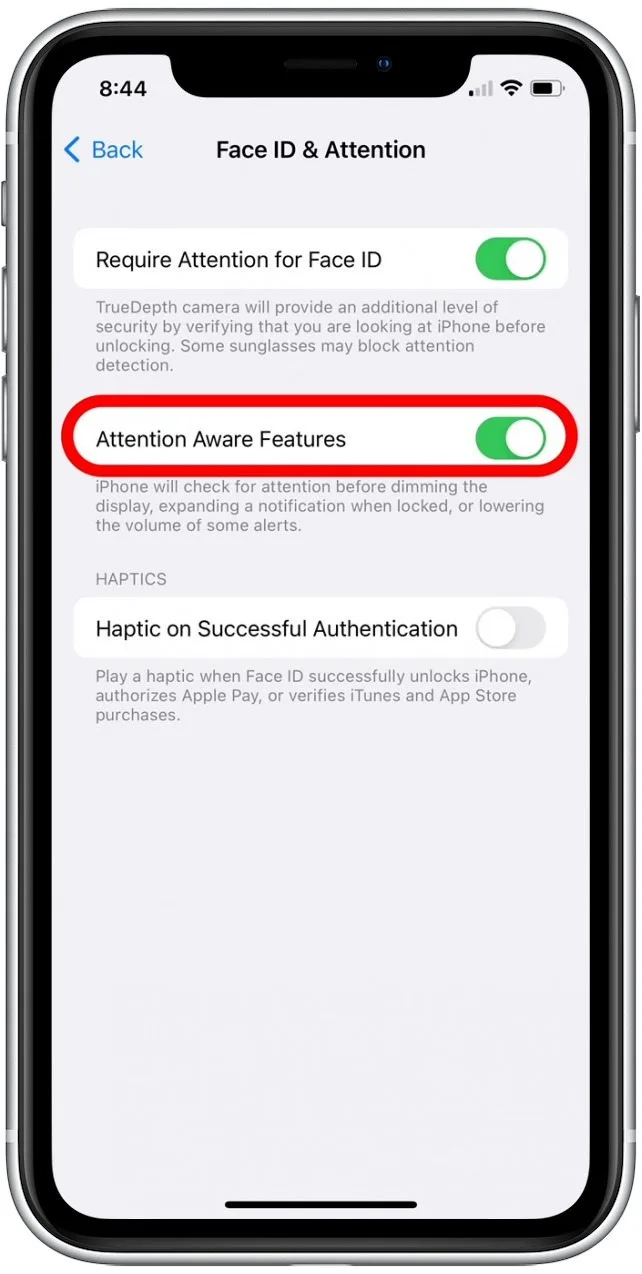
- Toggle Attention Aware Features on or off
Why You Might Want To Turn Attention Aware Features Off
While useful, these features are not ideal for everyone.
- You prefer manual control over screen behavior and alert volume
- You experience inconsistent behavior due to lighting or accessories
- You want to minimize all camera-based features
- You are troubleshooting screen dimming or notification issues
Troubleshooting Common Problems
If Attention Aware features are not working correctly, start with these checks.
- Make sure nothing is blocking the TrueDepth camera
- Clean the front sensors and screen
- Remove thick screen protectors or cases temporarily
- Restart your iPhone
- Confirm you are running the latest iOS version
Tips
- Attention Aware features work best in even lighting conditions
- Glasses and sunglasses may affect detection in some cases
- Disabling the feature does not turn off Face ID
- Accessibility settings may override attention detection behavior
FAQ
Does disabling Attention Aware features turn off Face ID?
No. Face ID continues to work for unlocking and app authentication.
Does Attention Aware features use facial data?
No facial data is stored or shared. All processing stays on the device.
Do Attention Aware features affect battery life?
The impact is minimal, but disabling them may slightly reduce background activity.
Are Attention Aware features always on?
They are enabled by default on supported devices but can be turned off at any time.
Summary
- Attention Aware features let your iPhone react when you are looking at it
- They control screen behavior, alerts, and notification visibility
- All processing stays on the device for privacy
- You can disable the feature in Face ID settings if needed
Conclusion
Attention Aware features are designed to make iPhone use feel more natural by responding to your presence instead of requiring constant interaction. For many users, they quietly improve usability, privacy, and convenience.
If you prefer full manual control or notice inconsistent behavior, turning them off is quick and reversible. Knowing how these features work helps you decide how your iPhone should behave in everyday use.


Discussion (0)
Be the first to comment.