ASUS RT-AX58U is part of a recent wave of more affordable Wi-Fi 6 wireless routers. While it still bundles all the advanced features that you expect from an ASUS router, it also provides support for Wi-Fi 6, and its price is lower than that of the first wave of Wi-Fi 6 routers. Does this lower price translate into less performance? Is ASUS RT-AX58U a reliable wireless router that you can buy to future-proof your home's Wi-Fi network? Read this review and find out:
ASUS RT-AX58U: Who is it good for?
This wireless router is a suitable choice for:
People who want to invest in the Wi-Fi 6 standard
Users who want fast Wi-Fi
Parents who desire efficient parental controls for their home network
Users who want a secure network, with proper antivirus and firewall protection
People who want to remotely control their router using a mobile app, from anywhere on the internet
Users who want to control their home network using the Alexa voice assistant
People who want task automation services from their wireless router, through IFTTT (If This, Then That)
Pros and cons
There are plenty of things to like about this wireless router:
Support for the newest wireless standard - Wi-Fi 6 or 802.11ax
Excellent speed on the 2.4 GHz band
Fast USB 3.0 port
Excellent security features
Powerful hardware that can handle many clients and connections
You can remotely control it with a mobile app, from anywhere on the internet
Great multilingual support and easily accessible Help documentation
It can be mounted on walls
There are also a few downsides to consider:
You may have to update the drivers of your Wi-Fi network cards to use Wi-Fi 6 in your network
The variability on the 5 GHz band could be improved
Product rating5/5
Verdict
ASUS RT-AX58U is a dual-band wireless router with a classic look. Sizewise, it is rather small and light when compared to other Wi-Fi 6 routers. It is also more affordable than others. However, this doesn't make it a lesser choice. On the contrary! It is one of the most balanced wireless routers with Wi-Fi 6 that we have tested so far. We recommend it to anyone interested in making the switch to Wi-Fi 6.
Unboxing the ASUS RT-AX58U wireless router
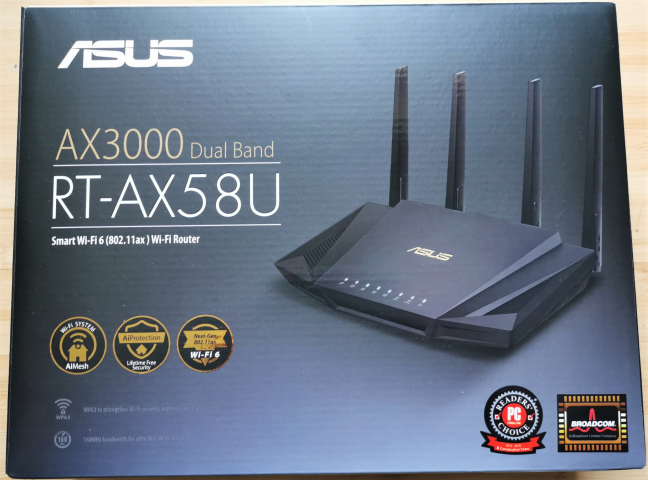
The ASUS RT-AX58U AX3000 dual-band wireless router comes in a black box with a big picture of the device on the top cover. Some stickers showcase that this router has a Broadcom processor, and it is Wi-Fi 6 compatible. It also works with the AiMesh ecosystem, and it bundles the AiProtection module for enhanced security in your network.
The packaging of the ASUS RT-AX58U AX3000 dual-band wireless router
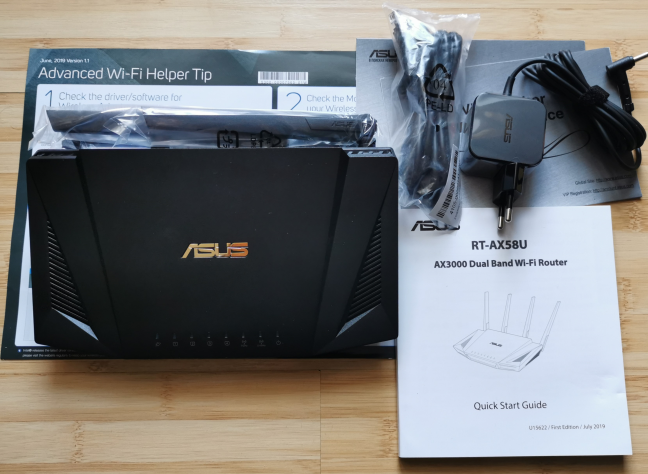
When you open the box, you find the following: the wireless router, its power adapter, an Ethernet cable, the Quick Setup Guide, the warranty, and a few leaflets with useful information. We recommend that you read the one letting you know what you need to connect your wireless devices with Wi-Fi 6.
ASUS RT-AX58U - what you find inside the box
Unboxing the ASUS RT-AX58U wireless router is a quick experience. Inside the box, you find the usual items, and you can get started with setting up your network immediately.
Hardware specifications and design
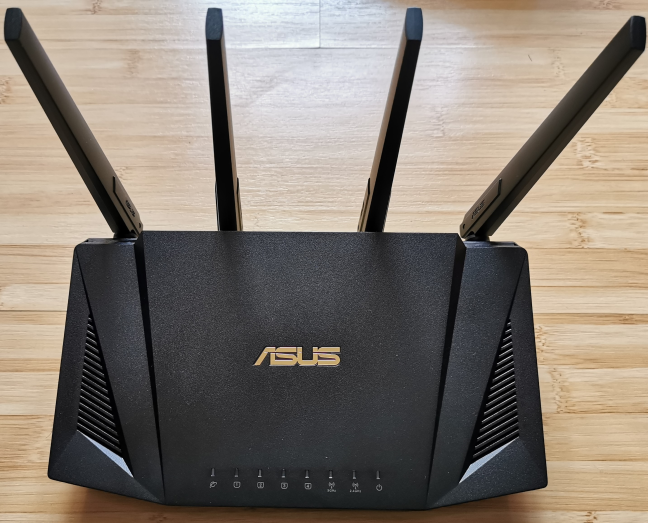
ASUS RT-AX58U features a tri-core Broadcom BCM6750 processor, running at 1.5 GHz, 512 MB of RAM, and 256 MB of storage space for the firmware. It is a dual-band wireless router, with support for the Wi-Fi 6 (802.11ax) wireless standard, that is capable of 2x2 MU-MIMO wireless transfers. The total maximum bandwidth is split as follows: 574 Mbps on the 2.4 GHz band, and 2402 Mbps on the 5 GHz, both when using the Wi-Fi 6 standard. ASUS RT-AX58U has four non-detachable external antennas. As you can see below, it has a classic router design. There are ventilation grids on the margins of the top side and on the sides, which give it a slightly aggressive look. On top, you also see the ASUS logo and the usual LEDs that signal the status of the router and its main features.
ASUS RT-AX58U
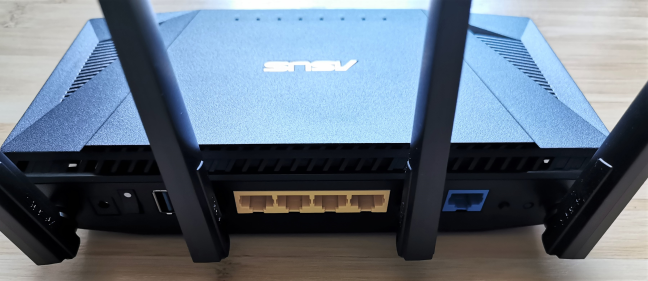
On the back, you find the power jack, the Power button, four Ethernet ports working at 1 Gbps, one WAN port, the WPS button, and the Reset button.
The ports on the back of the ASUS RT-AX58U
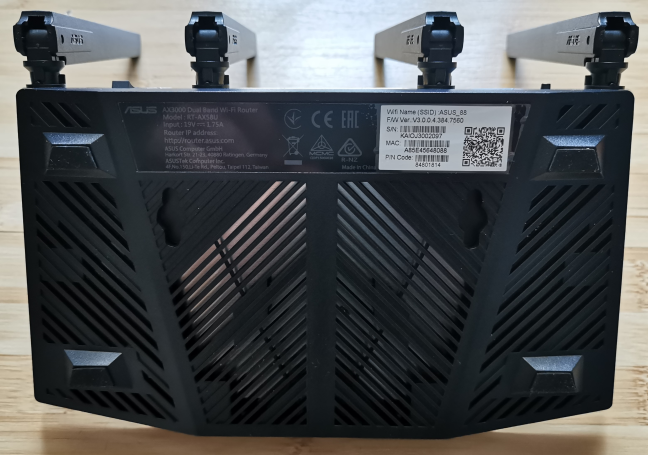
The bottom of the router is covered with ventilation grids that help keep it cool. There are also four rubber feet, and two holes for mounting it on walls and other surfaces.
The bottom of the ASUS RT-AX58U
ASUS RT-AX58U is a relatively small router. It is 8.8 x 6 x 6.2 inches or 224 x 154 x 160 mm in width x depth x height, and it weighs just 18.9 ounces or 538 grams.
You can find more details about the technical specs of this router, here: ASUS RT-AX58U Specifications.
Setting up and using the ASUS RT-AX58U wireless router
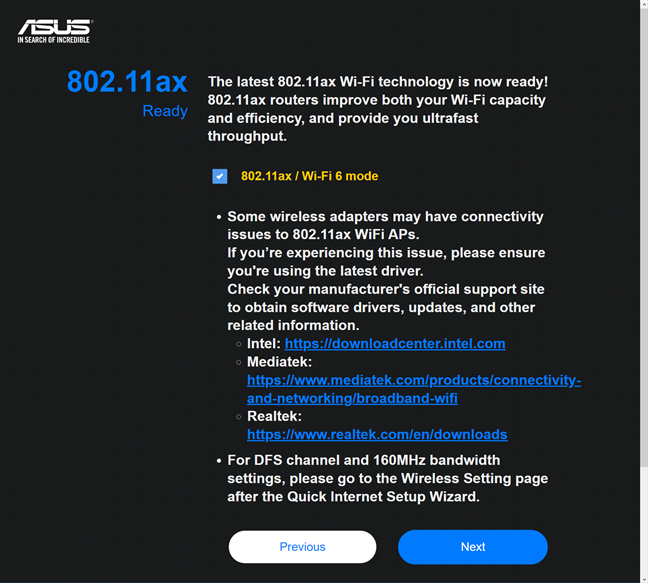
Setting up the ASUS RT-AX58U can be done using a web browser or the ASUS Router app for Android and iOS. You have to provide the details for your internet connection, choose a network name and password for the Wi-Fi, and set up the login name and password for the router. You are also asked whether you want to use the Yandex.DNS service to restrict access to malicious sites and adult content. Considering that this DNS service is from Russia, most international users won't enable it for their network. During the quick setup wizard, you are also asked whether you want to enable Wi-Fi 6 mode. Before you do that, it is essential to update the drivers for all the Wi-Fi network cards to make sure that they're compatible with Wi-Fi 6. If some of your laptops and computers don't see the Wi-Fi 6 network, then your drivers are incompatible with this standard. You have to either update them or disable Wi-Fi 6.
Enabling Wi-Fi 6 on ASUS RT-AX58U
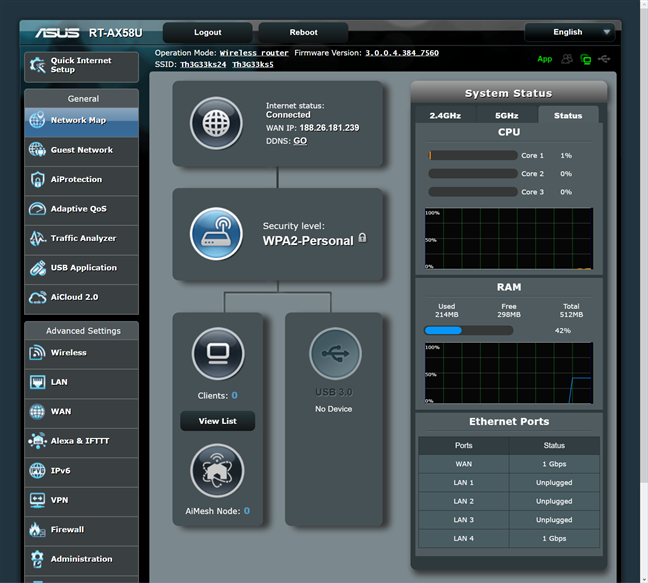
The user interface is easy to use, well organized, and available in 24 languages. If you are an advanced user, you are going to appreciate the complete control that you get. There are plenty of settings available for all the features of this wireless router.
The firmware of the ASUS RT-AX58U
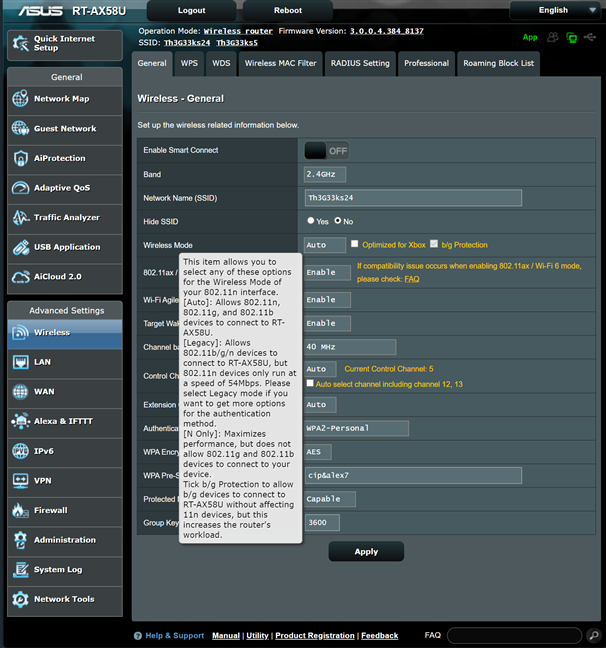
The user documentation is accessible and well-made. When you move the mouse cursor over a setting that you do not understand, a question mark is shown. Click on the question mark, and you see information explaining that setting. One downside is that the documentation has not been updated to include information about all the features included by ASUS in their latest firmware. Therefore, this trick does not work for everything.
Finding out more about specific settings
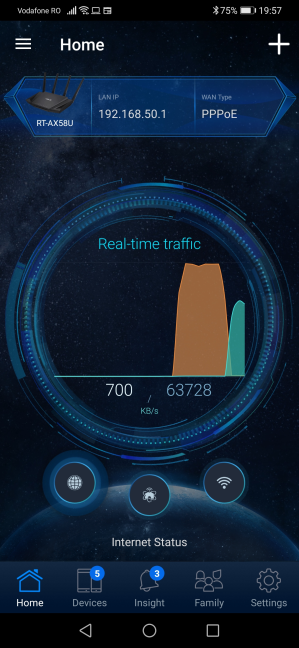
Some users may prefer the ASUS Router mobile app for setting up and administering the ASUS RT-AX58U. You can use the app to control your network from anywhere on the internet. With it, you can view the devices connected to the network, see their traffic in real-time, block them or limit their bandwidth, manage the devices used by your children, set up parental control rules, and configure the main features of the router.
The ASUS Router mobile app
We connected more than a dozen devices to the network managed by ASUS RT-AX58U, including a desktop PC, two laptops, one tablet, several smartphones, one wireless printer, two smart plugs, one smart bulb, an intelligent robot vacuum cleaner, and an Xbox One console.
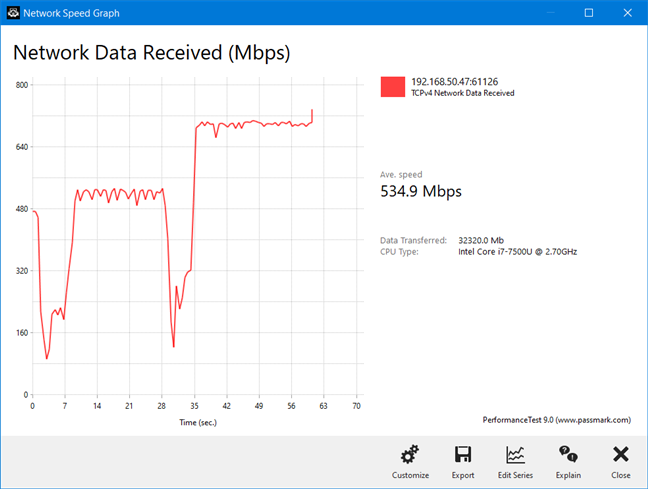
We then evaluated the speed and variability of wireless transfers. We took our laptop and moved to a room that is separated by one wall from the router. We made a wireless transfer on it. As you can see below, the average speed was quite high, but the variability deserves some improvement. We noticed this trend mostly on the 5 GHz band, in almost every room of our apartment.
ASUS RT-AX58U - the variability of wireless transfers on the 5 GHz band
If you want to know more about the real-world performance offered by ASUS RT-AX58U, including comparisons with other wireless routers, go to the next page of this review.
Wireless network performance
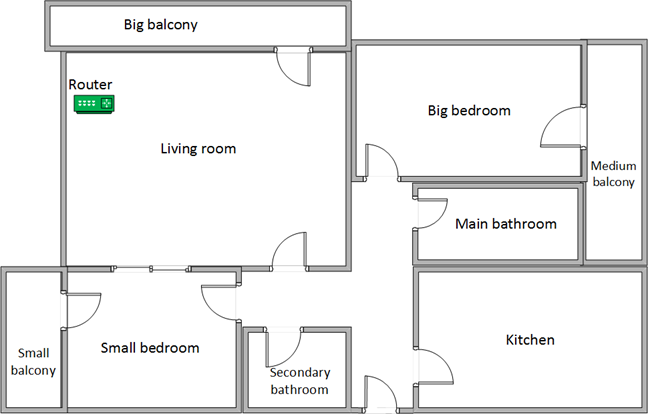
First, let's look at the apartment that was used in our testing and how it is set up. You can see that the router is placed in the living room. With most wireless routers, the signal strength is not that good in places like the Kitchen and the Medium balcony.
The apartment in which we tested the ASUS RT-AX58U
Our testing was done using a fast 1 Gigabit Internet connection that is capable of uploads on the internet of up to 500 Mbps. We used an HP Spectre 13 laptop for all our measurements and several software tools.
To get a better idea of the performance offered by ASUS RT-AX58U, we compared it with
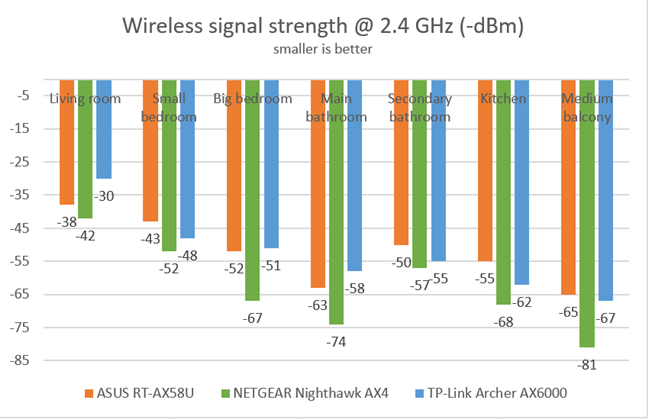
NETGEAR Nighthawk AX4 and TP-Link Archer AX6000. We analyzed the 2.4 GHz band first and measured the signal strength with NetSpot. As you can see below, we enjoyed good signal strength in all rooms.
ASUS RT-AX58U - Signal strength on the 2.4 GHz band
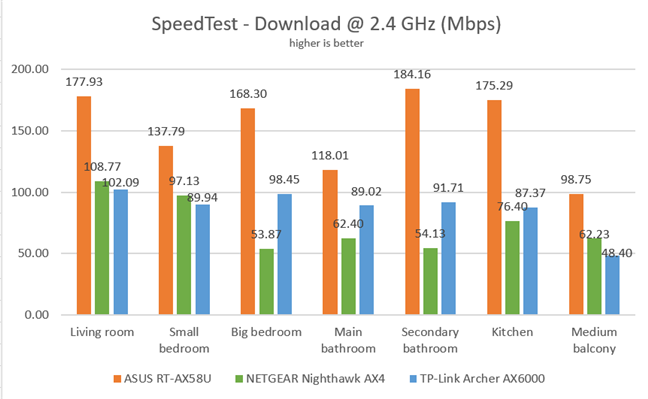
Next, we used SpeedTest to measure the speed of the internet connection when connected to the 2.4 GHz band. ASUS RT-AX58U provided outstandingly fast downloads in all rooms.
ASUS RT-AX58U - Download speeds in SpeedTest, on the 2.4 GHz band
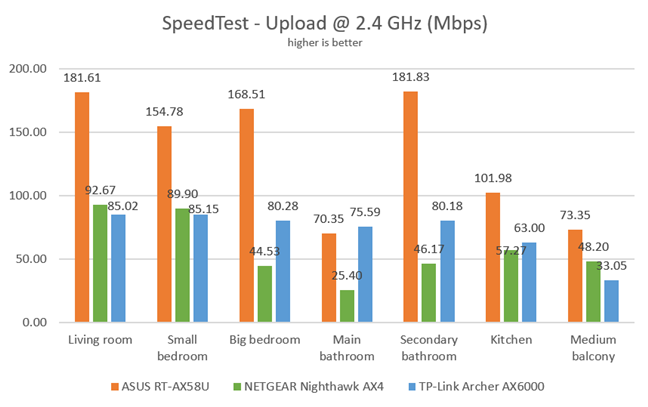
The same was true when we measured the upload speed with SpeedTest.
ASUS RT-AX58U - Upload speeds in SpeedTest, on the 2.4 GHz band
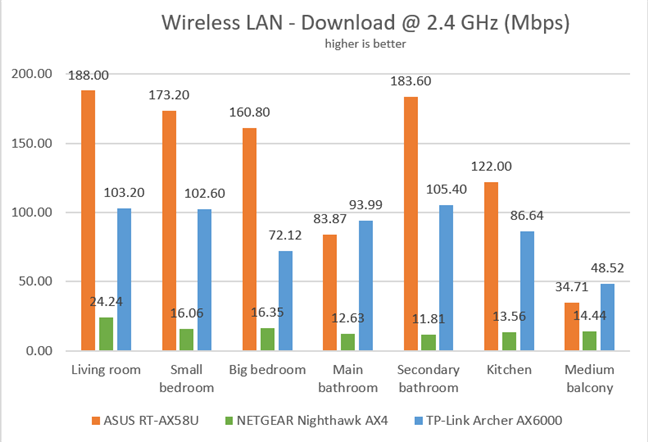
Continuing our measurements on the 2.4 GHz wireless network, we used the PassMark Performance test to transfer data between two computers connected to the network. Except for one room, ASUS RT-AX58U was the fastest router in our comparison.
ASUS RT-AX58U - Download speeds on the 2.4 GHz band
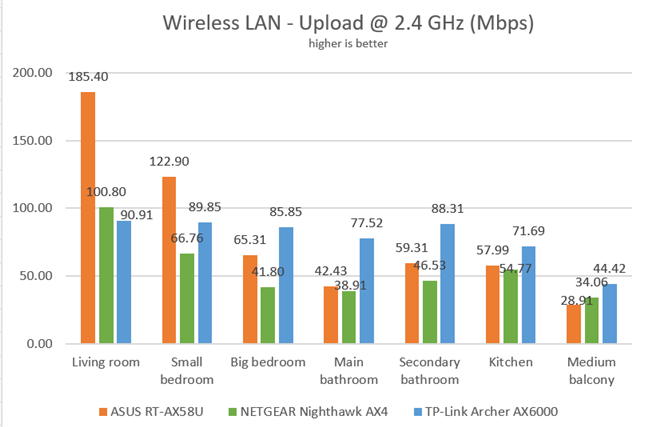
When we measured the upload speed, things were not as clear-cut, and ASUS RT-AX58U was outperformed in some rooms.
ASUS RT-AX58U - Upload speeds on the 2.4 GHz band
On the 2.4 GHz wireless band, ASUS RT-AX58U provides excellent speed that often beats its direct competitors.
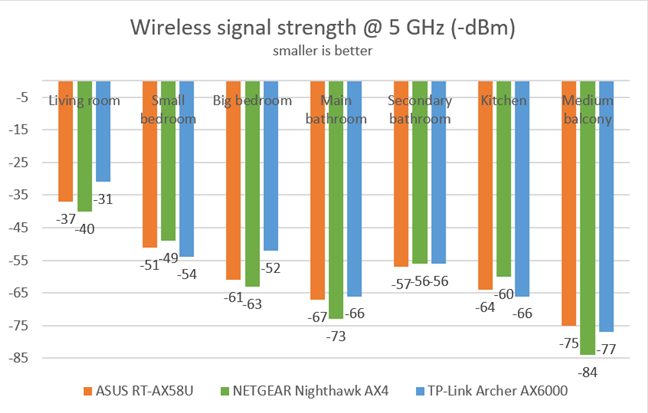
For the next set of measurements, we analyzed the performance of the 5GHz wireless band, using Wi-Fi 5. We looked at the evolution of the signal strength, from room to room. The signal strength provided by ASUS RT-AX58U was similar to that of other wireless routers.
ASUS RT-AX58U - Signal strength on the 5 GHz band
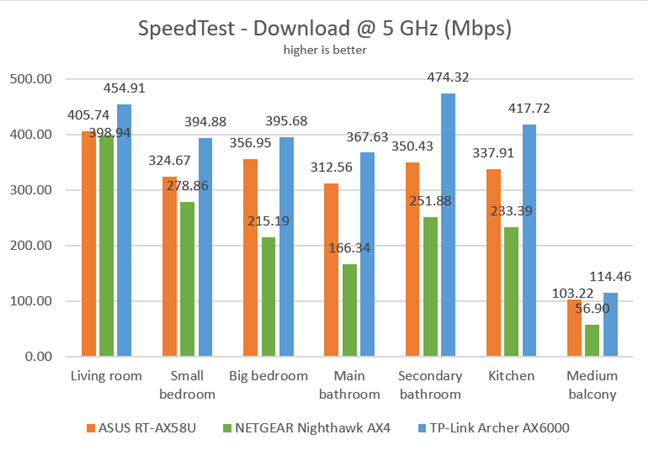
Next, we measured the download speed with SpeedTest in every room of our test apartment. ASUS RT-AX58U was a fast router but not the fastest in our comparison.
ASUS RT-AX58U - Download speeds in SpeedTest on the 5 GHz band
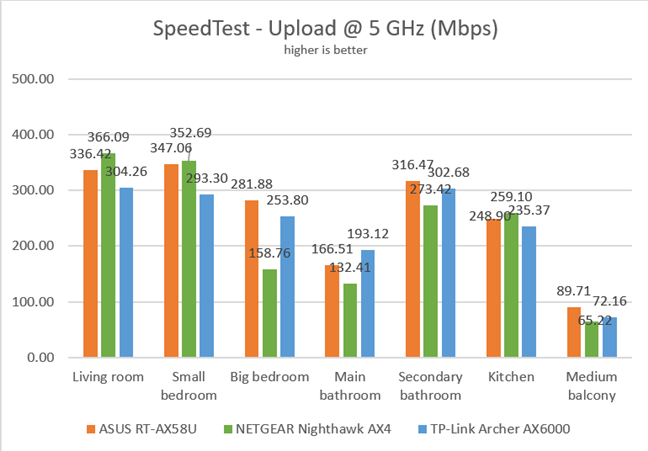
Uploads were fast too, but there was no clear winner in our comparison.
ASUS RT-AX58U - Upload speeds in SpeedTest on the 2.4 GHz band
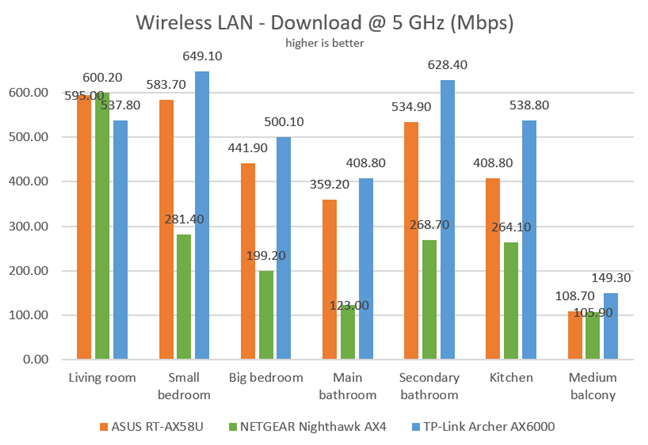
For the last measurements on the 5GHz wireless network, we used the PassMark Performance test to transfer data between two computers connected to the network. ASUS RT-AX58U delivered fast downloads in all rooms, without being the speed champion.
ASUS RT-AX58U - Download speeds on the 5 GHz band
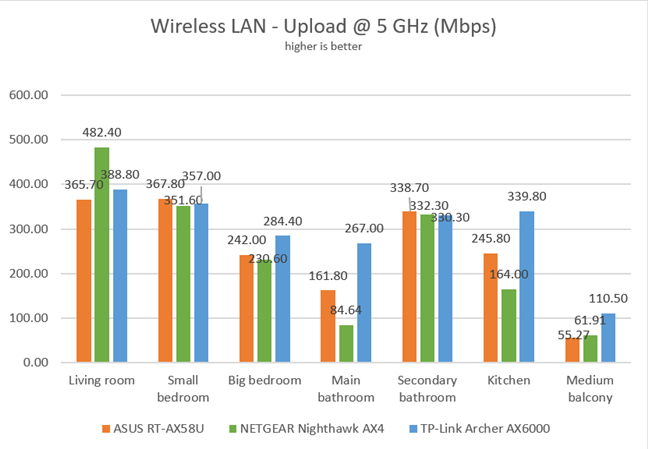
The same was true when we measured the upload speed.
ASUS RT-AX58U - Upload speeds on the 5 GHz band
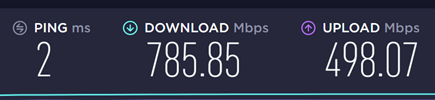
To see the speed on Wi-Fi 6 (802.11ax), we used a desktop computer with an ASUS PCE-AX58BT network card. On it, when we ran SpeedTest, we measured 785.85 Mbps for the download speed, and 498.07 Mbps for the upload. These are excellent speeds which prove the potential of the Wi-Fi 6 standard and the advantage of switching to it.
ASUS RT-AX58U - The speed on the 5 GHz band with Wi-Fi 6
NOTE: Do remember that the upload speed for our internet connection is capped at 500 Mbps.
On the 5 GHz band, ASUS RT-AX58U delivers great performance, similar to that of other Wi-Fi 6 routers.
Wired network performance
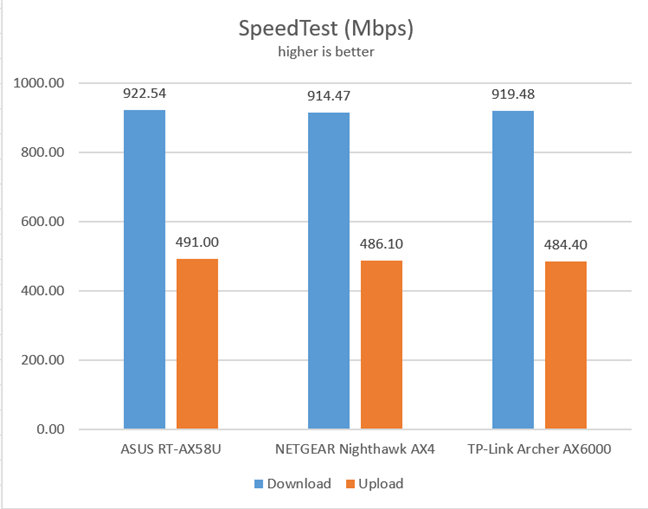
We measured the speed of the internet connection with a 1 Gbps Ethernet cable using SpeedTest. In this test, ASUS RT-AX58U was the fastest router in our comparison, as you can see below.
ASUS RT-AX58U - SpeedTest on Ethernet connections
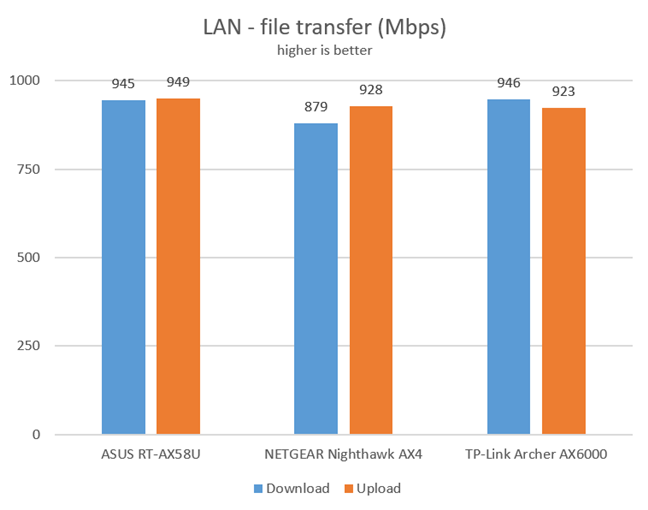
Then, we ran a network transfer between two computers, using the PassMark Performance test. This time too, ASUS RT-AX58U performed admirably well.
ASUS RT-AX58U - File transfers on Ethernet connections
ASUS RT-AX58U delivers real 1 Gbps Ethernet connections, as expected from a modern wireless router.
USB performance
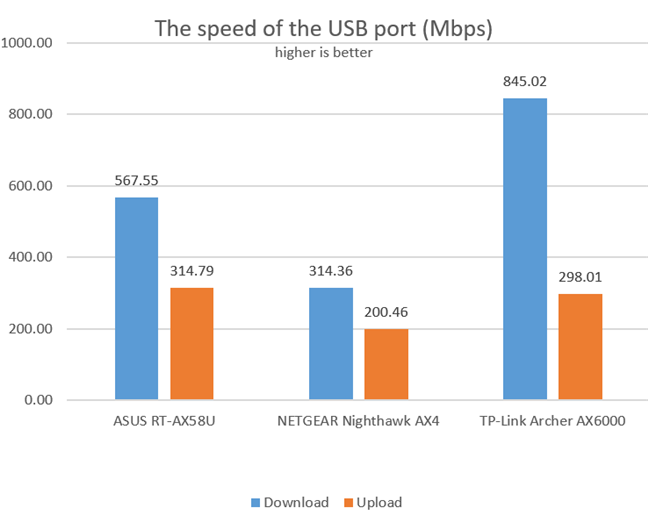
We connected a portable SSD to the USB 3.0 port of the router and made some data transfers on it. We measured a download speed of 567.55 Mbps, which is excellent for most users. However, more expensive routers deliver even better speeds.
ASUS RT-AX58U - The speed of the USB 3.0 port
ASUS RT-AX58U has a fast USB 3.0 port that you can use to connect fast storage to the router.
Extra features
The firmware on the ASUS RT-AX58U wireless router comes with plenty of advanced features:
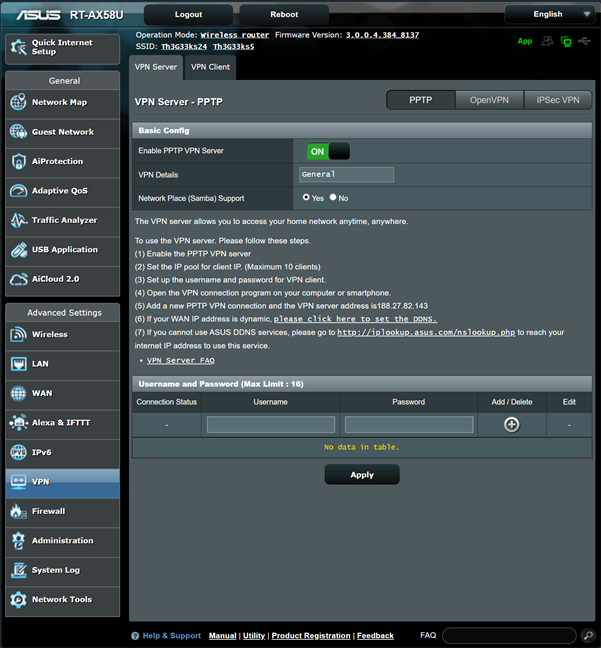
ASUS RT-AX58U can be used as a VPN server
Integration with Amazon's Alexa and IFTTT - you can say things like "Alexa, ask ASUS ROUTER to upgrade the firmware" to perform different tasks. You can also automate tasks that might otherwise be repetitive or unable to "talk to each other."
A comprehensive Router Security Assessment tool that verifies whether your settings are secure. When it finds problems, it proactively informs you and helps you fix things.
Malicious Sites Blocking - an efficient cloud-based module that blocks malicious websites on all the devices connected to your network.
Two-Way IPS - a two-way intrusion prevention system that protects all your network from spam, DDoS attacks, network attacks, and more. Additionally, it also scans the packets that are sent from your network to the internet.
Infected Device Prevention and Blocking - if your network devices get infected and become zombies in malware networks, they are automatically blocked, and you are informed about this problem.
Parental Controls - useful, cloud-based parental controls that can be used to set rules about internet access for children's devices.
Adaptive QoS - an advanced Quality of Service feature that you can use to optimize network traffic, including but not limited to online gaming.
Guest Network - you can enable three wireless guest networks with individual security and access settings, on each band.
Traffic Analyzer - offers visual traffic statistics that give you a clear picture of how your network is used and by which devices.
AiCloud 2.0 - it gives you the tools to create your own cloud storage service, using a hard disk connected to the router.
IPv6 - support for IPv6 addresses that are going to replace IPv4.
VPN - you can set the router to work as a VPN server, and you can also use it to turn your network-connected devices into VPN-enabled clients without additional VPN software required.
Network Tools - for analyzing the network and identifying what's wrong. They are useful when you need to troubleshoot problems.
DDNS - a service that allows you to connect to the router from the internet, even if your internet provider assigns you a dynamic public IP address.
The list of features available on the ASUS RT-AX58U is quite impressive, and it makes it stand out in the crowded market of wireless routers.
What is your opinion about the ASUS RT-AX58U wireless router?
Now you know our opinion about the ASUS RT-AX58U AX3000 dual-band wireless router and details about its strengths and weaknesses. Before closing this review, tell us what you think. Are you interested in purchasing this router? If you already own it, what has been your experience with it? Comment below and let's discuss.
My router RT-AX58U works fine, but on 2.4GHz the transfer is very low (about 40 Mbps) according to this review and worse than on my previous router (Asus RT-AC1200G+). I heard that this transfer can be improved with some settings, but I don’t know which ones. Has anyone had similar problems?
Ciprian Adrian Rusen ·
Which standard are you using for the 2.4 GHz ban?
Muddy Fox ·
I can’t agree more about this router. Build is solid, robust and looks good! The best part of it is the ability to personalize own preference on its app and more.
Anonymous ·
I’m glad you like it and that you agree with out review.
E De Groote ·
I’m interested in purchasing this router. It performs like his big brothers.
FigNewton ·
Was the device used to test data speeds WiFi 6 capable or is it using an older wifi standard?
Richard Pákozdi ·
Hello,
What is the distance between router and the medium balcony?
Thanks in advance!
Jim from Michigan ·
I purchased two of these routers to create an AiMesh in my home and replace about a 7 year old router with WiFi extender that were no longer getting firmware updates. If not for a brick wall running halfway through the middle of my home, I would have only needed one router to readily cover my 2100′ home and basement.
I am technically capable, but not an expert by far. Set up of the first router was fast and easy – done in less than 15 minutes except making some updates to devices as I changed SSID name and password at same time. Setting up the AiMesh was technically easy, but the directions and YouTube video were a bit unclear so setting up the second router as a node took a bit more fumbling around to finally get firmware updated, primary and node named, and connected. Once connected though, using the app on my phone instead of the GUI web interface, all went well. Speed and reliability dramatically improved throughout the house including both sides of the brick wall after about 48 hours of use. I’m very pleased with the upgrade even though I expect it will be a while before we use the WiFi 6 features.
George ·
Is there any advantage of AX58U over AX92U? Based on the speed comparison, the AX92U is definitely better for nearly the same price (for a single router usage). Did I overlook anything? Coverage? Software?
Anonymous ·
I would go for the AX92U, just because it is a mesh Wi-Fi that can provide larger coverage.
Declan ·
Any update on this as I am currently looking at the same situation? Using a single ax92u for my main router.
Simon ·
I got the AX3000 same as the AX58U model. I can say that the router is superb, however the initial installation was a little tricky but I might to reset and installed again. After that the router response very well.
I did experience some drop in the 5G at some distance but the 2.4G was able to pick up the bandwidth.
I am hoping for a new firmware becos the GUl was seems not as smooth as before.
Maximilian Vetter ·
Hello, can you please tell me if there is a difference in Wifi range if I would buy a even more expensive Asus Router like the AX88u or even the AX11000 or is the only difference a higher amount of Speed in the same rooms? Because I want to buy one Router that covers my house and I am so tired of having trouble with mesh networks :/
SoCalP ·
I have a AX-88U also and the range is a bit farther than the 58U but either will cover 2000 sq. ft. without an issue. Obviously the 88U is faster but in a smaller area to cover the 58U does a great job for half the cost of a 88U. I actually tried a Netgear Nighthawk Mesh AX1800 system and it was noticeably slower than the 58U and the coverage wasn’t better, it got returned.
I need a wlan router can really through walls. I tried Linksys WRT3200ACM , that is super BUT has no ability to through walls. I have a 4 rooms apartment
“AX58U is better than AX88U in some tests”, yes that was real in our testing. This model (AX58U) performed very well, and we like it a lot.
SoCalP ·
I’ve used the Asus RT-AX58U for a few weeks and the article mirrors my experience with it. Great router, works as advertised, no issues at all. It’s really a mini clone of the RT-AX88U with a little less horsepower.






























Discussion (19)
My router RT-AX58U works fine, but on 2.4GHz the transfer is very low (about 40 Mbps) according to this review and worse than on my previous router (Asus RT-AC1200G+). I heard that this transfer can be improved with some settings, but I don’t know which ones. Has anyone had similar problems?
Which standard are you using for the 2.4 GHz ban?
I can’t agree more about this router. Build is solid, robust and looks good! The best part of it is the ability to personalize own preference on its app and more.
I’m glad you like it and that you agree with out review.
I’m interested in purchasing this router. It performs like his big brothers.
Was the device used to test data speeds WiFi 6 capable or is it using an older wifi standard?
Hello,
What is the distance between router and the medium balcony?
Thanks in advance!
I purchased two of these routers to create an AiMesh in my home and replace about a 7 year old router with WiFi extender that were no longer getting firmware updates. If not for a brick wall running halfway through the middle of my home, I would have only needed one router to readily cover my 2100′ home and basement.
I am technically capable, but not an expert by far. Set up of the first router was fast and easy – done in less than 15 minutes except making some updates to devices as I changed SSID name and password at same time. Setting up the AiMesh was technically easy, but the directions and YouTube video were a bit unclear so setting up the second router as a node took a bit more fumbling around to finally get firmware updated, primary and node named, and connected. Once connected though, using the app on my phone instead of the GUI web interface, all went well. Speed and reliability dramatically improved throughout the house including both sides of the brick wall after about 48 hours of use. I’m very pleased with the upgrade even though I expect it will be a while before we use the WiFi 6 features.
Is there any advantage of AX58U over AX92U? Based on the speed comparison, the AX92U is definitely better for nearly the same price (for a single router usage). Did I overlook anything? Coverage? Software?
I would go for the AX92U, just because it is a mesh Wi-Fi that can provide larger coverage.
Any update on this as I am currently looking at the same situation? Using a single ax92u for my main router.
I got the AX3000 same as the AX58U model. I can say that the router is superb, however the initial installation was a little tricky but I might to reset and installed again. After that the router response very well.
I did experience some drop in the 5G at some distance but the 2.4G was able to pick up the bandwidth.
I am hoping for a new firmware becos the GUl was seems not as smooth as before.
Hello, can you please tell me if there is a difference in Wifi range if I would buy a even more expensive Asus Router like the AX88u or even the AX11000 or is the only difference a higher amount of Speed in the same rooms? Because I want to buy one Router that covers my house and I am so tired of having trouble with mesh networks :/
I have a AX-88U also and the range is a bit farther than the 58U but either will cover 2000 sq. ft. without an issue. Obviously the 88U is faster but in a smaller area to cover the 58U does a great job for half the cost of a 88U. I actually tried a Netgear Nighthawk Mesh AX1800 system and it was noticeably slower than the 58U and the coverage wasn’t better, it got returned.
in another review, AX58U is better than AX88U in some tests.
Could anyone tell me is it real?
https://www.digitalcitizen.life/asus-rt-ax58u-review?page=1
I need a wlan router can really through walls. I tried Linksys WRT3200ACM , that is super BUT has no ability to through walls. I have a 4 rooms apartment
here is the link of AX88U
https://www.digitalcitizen.life/asus-rt-ax88u-review?page=1
“AX58U is better than AX88U in some tests”, yes that was real in our testing. This model (AX58U) performed very well, and we like it a lot.
I’ve used the Asus RT-AX58U for a few weeks and the article mirrors my experience with it. Great router, works as advertised, no issues at all. It’s really a mini clone of the RT-AX88U with a little less horsepower.
Thanks for sharing your experience with us.