Even though the 802.11ax wireless standard, also known as Wi-Fi 6 is not yet finalized, we already see wireless routers with support for it being launched. The first consumer 802.11ax wireless router comes from ASUS. Its name is ASUS RT-AX88U, and this router is a beast, regarding size, hardware, and features. If you want to know what the first AX wireless router has to offer, read our review for ASUS RT-AX88U:
ASUS RT-AX88U: Who is it good for?
ASUS RT-AX88U is a great choice for the following types of users:
People who want to invest in the Wi-Fi 6 standard and plan to buy devices with support for it
Users who want the best security for their smart home devices
Users who want advanced firmware that offers complete control
People who want task automation services from their wireless router, through IFTT (If This, Then That)
Users who want to control their home network using the Alexa voice assistant
People who desire an advanced mobile app from which they can personalize almost everything the router has to offer
Pros and cons
There are many positives about the ASUS RT-AX88U:
Support for the newest wireless standard - 802.11ax
Very fast WiFi on the 2.4 GHz band
Excellent security features that secure your smart home
Useful features for gamers who play multiplayer games online
Powerful hardware that can handle many clients and simultaneous connections
Super-fast USB 3.0 ports
Advanced smartphone app for administering your wireless router
Great multilingual support and easily accessible Help documentation
It can be mounted on walls
It has eight Ethernet ports - a rare sight on consumer routers
There are some downsides to consider:
If you have laptops and devices with Intel wireless adapters, you must update your drivers; otherwise, your WiFi connection does not work with this router
The wireless coverage on the 5 GHz band is not that reliable in locations with two or more walls separating the network clients from the router
The price is not for everyone
Product rating4/5
Verdict
ASUS is the first manufacturer to launch a wireless router that is compatible with the new 802.11ax/Wi-Fi 6 wireless standard. The result is a massive router, with powerful hardware, eight Ethernet ports, as well as advanced firmware the caters to the needs of many users: gamers, parents, security-conscious users, IT professionals, and small businesses. If you purchase it, you future-proof your home network before the rest of the world. However, this also means that you pay more for being the first, and you confront a few glitches and incompatibilities that are going to be fixed in time, as the Wi-Fi 6 standard gets the final approval and compatible devices appear on the market. ASUS RT-AX88U is the kind of wireless router whose potential is going to be revealed in time, as the rest of the IT world gets onboard with the new Wi-Fi 6 standard.
Unboxing the ASUS RT-AX88U wireless router
ASUS RT-AX88U comes in a massive black box, with a picture of the router on the top cover, as well as a list of its most important features. The unboxing experience is pleasant and worthy of a premium device. Watch the video below to see what you are going to find inside the box.
Inside the packaging, there are the following items: the wireless router, its external antennas, the power adapter, an Ethernet cable, the Quick Setup guide, troubleshooting information for laptops with Intel wireless network cards, a guide for connecting to the WTFast service, the warranty and other legal information.
Hardware specifications and design
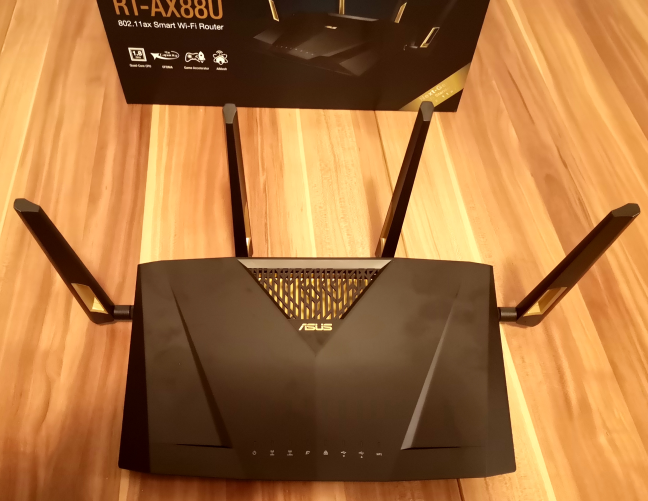
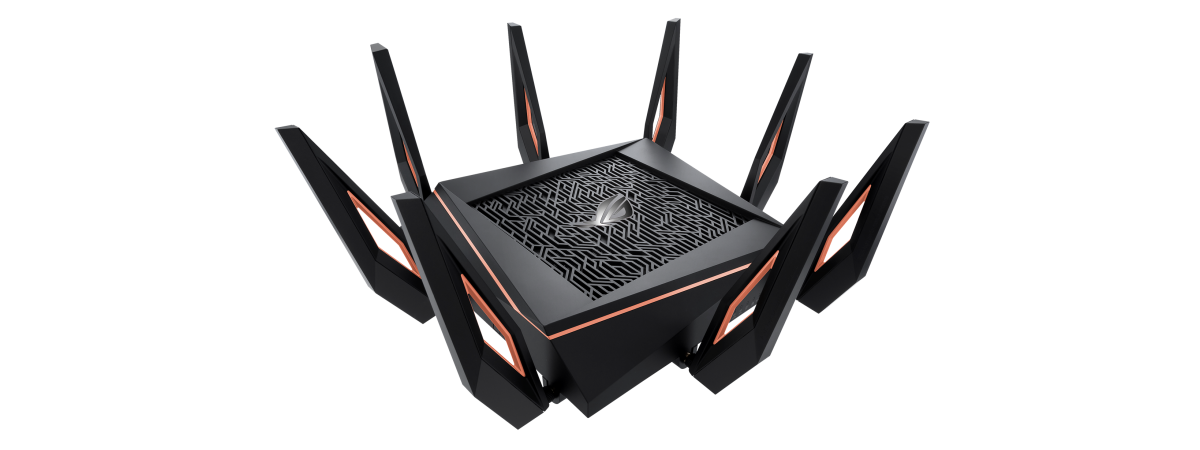
ASUS RT-AX88U looks similar to the popular ASUS RT-AC88U, a wireless router that was appreciated by many users (including us) when it was launched a few years ago. Visually, the new model uses a different accent color: gold instead of red. The ports are found in the same places, the ventilation grids are similar, and so on.
The ASUS RT-AX88U wireless router
The uniqueness of ASUS RT-AX88U lies in its modern and powerful hardware. This wireless router is powered by a 64-bit Broadcom BCM43684 quad-core System on a Chip (SoC) running at 1.8 GHz, 1 GB of DDR3 RAM, and 256 MB of storage space for the firmware.
The Broadcom BCM43684 SoC it uses brings support for the latest Wi-Fi 6 (802.11ax wireless standard), which aims to improve the speed of your wireless connections, the number of clients it can serve simultaneously, and the power consumption of network clients. An interesting feature of Wi-Fi 6 is that it improves the useful MU-MIMO transfer technology. Now it is more efficient, and also handles uploads, not only downloads, like it did in its first incarnation. However, the Wi-Fi 6 standard is so new that it is not finalized yet, and the final approval is expected for late 2019. Also, there are no client devices on the market. The only thing we know is that the iPhone is rumored to enable support for the Wi-Fi 6 standard sometime in 2019.
ASUS made a wireless router that you can use today, so RT-AX88U incorporates support for all the existing wireless networking standards 802.11ac Wave 2, and 802.11 b/g/n.
ASUS RT-AX88U is a dual-band wireless router with a total maximum theoretical bandwidth split as follows: 1148Mbps for the 2.4GHz band and 4804Mbps for the 5GHz band. That adds up to 5952 Mbps, hence the 6000 Mbps approximation you see in the marketing materials about this router. Keep in mind that these bandwidth approximations are valid only when using the new Wi-Fi 6 standard, which you cannot use with today's network clients.
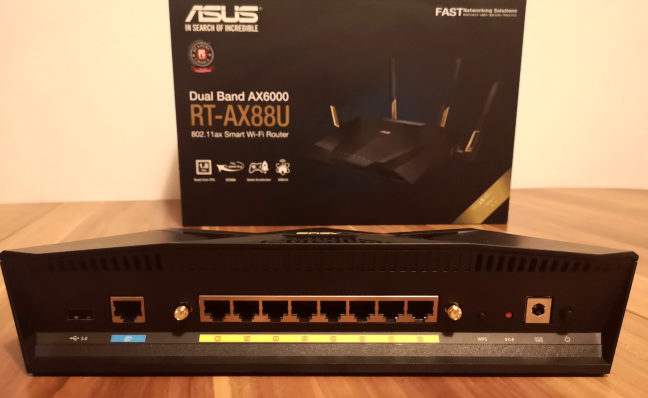
When it comes to ports, ASUS RT-AX88U is very generous. On the back, you get eight 1 Gbps Ethernet ports, a USB 3.0 port, the WAN port, the WPS button, the Reset jack, the Power jack, and the Power button.
The ports on the back of the ASUS RT-AX88U
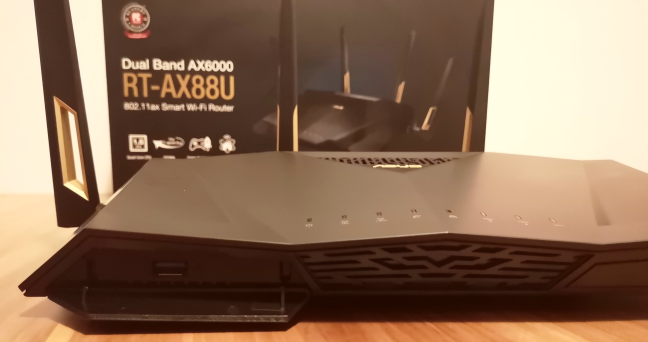
On the front, there are two buttons: one for turning the LEDs on and off, and another for controlling the WiFi broadcasting. There is also a door that hides another USB 3.0 port. The positioning of this port is not that well thought out, and it makes it more difficult to connect a second USB device to the router. It also has four external antennas, which enable 4x4 MU-MIMO wireless transfers.
The USB 3.0 port on the front of the ASUS RT-AX88U
A router with such powerful hardware and many ports is always large, and relatively heavy. ASUS RT-AX88U has a size of 11.8 x 7.4 x 2.4 inches or 300 x 188 x 61 mm in length x width x height. It also weighs 2.2 pounds or 1.01 kg.
The firmware on the ASUS RT-AX88U is the same as on other routers from the company. It includes the latest version of AiProtection Pro (which provides commercial-grade security from Trend Micro, and cloud-based parental controls), and support for ASUS AiMesh.
If you would like to learn more about the official specifications of this wireless router, go to this page: ASUS RT-AX88U Specifications.
Setting up and using the ASUS RT-AX88U wireless router
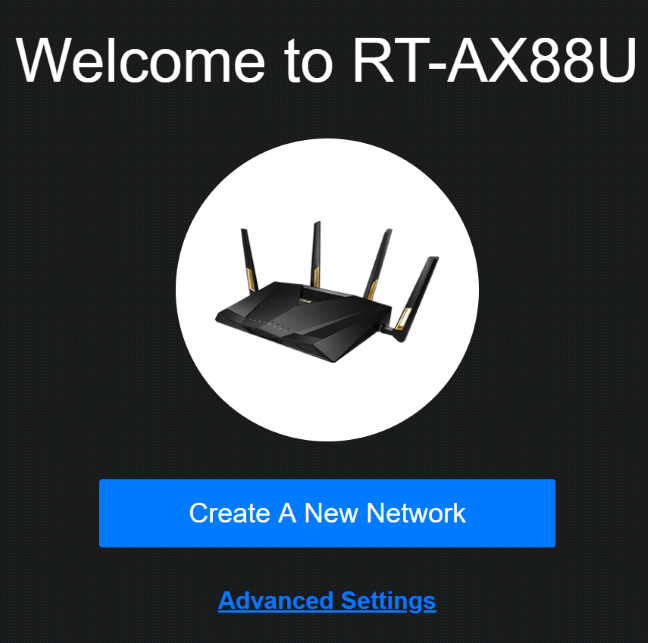
Setting up the ASUS RT-AX88U is easy: plug it to the powerline, connect it to the internet, connect it to a computer using the Ethernet cable found in the packaging, and access its configuration wizard in a web browser. First, you are asked to enter the details of your internet connection. Then, you configure the name(s) and password(s) for the wireless network, enable 802.11ax HE frame support (turning on the Wi-Fi 6 standard), and set the username and password for managing the router.
Welcome to ASUS RT-AX88U
After you provide the initial details, the router connects to the internet and checks for firmware updates. This is a proactive approach, and you should let ASUS RT-AX88U update its firmware so that you can benefit from performance and security improvements. At the end of the quick setup wizard, you are shown a summary of your settings.
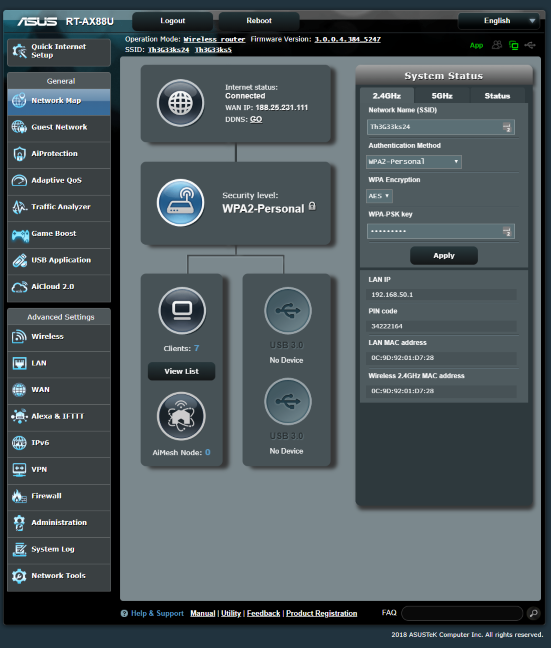
Now you can access the administration user interface. It is the same as on other ASUS routers, meaning that it is well organized and easy to use. All the settings are split into logical sections and finding your way is easy. You can configure everything that matters in detail, and advanced users are going to appreciate this fact.
The ASUS RT-AX88U firmware
Also, user documentation is well done and accessible. One neat trick is to move the mouse cursor over a setting that you do not understand, and a question mark is shown. Click on it, and you see information explaining that setting. One downside to this Help feature is that it has not been updated to include information about the novelties introduced by this router, like the 802.11ax HE frame support.
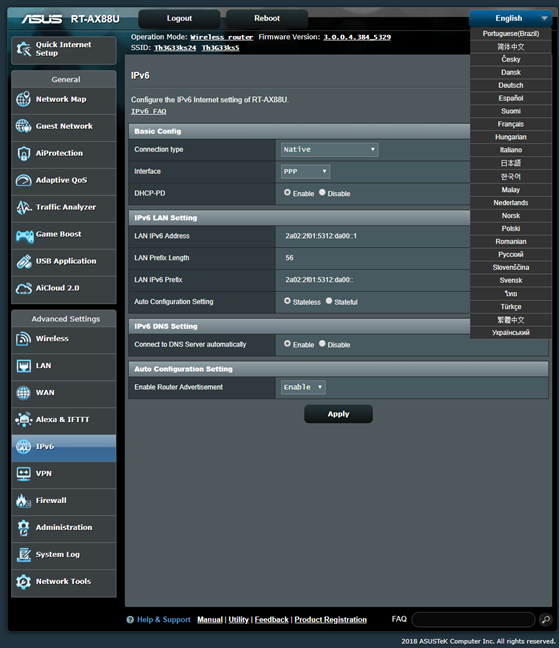
A positive is the multilingual support: the firmware for ASUS RT-AX88U is available in 24 languages. Most router manufacturers do not offer their firmware in so many languages.
The languages in which the firmware is available for ASUS RT-AX88U
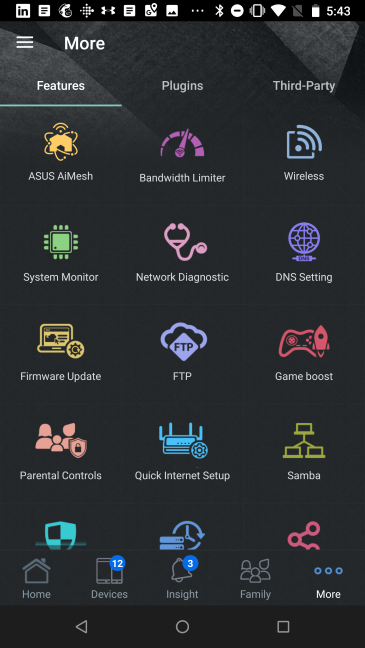
If you want to control your wireless network from your smartphone or tablet, including when you are not at home, you can use the ASUS router app. It offers many advanced customization options, including the ability to check on your children' devices, and set up rules for parental controls. The remote network diagnostics can be useful too when your family has problems with their WiFi, and you are not home to help.
The ASUS router app for Android
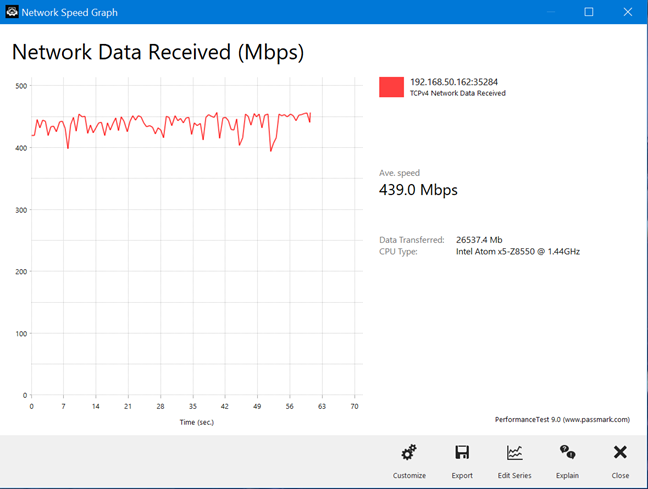
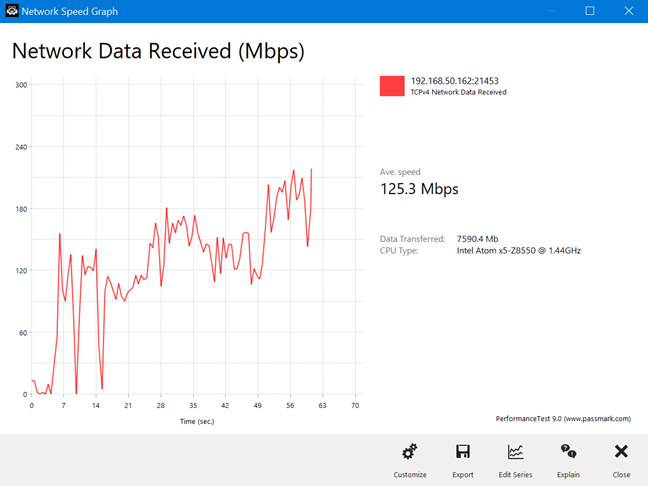
We connected about twenty devices to the network managed by ASUS RT-AX88U, including two desktop PCs, laptops, tablets, several smartphones, one wireless printer, two smart plugs, one smart bulb, and an Xbox One console. Then, we started sharing data and making transfers. In the room where the router was placed, and in those with a direct line of sight to it, we enjoyed very fast WiFi and stable network transfers. Below is an example of a typical network transfer on the 5 GHz band.
ASUS RT-AX88U - wireless transfer on the 5 GHz band
However, in the rooms that were separated by two walls from the router, with no direct line of sight to it, the variability of the transfers increased significantly. While increased variability is normal, other wireless routers from the same company, including the less expensive ASUS RT-AC86U offer better performance in this regard. This is an aspect that should be improved in future firmware updates. Below, you can see a network transfer on the 5 GHz band, in a room separated by two walls from the router:
ASUS RT-AX88U - wireless transfer on the 5 GHz band
Another important aspect of good wireless networking experiences is the compatibility of your router with network clients. ASUS RT-AX88U is a router with support for a new wireless network standard (Wi-Fi 6) that is not yet finalized, and there are no network clients on the market to support it. Unfortunately, this also brings some compatibility issues.
If you have a laptop, tablet or device with an Intel Dual Band Wireless-AC wireless network card, you might experience compatibility problems. We have a laptop with an Intel Dual Band Wireless AC-8260 adapter. At first, we could connect to the wireless network, but experienced frequent freezes and disconnects. We could not even stream a movie on Netflix or HBO GO. As documented by ASUS here, and in the packaging of the router, this problem goes away only if you update your drivers to Intel PROSet/Wireless WiFi version 20.70.0 or higher. After we updated the drivers, everything worked smoothly, and we no longer experienced problems.
If you want to know more about the real-world performance offered by ASUS RT-AX88U, go to the next page of this review.
Wireless network performance
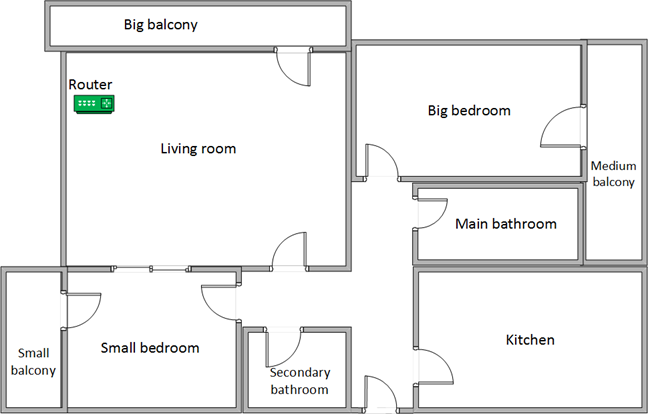
First, let's look at the apartment that was used in our testing and how it is set up. You can see that the router is placed in the living room. With most wireless routers, the signal strength is not that high in places like the Kitchen and the Medium balcony.
The apartment in which we tested ASUS RT-AX88U
Our testing was done using a fast 1 Gigabit Internet connection that is capable of uploads on the internet of up to 500 Mbps. We used an HP Spectre 13 laptop and a Lenovo Yoga Book for our measurements and several software tools.
To get a better idea of the performance offered by ASUS RT-AX88U, we compared with two high-end 802.11ac wireless routers: ASUS ROG Rapture GT-AC5300 and TP-LINK Archer C5400.
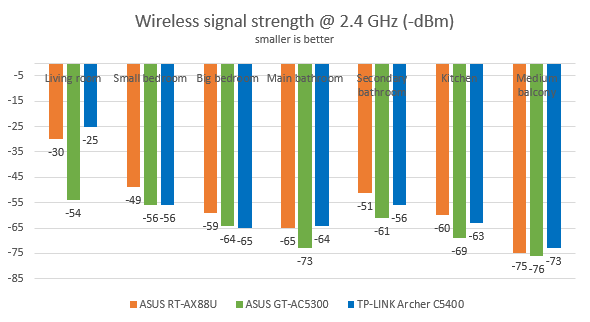
We analyzed the 2.4 GHz band first and measured the signal strength with NetSpot. You can see below how the signal strength evolved from room to room. The signal strength offered by ASUS RT-AX88U was good in all rooms. You can see how it evolved, from room to room, in the graphic below.
ASUS RT-AX88U - signal strength on the 2.4 GHz band
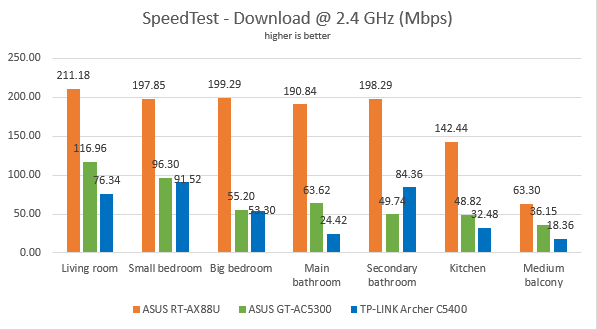
Next, we used SpeedTest to measure how fast the internet connection offered by this router is when using 2.4 GHz wireless network. ASUS RT-AX88U offered fantastic downloads in all rooms, except the one furthest from the router. ASUS RT-AX88U was often twice as fast than the routers we compared it to.
ASUS RT-AX88U - the download speed in SpeedTest, on the 2.4 GHz band
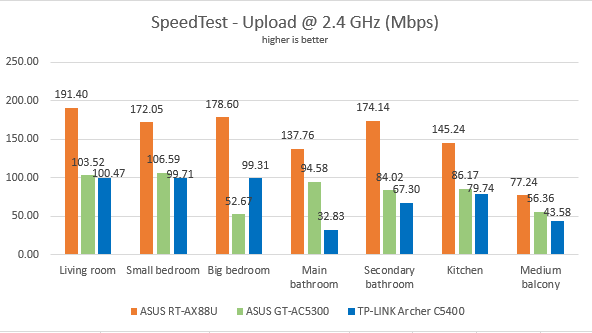
Uploads were very fast too, in SpeedTest.
ASUS RT-AX88U - the upload speed in SpeedTest, on the 2.4 GHz band
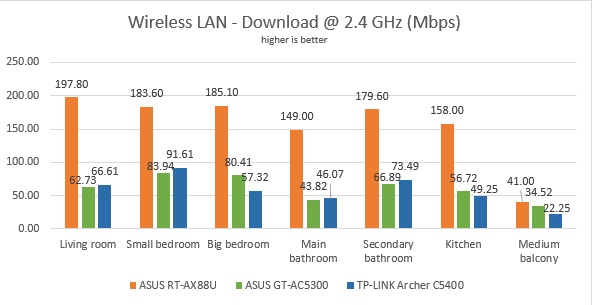
Continuing our measurements on the 2.4 GHz wireless network, we used the PassMark Performance test to transfer data between two computers connected to the network. In this test too, ASUS RT-AX88U was the fastest router in our comparison. In some rooms, the ASUS RT-AX88U was three times faster than the previous generation routers we compared it to.
ASUS RT-AX88U - the download speed on the 2.4 GHz band
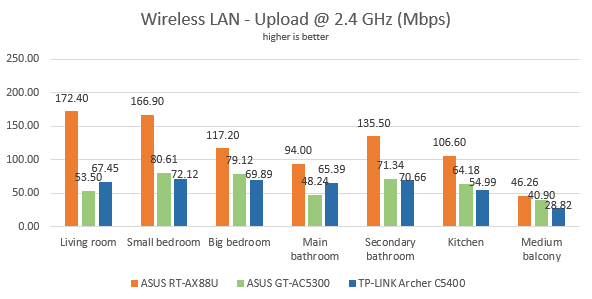
The same trend applied to the upload speed.
ASUS RT-AX88U - the upload speed on the 2.4 GHz band
Our testing has shown that ASUS RT-AX88U is amazingly fast on the 2.4 GHz wireless band.
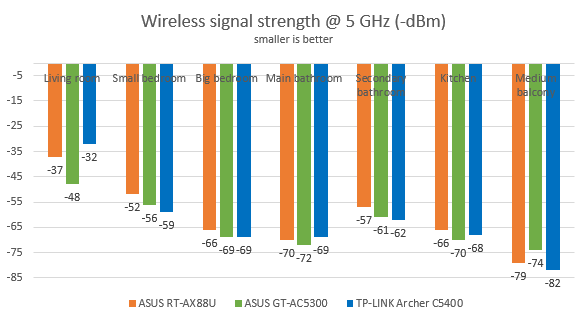
For the next set of measurements, we analyzed the performance of the 5GHz wireless band. We looked at the evolution of the signal strength, from room to room. ASUS RT-AX88U performed well without being too different from its competitors.
ASUS RT-AX88U - signal strength on the 5 GHz band
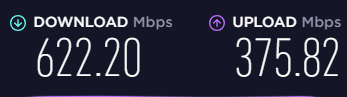
Then, we ran SpeedTest to see how fast the internet connection is when using the 5GHz band. To view the maximum potential of this router, we used the world's only PCI-Express network card with support for 4x4 MU-MIMO. When we used this network card, we obtained a maximum speed of 622.20 Mbps for the download and 375.82 Mbps for the upload - fast speeds but not the fastest you can get. The upload speed was rather underwhelming. Other 802.11ac routers like ASUS RT-AC86U, perform even better in this test.
ASUS RT-AX88U - the maximum speed on WiFi
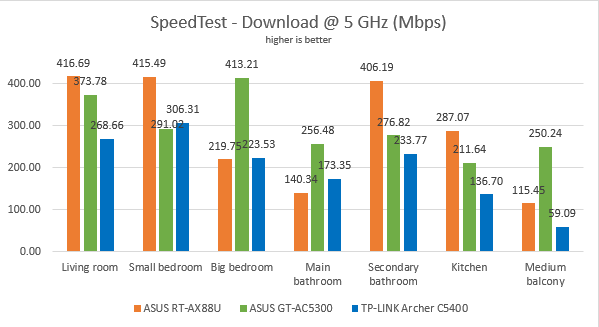
To get back to earth, and everyday devices people use, we took our laptops and measured the download speed with SpeedTest, in every room of our test apartment. ASUS RT-AX88U delivered fast downloads in the rooms with a direct line of sight to it. In others, it was outmatched by ASUS ROG Rapture GT-AC5300.
ASUS RT-AX88U - the download speed in SpeedTest, on the 5 GHz band
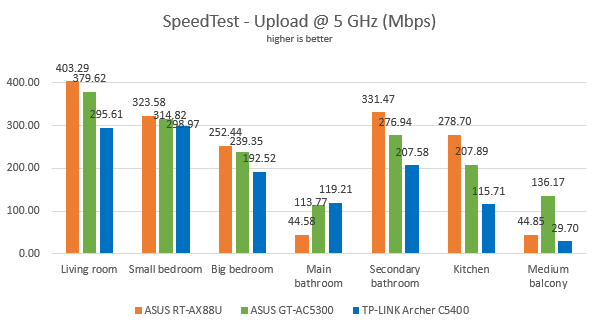
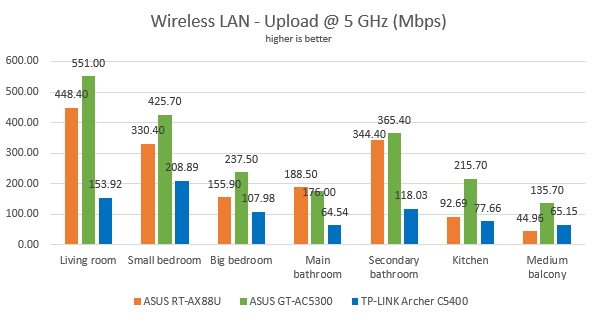
We noticed a similar trend when measuring the upload speed with SpeedTest.
ASUS RT-AX88U - the upload speed in SpeedTest, on the 5 GHz band
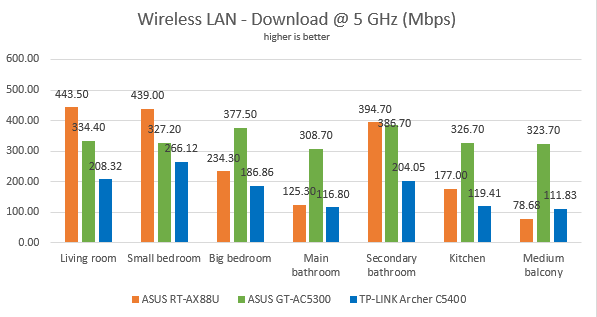
For the last measurements on the 5GHz wireless network, we used the PassMark Performance test to transfer data between two computers connected to the network. This test had similar results to the previous one: ASUS RT-AX88U delivers very fast network transfers as long as you have a direct line of sight to it. When one or more walls get in the way, previous generation routers can outperform it.
ASUS RT-AX88U - the download speed on the 5 GHz band
When we measured the upload speed, ASUS RT-AX88U was outmatched by ASUS ROG Rapture GT-AC5300.
ASUS RT-AX88U - the upload speed on the 5 GHz band
When network clients have a direct line of sight to ASUS RT-AX88U, this router delivers super fast downloads and uploads on the 5 GHz band. However, when one or more walls get in the way, previous high-end 802.11ac wireless routers outperform it.
Wired network performance
To test the quality of the wired Ethernet connection, we used a desktop PC equipped with an AMD Ryzen 5 1600 processor, running at 3.20GHz, 16GB of RAM, a fast Samsung 850 Pro 512GB SSD, and a Lenovo IdeaCentre 610s mini PC.
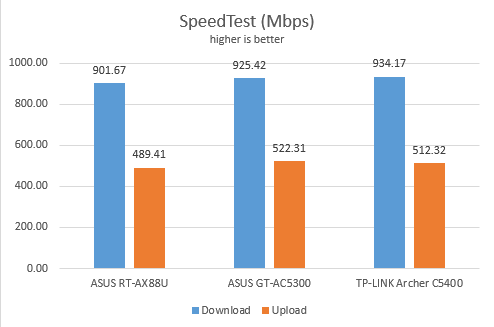
We measured the speed of the internet connection when using a 1 Gbps Ethernet cable, using SpeedTest. ASUS RT-AX88U reached speeds that were close to the maximum potential of our internet connection. However, the routers we compared it to were slightly faster.
ASUS RT-AX88U - the maximum speeds in SpeedTest, using Ethernet connections
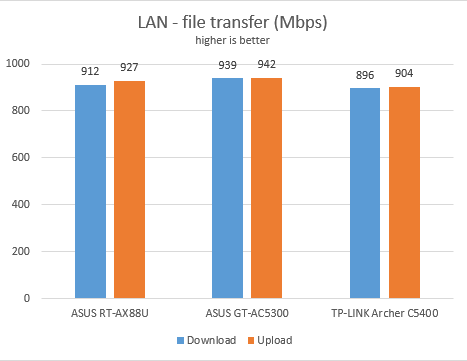
Then, we ran a network transfer between the two computers, using the PassMark Performance test. ASUS RT-AX88U delivered speeds that were close to 1 Gbps both for the download and the upload.
ASUS RT-AX88U - the speed when using Ethernet connections
The Ethernet ports on the ASUS RT-AX88U work at speeds close 1 Gbps, both for the download and the upload.
USB performance
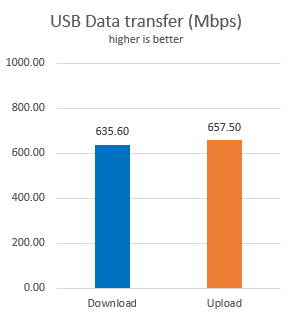
We connected a portable SSD drive to the USB 3.0 port of the ASUS RT-AX88U. Then we ran a few transfers from a desktop computer to this drive and back. We measured 635.6 Mbps for the download speed and an upload speed of 657.5 Mbps. These are top-notch speeds, making the ASUS RT-AX88U one the fastest routers that we have tested so far.
ASUS RT-AX88U - the speed of the USB ports
Users are going to love the speed potential of the USB 3.0 ports on the ASUS RT-AX88U. It is one of the fastest routers that we have tested so far, in this regard.
Extra features
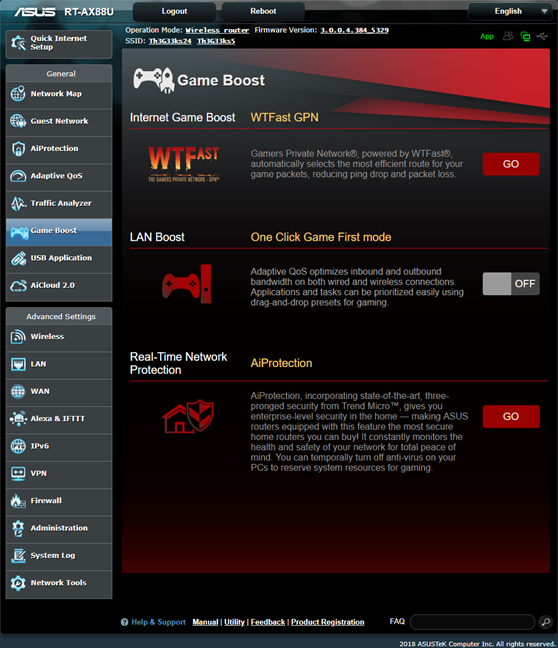
ASUS RT-AX88U bundles many of advanced features that are not found on competing routers. On this specific model, there are quite a few features for gamers:
WTFast GPN - You get the option to create a WTFast account, for optimized online gaming through a unique VPN service. You get access to some free features but, for the full service, you need to pay extra to WTFast.
LAN Boost - a one-click optimizer that enables Adaptive QoS to optimize inbound and outbound traffic for online gaming. If you want the best online gaming experience, you should enable this feature.
Real-Time Network Protection - a shortcut to the AiProtection module that provides many advanced security features.
ASUS RT-AX88U - Game Boost
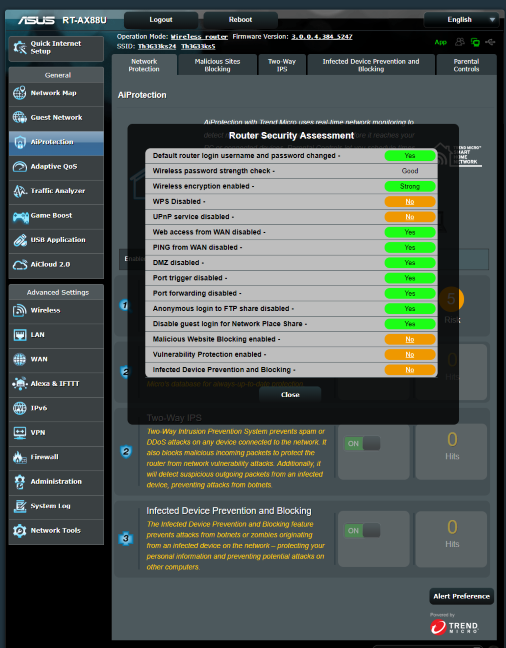
Security tools are a significant addition offered by ASUS RT-AX88U. The AiProtection module provides them:
A comprehensive Router Security Assessment tool which verifies where your router's settings are secure. When it finds problems, it proactively informs you and takes you where you need to fix things.
Malicious Sites Blocking - an efficient cloud-based module that blocks malicious websites on all the devices that are connected to your network.
Two-Way IPS - a two-way intrusion prevention system that protects all your network from spam, DDoS attacks, network attacks and more. Additionally, it also scans the packets that are sent from your network to the internet.
Infected Device Prevention and Blocking - if your network devices get infected, and they become zombies in malware networks, they are automatically blocked by your router, and you are informed about this problem so that you can fix things.
ASUS RT-AX88U - AiProtection
Other features offered by the ASUS RT-AX88U wireless router include:
Integration with Amazon's Alexa voice assistant and IFTT (If This, Then That) - a service that automates tasks that might otherwise be repetitive or unable to talk to each other. With the help of these services, you can do things like say "Alexa, ask ASUS ROUTER to upgrade the firmware" or get an email when your child gets home and connects his or her smartphone to the home WiFi.
Guest Network - you can enable up to three wireless networks for each band, with individual security and access settings.
Adaptive QoS - an intelligent QoS (Quality of Service) tool that you can use to analyze and prioritize network traffic efficiently.
Traffic Analyzer - offers visual traffic statistics which give you a clear picture of how your network is used and by which devices.
USB Applications - apps that are designed to work with all kinds of devices that you can connect to the router using USB: external hard disks, printers, and 3G or 4G dongles or modems.
AiCloud 2.0 - a mobile app that keeps you connected to your data wherever and whenever you have an Internet connection. With it, you can access the folders shared in your home network from your Android or iOS smartphone or via a personalized URL
IPv6 - support for IPv6 addresses that are going to replace IPv4.
VPN - you can set the router to work as a VPN server, and you can also use it to turn your network-connected devices into VPN-enabled clients, without additional VPN software required.
Network Tools - for analyzing the network and identifying what's wrong. They are useful when you need to troubleshoot problems.
Dual WAN - excellent for both small businesses and professionals who require always-on internet connections. You can also use a dual WAN to improve the quality of your internet connection and get the best possible performance.
DDNS - a service that allows you to connect to the router from the internet, even if your internet provider gives you a dynamic public IP address.
The ASUS RT-AX88U wireless router packs many premium features and tools that are going to be useful to its users. Some of them are aimed at gamers, others at parents, some at IT professionals, and many of them are useful to any user who wants more than just WiFi.
What is your opinion of the ASUS RT-AX88U?
You have arrived at the end of our review, and you know our opinion about the ASUS RT-AX88U wireless router and how it performed in our testing. Do you like what it has to offer? Would you consider purchasing it? If you already have the ASUS RT-AX88U, do share your experience with other readers and us.
Sir, are you able to test the update of this model, the Asus ax88 Pro ?
Ciprian Adrian Rusen ·
Hi Dimi. I just wrote to ASUS to send us a review sample, and they said Yes. However, I will be on vacation, visiting Vietnam for the next three weeks. So I’ll have the sample for review when I get back. Thanks for writing and asking for this review.
David ·
Looks Like ASUS has released Firmware Updates to the WIFI 6 Routers. Have you had an opportunity to check out the changes?
Thanks For Your Insight and Support!
Anonymous ·
I’m afraid not. After the review, we return the router(s)s to their manufacturer.
David ·
Thanks. I was hoping that a more recent review would be published with Firmware Updates recently released to aid in my decision to buy either the RT-AX88U or the RT11000 vs the GT-5300AC which looks as if it is still king.































Discussion (5)
Sir, are you able to test the update of this model, the Asus ax88 Pro ?
Hi Dimi. I just wrote to ASUS to send us a review sample, and they said Yes. However, I will be on vacation, visiting Vietnam for the next three weeks. So I’ll have the sample for review when I get back. Thanks for writing and asking for this review.
Looks Like ASUS has released Firmware Updates to the WIFI 6 Routers. Have you had an opportunity to check out the changes?
Thanks For Your Insight and Support!
I’m afraid not. After the review, we return the router(s)s to their manufacturer.
Thanks. I was hoping that a more recent review would be published with Firmware Updates recently released to aid in my decision to buy either the RT-AX88U or the RT11000 vs the GT-5300AC which looks as if it is still king.