




Apple can repair certain devices for free even when the standard warranty has expired. These repairs fall under Apple Service Programs, which target known hardware defects affecting specific models and production batches.
Many users miss out because Apple does not actively promote these programs. If your device shows a covered issue, you can often get a free fix without AppleCare+.
Table of contents
- What Apple service programs are and why they exist
- How Apple service programs differ from warranty and AppleCare+
- Devices commonly covered by Apple service programs
- How to check if your Apple device qualifies for a free repair
- What repairs Apple covers under service programs
- How to request a free repair from Apple
- What to do if Apple initially refuses the repair
- Common limitations and expiration rules to know
- Real-world examples of Apple service programs that saved users money
- How to stay informed about new Apple service programs
- FAQs
- Summary
What Apple service programs are and why they exist
Apple service programs address manufacturing defects that appear after devices reach customers. When Apple confirms a recurring issue, it launches a program that covers repairs for affected models.
These programs protect Apple from recalls while ensuring users do not pay for defects they did not cause.
How Apple service programs differ from warranty and AppleCare+
A standard Apple warranty covers defects for one year. AppleCare+ extends coverage and adds accidental damage protection for a fee.
Service programs sit outside both. They apply even if your warranty expired, as long as your device matches the affected model range and symptoms.
Devices commonly covered by Apple service programs
Apple most often includes iPhones, MacBooks, Mac minis, Apple Watches, and AirPods. Display issues, battery swelling, keyboard failures, and logic board faults appear frequently.
If your device shows a repeatable hardware issue, checking eligibility always makes sense.
How to check if your Apple device qualifies for a free repair
You can confirm eligibility in minutes using official Apple tools. Always start with the serial number, since model names alone do not guarantee coverage.
Check eligibility using Apple’s service program page
Find your device serial number, then compare it against Apple’s active service programs. You can do this by following the steps below:
- Open Settings > General > About on your device to check the serial number.
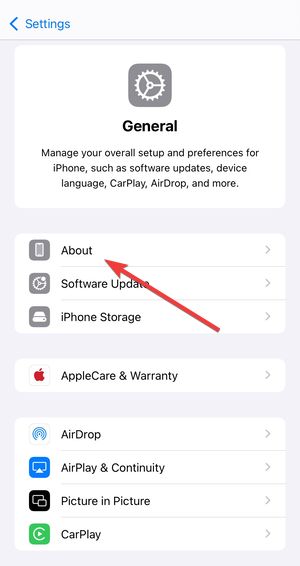

- Go to the Apple Service Programs page.
- Next, select the right program that best explain the problem your device is having.


- Lastly, type your device’s serial number, click Submit, and wait to see the eligibility.
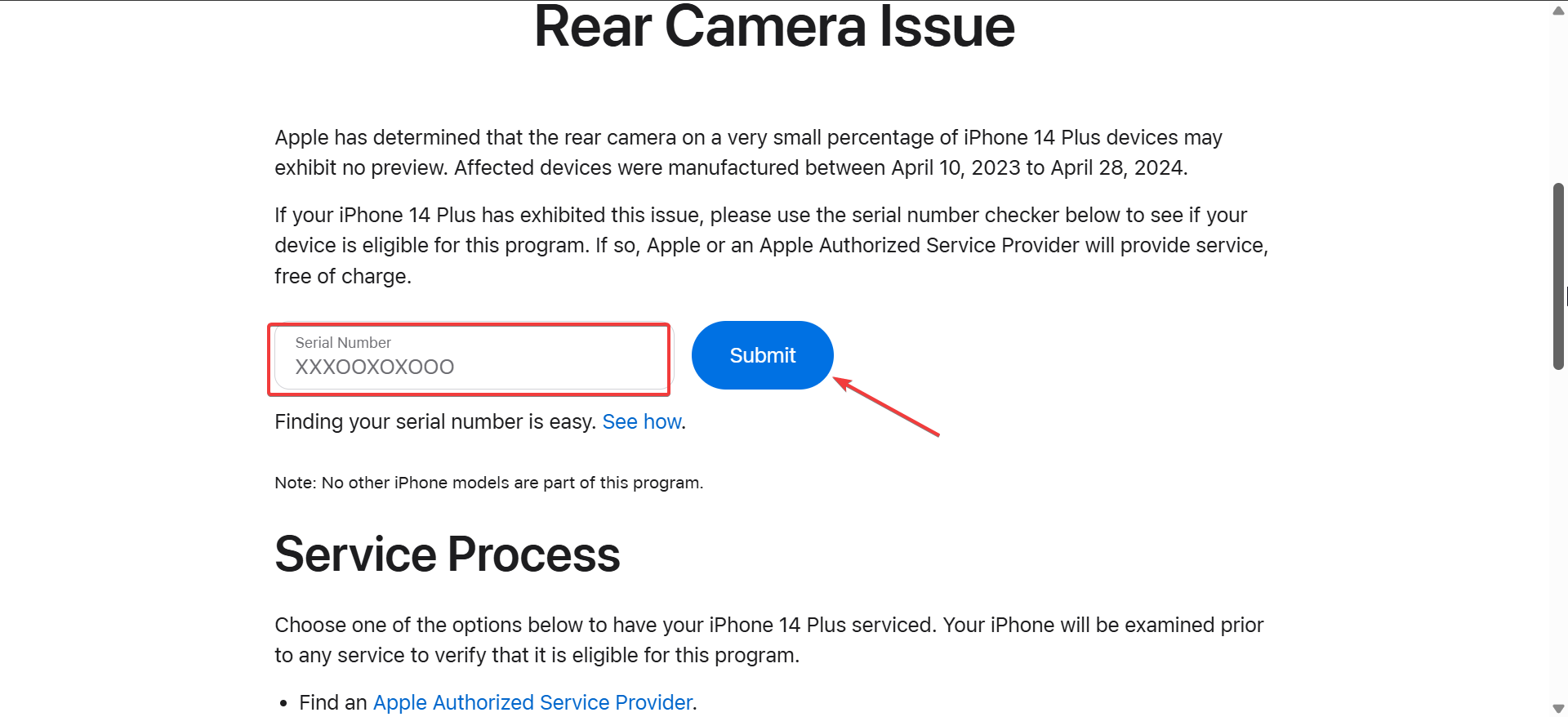
If your serial number qualifies, Apple confirms coverage immediately.
Check eligibility directly from your Apple device
On iPhone or iPad, open Settings → General → About → Coverage Expired. On Mac, open System Settings → General → About.
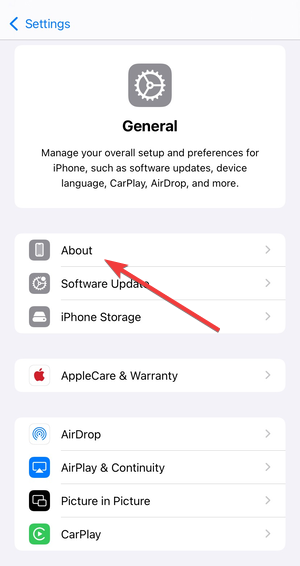
This method helps when you no longer have the original box or receipt.
What repairs Apple covers under service programs
Apple usually covers the exact defective component, not unrelated damage. Common examples include keyboard assemblies, batteries, displays, speakers, and logic boards.
Cosmetic damage or accidental damage can still block approval, even if the device qualifies.
How to request a free repair from Apple
Apple allows multiple ways to start a service request. Choosing the right option can reduce delays and repeated diagnostics.
Getting a free fix at an Apple Store
Bring your device and mention the specific service program by name. Ask for a diagnostic to confirm the known defect.
Apple Store technicians verify symptoms before approving the repair.
Using mail-in or authorized repair services
If no Apple Store sits nearby, request mail-in service or visit an Apple Authorized Service Provider. Apple covers shipping for approved repairs.
Mail-in repairs often take longer but follow the same eligibility rules.
What to do if Apple initially refuses the repair
A refusal does not always end the process. Many users succeed after clarification or escalation.
How to ask for a second diagnostic or escalation
Explain the symptoms clearly and reference the specific service program. Ask politely for a senior technician or second diagnostic.
Consistency between symptoms and program criteria improves approval chances.
When consumer law or regional rules help
Some regions offer extended consumer protection laws that strengthen repair claims. Use this route only after Apple denies eligibility under the service program.
Apple still makes the final determination.
Common limitations and expiration rules to know
Service programs usually last three to five years from the original purchase date. Apple can quietly expire programs without advance notice.
Always check eligibility as soon as issues appear.
Real-world examples of Apple service programs that saved users money
Users have avoided hundreds of dollars in repair costs through keyboard replacement programs, battery defect programs, and display repair programs.
Most success stories involve users who checked eligibility early and matched symptoms precisely.
How to stay informed about new Apple service programs
Bookmark Apple’s official service program page and check it quarterly. Tech news sites often report new programs weeks before users notice issues.
Early awareness increases your chances of qualifying.
FAQs
Can Apple service programs apply to second-hand devices?
Yes, coverage follows the device, not the original owner.
Does Apple erase data during service program repairs?
Apple recommends backups, but data loss depends on the repair type.
Can multiple repairs happen under one service program?
Apple usually limits coverage to the defective component once.
Do expired programs ever reopen?
Apple rarely reopens expired programs, but it has happened in extreme cases.
Summary
- Identify your device’s serial number and symptoms.
- Check Apple’s active service programs for eligibility.
- Request service through an Apple Store or mail-in repair.
- Escalate politely if Apple initially refuses.
Apple service programs exist to fix known defects, even when your coverage warranty status has expired, not to upsell repairs. Before paying out of pocket, always check whether Apple already offers a free fix for your device.


Discussion (0)
Be the first to comment.