




RJ45 Ethernet connectors power most wired networks in homes and offices. They create fast, stable links between your devices and your router or switch. This guide explains how RJ45 works, why it matters, and how it differs from similar connectors.
Table of contents
RJ45 Ethernet explained
RJ45 describes the common connector used on Ethernet cables. It plugs into ports on routers, PCs, and network switches to deliver reliable wired connectivity.

How an RJ45 connector works
The connector uses an 8P8C layout, which means eight positions and eight conductors. Each pin sends or receives data, and the twisted pairs reduce electrical interference.
What RJ45 is used for
You find these connectors on desktops, laptops, gaming consoles, smart TVs, routers, and access points. RJ45 provides consistent speeds that outperform Wi-Fi when you need stability.
RJ45 vs other connectors
Many modular connectors look similar. Knowing the difference helps you identify the right cable.
RJ45 vs RJ11
RJ45 uses eight pins, while RJ11 uses only four or six. RJ11 fits phone lines, not Ethernet ports, and cannot support the bandwidth required by modern networks.
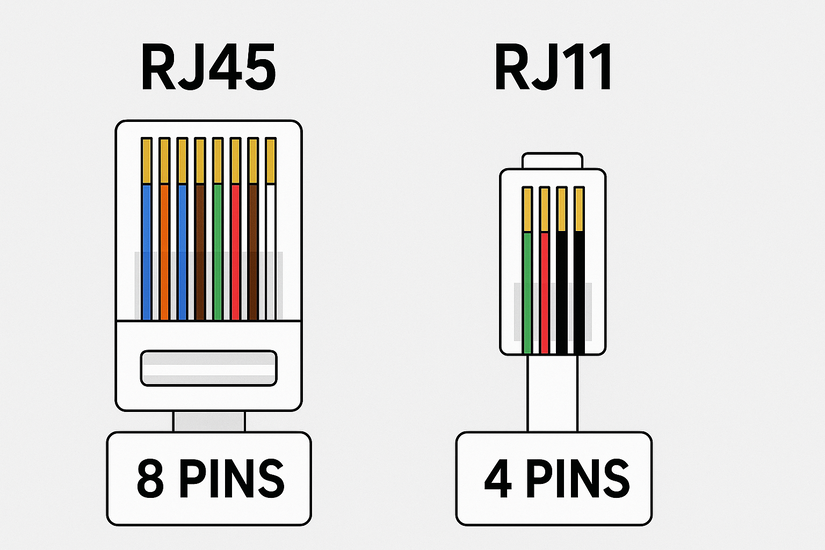
RJ45 vs 8P8C terminology
Most “RJ45” connectors today follow the 8P8C specification. People still use the RJ45 term out of habit, but Ethernet systems rely on the 8P8C standard for wiring.
Ethernet cable categories that use RJ45
Different Ethernet cable categories support different speeds and shielding designs.
Cat5e and Cat6 for typical users
Cat5e and Cat6 handle gigabit speeds and suit gaming, streaming, and everyday home use. They offer a strong balance of cost and performance.

Cat6a, Cat7, and Cat8 for high-performance needs
These categories push higher bandwidth over longer distances. They work well in offices, advanced home labs, and data center environments.
RJ45 wiring standards
Ethernet cables wiring follows one of two patterns. Installers follow these standards to ensure reliable signaling.
T568A vs T568B
T568A and T568B differ in color coding but achieve the same performance. You should pick one pattern and apply it to both ends of the cable.

Understanding straight-through vs crossover cables
Straight-through cables connect different device types, like PCs to switches. Crossover cables connect similar devices, though modern hardware usually auto-detects the correct mode.
When to use RJ45 Ethernet
Wired Ethernet gives you stable and predictable performance. You gain more control over your connection quality.
Performance advantages of wired Ethernet
RJ45 links reduce latency and eliminate the dropouts you often see with Wi-Fi. They also support full-speed gigabit transfers without interference.
Compatibility considerations
Most desktops and many laptops include RJ45 ports. If your device lacks one, you can use a USB-to-Ethernet adapter.
How to choose the right RJ45 cable
Picking the correct cable ensures the speed you expect.
Distance and speed requirements
Longer runs benefit from Cat6a or higher because they maintain signal quality over distance. Shorter home runs work well with Cat5e or Cat6.
Shielded vs unshielded cables
Shielded cables block interference in environments full of electrical noise. Unshielded cables work well in typical home settings.
Common problems with RJ45 connections
- Loose or damaged connectors: Bent clips or worn contacts cause random disconnects. Replace the cable if the connector wiggles inside the port.
- Incorrect wiring or pinout: Misplaced wires break the signal path. A simple cable tester reveals the faulty pairs.
- Cable category mismatch: A Cat5 cable limits speeds even if your router supports gigabit or faster. Upgrade the cable to unlock full performance.
FAQs
What does RJ45 mean? It refers to a standardized Ethernet connector type with eight pins.
Is RJ45 the same as Ethernet? Not exactly. RJ45 is the connector, while Ethernet refers to the networking technology.
Can I use an RJ11 plug in an RJ45 port? It physically fits, but it never works for Ethernet and may damage the port.
Do modern devices still need crossover cables? Not usually. Most ports support auto-MDI/MDIX and switch signal paths automatically.
Summary
- RJ45 describes the connector used by most Ethernet cables.
- It uses an 8P8C pin layout to send and receive data.
- Cat5e, Cat6, and higher categories support different speeds and shielding.
- T568A and T568B define the cable’s wiring pattern.
- Wired Ethernet boosts stability, reduces latency, and helps avoid Wi-Fi issues.
RJ45 Ethernet remains the simplest way to get fast and consistent networking. It supports every modern Ethernet cable category and works with almost all routers, switches, and PCs. When you understand the connector, the standards, and the cable types, you build a network that runs smoothly and avoids common performance problems.


Discussion (0)
Be the first to comment.