



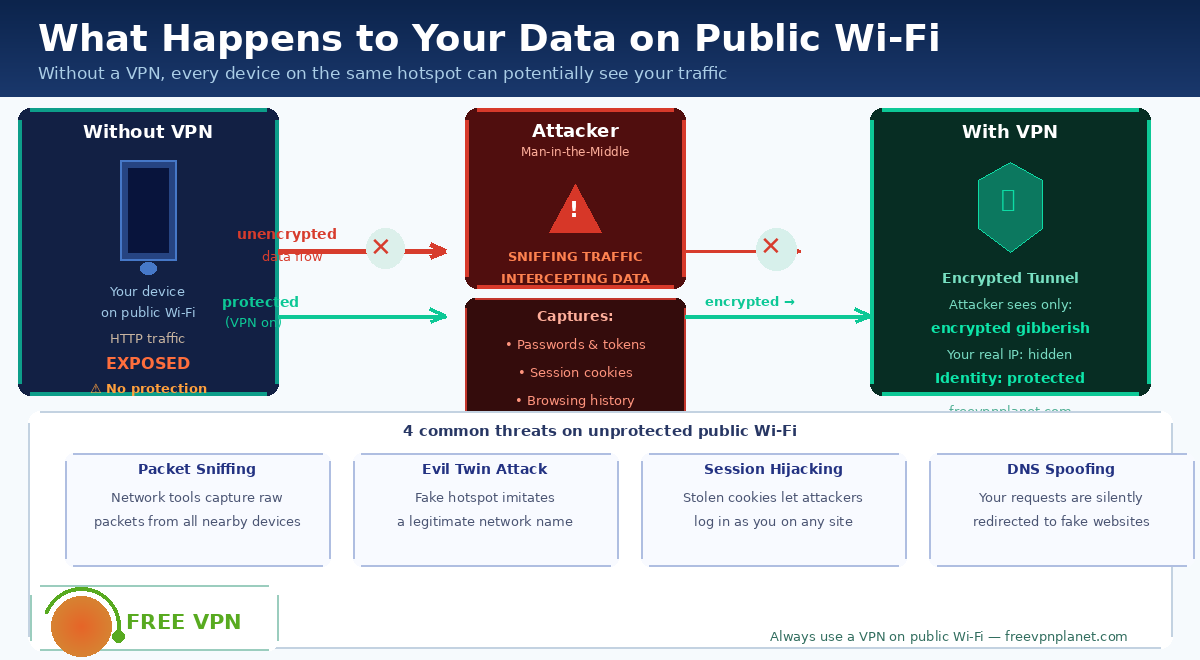
After connecting to the coffee shop's Wi-Fi, explore on your laptop. It feels no different from home. But the network you just joined is shared with dozens of strangers — and depending on what's running on it, some of them may be able to see more of your traffic than you'd expect.
The Difference Between Home and Public Networks
Your wifi router at home dictates what devices can see and connect to each other, and what they can see of each other's communications. You can’t know who set up the network, how it was set up, or who else might be linked to it through a public hotspot, like as a hotel, library, airport or café. When you share a broadcast medium with strangers, network-level isolation is off by default.
The protocols that carry your web requests don't ask whether the network is trustworthy. A request sent over HTTP — the non-encrypted version of the web's transfer protocol — moves through the network as readable text. Any device on the same access point with the right software can see what you're requesting, what data you're sending with those requests, and the responses coming back.
What an Attacker on the Same Network Can See
The most basic form of network monitoring is called packet sniffing. Network packets — the small units of data that carry web traffic — are transmitted to every device on the same access point before the router filters them by destination. Tools designed to capture these packets in promiscuous mode can read the contents of unencrypted traffic without any special access to the network.
A more targeted attack is session hijacking. Many websites use cookies to keep you logged in. These cookies are small tokens sent back and forth with each request. If your session cookie travels over an unencrypted connection, someone who captures it can use it to authenticate as you on that website — no password required. Your account stays yours by name, while someone else acts through it.
The evil twin attack can also be used to take data from devices that connect automatically or without being checked. This is done by making a fake hotspot with the same name as a real one (like Airport Wi-Fi or CafeNet). If your device connected to that network before, it may rejoin the fake one silently.
What HTTPS Protects — and What It Doesn't
The shift toward HTTPS has significantly reduced the risk of content interception. When a site uses HTTPS, the data flowing between your browser and that server is encrypted — a sniffer on the same Wi-Fi network would see that you connected to a server, but not the content of what you sent or received.
However, HTTPS doesn't conceal which domains you visit — that information travels in plaintext through DNS queries and the initial TLS handshake. It also doesn’t safeguard any traffic that is generated outside the browser, email clients that have unencrypted connections, or programs that use obsolete or poorly-implemented protocols. Also , it does n't prevent a malicious access point from changing DNS answers to send you to a phony website that looks like the real thing .
How Encryption Closes These Gaps
When all of your traffic passes through an encrypted tunnel before leaving your device, the access point — and anyone monitoring it — sees only encrypted data going to a server, with no visibility into destinations or content. This is what a VPN (Virtual Private Network) does: it wraps every packet from your device in a layer of encryption before it reaches the hotspot, so network-level observers have nothing readable to work with.
Tools like Planet VPN encrypt traffic across all apps and protocols, not just browser requests, and replace your visible IP address with that of a server in another location. The practical effect is that a packet sniffer on a public hotspot receives data that is computationally indistinguishable from random noise — there's nothing actionable to extract.
For regular travelers, remote workers, or anyone who frequently uses shared networks, this kind of blanket protection matters most in the moments when the risk feels lowest — when a network looks normal, has a familiar name, and the connection seems fast and reliable.
Building a Habit Around Network Awareness
The security properties of a network are invisible to most users. There is no warning when a coffee shop updates its router to one with weaker settings. There is no indicator when a hotspot next to you has the same name as the real one. The only reliable signal is whether your own device is treating all network traffic as potentially hostile — and encrypting accordingly.
Public Wi-Fi is useful and often necessary. The question is not whether to use it, but whether to use it with the same assumptions you apply to your home network — which is a fundamentally different environment, with fundamentally different trust properties.


Discussion (0)
Be the first to comment.