




On Cash App, “cash out” means you move money from your Cash App balance to your bank account or debit card, or you withdraw it with your Cash App Card. When you understand how Cash App cash out works, you choose the right option between standard transfer, instant cash out, or ATM withdrawal and avoid surprise fees.
This quick guide explains what Cash Out means on Cash App, how each withdrawal option works in current versions of the app, and how to pick the safest and cheapest way to get your money.
What Cash Out Means On Cash App

Cash out on Cash App covers any time you take money out of your Cash App balance. You either send it to a linked bank account, send it instantly to a debit card, or use your Cash App Card at a store or ATM. The app calls all of these actions a “cash out,” even if you never touch paper bills.
Before you cash out on Cash App, check that you have an available balance and a linked bank account or debit card. Cash App only sends money out of your Cash App balance, so pending payments or investments do not move until they settle.
How To Cash Out On Cash App
Cash App keeps the basic steps the same for every type of cash out, then lets you choose standard or instant speed. Use these steps on an iPhone or Android phone when you want to move money off Cash App.
- Open Cash App on your phone and sign in.

- Tap your Cash App balance in the bottom left (or the Banking tab).

- Choose Cash Out.
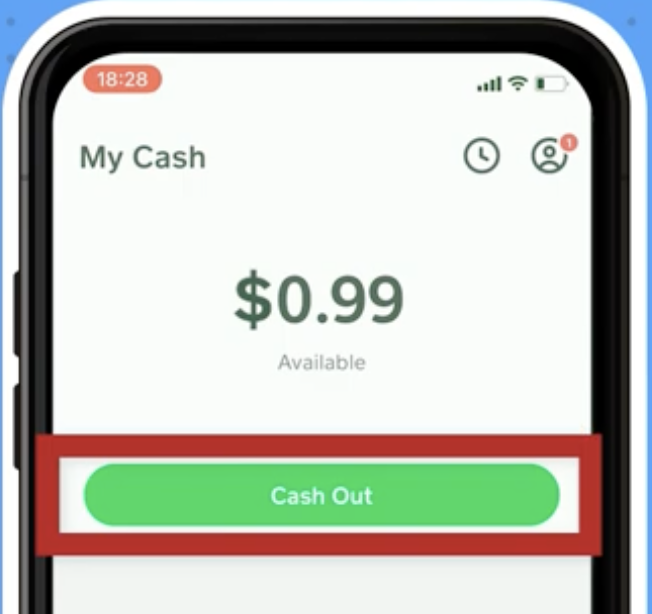
- Enter how much money you want to move from your Cash App balance.
- Tap Cash Out again to continue.
- Select Standard for a free bank transfer, or Instant for faster delivery with a fee.
- Confirm the linked bank account or debit card and approve the Cash App cash out.
Standard Cash Out To A Bank Account
A standard Cash App cash out sends your balance to a linked bank account with no Cash App fee. The app usually shows a delivery window of one to three business days, and most users in the United States see the transfer finish within that range.
Choose a standard Cash App cash out when you do not need the money right away and you want the full amount to reach your bank. This works best for routine transfers like moving extra Cash App funds into your main checking account.
Instant Cash Out To A Debit Card
An instant Cash App cash out sends money to your linked debit card in minutes in most cases. Cash App charges a percentage-based fee for this instant cash out option, with the fee and total amount clearly listed on the confirmation screen before you approve it.
Use instant cash out when you need fast access to your Cash App money and you accept the extra fee. Many users treat instant cash out as an emergency feature rather than a daily habit so those small fees do not add up.
Using Cash App Card For Cash Out
Your Cash App Card also works as a way to cash out without starting a transfer. When you pay in a store, you cash out by spending directly from your Cash App balance. You can also use the Cash App Card at an ATM that accepts Visa to withdraw cash, though the ATM and Cash App may both charge fees after any free withdrawal limits.
This option helps when you want physical cash or when you prefer to spend your Cash App balance without waiting for a bank transfer. Always check the ATM fee notice on the screen before you confirm the withdrawal so you know the total cost.
Troubleshooting Common Problems
Cash App usually sends cash outs without problems, but a few common issues can slow your money down or stop it completely. These quick checks often fix a Cash App cash out that seems stuck or failed.
- Cash out pending: Open the activity tab, tap the pending cash out, and look for a message that asks you to confirm your identity or verify a bank. Complete those prompts and try again.
- Cash out failed: Check that the debit card or bank account still works and has not expired or closed. Remove and re-add the card or bank inside Cash App if needed.
- Wrong account or card: Review your linked banks and cards before each cash out. Edit or remove old accounts so you do not send money to the wrong place.
- Cash App security lock: If Cash App flags a transfer as risky, it may cancel the cash out. Double-check that you recognize all recent payments and then try a smaller cash out amount.
- ATM decline with Cash App Card: Confirm that your Cash App balance covers the withdrawal plus any ATM fees and that you entered the correct PIN.
Tips
- Use standard cash out whenever possible to avoid instant cash out fees and keep more of your money.
- Keep at least one backup bank account or debit card linked so you have another option if your primary card expires.
- Turn on security locks such as PIN or biometric ID inside Cash App to protect your balance before you cash out.
- Check your Cash App cash out history in the activity tab if you track spending or reconcile a budget.
- Plan large Cash App to bank transfers on weekdays so standard cash outs do not run into weekend delays at your bank.
FAQ
What Does Cash Out Mean On Cash App?
Cash out means you transfer money from your Cash App balance to a linked bank account or debit card, or you withdraw it with your Cash App Card. Any time you move funds out of Cash App, the app treats it as a cash out.
Is Cash Out On Cash App Free?
Standard cash out to a bank account usually does not include a Cash App fee, but it can take up to a few business days. Instant cash out costs a small percentage of the transfer, and ATM withdrawals with the Cash App Card can include Cash App and ATM operator fees.
How Long Does A Cash App Cash Out Take?
Standard Cash App cash outs typically arrive in one to three business days, depending on your bank. Instant cash out sends money to your debit card within minutes in most cases, but it costs more.
Can I Cancel A Cash Out On Cash App?
You can only cancel a cash out while it still shows as pending and Cash App still displays a cancel option in the activity screen. Once your bank or card accepts the transfer, you usually need to work with that bank to move the money back.
Does Cash Out Affect My Cash App Limits?
Cash out activity counts toward your Cash App send and receive limits. Verifying your identity in the app often raises those limits for larger withdrawals and transfers.
Summary
- Cash out on Cash App means you move money from your Cash App balance to a bank account, debit card, or Cash App Card withdrawal.
- Standard cash out sends money to your bank for free but can take up to a few business days.
- Instant cash out reaches your debit card in minutes and charges a small percentage fee for the speed.
- The Cash App Card lets you spend or withdraw your balance directly, sometimes with ATM fees.
- Check cards, accounts, and security alerts any time a Cash App cash out shows as pending or fails.
Conclusion
When you know what cash out means on Cash App and how each option works, you decide the best way to move your money every time. Standard transfers give you free Cash App withdrawals when you can wait, while instant cash out and the Cash App Card give you fast access when timing matters more than small fees.
Review your bank details, keep your account secure, and watch the fee line on the confirmation screen before you tap approve. With a clear Cash App cash out strategy, you control how and when your balance leaves the app instead of letting fees and delays control you.


Discussion (0)
Be the first to comment.