The Copy and Paste commands have been hailed as lifesavers by many computer users, eliminating the tedious work of recreating data that is already available elsewhere. They deal in saved time, and this is a precious commodity in our digital age. Do you understand what Copy, Cut, and Paste do? Do you know how they work? From where do the terms come? Read this guide and learn the answers to all these questions:
Definition: What is Copy and Paste when it comes to computers?
Copy and Paste are ones of the most used commands when using computers and devices. With Copy and Paste, you transfer information from one place to another. The Copy command creates a duplicate of a piece of data in a storage area in Windows called clipboard. The Paste command inserts the data from the clipboard in the place where you use this command.
The clipboard can hold different data like text, images, videos, files or folders. The necessary condition is that the two places, where you Copy and where you Paste, are compatible, and can work with the same data. For more details, read: What is the clipboard from Windows?.
Cut versus Copy: what is different?
The Cut command copies the selected data to the clipboard, but it also deletes it from its origin. The Copy command is used to duplicate the origin data, while the Cut command is used to move data. The Windows clipboard is a place with a fragile existence. If you Cut and then forget to Paste before copying new data to the clipboard or shutting down your computer, the old data can be lost forever (with the exception of files and folders that remain in their original place). One remedy for this is a new feature in Windows 10 October 2018 Update. See How to use the Clipboard in Windows 10: Paste older items, pin items or delete items.
From where do the terms Copy, Cut, and Paste come?
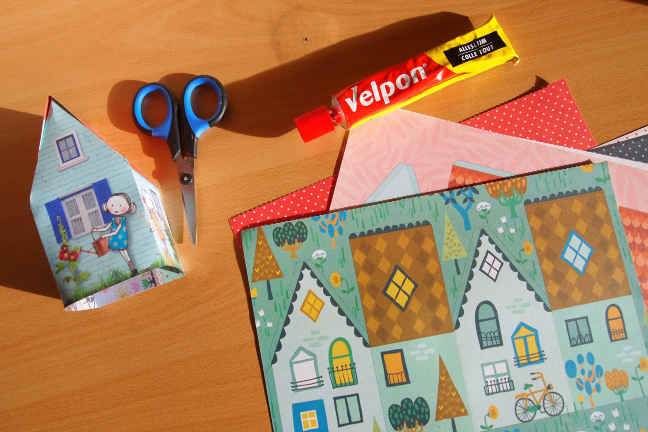
While the Copy and Cut commands have names that easily make sense, the Paste command is harder to grasp. The actual origin of the words Cut and Paste come from the editing process on paper. The cut was done using scissors, and the resulting scraps of paper were pasted onto another page.
Cut and Paste using paper and scissors
As a result, the clipboard commands are associated with standard icons that are displayed alongside their names to make the recognition easier, and the Cut command is associated with scissors.
Windows icons for clipboard commands
What is Cut, Copy and Paste on the keyboard?
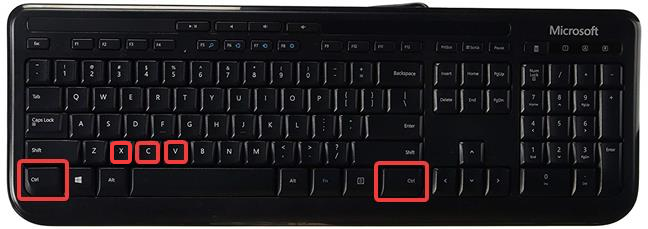
The Cut, Copy and Paste commands are strongly associated with their keyboard shortcuts: CTRL+X,CTRL+C, and CTRL+V. This is the fastest way to access them when you have a keyboard available.
The way to run them is to press and hold the CTRL key, and, while pressing CTRL, press the other key in the combination (X, C, or V).
The keys for Cut, Copy and Paste on the keyboard
How often do you Copy and Paste?
For the user who produces content on a computer, Copy and Paste are the essential tools of productivity and of avoiding reinventing the wheel. For the authors who sell their content for a living, "Copy and Paste" is a disparaging expression that identifies the practice of getting somebody else's content and presenting as their own. What is your experience with Copy and Paste? Do you use these commands often? Comment below and let's discuss.










Discussion (0)
Comments are closed.