




If you want to transfer YouTube subscriptions to another account, start with a clear truth: YouTube does not support direct subscription transfers. You can’t move subscriptions from one Google account to another with a single click.
You still have safe, practical ways to keep or rebuild your subscriptions. The right method depends on whether you use one Google account or two.
Table of contents
- Why YouTube subscriptions can’t be transferred directly
- What “transfer” actually means on YouTube
- Switch subscriptions using a Brand Account
- Transfer subscriptions between two different Google accounts
- Can you automate subscription transfers?
- Common mistakes when trying to move subscriptions
- What happens to watch history, likes, and recommendations
- Best option based on your situation
- FAQs
- Summary
Why YouTube subscriptions can’t be transferred directly
YouTube ties subscriptions to a specific Google account and channel ID. This design blocks bulk migration between separate accounts, even when you own both.
Knowing this upfront saves time and helps you avoid unsafe third-party tools.
What “transfer” actually means on YouTube
Most people mean one of three things when they say “transfer.” You either switch channels, export a list, or manually resubscribe.
YouTube supports switching channels under the same Google account. Any move across accounts requires a workaround.
Switch subscriptions using a Brand Account
A Brand Account lets multiple channels live under one Google login. Switching channels can show you the subscriptions tied to that channel without moving anything.
To do this, go to Settings > Advanced settings on YouTube and click the Move channel to a brand account option. Next, go to the Account section under Settings and click Add or remove managers in front of Channel Managers.
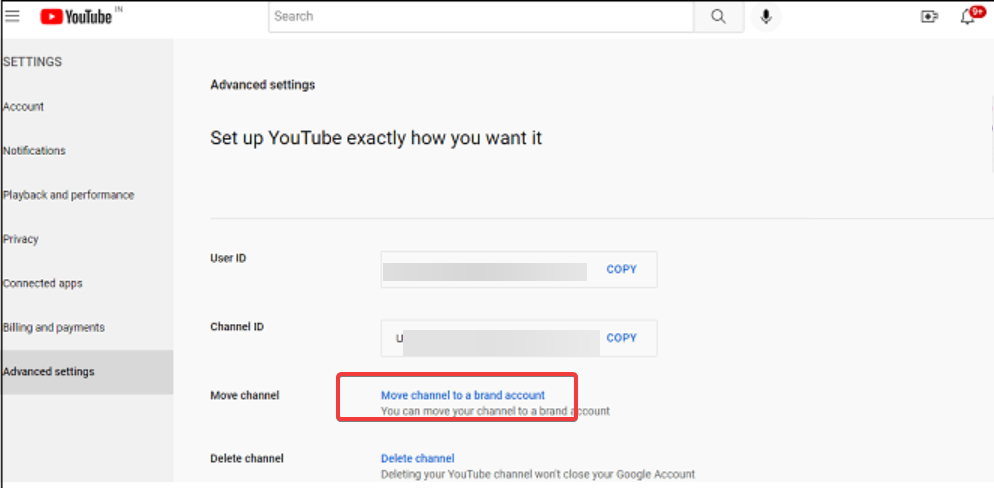
Now, click Manage permissions and sign in if you are asked to verify your account. From here, click the Invite new user option and add your new Google account. Finally, set the role as Owner or Manager and click Invite, followed by Done.
This moves the channel data (videos, subs) after the new account is verified.
Transfer subscriptions between two different Google accounts
YouTube offers no direct transfer between accounts. The safest workaround uses an export plus manual rebuilding.
This method takes longer, but it keeps your account safer than automation hacks.
Export subscriptions with Google Takeout
Go to the Google Takeout page and deselect all other options except YouTube and YouTube Music. Click the Next step button, then select your export type, size, and every other detail.

Now, click the Create export button, and you will be notified by email when the export is complete.

Re-subscribe efficiently using the exported list
Download the exported Zip file and extract the content. Next, look for a subscriptions.csv file and double-click it to open it. Now, you can start pasting the URL of the channels you subscribed to on your browser to subscribe again, or use a Chrome extension to perform bulk subscription.

Can you automate subscription transfers?
YouTube blocks full automation for subscription actions in most consumer workflows. Tools that promise one-click transfers often trigger security checks or policy issues.
Manual methods take more time, but they keep you in control.
Why third-party “transfer tools” are unsafe
Many tools rely on browser automation, scraped scripts, or unofficial methods. These tactics can violate policies and put your account at risk.
Avoid them even if they look convenient.
Common mistakes when trying to move subscriptions
Many users delete the old account too early or assume that watch history will move with subscriptions. Others install shady extensions that claim to migrate everything.
Confirm your new subscriptions list before you remove access to your old account.
What happens to watch history, likes, and recommendations
Watch history, likes, and recommendations stay with the original account. A new account starts fresh even if you re-subscribe to the same channels.
Expect recommendations to change for a while as YouTube relearns your viewing habits.
Best option based on your situation
If you created a Google account that you use for your YouTube, switching channels through a Brand Account usually works best. If you use two accounts, export your subscriptions and re-subscribe manually.
If you want a cleaner feed, start fresh and rebuild only the subscriptions you still watch.
FAQs
Can YouTube add subscription transfers in the future?
YouTube has not announced a direct subscription transfer feature.
Do subscriptions affect monetization or recommendations?
Subscriptions influence recommendations, but they do not move monetization status between accounts.
Will re-subscribing notify creators?
Creators can see new subscribers, but they won’t see your previous subscription history.
Summary
- YouTube does not support direct subscription transfers between Google accounts.
- Brand Accounts help only when both channels live under the same Google login.
- Google Takeout can export a subscription list you can reuse safely.
- Manual re-subscription remains the safest option across separate accounts.
Transferring YouTube subscriptions works best when you pick the method that matches your setup. Switch channels when you stay inside one Google account, and export plus re-subscribe when you move to a different account. Skip automation tools, rebuild carefully, and you’ll avoid account problems.


Discussion (0)
Be the first to comment.