Heimdal is a relative newcomer to the market of security products. In the past, they offered Heimdal Free and Heimdal PRO to home users. They were efficient products, that added new layers of protection to existing antivirus products. We loved using them, and we highly recommended Heimdal to all our readers. The company has recently launched new products, with different names, that also include the traditional antivirus protection that they lacked in the past. We now have Heimdal Thor Free, Heimdal Thor Foresight, Heimdal Thor Vigilance, and Heimdal Thor Premium Home. Read this review and understand what is different between all these products, how efficient they are in protecting your Windows computer, and which one we recommend that you buy:
What are Heimdal Thor Premium Home, Heimdal Thor Vigilance Home, Heimdal Foresight Home, and Heimdal Thor Free?
Heimdal Thor Premium Home is the top security app created by Heimdal for home users, and it includes the following security modules:
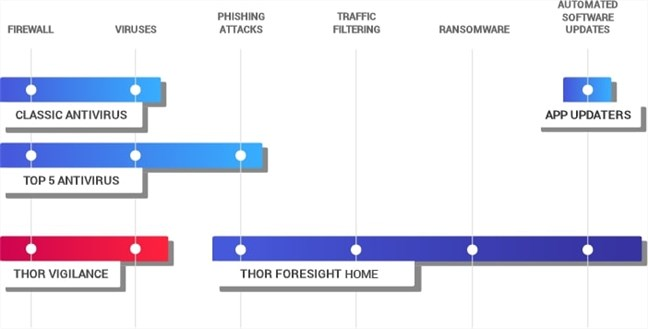
Thor Foresight Home is a module that provides you with additional security layers. It scans your computer for third-party apps that are known to have security vulnerabilities and, if any are found, automatically updates them to their latest versions. It can also block incoming attacks, ransomware, banking trojans, phishing attempts, and so on, by scanning all your internet traffic (HTTP, HTTPS, and DNS). If you are already a victim, Thor Foresight Home can also block the communications between malware and cybercriminal-controlled servers, to prevent botnet inclusions, data leakage, ransomware dial back, etc. In conclusion, Thor Foresight Home is a security module that offers you proactive protection, to stop threats before they reach your computer.
Thor Vigilance Home is the antivirus module bundled by Heimdal Thor Premium Home, based on the Avira antivirus engine. The antivirus uses both local and cloud-based virus definitions, and provides you with protection against traditional malware threats. In other words, Thor Vigilance Home offers reactive protection against threats that have already found their way onto your computer, or those that you are accessing in real-time.
The differences between Heimdal's Thor products
If you do not need all the features of Heimdal Thor Premium Home, you can buy Thor Vigilance Home and get only the antivirus module, or Thor Foresight Home to get only the proactive protection layer. Heimdal Thor Free includes just the app-updater module.
Heimdal Thor Premium Home: Who is it good for?
Heimdal Thor Premium Home is a security product that is great for people who want to:
Protect their computers from malware attacks originating on the internet, ransomware, banking and financial trojans, viruses, phishing attempts, etc.
Automatically patch and keep vulnerable apps up-to-date
Stop their personal information from being stolen and leaked online
Be protected from malware threats that have already found their way onto their computers, using its built-in antivirus engine
Pros and cons
We appreciate the following about Heimdal Thor Premium Home:
The user interface looks good, and it is easy to use
It enhances your security by automatically patching many of the commonly used, known to be vulnerable, third-party apps
Has a web scanning engine that protects you against malicious websites before you reach them in your web browsers and apps
If your PC gets infected, Heimdal Thor Premium Home can block internet traffic and stop hackers from stealing your information. That is especially important when you consider your financial and banking data
It includes an antivirus engine that offers reactive protection even when malware managed to get on your computer
We identified a couple of less positive aspects too:
There are too many Thor products, with names that do not make it easy for people to understand what they do and how they differ from one another. The portfolio of Heimdal Thor products should be simpler to understand.
Thor Vigilance should proactively ask users to scan removable drives when they get plugged into their PCs
Thor Vigilance is slow to scan your computer for viruses and other malware
Product rating4/5
Verdict
Heimdal Thor Premium Home is an innovative security product, with many protection layers. If you want the best possible security from Heimdal, you should consider purchasing it. The proactive protection features that it includes are excellent, as they cover security gaps usually left open by traditional antivirus products. While the new Thor Vigilance antivirus module is not the best that we have tested, the Heimdal Thor Premium Home product as a whole is one of the best products on the market that deliver complete anti-malware protection.
Which Heimdal Thor product should I buy? Discount code available!
The new portfolio of Heimdal Thor products for home users can be confusing. If you have a good antivirus already installed, you should buy Thor Foresight Home. If you do not have an antivirus, and you want to save on the cost for complete antivirus protection, then Heimdal Thor Premium Home is your best choice. Our readers get a large discount of 60% for Heimdal Thor Premium Home and of 50% for Thor Foresight Home. Get the discount here.
The download and installation experience
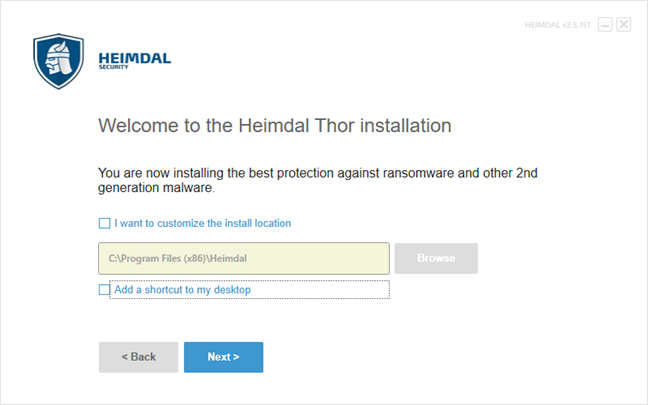
To get Heimdal Thor Premium Home on your computer, you must first download it from the official website. The file you download is a small executable called Heimdal.DeliveryLauncher.msi, with a size of only 756 KB. The launcher downloads the files required for the installation. You should get around 42.8 MB of files from Heimdal's servers. Heimdal Thor Premium Home lets you choose the language it uses (English, German, Danish or Korean). You can also select a custom install location and say whether you want a shortcut for it placed on your desktop.
The installation wizard for Heimdal Thor Premium Home
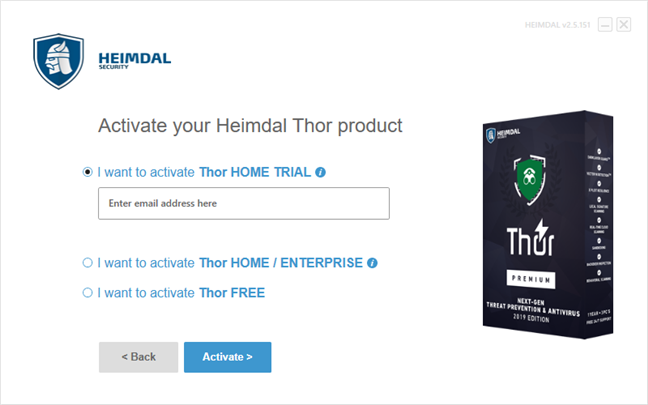
Once you agree to its license terms, you can activate the product. If you purchased a Home or Enterprise license, enter your license key. Otherwise, you can choose to activate a trial version of Heimdal Thor Premium Home or use the Free version, which means you only get the app patching feature in the Heimdal Thor Foresight module, but nothing more. For the free trial or the free version of Thor, you have to provide only an email address.
The activation step for Heimdal Thor Premium Home
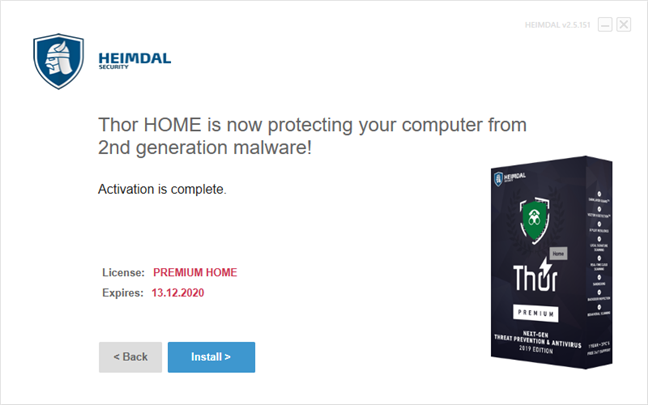
When the activation is complete, the wizard tells you when the license expires, and you can continue installing the software.
The end of the installation wizard for Heimdal Thor Premium Home
The install process takes a few seconds from start to finish. Once the installation ends, Heimdal Thor Premium Home loads its user interface and starts its protection processes. There is no need for a reboot.
The download and install processes for Heimdal are fast and easy to go through. If you are installing the Thor Premium Trial or the Thor Free versions, the only personal information you have to provide is a valid email address. If you are installing Thor Home Premium or Enterprise, you must also enter the license key to activate your product.
Ease of use and configuration
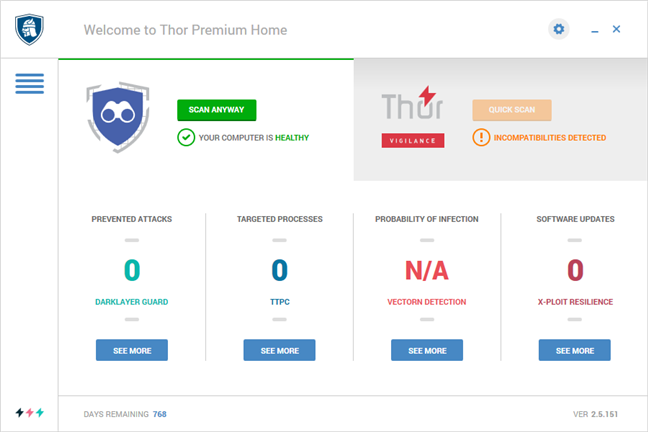
Heimdal Thor Premium Home's user interface is rather good looking, following the flat design trend that we see everywhere from Windows 10 to Android. The user interface is split into two major sections: Thor Foresight and Thor Vigilance. Thor Foresight shows whether your computer is healthy or not, and gives you details and access to the different features in this module: DarkLayer Guard, Targeted processes, Probability of infection and Software updates.
The user interface of Heimdal Thor Premium Home
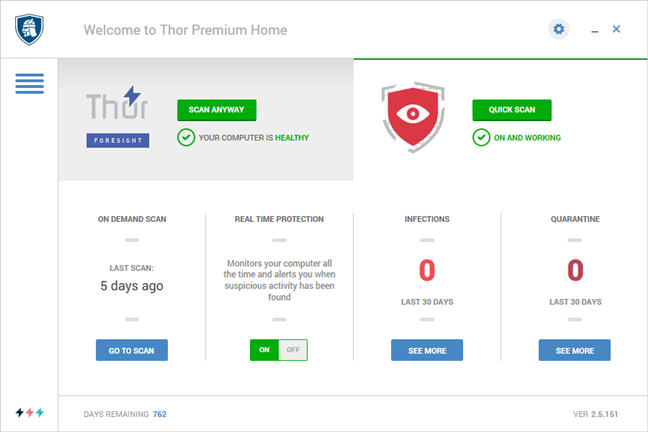
Thor Vigilance is the section found on the right side of the window, and it shows whether or not it is enabled and working well. It also gives you access to its main features and actions. You can use it to start or see when the last On Demand Scan was run, enable or disable the Real Time Protection, see the number of Infections and Quarantined items from the last 30 days.
The Thor Vigilance section of the user interface
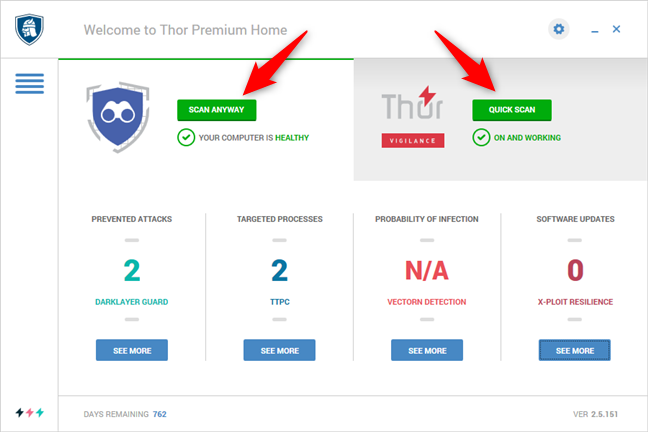
Both Thor Foresight and Thor Vigilance let you trigger manual scans with just a click or tap on the Scan Anyway or Quick Scan buttons.
The scanning buttons for Thor Foresight and Thor Vigilance
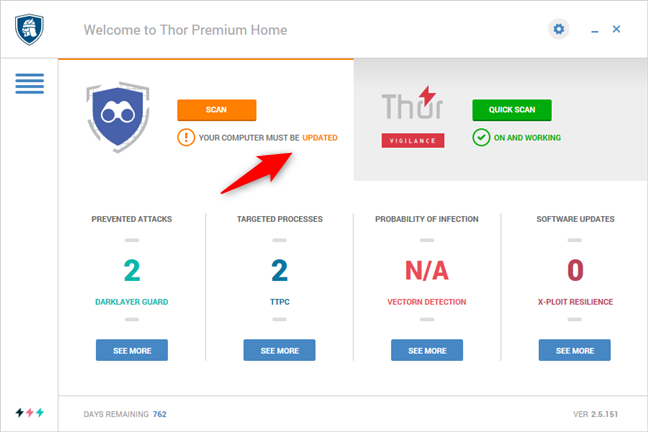
The central console also changes its coloring depending on your system's health state. For instance, if Heimdal Thor Premium Home finds third-party apps that need to be patched with updates, the Thor Foresight section turns yellow and tells you that "Your computer must be updated," like in the screenshot below.
Notification about the need to update some of the apps on the computer
Inside the Heimdal Thor Foresight module, there are three major security components: DarkLayer Guard, VectorN Detection, and X-ploit Resilience. Let's see what each of them does:
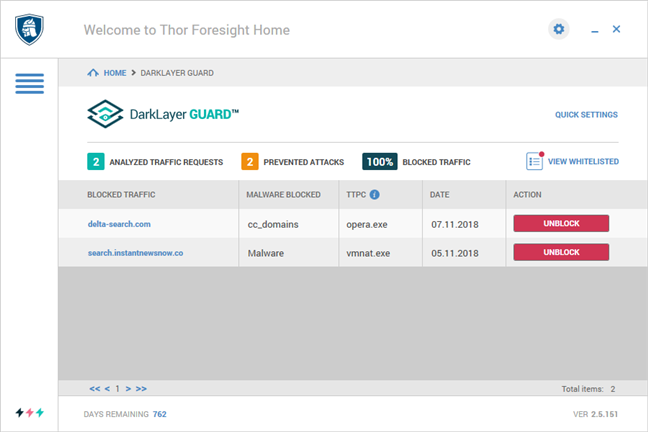
DarkLayer Guard is a two-way traffic scanning engine that allows Heimdal Thor Foresight to block network communications when it detects zero-day exploits, ransomware, data leakage, and next-generation attacks. Dark Layer Guard protects your PC from attacks before they compromise it.
The DarkLayer Guard from Heimdal Thor Premium Home
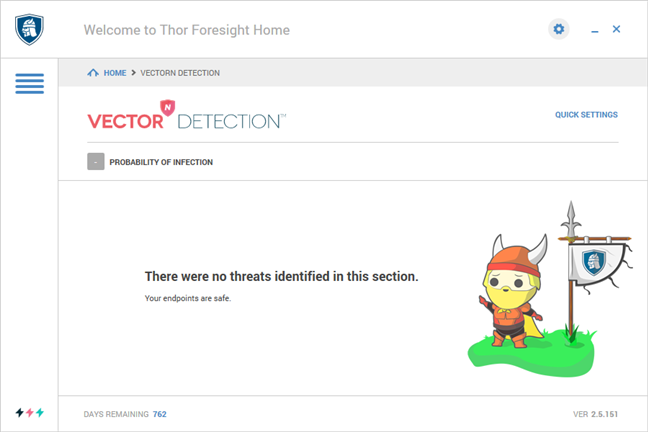
Thor Foresight's VectorN Detection, according to Heimdal, "uses Machine Learning technology to perform an in-depth analysis of all incoming and outgoing HTTP, HTTPS, and DNS traffic." It is designed to analyze the user's internet traffic patterns to identify known and also yet unknown malware attacks. In other words, it detects and blocks second-generation malware.
The VectorN section from the Heimdal Thor Premium Home
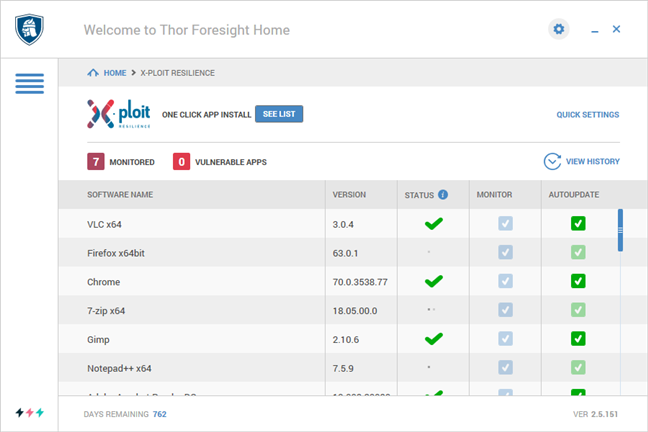
The third security component from Thor Foresight is called X-ploit Resilience. It is responsible for keeping your third party apps up to date, patched with the latest updates available. X-ploit Resilience displays all the third-party apps that are installed and monitored by Heimdal Thor Foresight. For each of them, you can see the version installed, its Status, and two different check marks one for choosing whether you want to monitor that software and one for turning the Autoupdate feature On or Off.
The X-ploit Resilience section of Heimdal Thor Premium Home
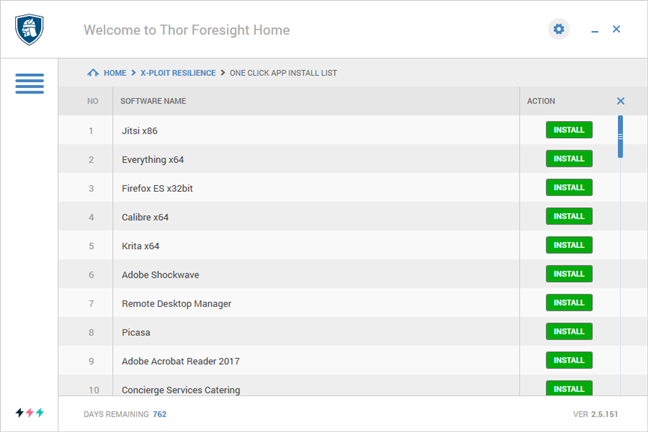
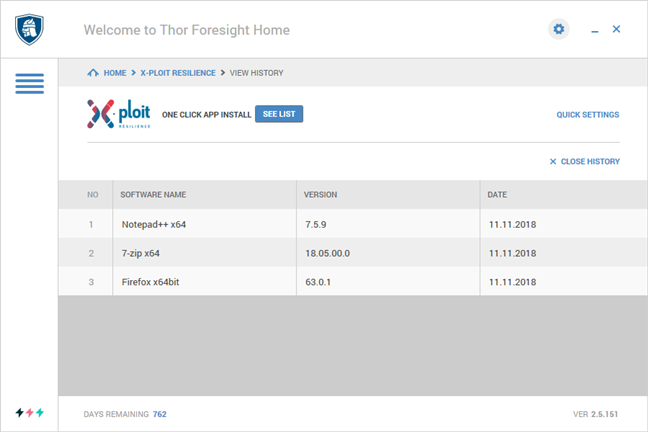
If one of the third party apps from Heimdal Thor Foresight's list is not installed on your computer, you can also install it using the One Click App Install feature. We like this small detail, as it allows you to quickly install any of these apps, with just one click. There is no need to go to a particular website to download and install the app. If Heimdal Thor Foresight knows it, it has it.
The list of third-party apps supported by Heimdal Thor Foresight's patching system is extensive. It can now monitor over 70 third-party apps. Although some of the apps are different versions or editions of the same software, the list is quite long and it includes: 7-zip, Adobe Acrobat Reader, Adobe Acrobat Pro, Adobe AIR, Adobe Flash Player, Adobe Reader, Adobe Shockwave, Accordance, Audacity, Axure, Backup and Sync from Google, Box Sync, Calibre, CCleaner, Chrome, Cisco WebEx Meeting Center, Classic Shell, Concierge Services Catering, Dropbox, Everything, FileZilla, Firefox, Foxit Reader, Garmin Express, Gimp, iTunes, Jabra Direct, Java and 8, Jitsi, KaBoo, Krita, Lenovo System Update, LibreOffice, Microsoft Power BI Desktop, Microsoft Silverlight, NemID, Notepad++, OpenOffice, Paint.Net, Picasa, Pidgin, Remote Desktop Manager, Skype, TeamViewer, Thunderbird, VirtualBox, VLC, and WinRar.
The list with apps that can be updated by Heimdal Thor Premium Home
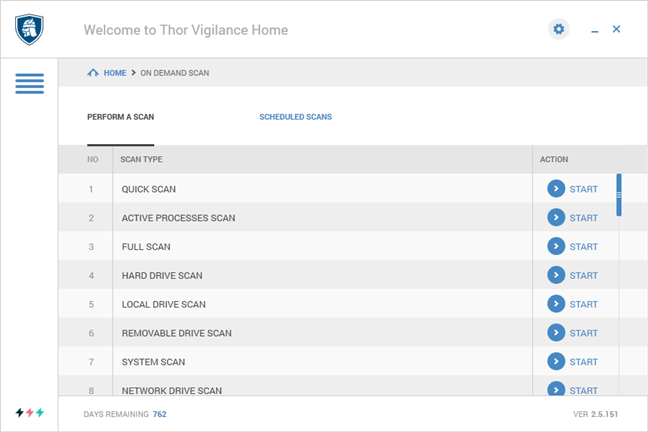
The other module from Heimdal Thor Premium Home - Thor Vigilance - is a traditional antivirus engine based on Avira. It can be used to detect and block malware that is already on your computer so that it can act against viruses, trojans, harmful scripts, spyware programs, and others alike. Thor Vigilance uses malware signatures found on your system as well as in the cloud.
The antivirus scans that can be run with Thor Vigilance
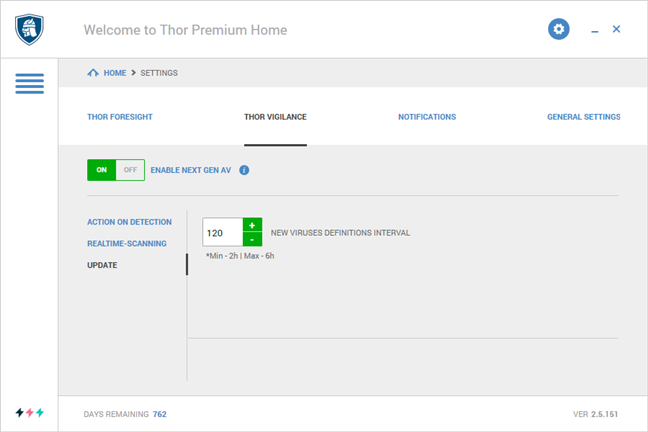
Although many of the protection modules found in Heimdal Thor Premium Home can be enabled or disabled right from the main interface, this security product also includes a series of more advanced Settings. You can access them by clicking on the small cog wheel from the top right corner of the user interface. You can turn the main modules On or Off as well as set the frequency of scans for things like patching apps or updating virus definitions.
The settings page for Thor Vigilance
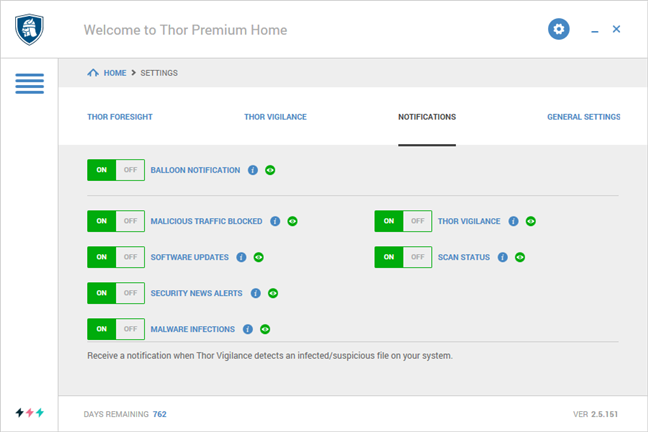
We appreciated that Heimdal Thor Premium Home includes a range of settings which you can use to adjust the number and types of notifications you receive from it. In the Notifications section from the Settings, you can turn the Balloon notification On or Off altogether, but you can also go into detail and see whether you want to see notifications about malicious traffic that has been blocked, about software updates, malware infections or security news alerts.
The Notification settings for Heimdal Thor Premium Home
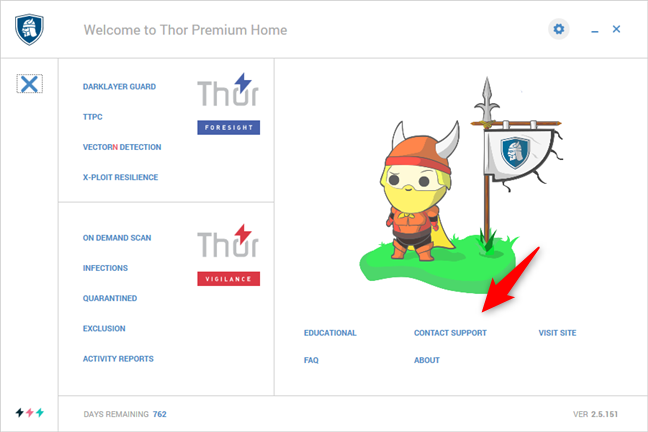
Heimdal Thor Premium Home also includes some Support options: open the menu from the central console, and you can then access their Educational materials, FAQ (Frequently asked questions), read the product manuals or, if you need further help, you can Contact them by sending an email with a ticket request.
The support options available in Heimdal Thor Premium Home
Heimdal Thor Premium Home offers a user interface with a flat design that looks good. We liked how easy it is to work with the various modules and features available, and we are sure that users will be pleased too.
How well does Heimdal Thor Premium Home protect you?
Heimdal Thor Premium Home works by adding a series of extra layers of security on top of your antivirus solution or together with Thor Vigilance (the antivirus engine that is part of Thor Premium Home), all to protect you against cyber threats. Let's take a look at each of these security features and see whether they work as advertised:
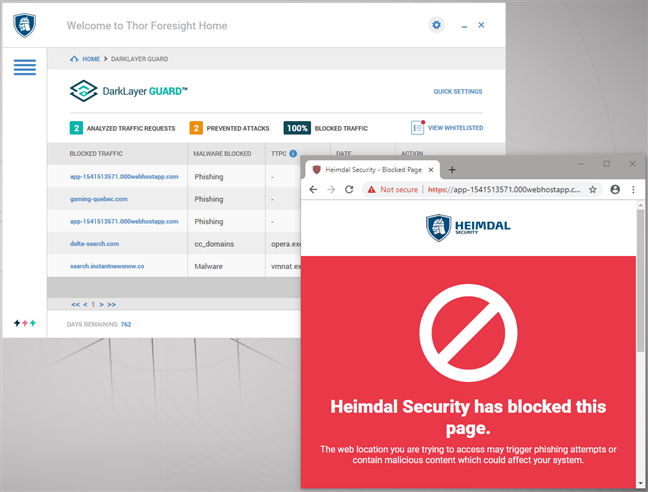
The first protection layers offered by Heimdal Thor Premium Home are the DarkLayer Guard and VectorN modules. They analyze all the traffic going on your computer and check whether the websites that you are trying to load are known to hold malicious content. If they detect something dangerous, Heimdal tries to stop the threats before they reach your computer.
To test the efficiency of this security product, we used all the popular web browsers (Microsoft Edge, Google Chrome, Mozilla Firefox,Opera, and Internet Explorer) and tried to load a series of websites known to be phishing scams or hold malicious content. Our findings were positive, and we can confirm that Heimdal Thor managed to block all the malicious websites that we tried to access. It worked as it should have in all the web browsers that we tested.
Testing the DarkLayer Guard security component
Heimdal Thor Premium Home also includes Thor Vigilance, which is an antivirus engine designed to react when malware is already found on your PC or when your computer is already infected.
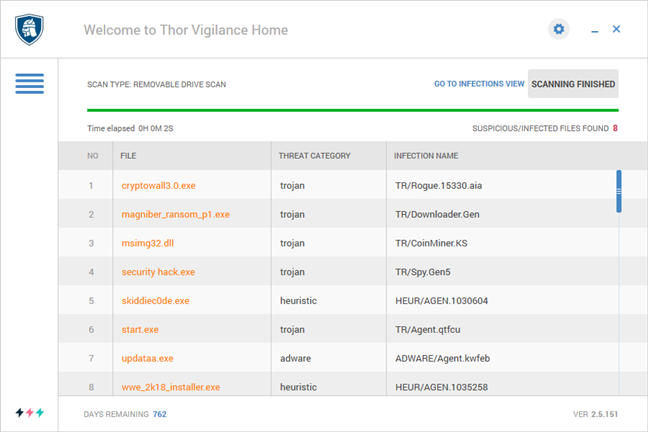
For it, we started by checking how it deals with infected malware files stored on removable drives. We placed a bunch of viruses on a USB memory stick and then plugged it into our test computer. Unfortunately, Thor Vigilance did not automatically scan the memory stick, nor did it ask us if we wanted to scan it. We decided to run a custom scan to see if it identified the malicious files we had on that stick. Thor Vigilance managed to identify all of them and promptly moved them into the quarantine.
Results from the antivirus scan on an infected removable drive
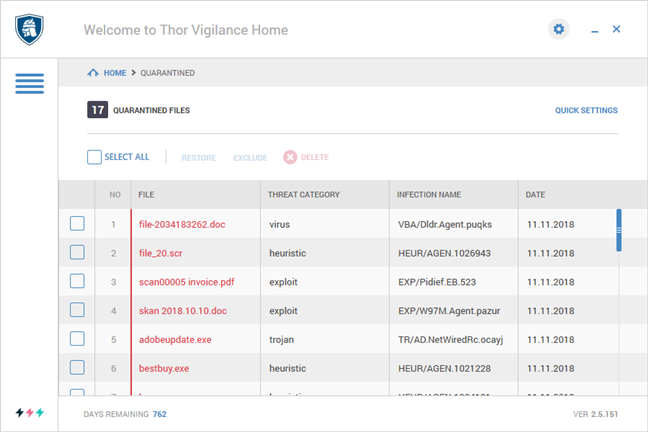
Next, we took our test computer and installed a clean version of Windows 10, we patched it with all the available system updates, and then we installed a whole series of viruses on it. We asked Heimdal Thor Premium Home to install itself and clean our computer. We were pleased to see that the suite had no problems installing and starting its protection services. We were also happy to see that it was able to detect and to remove all the malware on the system.
The files quarantined by Heimdal Thor Premium Home during a system-wide scan
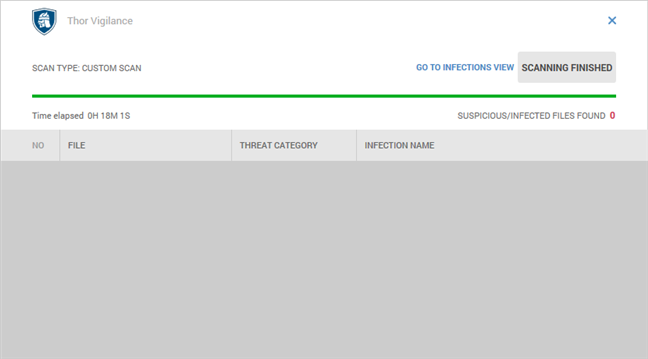
Another important feature when it comes to evaluating the performance of an antivirus engine is how fast it is when scanning for malware. Therefore, we measured the speed at which Heimdal Thor Vigilance scanned our 137GB system partition with 75GB of files on it. It took 18 minutes, on average, which is rather slow.
The time needed by Thor Vigilance to scan a Windows 10 partition
At the time of writing this review, Heimdal Thor Premium Home can monitor and automatically patch over 70 different third-party apps. The list includes widely used programs known to be vulnerable that are usually targeted by malware and hackers. We wanted to see whether Heimdal Thor Premium Home does indeed update the programs found in this list of critical applications. So we used our test computer that was running on Windows 10, and we installed old versions of a few of the programs found in Heimdal Thor Foresight's list. Then, we watched what Heimdal Thor Foresight does. It immediately detected and started updating the old apps. In only a couple of minutes, they were all patched up.
A list of apps that were patched automatically by Thor Foresight
Heimdal Thor Premium Home keeps its word and delivers what it promises. We found it to be an effective product in our testing. The only things that should be improved are the scanning speed offered by the Thor Vigilance antivirus engine, and the fact that it does not ask whether you want to scan removable drives or not.
What is your opinion about Heimdal Thor Premium Home?
Now you know what Heimdal Thor Premium Home is and does. You have also seen how it fared in our testing, and you know our opinion about this security product. Before closing this review, share your opinion about it, in the comments section below. Do you like what it has to offer? Are you considering purchasing a Heimdal Thor Premium Home license?
I have used Thor Premium home for 2 years now and have been impressed. I initially had problems getting it to scan on demand, but after negotiations with their support team and enabling them to access my system remotely, I have not since had this issue and renewed it. it has successfully blocked viruses from entering on my system. Utilising Gibsons “Shields up” testing, all my ports are stealthed something I was not able to achieve using Bitdefender, which I had been using earlier. I do not worry about how long scans take, but the impact on my system has been negligable. Currently it serves my needs the best. The only downside I can think of is that it neither offers nor supports VPN and I had to uninstall my previous VPN as it would not work with Thor.
Lawrence Moroni ·
considering purchasing a Heimdal Thor Premium Home license?
John Goodmoore ·
Super cool product! I just got upgraded to their THOR security suite and it’s even better! I can highly recommend it.
joe zaza ·
The price is far too high! USD 74.96 / year, for what this “security product” can do! You can find a better option for free !!
Anonymous ·
Use our discounts. You have links inside the article.
Jimbo ·
Great product! It has blocked me several times from attacks in the last 4 months I’ve had it. Very pleased with this app.
Ciprian Adrian Rusen ·
Thanks for your feedback. I’m happy that you are pleased with it. 😉
Sam ·
I have been using Heimdal Pro for about a year along with Bitdefender and the free version of Malwarebytes (it can detect and delete PUPs when I run a scan). I’ve had no problems and it does a good job of alerting me of needed updates. At the very least it does no harm and at the best it is stopping bad guys before they ever get to me.
Makarand ·
There used to be a product GesWall which died down, is it similar to that?
Corinne Larimore ·
I would just like to add I had a terrible experience with Reimage Plus and my Malwarebytes 3.0 automatically blocks it. So if you’re basing your decision on Reimage Plus, please don’t as I know for a fact Reimage Plus has relationships with companies of which one company actually got me on Identity Theft, and Reimage Plus was the company that referred me to this company. So you can’t tell me they didn’t know the company’s history and/or if they didn’t, they need to do a lot more research into the companies they align themselves with. Let’s just say if I had never heard of Reimage Plus, I would not have been hit by Identity Theft. You really need to question any company you give your financial information to, and further, even though they denied any involvement, they refunded my money. Food for thought.
Peter ·
Reimage has been blocked by many virus / security programs. Having owned one at one point I can only agree. Tweaking.com Pro is solid, transparent and it not blocked.
Keith Erickson ·
As far as problems with blocked websites, I have had none like the one you are referring to. My experiences have been totally positive. I don’t use it, but I tried going to reimageplus.com and Webroot SecureAnywhere blocked it immediately. I looked up what websites have been blocked in Heimdal Pro’s Activity Reports, and reimage.com was listed. My computer displays a screen from Webroot (that says “Suspicious attack ahead”), so I have to check with Heimdal to be sure, but rimageplus.com was not listed. Secunia SeureAnywhere went on to say (about reimageplus.com) “This is a high risk site. There is a high probability that you will be exposed to malicious links or payloads.” I’m going to request a website review from Webroot. Hope this helps…
Cal ·
PS. Article on Heimdal is very good. It clarifies what I thought it was meant to do, running along side a virus program and not conflicting, and adding security. I hope to be able to install it on 4 pc’s, and got extra licenses from a package/xtra year deal they recently offered.
cal ·
Heimdal support is not good. Upon installation, on 2 pc’s, it blocked http://www.reimageplus.com. It reported to me in a file that it is blocking a bad website: cdnrepl.reimage.com. It has blocked reimageplus.com six times.
I complained and got 2 messages that “reimage.com” is not blocked.
I complained and was told to try turning off the directories in the menu. Reimageplus then ran ok several time, but this week it was blocked again on my HP from qvc.
I loaded Heimdal on my surface pro and reimageplus got blocked. I turned off the H directories, and then had to go to startup files to turn them off when booting.. Reimage then ran.
Heimdal’s latest email was in broken english and not very clear, but it stated that reimageplus.com was NOT blocked. And it stated that it was blocking reimage.com.
They stated that reimage.com was a compromised domain and reimage support had to clean it up before it would not be blocked.
I am no tech. My program uses reimageplus.com and it is one of my best utilities to clean up my pc. I have a reimage tech call friday at 10 am, but can they do anything to help here if they can’t control their database?
Keith Erickson ·
I have always found Heimdal’s Tech Support to be good, although I haven’t had the problem you have had (see comment below). The only thing about this software that is in any way lacking is the big check mark on the program’s main screen. I didn’t know that if you move your mouse over it, it changes to “SCAN”. Other than that, I’m really happy with it. (I made this reply in the interest of you being notified that I tested the website you’re having a problem with) I don’t think you can find another program exactly like Heimdal Pro. If there are any, let’s hear about them!
ChinghissKhan ·
REIMAGE is utter JUNK!
Ankur ·
Hi,
Is it similar to Hitman Pro Alert or MBAM Anti Exploit ?











Discussion (17)
I have used Thor Premium home for 2 years now and have been impressed. I initially had problems getting it to scan on demand, but after negotiations with their support team and enabling them to access my system remotely, I have not since had this issue and renewed it. it has successfully blocked viruses from entering on my system. Utilising Gibsons “Shields up” testing, all my ports are stealthed something I was not able to achieve using Bitdefender, which I had been using earlier. I do not worry about how long scans take, but the impact on my system has been negligable. Currently it serves my needs the best. The only downside I can think of is that it neither offers nor supports VPN and I had to uninstall my previous VPN as it would not work with Thor.
considering purchasing a Heimdal Thor Premium Home license?
Super cool product! I just got upgraded to their THOR security suite and it’s even better! I can highly recommend it.
The price is far too high! USD 74.96 / year, for what this “security product” can do! You can find a better option for free !!
Use our discounts. You have links inside the article.
Great product! It has blocked me several times from attacks in the last 4 months I’ve had it. Very pleased with this app.
Thanks for your feedback. I’m happy that you are pleased with it. 😉
I have been using Heimdal Pro for about a year along with Bitdefender and the free version of Malwarebytes (it can detect and delete PUPs when I run a scan). I’ve had no problems and it does a good job of alerting me of needed updates. At the very least it does no harm and at the best it is stopping bad guys before they ever get to me.
There used to be a product GesWall which died down, is it similar to that?
I would just like to add I had a terrible experience with Reimage Plus and my Malwarebytes 3.0 automatically blocks it. So if you’re basing your decision on Reimage Plus, please don’t as I know for a fact Reimage Plus has relationships with companies of which one company actually got me on Identity Theft, and Reimage Plus was the company that referred me to this company. So you can’t tell me they didn’t know the company’s history and/or if they didn’t, they need to do a lot more research into the companies they align themselves with. Let’s just say if I had never heard of Reimage Plus, I would not have been hit by Identity Theft. You really need to question any company you give your financial information to, and further, even though they denied any involvement, they refunded my money. Food for thought.
Reimage has been blocked by many virus / security programs. Having owned one at one point I can only agree. Tweaking.com Pro is solid, transparent and it not blocked.
As far as problems with blocked websites, I have had none like the one you are referring to. My experiences have been totally positive. I don’t use it, but I tried going to reimageplus.com and Webroot SecureAnywhere blocked it immediately. I looked up what websites have been blocked in Heimdal Pro’s Activity Reports, and reimage.com was listed. My computer displays a screen from Webroot (that says “Suspicious attack ahead”), so I have to check with Heimdal to be sure, but rimageplus.com was not listed. Secunia SeureAnywhere went on to say (about reimageplus.com) “This is a high risk site. There is a high probability that you will be exposed to malicious links or payloads.” I’m going to request a website review from Webroot. Hope this helps…
PS. Article on Heimdal is very good. It clarifies what I thought it was meant to do, running along side a virus program and not conflicting, and adding security. I hope to be able to install it on 4 pc’s, and got extra licenses from a package/xtra year deal they recently offered.
Heimdal support is not good. Upon installation, on 2 pc’s, it blocked http://www.reimageplus.com. It reported to me in a file that it is blocking a bad website: cdnrepl.reimage.com. It has blocked reimageplus.com six times.
I complained and got 2 messages that “reimage.com” is not blocked.
I complained and was told to try turning off the directories in the menu. Reimageplus then ran ok several time, but this week it was blocked again on my HP from qvc.
I loaded Heimdal on my surface pro and reimageplus got blocked. I turned off the H directories, and then had to go to startup files to turn them off when booting.. Reimage then ran.
Heimdal’s latest email was in broken english and not very clear, but it stated that reimageplus.com was NOT blocked. And it stated that it was blocking reimage.com.
They stated that reimage.com was a compromised domain and reimage support had to clean it up before it would not be blocked.
I am no tech. My program uses reimageplus.com and it is one of my best utilities to clean up my pc. I have a reimage tech call friday at 10 am, but can they do anything to help here if they can’t control their database?
I have always found Heimdal’s Tech Support to be good, although I haven’t had the problem you have had (see comment below). The only thing about this software that is in any way lacking is the big check mark on the program’s main screen. I didn’t know that if you move your mouse over it, it changes to “SCAN”. Other than that, I’m really happy with it. (I made this reply in the interest of you being notified that I tested the website you’re having a problem with) I don’t think you can find another program exactly like Heimdal Pro. If there are any, let’s hear about them!
REIMAGE is utter JUNK!
Hi,
Is it similar to Hitman Pro Alert or MBAM Anti Exploit ?