




In the last couple of years, I have become a bit bored with Samsung’s offers in the smartwatch market. Luckily, things have changed with the launch of the Galaxy Watch8 and the Watch8 Classic. Not only do we get some design updates, but also some very interesting new features. The Galaxy Watch8 is the first smartwatch to have Google Gemini built in and to introduce health metrics like the Antioxidant Index and AGEs Index, designed to help you make better nutritional choices. And if you don’t like having your smartphone around when you go running, there’s also an LTE version available. If you’re curious about the Samsung Galaxy Watch8, read this review:
![Verdict]()

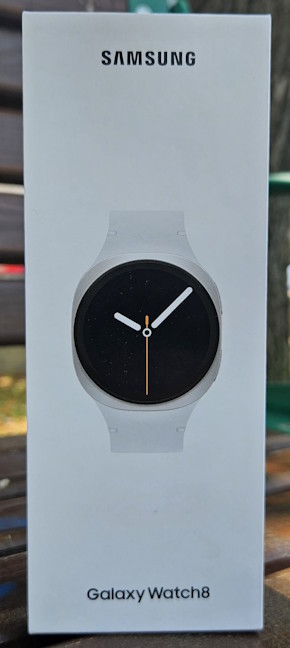
 Samsung Galaxy Watch8 comes in a simple white box
All the items found inside the box are nicely tucked inside their own protective packaging. When you unpack everything, you should have the following items: the watch, its strap, the charging cradle, the quick start guide, the warranty documents, and leaflets containing product safety information and other details.
Samsung Galaxy Watch8 comes in a simple white box
All the items found inside the box are nicely tucked inside their own protective packaging. When you unpack everything, you should have the following items: the watch, its strap, the charging cradle, the quick start guide, the warranty documents, and leaflets containing product safety information and other details.
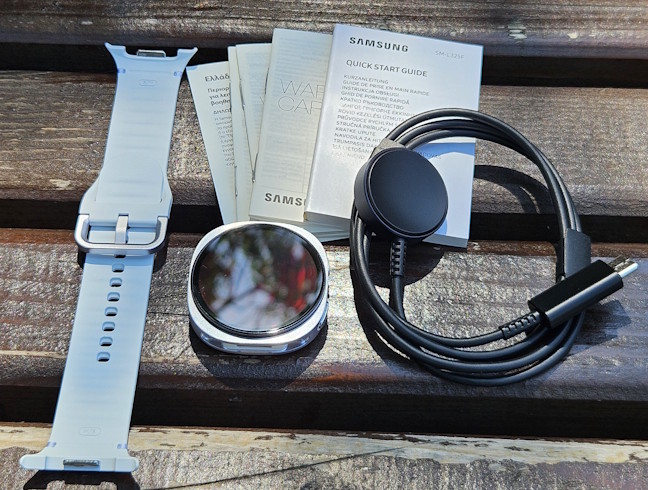
 Unboxing the Samsung Galaxy Watch8
I enjoyed unboxing the Samsung Galaxy Watch8. The packaging is minimalist and elegant, giving the impression that you have purchased a premium product with a well-thought-out design. Before setting it up, it's a good idea to read the Quick Start Guide to familiarize yourself with the steps involved.
Unboxing the Samsung Galaxy Watch8
I enjoyed unboxing the Samsung Galaxy Watch8. The packaging is minimalist and elegant, giving the impression that you have purchased a premium product with a well-thought-out design. Before setting it up, it's a good idea to read the Quick Start Guide to familiarize yourself with the steps involved.
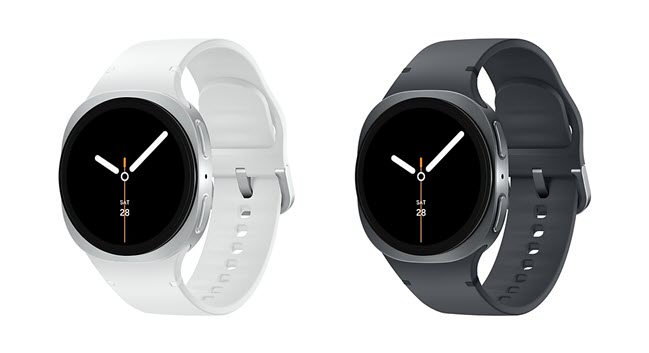
 The Samsung Galaxy Watch8 is only available in two colors
The straps are available in various materials and colors, allowing for easy customization. The Galaxy Watch8 can have 4G LTE connectivity, while more affordable versions are limited to Bluetooth and Wi-Fi. I received the 40 mm model that includes 4G LTE connectivity, paired with a small to medium white strap. Unfortunately, the strap is a bit small for my hands, but I’ll give it a try anyway. 🙂 As shown in the picture below, Samsung incorporated a quick-release system for the straps, making replacements easier. You can simply press the two buttons at the bottom of the Galaxy Watch8 to remove the straps. On the right side of the display, you find the Home and Back buttons, and a microphone between them.
The Samsung Galaxy Watch8 is only available in two colors
The straps are available in various materials and colors, allowing for easy customization. The Galaxy Watch8 can have 4G LTE connectivity, while more affordable versions are limited to Bluetooth and Wi-Fi. I received the 40 mm model that includes 4G LTE connectivity, paired with a small to medium white strap. Unfortunately, the strap is a bit small for my hands, but I’ll give it a try anyway. 🙂 As shown in the picture below, Samsung incorporated a quick-release system for the straps, making replacements easier. You can simply press the two buttons at the bottom of the Galaxy Watch8 to remove the straps. On the right side of the display, you find the Home and Back buttons, and a microphone between them.
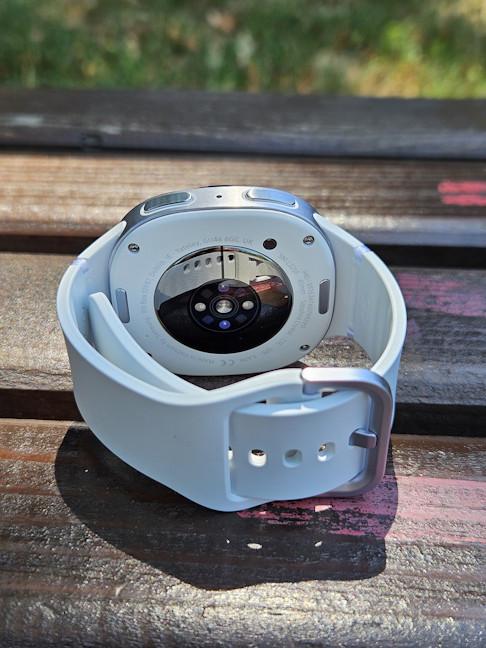
 I'm testing the 40mm Galaxy Watch8 with the small strap
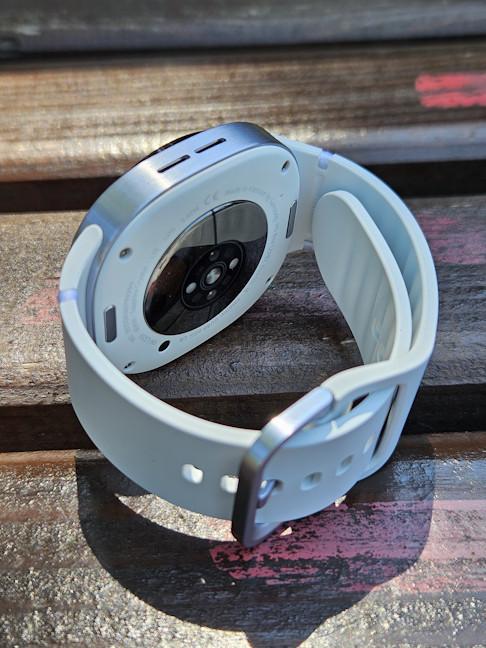
On the left, there are two speakers that can be used during calls or for listening to music while using the smartwatch. The size of the watch is 46.0 x 43.7 x 8.6 mm (or 1.81 × 1.72 × 0.34 inches) for the 44mm version and 42.7 x 40.4 x 8.6 mm (or 1.68 × 1.59 × 0.34 inches) for the 40mm version. The first version weighs 34 grams (1.2 oz), while the second weighs just 30 grams (1.06 oz) without the strap.
I'm testing the 40mm Galaxy Watch8 with the small strap
On the left, there are two speakers that can be used during calls or for listening to music while using the smartwatch. The size of the watch is 46.0 x 43.7 x 8.6 mm (or 1.81 × 1.72 × 0.34 inches) for the 44mm version and 42.7 x 40.4 x 8.6 mm (or 1.68 × 1.59 × 0.34 inches) for the 40mm version. The first version weighs 34 grams (1.2 oz), while the second weighs just 30 grams (1.06 oz) without the strap.
 It weighs just 30 grams
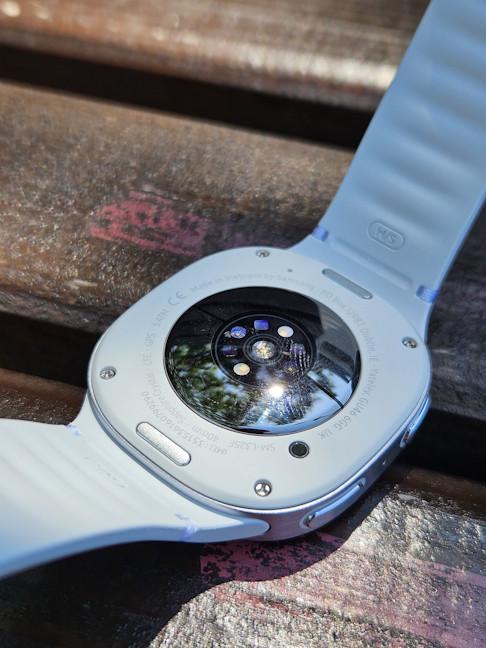
On the back of the Watch8, you find Samsung’s BioActive sensor, though calling it a sensor is an understatement. In reality, it's a collection of multiple sensors working together. The Galaxy Watch8 features an impressive range of monitoring technologies, including an accelerometer, barometer, bioelectrical impedance analysis sensor, electrical heart rate sensor, gyro sensor, geomagnetic sensor, infrared temperature sensor, light sensor, and optical heart rate sensor. With all these sensors packed into one small device, the Watch8 will know more about your body than your doctor does. And, unlike your doctor, it won't judge you for choosing a burger over a salad… unless you enable one of its new features. But more on that later in this review.🙂
It weighs just 30 grams
On the back of the Watch8, you find Samsung’s BioActive sensor, though calling it a sensor is an understatement. In reality, it's a collection of multiple sensors working together. The Galaxy Watch8 features an impressive range of monitoring technologies, including an accelerometer, barometer, bioelectrical impedance analysis sensor, electrical heart rate sensor, gyro sensor, geomagnetic sensor, infrared temperature sensor, light sensor, and optical heart rate sensor. With all these sensors packed into one small device, the Watch8 will know more about your body than your doctor does. And, unlike your doctor, it won't judge you for choosing a burger over a salad… unless you enable one of its new features. But more on that later in this review.🙂
 The BioActive sensor can do many things
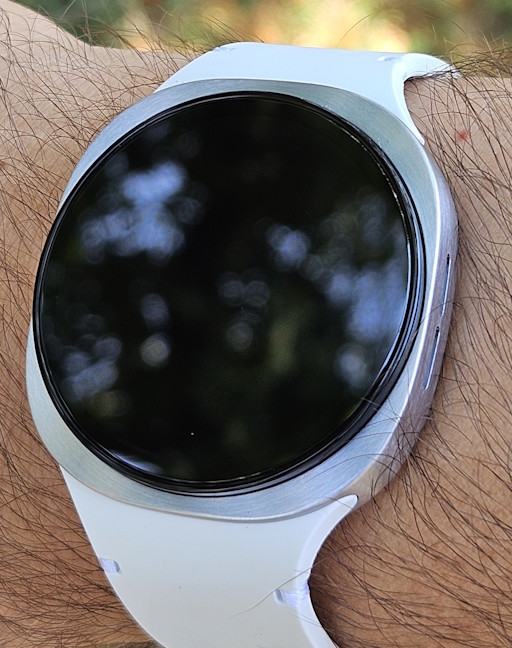
The display on the Samsung Galaxy Watch8 features a Super AMOLED panel, with a resolution of 438 x 438 pixels for the 40mm model and 480 x 480 pixels for the 44mm model. The brightness can reach up to 3,000 nits, making it great for outdoor use. The battery capacity also varies depending on the model: 325 mAh for the 40 mm Watch8 and 435 mAh for the 44 mm version. Both models provide up to 30 hours of use with the display always on.
The BioActive sensor can do many things
The display on the Samsung Galaxy Watch8 features a Super AMOLED panel, with a resolution of 438 x 438 pixels for the 40mm model and 480 x 480 pixels for the 44mm model. The brightness can reach up to 3,000 nits, making it great for outdoor use. The battery capacity also varies depending on the model: 325 mAh for the 40 mm Watch8 and 435 mAh for the 44 mm version. Both models provide up to 30 hours of use with the display always on.
 The display reaches 3000 nits in brightness
The Galaxy Watch8 is powered by a penta-core Exynos W1000 processor, featuring one core operating at 1.6 GHz and four cores operating at 1.5 GHz. The smartwatch also features 2GB of RAM and 32 GB of storage space. Additionally, it offers dual-frequency GPS connectivity for improved accuracy, Bluetooth 5.3, and Wi-Fi support on both 2.4 GHz and 5 GHz wireless bands. However, it is notable that Wi-Fi 6 and Wi-Fi 7 connectivity are missing, which is a surprising omission. Nevertheless, NFC support is included for payments and other services.
I appreciate that Samsung designed the Galaxy Watch8 to look elegant. It is also durable and can be used outdoors. It’s water-resistant enough for swimming (rated up to 5ATM), sealed against dust and accidental splashes (IP68), and rugged enough to withstand drops, challenging weather conditions, and tough outdoor trips, thanks to its military-grade durability rating (MIL-STD-810H).
Spec-wise, the Samsung Galaxy Watch8 appears to be a great device for health and sports tracking. Its extensive list of sensors should help you gain a detailed view of your body, habits, and well-being, providing a comprehensive understanding of your overall health. The only downside I can see in its spec sheet is the battery life, which isn’t on par with similarly priced smartwatches from other brands.
The display reaches 3000 nits in brightness
The Galaxy Watch8 is powered by a penta-core Exynos W1000 processor, featuring one core operating at 1.6 GHz and four cores operating at 1.5 GHz. The smartwatch also features 2GB of RAM and 32 GB of storage space. Additionally, it offers dual-frequency GPS connectivity for improved accuracy, Bluetooth 5.3, and Wi-Fi support on both 2.4 GHz and 5 GHz wireless bands. However, it is notable that Wi-Fi 6 and Wi-Fi 7 connectivity are missing, which is a surprising omission. Nevertheless, NFC support is included for payments and other services.
I appreciate that Samsung designed the Galaxy Watch8 to look elegant. It is also durable and can be used outdoors. It’s water-resistant enough for swimming (rated up to 5ATM), sealed against dust and accidental splashes (IP68), and rugged enough to withstand drops, challenging weather conditions, and tough outdoor trips, thanks to its military-grade durability rating (MIL-STD-810H).
Spec-wise, the Samsung Galaxy Watch8 appears to be a great device for health and sports tracking. Its extensive list of sensors should help you gain a detailed view of your body, habits, and well-being, providing a comprehensive understanding of your overall health. The only downside I can see in its spec sheet is the battery life, which isn’t on par with similarly priced smartwatches from other brands.

 Setting up the Samsung Galaxy Watch8
You can add apps through Google Play, as Watch8 uses Google’s Wear OS version 6, alongside Samsung’s One UI version 8. The fun part is that you have access to many apps for this smartwatch, and you can install anything you need, unlike on smartwatches from competitors like HUAWEI or Garmin. The list of featured apps that comes with the smartwatch is relatively extensive, including options from Samsung, Google, and third-party developers.
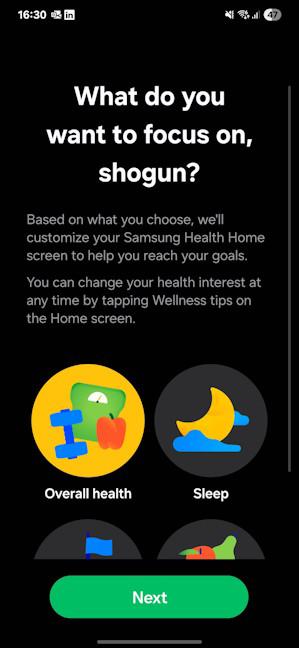
To track your health and sports activities, you need to use the Samsung Health app, which begins by asking you to set your objectives and provide some personal data, such as your height and weight.
Setting up the Samsung Galaxy Watch8
You can add apps through Google Play, as Watch8 uses Google’s Wear OS version 6, alongside Samsung’s One UI version 8. The fun part is that you have access to many apps for this smartwatch, and you can install anything you need, unlike on smartwatches from competitors like HUAWEI or Garmin. The list of featured apps that comes with the smartwatch is relatively extensive, including options from Samsung, Google, and third-party developers.
To track your health and sports activities, you need to use the Samsung Health app, which begins by asking you to set your objectives and provide some personal data, such as your height and weight.
 Use Samsung Health to set your goals
The app is comprehensive and relatively easy to use, but doesn’t give you access to all the health tracking features of the Galaxy Watch8. You also need the Samsung Health Monitor if you want to make an ECG or check your blood pressure. Unfortunately, this app is only available to people who own Samsung Galaxy smartphones and tablets.
Use Samsung Health to set your goals
The app is comprehensive and relatively easy to use, but doesn’t give you access to all the health tracking features of the Galaxy Watch8. You also need the Samsung Health Monitor if you want to make an ECG or check your blood pressure. Unfortunately, this app is only available to people who own Samsung Galaxy smartphones and tablets.
 Samsung Health Monitor is available only for Samsung Galaxy phones
While all these apps are user-friendly on their own, switching between them can be frustrating, especially during the initial setup process, when you have to provide a lot of information and customize many settings before you can fully utilize the Galaxy Watch8 and all its features. After completing the initial setup, it was time to start wearing and using the smartwatch. One of the first things I appreciated about it is the display’s brightness, which is excellent, even for outdoor use in direct sunlight. It’s also comfortable to wear, lightweight, and shouldn’t bother you when you wear it during sleep or intense sports activities.
Samsung Health Monitor is available only for Samsung Galaxy phones
While all these apps are user-friendly on their own, switching between them can be frustrating, especially during the initial setup process, when you have to provide a lot of information and customize many settings before you can fully utilize the Galaxy Watch8 and all its features. After completing the initial setup, it was time to start wearing and using the smartwatch. One of the first things I appreciated about it is the display’s brightness, which is excellent, even for outdoor use in direct sunlight. It’s also comfortable to wear, lightweight, and shouldn’t bother you when you wear it during sleep or intense sports activities.
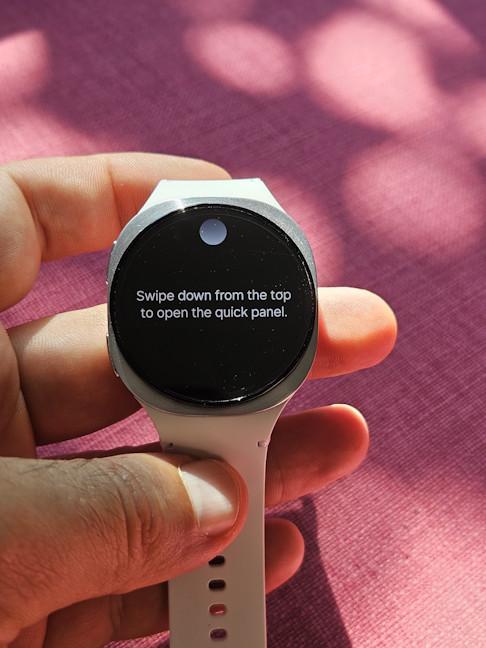 The display looks and works great
The app ecosystem is excellent, and Samsung offers all the features you can think of, including niche ones for water and food logging. You can also use the Watch8 to make calls without your phone (if you opt for the 4G LTE variant), as well as store and listen to music offline. The built-in microphone and speakers are useful, but only if you’re in a quiet environment. If you’re the type of person who likes listening to music while running, consider pairing your headphones with the smartwatch to enjoy high-quality audio.
The display looks and works great
The app ecosystem is excellent, and Samsung offers all the features you can think of, including niche ones for water and food logging. You can also use the Watch8 to make calls without your phone (if you opt for the 4G LTE variant), as well as store and listen to music offline. The built-in microphone and speakers are useful, but only if you’re in a quiet environment. If you’re the type of person who likes listening to music while running, consider pairing your headphones with the smartwatch to enjoy high-quality audio.

 You can also take calls and listen to music
Samsung Wallet is also available, and you can use it to make NFC payments, as well as store boarding passes and all kinds of cards. The Watch8 features both Bixby and Gemini, allowing you to use either one as your assistant. I found it useful to have such an assistant available with the touch of a button and ask it to do things for me, like adding one cup of water to my daily water log or looking for information online, while I was walking around the city.
You can also take calls and listen to music
Samsung Wallet is also available, and you can use it to make NFC payments, as well as store boarding passes and all kinds of cards. The Watch8 features both Bixby and Gemini, allowing you to use either one as your assistant. I found it useful to have such an assistant available with the touch of a button and ask it to do things for me, like adding one cup of water to my daily water log or looking for information online, while I was walking around the city.
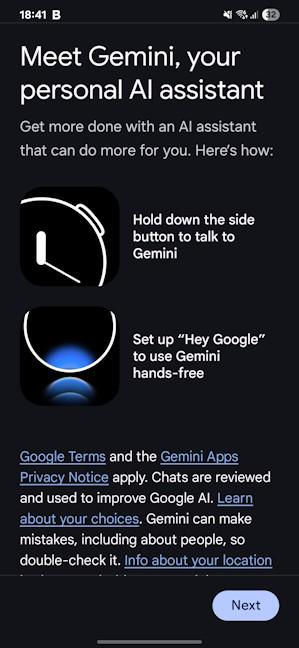 Gemini is built into the Samsung Galaxy Watch8
Samsung has also incorporated features from the smartphone world, such as the Now Bar, first showcased on the Samsung Galaxy S25 Ultra, and multi-information tiles.
When it comes to battery life, the situation isn’t great. Samsung says that the Watch8 should last up to thirty hours on a single charge with the display always on. Unfortunately, that’s not a realistic estimate unless you’re very sedentary and don’t use your smartwatch for sleep or sports tracking. I set the display to turn off when I wasn’t using the Watch8, and I had to charge it every 22 to 23 hours. Charging is also slow. If you’re using a Samsung 45-Watt charger, the battery on the smaller 40mm version charges to 31% in 30 minutes, and it takes 81 minutes to charge fully.
Gemini is built into the Samsung Galaxy Watch8
Samsung has also incorporated features from the smartphone world, such as the Now Bar, first showcased on the Samsung Galaxy S25 Ultra, and multi-information tiles.
When it comes to battery life, the situation isn’t great. Samsung says that the Watch8 should last up to thirty hours on a single charge with the display always on. Unfortunately, that’s not a realistic estimate unless you’re very sedentary and don’t use your smartwatch for sleep or sports tracking. I set the display to turn off when I wasn’t using the Watch8, and I had to charge it every 22 to 23 hours. Charging is also slow. If you’re using a Samsung 45-Watt charger, the battery on the smaller 40mm version charges to 31% in 30 minutes, and it takes 81 minutes to charge fully.
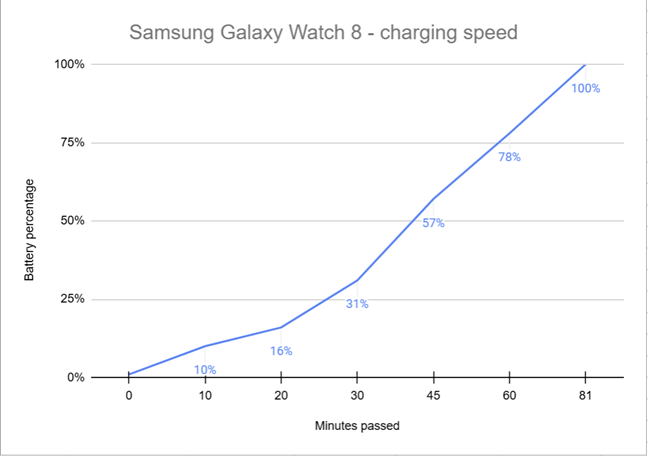
 Charging the Samsung Galaxy Watch8 is slow
I enjoyed the smartwatch experience on the Galaxy Watch8. Although you need to set up and use several apps, you gain access to all the smartwatch features you might want. The Watch8 is comfortable to wear and easy to operate. The only downsides are its battery life and charging speed.
Charging the Samsung Galaxy Watch8 is slow
I enjoyed the smartwatch experience on the Galaxy Watch8. Although you need to set up and use several apps, you gain access to all the smartwatch features you might want. The Watch8 is comfortable to wear and easy to operate. The only downsides are its battery life and charging speed.

 Measuring the blood pressure and making ECGs
If you’re suffering from diabetes or have other health risks that are related to glucose, the Samsung Health app also offers the ability to manually log glucose levels and keep track of them, as well as integrate apps for continuous glucose monitoring. Samsung has also introduced innovative metrics, including the Antioxidant Index, the AGEs Index, and Vascular Load.
Measuring the blood pressure and making ECGs
If you’re suffering from diabetes or have other health risks that are related to glucose, the Samsung Health app also offers the ability to manually log glucose levels and keep track of them, as well as integrate apps for continuous glucose monitoring. Samsung has also introduced innovative metrics, including the Antioxidant Index, the AGEs Index, and Vascular Load.
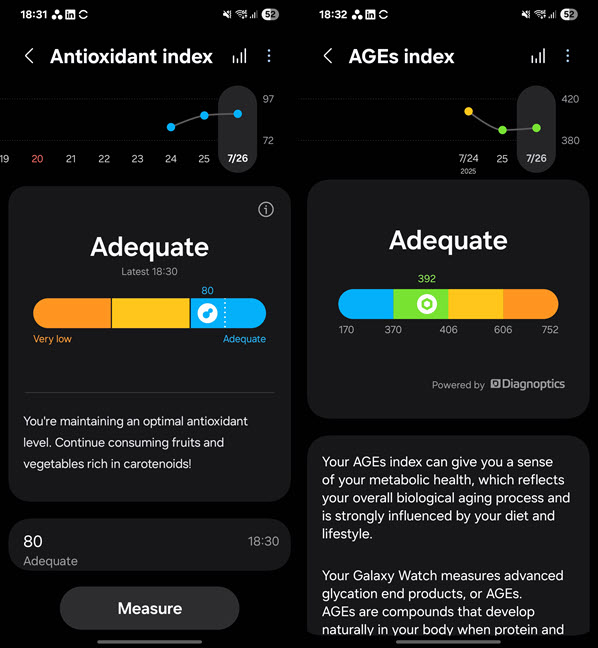 These are very interesting metrics
The Antioxidant Index feature allows you to scan your finger and evaluate whether you’re maintaining a healthy antioxidant level in your blood by consuming fruits and vegetables rich in carotenoids. I was happy to see that my efforts to improve my eating habits are paying off, and each morning I woke up with an Adequate level, which is the maximum available in Samsung’s evaluation. I also did a dietary experiment to learn more about how this feature works. You can view it in the YouTube clip below:
The AGEs Index is automatically calculated by the Galaxy Watch8, and it requires you to wear the smartwatch while sleeping to improve its accuracy. This index evaluates your metabolic health, which reflects your overall biological aging process. It is influenced not only by what you eat but also by your lifestyle. I'm glad to see that I’m at an adequate level, and not aging faster than normal for someone my age.
The Vascular Load requires you to wear the Galaxy Watch8 for three consecutive nights to record a baseline, and then for a fourth night to start displaying data about its evolution. This metric aims to give you a sense of the stress your vascular system experiences, so you can make healthier diet and lifestyle choices.
These are very interesting metrics
The Antioxidant Index feature allows you to scan your finger and evaluate whether you’re maintaining a healthy antioxidant level in your blood by consuming fruits and vegetables rich in carotenoids. I was happy to see that my efforts to improve my eating habits are paying off, and each morning I woke up with an Adequate level, which is the maximum available in Samsung’s evaluation. I also did a dietary experiment to learn more about how this feature works. You can view it in the YouTube clip below:
The AGEs Index is automatically calculated by the Galaxy Watch8, and it requires you to wear the smartwatch while sleeping to improve its accuracy. This index evaluates your metabolic health, which reflects your overall biological aging process. It is influenced not only by what you eat but also by your lifestyle. I'm glad to see that I’m at an adequate level, and not aging faster than normal for someone my age.
The Vascular Load requires you to wear the Galaxy Watch8 for three consecutive nights to record a baseline, and then for a fourth night to start displaying data about its evolution. This metric aims to give you a sense of the stress your vascular system experiences, so you can make healthier diet and lifestyle choices.
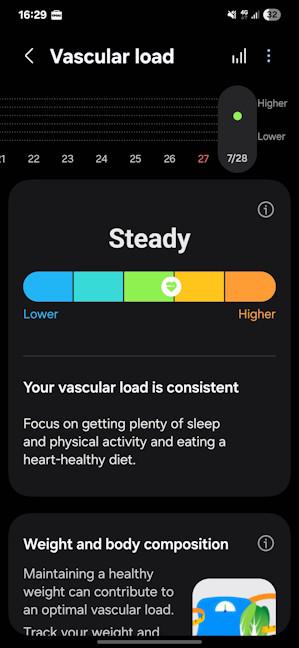 The Vascular Load is another useful metric
This is the most comprehensive heart monitoring I’ve seen on a smartwatch so far. To verify its accuracy, I compared the Samsung Galaxy Watch8 with a professional pulse oximeter that has a medical certification valid in the European Union. I noticed that the Galaxy Watch8 had the tendency to underreport blood oxygen levels (SpO2), and its heart tracking didn’t always agree with the pulse oximeter readings. However, the differences in heart rate were always small when I was sitting idle.
The Vascular Load is another useful metric
This is the most comprehensive heart monitoring I’ve seen on a smartwatch so far. To verify its accuracy, I compared the Samsung Galaxy Watch8 with a professional pulse oximeter that has a medical certification valid in the European Union. I noticed that the Galaxy Watch8 had the tendency to underreport blood oxygen levels (SpO2), and its heart tracking didn’t always agree with the pulse oximeter readings. However, the differences in heart rate were always small when I was sitting idle.
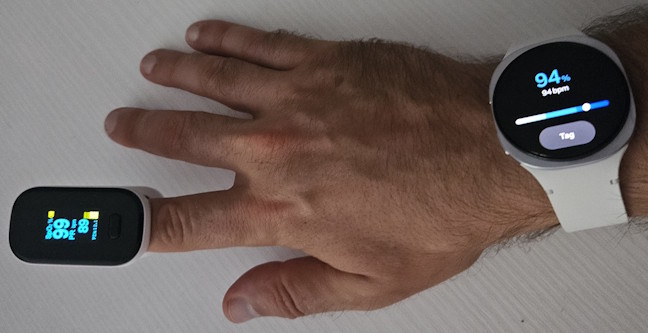
 How accurate is the Samsung Galaxy Watch8?
I also made a comparison during an indoor cycling session. Most of the time, the pulse tracking was nearly identical to the pulse oximeter readings. However, the Galaxy Watch8 had a slight delay in detecting when my pulse was rising due to increased effort. It identified the uptick in my pulse three or four seconds later than the pulse oximeter. This is a relatively good performance, but it also highlights that the Samsung Galaxy Watch8, like many other smartwatches, is not a medical device, and it does not always provide accurate readings.
Samsung has also improved its sleep-related functionality. The Watch8 provides you with bedtime guidance to help you enjoy optimal sleep. It also has improved its sleep tracking quality. For example, it correctly detected that one night I slept very little, even though I went to bed at my usual hour and stayed in bed for eight hours and 31 minutes. I was testing a smartwatch from another company in parallel, and that one detected my time spent awake in bed as sleep. The Galaxy Watch8 was able to accurately evaluate my energy levels and report an Energy score that was much closer to reality.
How accurate is the Samsung Galaxy Watch8?
I also made a comparison during an indoor cycling session. Most of the time, the pulse tracking was nearly identical to the pulse oximeter readings. However, the Galaxy Watch8 had a slight delay in detecting when my pulse was rising due to increased effort. It identified the uptick in my pulse three or four seconds later than the pulse oximeter. This is a relatively good performance, but it also highlights that the Samsung Galaxy Watch8, like many other smartwatches, is not a medical device, and it does not always provide accurate readings.
Samsung has also improved its sleep-related functionality. The Watch8 provides you with bedtime guidance to help you enjoy optimal sleep. It also has improved its sleep tracking quality. For example, it correctly detected that one night I slept very little, even though I went to bed at my usual hour and stayed in bed for eight hours and 31 minutes. I was testing a smartwatch from another company in parallel, and that one detected my time spent awake in bed as sleep. The Galaxy Watch8 was able to accurately evaluate my energy levels and report an Energy score that was much closer to reality.
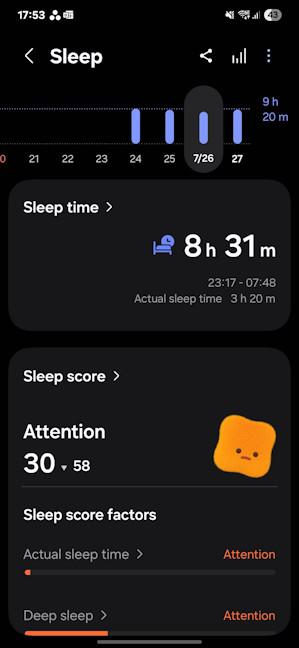 Sleep tracking has improved
For individuals who need to monitor their sleep quality, Samsung can track blood oxygen levels during sleep, skin temperature, and detect snoring, as well as identify early signs of health problems, such as apnea.
Each morning, when you wake up and open the Samsung Health app, you see your Energy score and all the factors that influenced it, both positively and negatively, together with some advice for how to approach the day.
Sleep tracking has improved
For individuals who need to monitor their sleep quality, Samsung can track blood oxygen levels during sleep, skin temperature, and detect snoring, as well as identify early signs of health problems, such as apnea.
Each morning, when you wake up and open the Samsung Health app, you see your Energy score and all the factors that influenced it, both positively and negatively, together with some advice for how to approach the day.
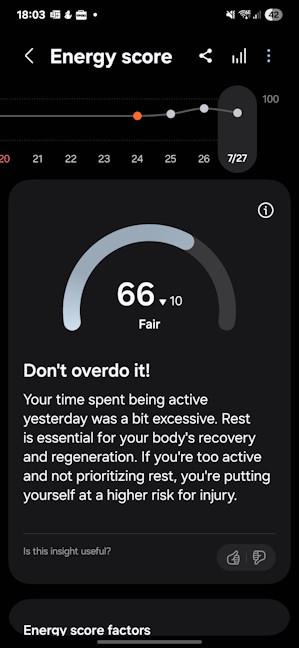 How's your energy level?
The Samsung Galaxy Watch8 places a significant focus on your overall stress, providing alerts when it exceeds normal levels, along with recommendations and tools to help lower it. You can also journal your mood, do guided breathing exercises, and meditate.
How's your energy level?
The Samsung Galaxy Watch8 places a significant focus on your overall stress, providing alerts when it exceeds normal levels, along with recommendations and tools to help lower it. You can also journal your mood, do guided breathing exercises, and meditate.
 Samsung also focuses on mindfulness
The health tracking features of the Galaxy Watch8 are a major strength of this product. Samsung offers everything you can think of, and it has managed to compile the most comprehensive list of sensors and health metrics. It’s up to their users to truly take advantage of what they have to offer.
Samsung also focuses on mindfulness
The health tracking features of the Galaxy Watch8 are a major strength of this product. Samsung offers everything you can think of, and it has managed to compile the most comprehensive list of sensors and health metrics. It’s up to their users to truly take advantage of what they have to offer.
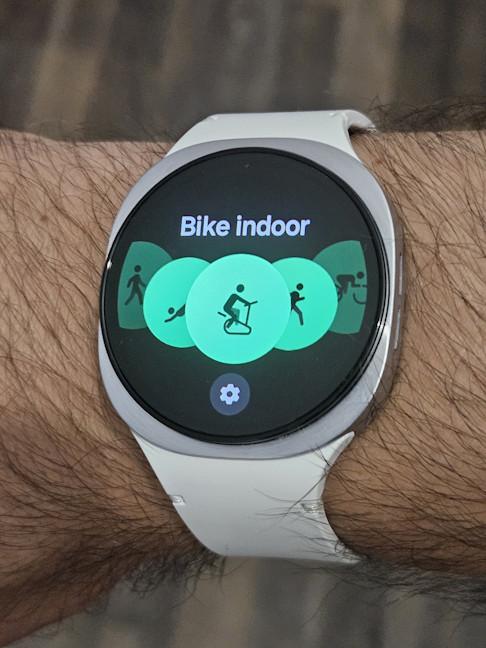 You can track more than 100 activities
You can start tracking your activities from either the smartwatch or the Samsung Health app. You can also pin your favorite activities so that it’s easier to access them and start tracking. If you forget to start tracking an activity manually, the Watch8 can automatically detect that you have started a running or walking session and track it for you. The GPS connectivity is pretty good. In my testing, the Galaxy Watch8 generally required between 8 and 10 seconds to acquire the GPS signal, which is faster than many smartwatches I’ve tested in recent years. The accuracy of its GPS tracking, while not the best I’ve seen on a smartwatch, is precise enough and useful. At the end of each workout, you receive a report with a summary that includes data on your heart rate, calories burned, VO2 MAX (only for some outdoor activities such as running or cycling), estimated sweat loss, along with charts detailing your performance, and a map of your route.
You can track more than 100 activities
You can start tracking your activities from either the smartwatch or the Samsung Health app. You can also pin your favorite activities so that it’s easier to access them and start tracking. If you forget to start tracking an activity manually, the Watch8 can automatically detect that you have started a running or walking session and track it for you. The GPS connectivity is pretty good. In my testing, the Galaxy Watch8 generally required between 8 and 10 seconds to acquire the GPS signal, which is faster than many smartwatches I’ve tested in recent years. The accuracy of its GPS tracking, while not the best I’ve seen on a smartwatch, is precise enough and useful. At the end of each workout, you receive a report with a summary that includes data on your heart rate, calories burned, VO2 MAX (only for some outdoor activities such as running or cycling), estimated sweat loss, along with charts detailing your performance, and a map of your route.
 The report you get when biking
This data is sufficient and useful for most people. However, those who are very data-driven and desire even more granular information are likely to be disappointed. You can’t integrate the Samsung Galaxy Watch8 with third-party fitness equipment, and you can’t manually edit your workouts to add data. For example, during my indoor biking sessions, I couldn’t manually add the distance I had cycled, and it couldn't calculate my average speed. Similarly, for my indoor strength training, I couldn’t add data about the weights I was using for more precise tracking.
The report you get when biking
This data is sufficient and useful for most people. However, those who are very data-driven and desire even more granular information are likely to be disappointed. You can’t integrate the Samsung Galaxy Watch8 with third-party fitness equipment, and you can’t manually edit your workouts to add data. For example, during my indoor biking sessions, I couldn’t manually add the distance I had cycled, and it couldn't calculate my average speed. Similarly, for my indoor strength training, I couldn’t add data about the weights I was using for more precise tracking.
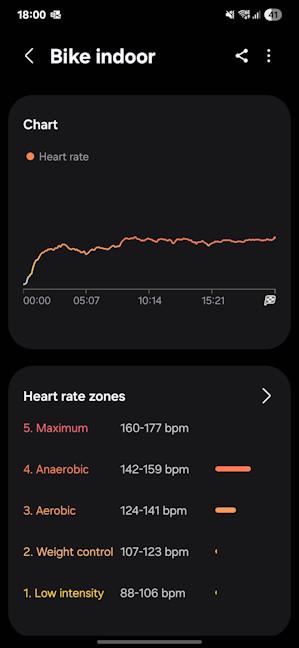 When biking indoors, you get less data
While these limitations can be important for sports enthusiasts and professionals, most people won’t be bothered by them, and they’ll get enough data to motivate them to keep a healthy lifestyle. Samsung also offers access to a large collection of fitness videos for various activities and difficulty levels, allowing you to create your own workout routine directly within the Samsung Health app.
When biking indoors, you get less data
While these limitations can be important for sports enthusiasts and professionals, most people won’t be bothered by them, and they’ll get enough data to motivate them to keep a healthy lifestyle. Samsung also offers access to a large collection of fitness videos for various activities and difficulty levels, allowing you to create your own workout routine directly within the Samsung Health app.
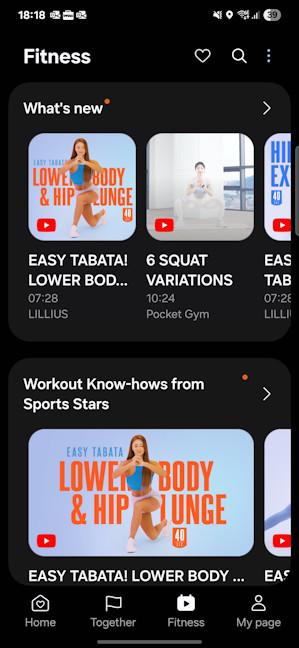 Samsung offers access to many fitness workouts
Samsung has implemented a Personalized Running Coach that builds a profile about you, using the data you provide and by collecting data about your performance during a trial 12-minute run. It determines your current fitness level and then builds a training program that’s tailored to you. Unfortunately, I couldn’t test it because my doctor hasn’t yet given me clearance to return to running. Hopefully, in a few months I’ll be able to do that again. 🙂
Samsung offers access to many fitness workouts
Samsung has implemented a Personalized Running Coach that builds a profile about you, using the data you provide and by collecting data about your performance during a trial 12-minute run. It determines your current fitness level and then builds a training program that’s tailored to you. Unfortunately, I couldn’t test it because my doctor hasn’t yet given me clearance to return to running. Hopefully, in a few months I’ll be able to do that again. 🙂
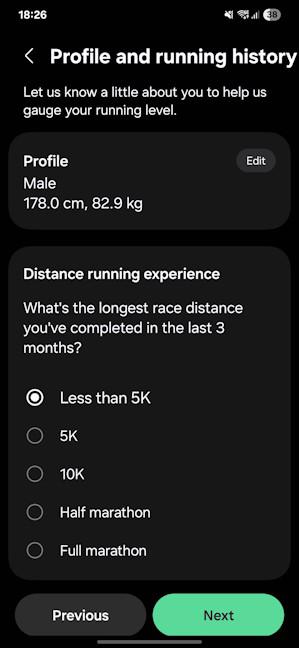 The running coach can be useful
There’s also a Together tab in the Samsung Health app, where you can join walking or running challenges created by Samsung, or by your friends and co-workers. It’s quite enjoyable, and it can help keep you motivated to stay active.
The running coach can be useful
There’s also a Together tab in the Samsung Health app, where you can join walking or running challenges created by Samsung, or by your friends and co-workers. It’s quite enjoyable, and it can help keep you motivated to stay active.
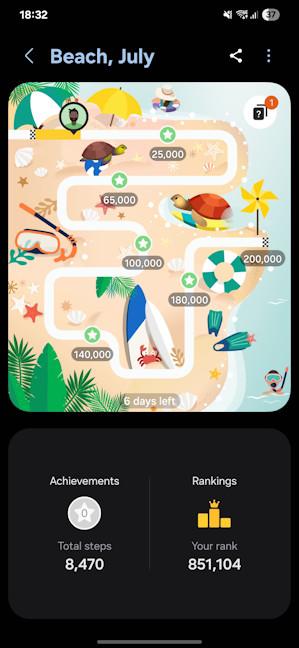 Challenging others can be fun
The Samsung Galaxy Watch8 is a good companion for people who want to improve their lifestyle and integrate sports into their daily routine. It offers a generous list of sports tracking profiles and provides you with sufficient data and coaching to keep you motivated. However, sports enthusiasts and professionals who require in-depth tracking, profiles for multi-sport activities, and integrations with various third-party fitness equipment should look elsewhere.
Challenging others can be fun
The Samsung Galaxy Watch8 is a good companion for people who want to improve their lifestyle and integrate sports into their daily routine. It offers a generous list of sports tracking profiles and provides you with sufficient data and coaching to keep you motivated. However, sports enthusiasts and professionals who require in-depth tracking, profiles for multi-sport activities, and integrations with various third-party fitness equipment should look elsewhere.
Samsung Galaxy Watch8: Who is it good for?
This smartwatch is a great choice for:- People looking for the most comprehensive health tracking features
- Users interested in a great smartwatch with lots of apps and features
- People who desire a good-looking wearable device that is comfortable to wear
- Users invested in the Samsung Galaxy ecosystem
Pros and cons
Here are the things I like about the Galaxy Watch8:- The most comprehensive health tracking on the market, with new metrics
- Improved sleep tracking
- Slimmer, lighter, and more comfortable to wear than previous versions
- Available with 4G LTE connectivity
- Many new tools and features (Gemini AI, Personalized Running Coach, etc.)
- You have to charge it daily (and the charging speed could be faster)
- You need to install several apps to take advantage of all its features
- Some features work only with Samsung Galaxy smartphones
Verdict
The Galaxy Watch8 features a new look and a slimmer design, perfect for people who prefer a more compact smartwatch on their wrist. This device features an extensive list of sensors and health tracking capabilities, making it one of the most useful devices you can buy. Sleep tracking has improved, heart tracking is quite good, and you also get new metrics like the Antioxidant Index, AGEs Index, and Vascular Load (I invite you to read this review till the end to learn more about them). While its sports tracking is competent, it is not as comprehensive as what other brands have to offer. However, it is sufficient for most users, and the new Personalized Running Coach is helpful for those looking to develop a healthy running routine. If you don’t have a Samsung Galaxy smartphone, you shouldn’t buy the Watch8, as you won’t be able to access all its features. But if you do, it’s an attractive option that’s very likely to meet most of your needs. The only downside is that you’ll have to charge it daily.Unboxing the Samsung Galaxy Watch8
The Galaxy Watch8 comes in a relatively small white box made from recycled cardboard, featuring the company’s name, the product name, and a picture of the device. There is no other product information printed on it, except for a sticker that shares the manufacturing date, the product’s model and serial number, in small print.Design and hardware specifications
When compared to its predecessor, the Galaxy Watch7, Samsung has introduced several changes to the Galaxy Watch8. The bezel has a different shape, and it’s no longer a perfect circle. The straps are easier to attach than before, and the smartwatch itself is 11% thinner than its predecessor. The Galaxy Watch8 is available in two colors (silver and graphite), two band sizes (small/medium and medium/large), and two watch sizes: 40 mm (suitable for people with smaller hands) and 44 mm.Setting up and using the Samsung Galaxy Watch8
If you use a Samsung Galaxy smartphone or tablet, the Watch8 is detected as soon as you turn it on. The initial setup is completed through the Galaxy Wearable app, which is mandatory for receiving firmware updates and configuring the smartwatch features of the Watch8. With this app, you can quickly change your watch face and add new ones, set up the apps screen, tiles, quick panel, and more.Health tracking with the Samsung Galaxy Watch8
The area where the Samsung Galaxy Watch8 stands out in a crowded market is its plethora of sensors and health tracking features. You get all the features that have become the standard for smartwatches (like heart rate tracking, sleep analysis, and blood oxygen levels), and a lot more. If you don’t mind using an additional app, Samsung Health Monitor, you can take an on-demand reading of your blood pressure (which’s very useful for people suffering from heart problems) and record an ECG in just 30 seconds. The ECG sensor is somewhat finicky, and it occasionally requires multiple attempts to obtain a successful reading. However, eventually, you’ll finalize the ECG after a few tries and be able to see if there are any issues with your heart rhythm. I also attempted to compare the accuracy of the Blood pressure measurements using a recently purchased medical blood pressure monitor. Unfortunately, I couldn’t get the Galaxy Watch8 to finish its measurement simultaneously with the monitor. There was always a difference of a couple of seconds. The results I got were never identical, but close to each other, which is a good sign.Sports tracking with Samsung Galaxy Watch8
The Galaxy Watch8 is designed for people who want to improve and maintain their health. It’s not a tool for professional athletes or individuals involved in multisport activities, such as triathlons. You can’t even track multisports on this smartwatch, as it lacks the necessary functionality. What you do get is a generous list of profiles for activities that can be tracked. Samsung offers over 100 of them, including niche options such as golfing, skating, or dancing. I haven’t finished my post-knee surgery recovery, so I couldn’t test this smartwatch while engaging in my usual activities, which previously included running and hiking. However, I did use it to track several indoor and outdoor biking activities, a couple of outdoor walks, two pilates sessions, and two strength training sessions.

Discussion (0)
Be the first to comment.