




The Garmin Venu series has always been a mid-range line of smartwatches for people who lead active lifestyles but are not professional runners or serious endurance athletes. Garmin has decided to change its approach by introducing a very surprising smartwatch: the Venu X1, which looks similar to the Apple Watch Ultra series but has nothing in common with it except for its design. But is it any good? And what kind of features does it add to the successful Venu series? Read this review to find out:
![Verdict]()


 Unboxing the Garmin Venu X1 in the great outdoors
Inside the box, you find only a few items: the smartwatch itself, its USB-C charging cable, the quick setup guide, and warranty information. At the start of the trail, I quickly got it working, and then used it to track my activity throughout the day.
Unboxing the Garmin Venu X1 in the great outdoors
Inside the box, you find only a few items: the smartwatch itself, its USB-C charging cable, the quick setup guide, and warranty information. At the start of the trail, I quickly got it working, and then used it to track my activity throughout the day.
 This is everything you find inside the box
In true Garmin fashion, unboxing the Venu X1 is a brief and practical experience. The company doesn’t bundle any flashy extras, and it only provides you with what you need to get started with using their smartwatch.
This is everything you find inside the box
In true Garmin fashion, unboxing the Venu X1 is a brief and practical experience. The company doesn’t bundle any flashy extras, and it only provides you with what you need to get started with using their smartwatch.
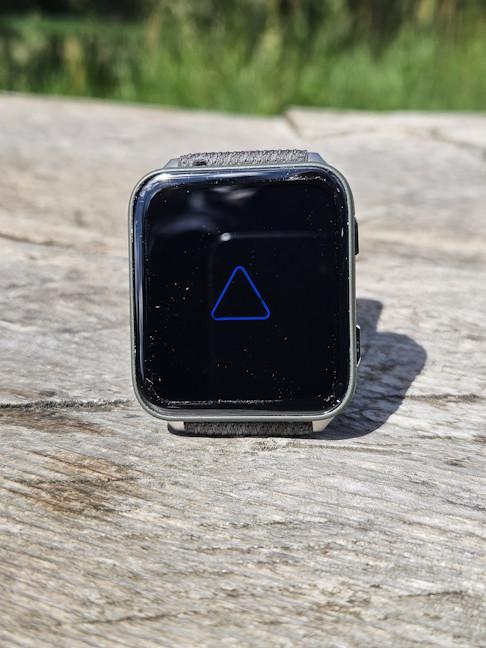 The display is large and bright
Although it’s a large smartwatch, Garmin Venu X1 is very light: 34 grams without the strap and 40 grams with it. The sides of the case are made from fiber-reinforced polymer, and the back of the case is made from titanium. The case is super thin, with a thickness of just 7.9mm. On the left side of the smartwatch, there are two buttons and a microphone for taking calls. On the top left corner, there’s also an LED flashlight, which is difficult to see in the pictures.
The display is large and bright
Although it’s a large smartwatch, Garmin Venu X1 is very light: 34 grams without the strap and 40 grams with it. The sides of the case are made from fiber-reinforced polymer, and the back of the case is made from titanium. The case is super thin, with a thickness of just 7.9mm. On the left side of the smartwatch, there are two buttons and a microphone for taking calls. On the top left corner, there’s also an LED flashlight, which is difficult to see in the pictures.
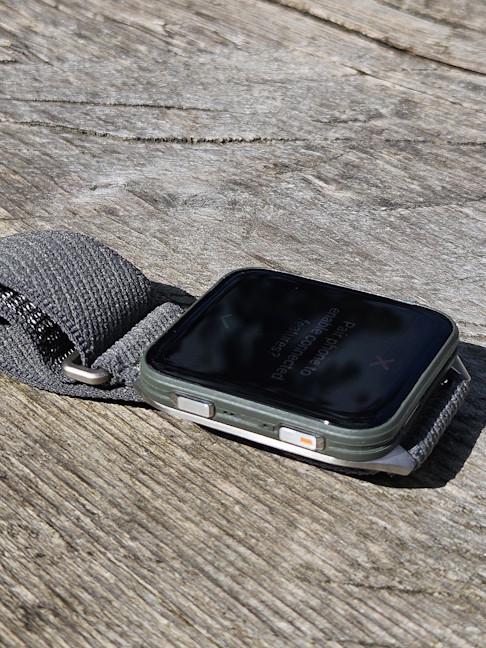 Garmin Venu X1 is also very thin
On the right side, there’s a speaker that can be used for listening to music offline and taking calls. The Garmin Venu X1 comes with a nylon band that can be black or moss, as the company calls it.
Garmin Venu X1 is also very thin
On the right side, there’s a speaker that can be used for listening to music offline and taking calls. The Garmin Venu X1 comes with a nylon band that can be black or moss, as the company calls it.
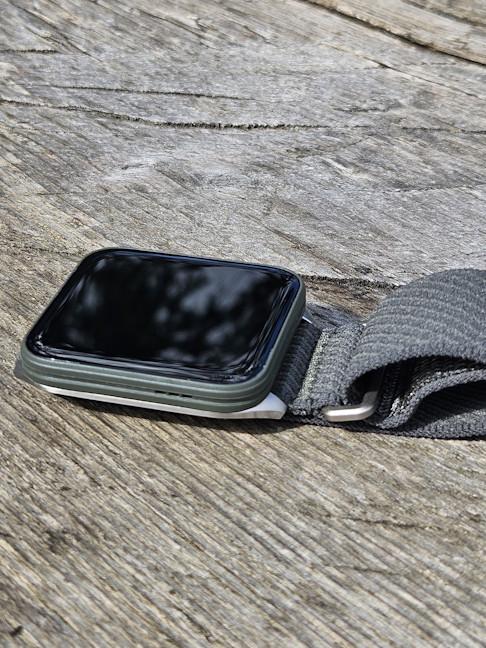 The Garmin Venu X1 has a nylon strap
On the back of the case, you see the Garmin Elevate Gen5 optical HR sensor (the company’s latest version), as well as the charging port. The 24mm nylon band is easy to remove and replace, and if you’re aiming for a more elegant look, you can find more options to purchase in Garmin’s online store.
The Garmin Venu X1 has a nylon strap
On the back of the case, you see the Garmin Elevate Gen5 optical HR sensor (the company’s latest version), as well as the charging port. The 24mm nylon band is easy to remove and replace, and if you’re aiming for a more elegant look, you can find more options to purchase in Garmin’s online store.
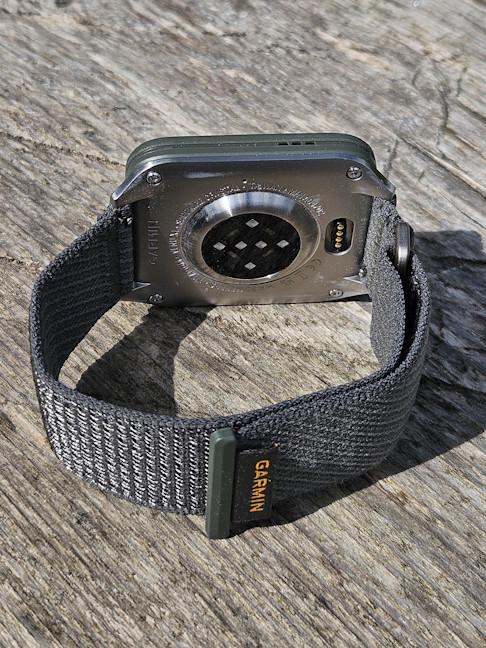 The latest Garmin heart rate sensor is built in
The Garmin Venu X1 offers 32 GB of storage and a battery life of up to 8 days during normal use. Keep in mind that its large, bright display consumes a lot of battery, and if you enable the always-on display, you only get up to two days of use on a single charge.
This is a premium product with an extensive list of sensors: a barometric altimeter, a compass, a gyroscope, an accelerometer, a thermometer, and an ambient light sensor. You also get GPS, NFC, Bluetooth, Wi-Fi, and ANT+ for connecting third-party fitness equipment to your smartwatch. What’s missing, though, is ECG functionality. I find this a bit odd because more affordable Garmin smartwatches have this feature. Platform-wise, it works with both iPhones and Android devices.
The Garmin Venu X1 is an appealing smartwatch designed to attract those who like a look similar to the Apple Watch Ultra 2. It features a surprisingly lightweight body, some of Garmin's best hardware specs and features, and excellent build quality. It’s also suitable for swimming, thanks to its 5 ATM water resistance rating. The only odd omission is the lack of ECG functionality, even though its Elevate Gen5 optical heart rate sensor could provide it. For even more technical details about this smartwatch, check its official product page: Garmin Venu X1.
The latest Garmin heart rate sensor is built in
The Garmin Venu X1 offers 32 GB of storage and a battery life of up to 8 days during normal use. Keep in mind that its large, bright display consumes a lot of battery, and if you enable the always-on display, you only get up to two days of use on a single charge.
This is a premium product with an extensive list of sensors: a barometric altimeter, a compass, a gyroscope, an accelerometer, a thermometer, and an ambient light sensor. You also get GPS, NFC, Bluetooth, Wi-Fi, and ANT+ for connecting third-party fitness equipment to your smartwatch. What’s missing, though, is ECG functionality. I find this a bit odd because more affordable Garmin smartwatches have this feature. Platform-wise, it works with both iPhones and Android devices.
The Garmin Venu X1 is an appealing smartwatch designed to attract those who like a look similar to the Apple Watch Ultra 2. It features a surprisingly lightweight body, some of Garmin's best hardware specs and features, and excellent build quality. It’s also suitable for swimming, thanks to its 5 ATM water resistance rating. The only odd omission is the lack of ECG functionality, even though its Elevate Gen5 optical heart rate sensor could provide it. For even more technical details about this smartwatch, check its official product page: Garmin Venu X1.
 Setting up the Garmin Venu X1
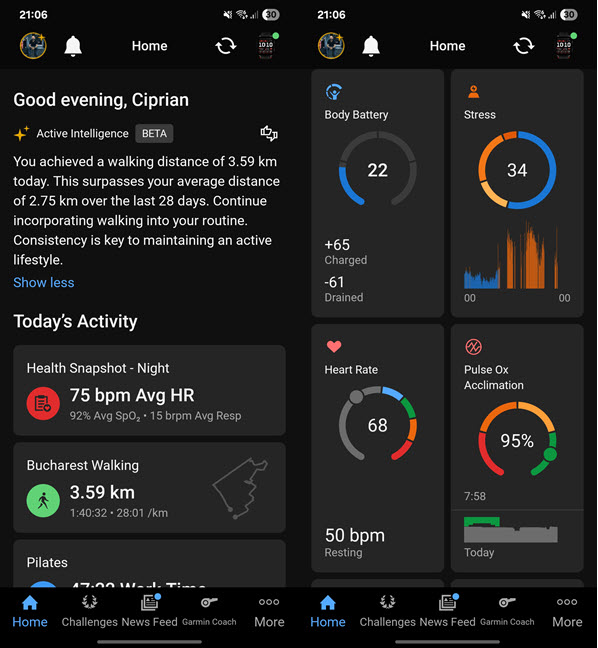
The Connect app is much more data-driven than alternatives from other brands, and it’s filled with detailed reports for all the data sets tracked by your smartwatch. Its user interface is split into tabs, and Home is where you can access details about your latest workouts, view your health data, check your Sleep Coach recommendations, and interact with Garmin’s Active Intelligence, if you have a Connect+ subscription.
Setting up the Garmin Venu X1
The Connect app is much more data-driven than alternatives from other brands, and it’s filled with detailed reports for all the data sets tracked by your smartwatch. Its user interface is split into tabs, and Home is where you can access details about your latest workouts, view your health data, check your Sleep Coach recommendations, and interact with Garmin’s Active Intelligence, if you have a Connect+ subscription.
 The Garmin Connect app
You can personalize not only which tabs are shown on the bottom of the app, but also the tiles displayed on the Home tab and their order. If you want to install additional watch faces and apps like Hydration Tracking, you must fire up the Connect IQ app store. Here, you can find both free and paid options. While the third-party app ecosystem is relatively varied, it’s inferior to what you get on the Apple Watch and Wear OS smartwatches. Luckily, you do get a cool feature that’s available on the competing platforms I’ve mentioned: the ability to not only receive notifications about your messages on WhatsApp, but also view a preview of the pictures in those messages.
The Garmin Connect app
You can personalize not only which tabs are shown on the bottom of the app, but also the tiles displayed on the Home tab and their order. If you want to install additional watch faces and apps like Hydration Tracking, you must fire up the Connect IQ app store. Here, you can find both free and paid options. While the third-party app ecosystem is relatively varied, it’s inferior to what you get on the Apple Watch and Wear OS smartwatches. Luckily, you do get a cool feature that’s available on the competing platforms I’ve mentioned: the ability to not only receive notifications about your messages on WhatsApp, but also view a preview of the pictures in those messages.
 For more apps and watch faces, use Connect IQ
Moving on to the more practical aspect of your user experience, wearing the Garmin Venu X1 is surprisingly comfortable, for a smartwatch this big. It feels light even during sleep, and most of the time, you forget it’s there, sitting on your wrist. The display’s brightness is excellent in all conditions. Two features I appreciate a lot are the Red Shift mode for the display and the built-in flashlight. The Red Shift mode turns on automatically after sunset. It changes the entire watch interface to shades of red, green, or orange to preserve your night vision by blocking the colors that constrict pupils, and also reduces sleep cycle disturbances. It’s excellent.🙂
The flashlight can be turned on with a press of a button when required. It can use both red and white light, and its brightness can be adjusted. The red light is excellent when you need to move around the house at night, and you don’t want to disturb your sleep too much or bother others with your light.
For more apps and watch faces, use Connect IQ
Moving on to the more practical aspect of your user experience, wearing the Garmin Venu X1 is surprisingly comfortable, for a smartwatch this big. It feels light even during sleep, and most of the time, you forget it’s there, sitting on your wrist. The display’s brightness is excellent in all conditions. Two features I appreciate a lot are the Red Shift mode for the display and the built-in flashlight. The Red Shift mode turns on automatically after sunset. It changes the entire watch interface to shades of red, green, or orange to preserve your night vision by blocking the colors that constrict pupils, and also reduces sleep cycle disturbances. It’s excellent.🙂
The flashlight can be turned on with a press of a button when required. It can use both red and white light, and its brightness can be adjusted. The red light is excellent when you need to move around the house at night, and you don’t want to disturb your sleep too much or bother others with your light.

 The Red Shift mode is very useful
Unfortunately, the Garmin Venu X1 comes with only one preinstalled watch face (pictured above). It looks good, and it’s very data-driven. However, I wish there were more options available on this smartwatch.
The built-in microphone and speaker can also be useful. You can take voice notes, answer calls from your smartwatch (if you have your smartphone around), and listen to music, including offline. While the audio quality you get isn’t great, it’s good enough for a quick call or voice note when you’re in a quiet environment.
The Red Shift mode is very useful
Unfortunately, the Garmin Venu X1 comes with only one preinstalled watch face (pictured above). It looks good, and it’s very data-driven. However, I wish there were more options available on this smartwatch.
The built-in microphone and speaker can also be useful. You can take voice notes, answer calls from your smartwatch (if you have your smartphone around), and listen to music, including offline. While the audio quality you get isn’t great, it’s good enough for a quick call or voice note when you’re in a quiet environment.

 Did you know that you can take voice notes while on the go?
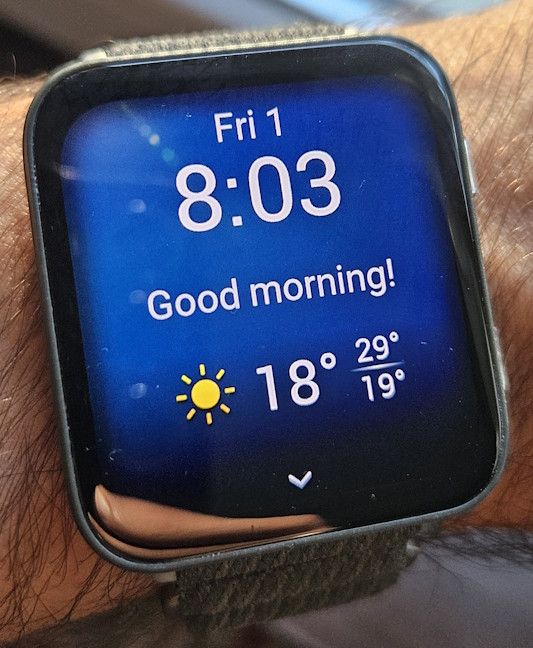
Other features you might appreciate are the Morning and Evening reports. The Morning Report gives you information about the upcoming day, including the weather forecast, data about your body battery, suggested workouts, calendar items, women’s health tracking information (if enabled), and more. The Evening Report shares information about your next alarm, a summary of the day’s activities, what workouts are scheduled for tomorrow, how much sleep you need tonight, etc. They’re simple but useful features that improve the user experience.
Did you know that you can take voice notes while on the go?
Other features you might appreciate are the Morning and Evening reports. The Morning Report gives you information about the upcoming day, including the weather forecast, data about your body battery, suggested workouts, calendar items, women’s health tracking information (if enabled), and more. The Evening Report shares information about your next alarm, a summary of the day’s activities, what workouts are scheduled for tomorrow, how much sleep you need tonight, etc. They’re simple but useful features that improve the user experience.
 Welcome to the Morning Report
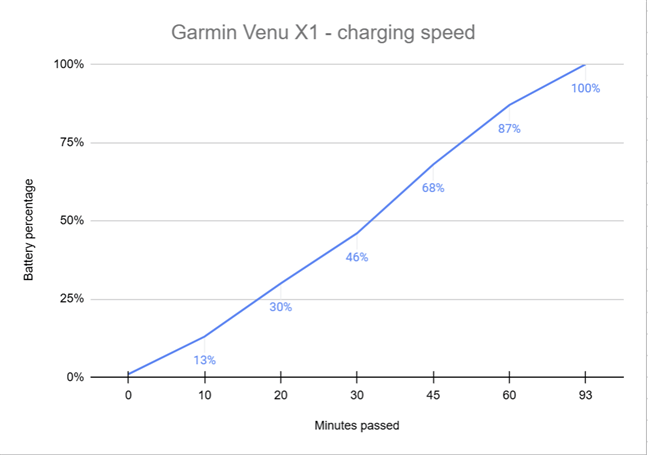
According to Garmin, the Venu X1 should last up to eight days of typical use when the display is set to turn off automatically when not in use. One issue is that this smartwatch is configured to keep the display on while tracking activities. Therefore, if you go hiking for a couple of hours, the battery will drain quickly because the AMOLED display is large and consumes a lot of energy. Consequently, I recommend changing the settings on the Venu X1 so that it turns off its display while tracking activities. I set it this way and enabled Pulse Ox tracking during sleep. With these settings, the Venu X1 lasted between four and five days on a single charge. I also measured the charging speed using a 45-watt smartphone charger. In just 20 minutes, the battery increased to 30%. A full charge took 93 minutes, which is quite slow. For future models, Garmin should improve its battery charging technology.
Welcome to the Morning Report
According to Garmin, the Venu X1 should last up to eight days of typical use when the display is set to turn off automatically when not in use. One issue is that this smartwatch is configured to keep the display on while tracking activities. Therefore, if you go hiking for a couple of hours, the battery will drain quickly because the AMOLED display is large and consumes a lot of energy. Consequently, I recommend changing the settings on the Venu X1 so that it turns off its display while tracking activities. I set it this way and enabled Pulse Ox tracking during sleep. With these settings, the Venu X1 lasted between four and five days on a single charge. I also measured the charging speed using a 45-watt smartphone charger. In just 20 minutes, the battery increased to 30%. A full charge took 93 minutes, which is quite slow. For future models, Garmin should improve its battery charging technology.
 Charging the Garmin Venu X1
My user experience with the Garmin Venu X1 was quite positive. The smartwatch feels responsive when interacting with it, is lightweight and comfortable to wear, offers excellent display visibility, and includes useful features like the Red Shift mode, which helps you fall asleep more easily if you’re using the Venu X1 before going to bed. 🙂
Charging the Garmin Venu X1
My user experience with the Garmin Venu X1 was quite positive. The smartwatch feels responsive when interacting with it, is lightweight and comfortable to wear, offers excellent display visibility, and includes useful features like the Red Shift mode, which helps you fall asleep more easily if you’re using the Venu X1 before going to bed. 🙂
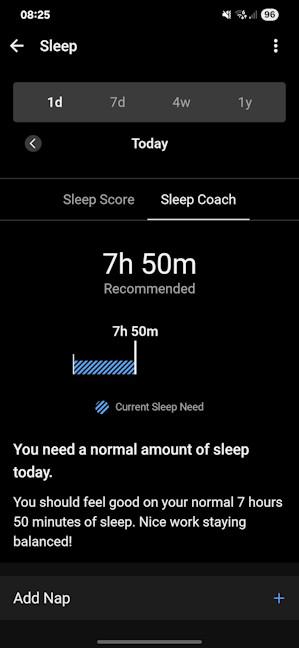 The Sleep Coach is a useful new feature
An area where Garmin shines is the granularity of all the data it collects, and the fact that it can be viewed not only on a day-by-day basis, but also at a weekly, monthly, or yearly level, so that you can identify trends and see the impact of your lifestyle choices.
The Sleep Coach is a useful new feature
An area where Garmin shines is the granularity of all the data it collects, and the fact that it can be viewed not only on a day-by-day basis, but also at a weekly, monthly, or yearly level, so that you can identify trends and see the impact of your lifestyle choices.
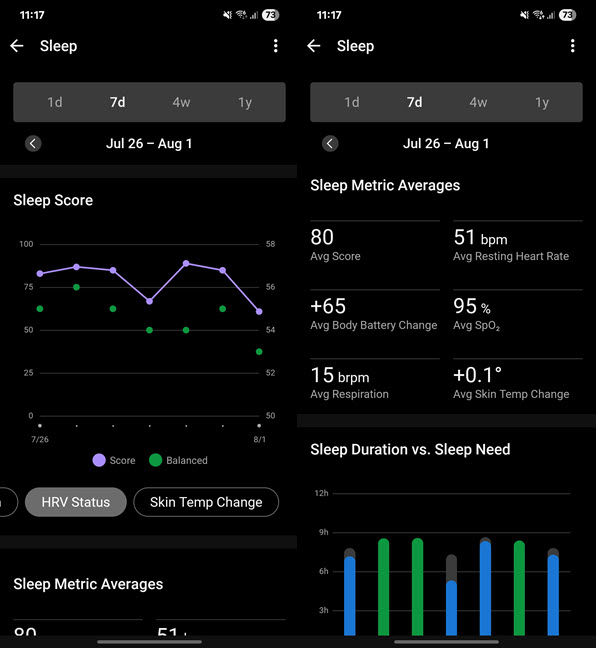 Garmin does a great job at showing you trends
You can set the Garmin Venu X1 to gather all this health information automatically, both during the day and night, but also on demand. For example, if you want to increase the battery life, you can leave the Pulse Ox metrics turned off and make a manual Health Snapshot now and then, which takes two minutes to finalize. At the end of it, you get data about your heart rate, its variability, the blood oxygen level, respiration rate, and stress.
Garmin does a great job at showing you trends
You can set the Garmin Venu X1 to gather all this health information automatically, both during the day and night, but also on demand. For example, if you want to increase the battery life, you can leave the Pulse Ox metrics turned off and make a manual Health Snapshot now and then, which takes two minutes to finalize. At the end of it, you get data about your heart rate, its variability, the blood oxygen level, respiration rate, and stress.
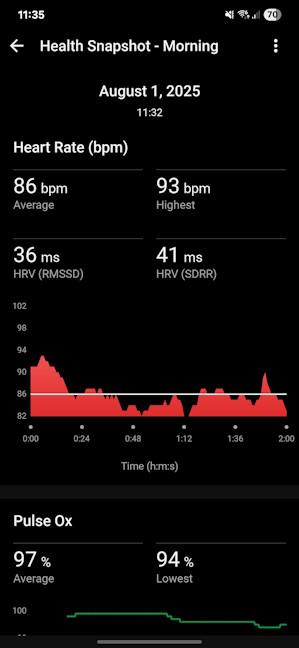 Taking a Health Snapshot takes 2 minutes
It’s great to have all this data available, but is it accurate? While I don’t have advanced medical equipment to compare it to, I made several simultaneous measurements using the Garmin Venu X1 and a professional pulse oximeter with a medical certification valid in the European Union. I noticed that two devices showed a high correlation in measuring heart rate, both when sitting idle and when cycling indoors, which is excellent. However, the Venu X1 tends to underreport the blood oxygen level. The differences were meaningful and varied between 4% and 9%. Therefore, take this metric with a grain of salt. If the Venu X1 says your blood oxygen level is around 90%, you’re completely fine.
Taking a Health Snapshot takes 2 minutes
It’s great to have all this data available, but is it accurate? While I don’t have advanced medical equipment to compare it to, I made several simultaneous measurements using the Garmin Venu X1 and a professional pulse oximeter with a medical certification valid in the European Union. I noticed that two devices showed a high correlation in measuring heart rate, both when sitting idle and when cycling indoors, which is excellent. However, the Venu X1 tends to underreport the blood oxygen level. The differences were meaningful and varied between 4% and 9%. Therefore, take this metric with a grain of salt. If the Venu X1 says your blood oxygen level is around 90%, you’re completely fine.
 How accurate is the Garmin Venu X1?
It’s important to note that this smartwatch also includes women’s health tracking features for monitoring their menstrual cycles and pregnancy, complete with exercise and nutrition education. Since I’m a man, I can’t test these features or comment on their effectiveness. However, the feedback I received from women using different Garmin models was positive, as they found all these tools useful. 🙂
The Venu X1 is packed with all the latest Garmin technology to monitor your overall health. The only missing feature is the ability to record electrocardiograms (ECGs). Sleep tracking has been improved compared to previous Garmin Venu models, and heart rate monitoring is reliable both when you’re resting and during exercise. Next, let’s see how well it tracks your sports activities. 🙂
How accurate is the Garmin Venu X1?
It’s important to note that this smartwatch also includes women’s health tracking features for monitoring their menstrual cycles and pregnancy, complete with exercise and nutrition education. Since I’m a man, I can’t test these features or comment on their effectiveness. However, the feedback I received from women using different Garmin models was positive, as they found all these tools useful. 🙂
The Venu X1 is packed with all the latest Garmin technology to monitor your overall health. The only missing feature is the ability to record electrocardiograms (ECGs). Sleep tracking has been improved compared to previous Garmin Venu models, and heart rate monitoring is reliable both when you’re resting and during exercise. Next, let’s see how well it tracks your sports activities. 🙂

 You can track many sports and activities
Other than this, there’s no limit to what kind of activities you can track with the Venu X1: multisports enthusiasts have all the features they need, as well as people passionate about running, cycling, and swimming in shallow waters. Even golfers can enjoy specialized tracking profiles, complete with maps and data for 43000 courses worldwide. The only feature I wish Garmin would add to all its smartwatches, including the Venu X1, is tracking profiles for dancing. 🙂
Unfortunately, the Venu X1 also lacks the SatIQ technology for GPS tracking found on the Fenix 8. However, this doesn’t make it bad at GPS tracking. During my testing, I found that it required between 8 and 12 seconds to lock a GPS signal (it’s not slow, but it isn’t fast either), and the tracking map generated at the end of an activity was quite accurate and useful. When you finish an outdoor activity, you can see a detailed map of where you’ve been, coupled with plenty of stats that are relevant to your specific activity.
You can track many sports and activities
Other than this, there’s no limit to what kind of activities you can track with the Venu X1: multisports enthusiasts have all the features they need, as well as people passionate about running, cycling, and swimming in shallow waters. Even golfers can enjoy specialized tracking profiles, complete with maps and data for 43000 courses worldwide. The only feature I wish Garmin would add to all its smartwatches, including the Venu X1, is tracking profiles for dancing. 🙂
Unfortunately, the Venu X1 also lacks the SatIQ technology for GPS tracking found on the Fenix 8. However, this doesn’t make it bad at GPS tracking. During my testing, I found that it required between 8 and 12 seconds to lock a GPS signal (it’s not slow, but it isn’t fast either), and the tracking map generated at the end of an activity was quite accurate and useful. When you finish an outdoor activity, you can see a detailed map of where you’ve been, coupled with plenty of stats that are relevant to your specific activity.
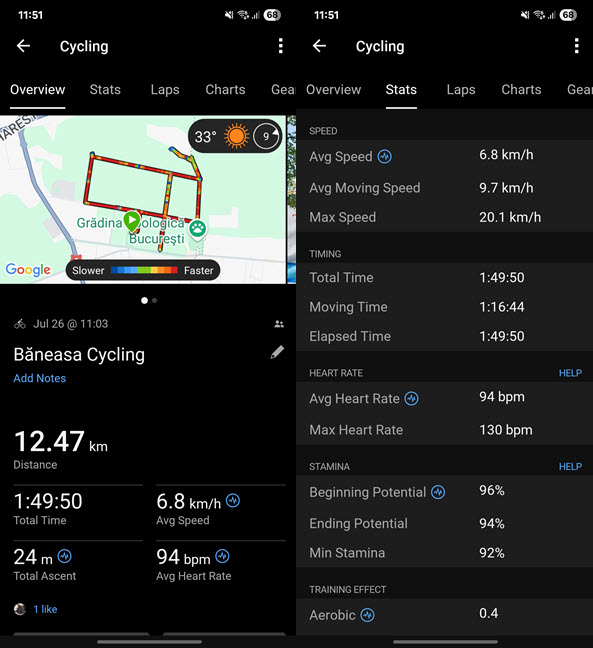
 The report you get at the end of a cycling session
During my testing of the Garmin Venu X1, I tracked several outdoor cycling activities, many indoor cycling sessions, multiple walks, and strength training workouts. A handy but inconsistent feature is that during strength training, the smartwatch tries to identify the specific exercise you’re doing. It also lets you specify the type of weights you’re using for more accurate measurements. Unfortunately, the smartwatch isn’t always able to recognize the exercise, so you may end up with several unknown exercises in the final report. Speaking of which, the report is quite detailed, including not just basic stats like your average heart rate and calories burned, but also a map showing the muscles targeted by your exercises and an assessment of the training effect, which can help you create a balanced workout plan.
The report you get at the end of a cycling session
During my testing of the Garmin Venu X1, I tracked several outdoor cycling activities, many indoor cycling sessions, multiple walks, and strength training workouts. A handy but inconsistent feature is that during strength training, the smartwatch tries to identify the specific exercise you’re doing. It also lets you specify the type of weights you’re using for more accurate measurements. Unfortunately, the smartwatch isn’t always able to recognize the exercise, so you may end up with several unknown exercises in the final report. Speaking of which, the report is quite detailed, including not just basic stats like your average heart rate and calories burned, but also a map showing the muscles targeted by your exercises and an assessment of the training effect, which can help you create a balanced workout plan.
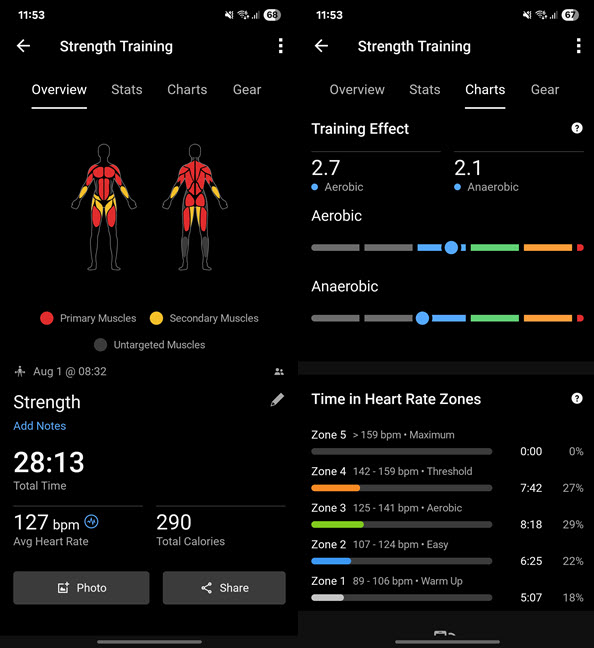
 How strong is your strength training?
Outdoor enthusiasts are going to be happy with the Venu X1 because it gives them access to offline maps, the ability to track their trail, and find their way back in case they get lost. PacePro is also available, giving users grade-adjusted pace guidance throughout their activity, based on elevation and personal pacing preferences.
How strong is your strength training?
Outdoor enthusiasts are going to be happy with the Venu X1 because it gives them access to offline maps, the ability to track their trail, and find their way back in case they get lost. PacePro is also available, giving users grade-adjusted pace guidance throughout their activity, based on elevation and personal pacing preferences.
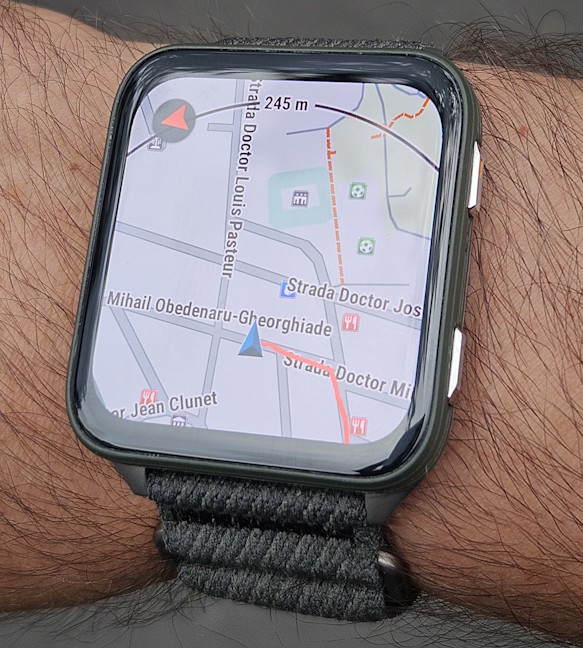
 Garmin Venu X1 has maps available
One last feature worth mentioning is Garmin Coach Plans. They’re more varied than the ones found on previous Venu smartwatches. They can provide you with coaching for different goals: training for a specific race or event, achieving a personal milestone, improving your fitness, or gaining strength. They’re well-designed and don’t require you to pay for Garmin Connect+. Your access to them is included in the price of the Garmin Venu X1.
Garmin Venu X1 has maps available
One last feature worth mentioning is Garmin Coach Plans. They’re more varied than the ones found on previous Venu smartwatches. They can provide you with coaching for different goals: training for a specific race or event, achieving a personal milestone, improving your fitness, or gaining strength. They’re well-designed and don’t require you to pay for Garmin Connect+. Your access to them is included in the price of the Garmin Venu X1.
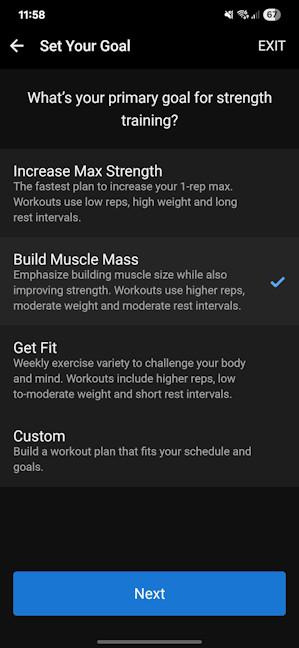 Garming Coach Plans are also included
While it’s not as feature-rich as the Fenix 8, the Garmin Venu X1 is surprisingly close for a smartwatch in the Venu series. This makes it a great choice for people who take sports seriously, train hard, and participate in various sports competitions.
Garming Coach Plans are also included
While it’s not as feature-rich as the Fenix 8, the Garmin Venu X1 is surprisingly close for a smartwatch in the Venu series. This makes it a great choice for people who take sports seriously, train hard, and participate in various sports competitions.
Garmin Venu X1: Who is it good for?
This smartwatch is a great choice for:- People who appreciate a large smartwatch with an Apple-inspired design
- Users looking for a smartwatch with good battery life and great outdoor visibility
- People who want to keep an eye on their health and train hard
- Those who own fitness equipment that can be interconnected using the ANT+ protocol
Pros and cons
Here are the things I like about the Garmin Venu X1:- Beautiful display with excellent outdoor visibility
- Includes Garmin’s latest optical heart rate sensor
- It’s surprisingly lightweight and comfortable to wear
- Useful built-in flashlight and Red Shift mode
- Excellent sports tracking and coaching tools
- Good battery life
- Missing ECG functionality
- Only one preinstalled watch face
- Slow charging speed
Verdict
The Venu X1 surprised me by becoming one of my favorite smartwatches in recent years. I’m not a fan of Apple Watches, but it doesn’t bother me that the Venu X1 has a similar design. I enjoy its large AMOLED display, with excellent outdoor visibility and plenty of space to view and interact with the notifications I receive. It’s very thin, light, and comfortable to wear. While it doesn’t offer multi-band GPS tracking, it’s accurate enough for most people, and its multisport capabilities are excellent for triathletes and other endurance athletes. The Garmin Venu X1 is a capable smartwatch that features most of the health tracking functions regular people need, along with many innovative tools for sports tracking and outdoor activities. I expect it will become one of Garmin’s most popular smartwatches. 🙂Unboxing the Garmin Venu X1
When I received the Garmin Venu X1, I was about to start my first hiking trip after recovering from a knee surgery I had a few months earlier. I was very excited about this trip because I had missed similar experiences for quite some time. So, I took the Venu X1 with me and decided to unbox it just before hitting the trail. 😊 The smartwatch comes in a square gray cardboard box featuring a picture of the device, the company’s logo, and the product name. If it wasn’t obvious enough from its price ($799.99 at launch), the company also labels this device as a “premium GPS smartwatch” on the bottom-left corner of the box. 🙂Design and hardware specifications
The design of the Garmin Venu X1, as well as its price, is similar to that of the Apple Watch Ultra 2. It has a square AMOLED display, with rounded corners, and measures 41 x 46 x 7.9 mm. It’s a large 2-inch display that is protected by a scratch-resistant Sapphire Crystal lens, and it has a resolution of 448 x 486 pixels. Unfortunately, Garmin doesn’t communicate the brightness of its displays. However, from my experience with it, it looks like their brightest display yet, probably around 2000 nits.Setting up and using the Garmin Venu X1
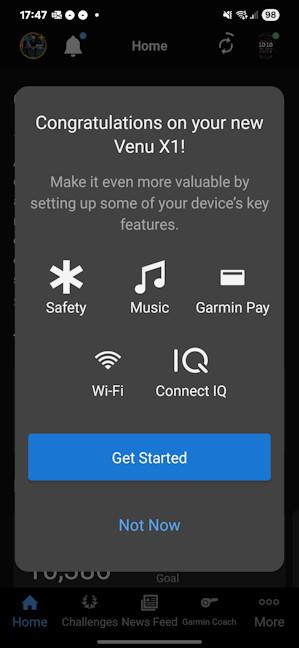
Before you can start using the Garmin Venu X1, you must set it up on your smartphone. It’s compatible with both iOS and Android, and on both of them, you need to install Garmin’s Connect app, sign in with an account, and pair the smartwatch. The setup process takes a while, and it involves all the usual steps, from giving it all the necessary permissions and choosing the hand on which you’re going to wear it, to setting your goals and sleep schedule. Once you’re done with the basics, you’re asked to set up features like Music, Garmin Pay, or Safety.Health tracking with the Garmin Venu X1
The Venu X1 includes all the latest health tracking features from Garmin, except for the ability to record an ECG. It’s unclear why this is the case, and for a smartwatch in its price range, it’s a significant drawback. On the upside, you do get plenty of health tracking data: the heart rate, blood oxygen levels (Pulse Ox), heart rate variability, VO2 Max (an indicator for your cardiovascular fitness), stress levels, breathing, skin temperature during sleep, etc. The sleep tracking is Garmin’s best to date, filled with tons of data that is then used to calculate a Body Score and Training Readiness each morning. You also get a Sleep Coach that gives you actionable advice on how to improve your sleep quality.Sports tracking with Garmin Venu X1
When it comes to sports tracking, the Garmin Venu X1 offers nearly everything the Garmin Fenix 8 does, except for one key difference: the Venu X1 has only a 5 ATM resistance rating and is limited to swimming in pools and shallow water. It’s not recommended, and it also lacks tracking profiles for activities such as snorkeling, scuba diving, and other similar sports.


Discussion (0)
Be the first to comment.