Data security and data privacy are increasingly hot topics nowadays and because of that, more and more companies offer secure storage devices that aim to protect your data. One such example is the new Kingston DataTraveler 2000, a USB 3.1 memory stick that uses military grade 256-bit AES hardware encryption to protect all the data stored on it. Another cool aspect of this device is that it also includes a physical keypad that you can use to enter the access PIN code set for your drive. We have had the pleasure of using and testing this little device for a couple of days and we are now ready to share our experience. If you're looking to buy a set of secure USB flash drives for yourself or your organisation, you should definitely read this review.
Unboxing and hardware specifications
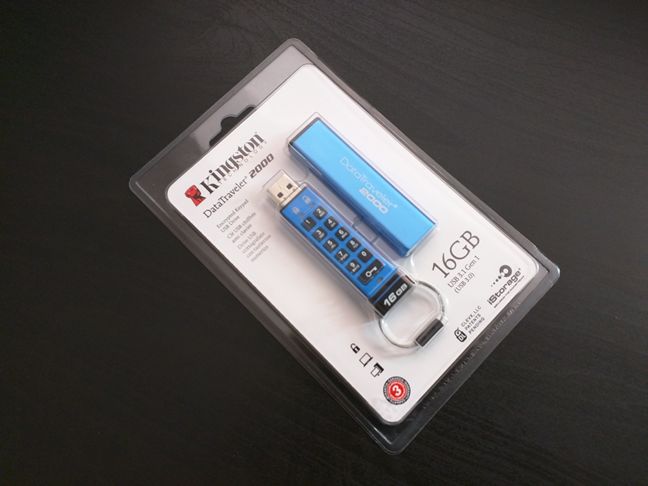
The Kingston DataTraveler 2000 comes in a simple plastic wrapping which you will have to cut in order to get to the contents. Inside, you'll find the USB memory stick, a metallic sleeve for it, and a piece of paper cardboard on which it is printed the quick user guide and the warranty details.
The Kingston DataTraveler 2000 is a USB 3.1 Generation 1 memory stick (or simply USB 3.0) that comes in two capacity variants: 16GB and 32GB. The smaller one - the 16GB model - offers read speeds of up to 120MB/s and write speeds of up to 20MB/s. The larger capacity model, which offers 32GB of storage space, can read data at a maximum speed of 135MB/s and can write data at a maximum speed of 40MB/s. These are all values which you can achieve when you use the Kingston DataTraveler 2000 with a USB 3.1 port. Before moving forward, we would like to mention that we tested the 16GB variant.
That's not to say that the USB memory stick doesn't support USB 2.0 too. It does, but the transfer speeds are less than those you get from USB 3.0. When used on a USB 2.0 port, the Kingston DataTraveler 2000 can read data at a maximum of 30MB/s and can write data at a maximum speed of 20MB/s. These values are true for both the 16GB and the 32GB models.
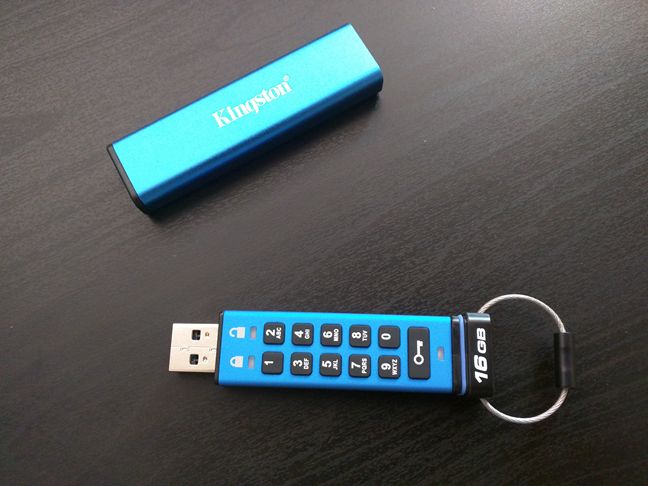
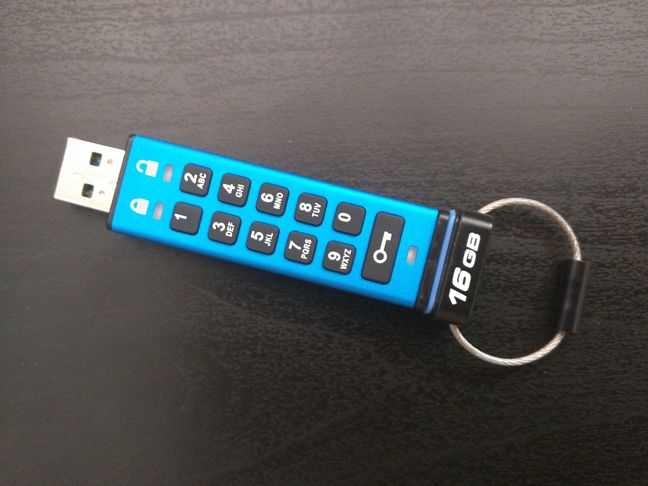
The Kingston DataTraveler 2000 is a USB memory stick that offers military grade 2 56-bit AES hardware encryption. In order to be able to use the memory stick and access the data found on it, you must unlock it by entering a security PIN code. To make this operation as easy as possible, Kingston chose to embed an alphanumeric physical keypad right onto the memory stick. Because the entire data encryption process is done on the drive itself, it also has a built-in 3.7 volts li-polymer rechargeable battery that's charged each time you connect the thumb drive to a computer. The fact that the encryption is done directly by the memory stick is also the reason why you don't need to install any additional software on your computer in order to be able to access the encrypted data on the DataTraveler 2000.
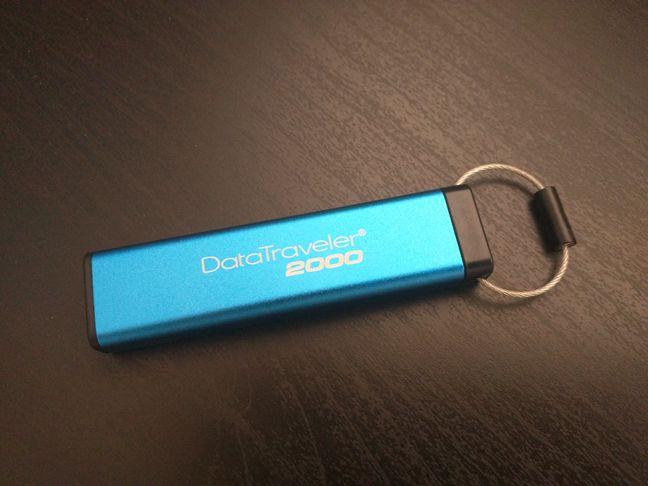
The Kingston DataTraveler 2000 is 7 8mm (~3.07in) long, 18mm (~0.71in) wide and 8mm (~0.31in) thick without taking into consideration the metal sleeve you get with it. When you put the drive into this sleeve, its dimensions grow a bit larger, to 80mm (~3.15in) x 20mm (~0.79in) x 10.5mm (~0.41in) .
If you want more details about the features and hardware specifications of the Kingston DataTraveler 2000 encrypted flash drive, check its official web page: Kingston DataTraveler 2000.
Features and user experience
The Kingston DataTraveler 2000 is very easy to use, all things considered. First of all, we need to underline the fact that this is a secure storage device, that uses a very strong encryption. Typically, using such devices is a pain and requires you to use specialized encryption software on each of the computers to which you connect the removable drive. The DataTraveler 2000 does all the encryption and decryption on its own internal hardware, so there's no need for any additional tools.
To be able to access the encrypted data found on the DataTraveler 200, all you need to do is use the physical keypad to enter the security PIN code and then plug it in your computer. It's the easiest and simplest ways we've seen of doing encryption on a USB memory stick!
However, don't think that the PIN code is also simple, because Kingston has three very important rules that you must follow when you create your passcode:
Your PIN code must be between 7 and 15 characters in length.
Your PIN code must not contain only repetitive numbers (for instance: 2-2-2-2-2-2-2).
Your PIN code must not contain only consecutive numbers (for instance: 1-2-3-4-5-6-7, 7-6-5-4-3-2-1 or 3-2-1-0-1-2-3).
These security rules will make sure that you don't stand a chance of creating an easy to guess PIN code.
The keypad is the only thing you need when you want to change the PIN code of the DataTraveler 2000 or when you want to switch between using it in read-only mode or read-write mode. These are all very simple operations to do and involve only a few presses on the keys from the memory stick's keypad. You will find the detailed configuration steps in the Kingston DataTraveler 2000 User Manual.
As a former military employee, I can tell you that security is very important and the USB flash drives used by employees in such environments receive special attention from any serious organisation, governmental or not. The Kingston DataTraveler 2000 is a USB storage device that such organisations should look at as a good acquisition. Besides the built-in hardware encryption, the DataTraveler 2000 shows off with a very decisive security measure: if someone enters the wrong PIN 10 times or if someone tries to run brute-force attacks on this flash drive, it will self destruct!
Don't read our above statement as referring to physical self-destruction. 🙂 It's about the fact that, if someone tries to tamper with it, the Kingston DataTraveler 2000 automatically destroys the data it stores and reformats itself using a new encryption key . This ensures that no one can access your data.
Performance in benchmarks
No review would be complete without a section about performance, so we ran a few speed tests on the Kingston DataTraveler 2000. As we mentioned earlier, we tested the 16GB model, so you should take into consideration that the speed results we obtained are for this model only. They do not apply to the 32GB model.
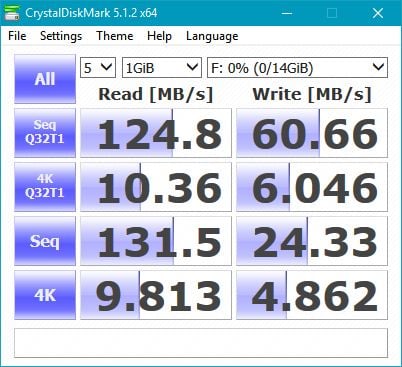
For the first round of tests, we used a benchmarking tool called CrystalDiskMark. This program runs tests that measure how fast a drive reads and writes blocks of data. As you can see from the screenshot below, the maximum read and write speeds we measured with CrystalDiskMark for sequential data transfers are even higher than those advertised by the Kingston DataTraveler 2000 in its official hardware specifications. Unfortunately though, the random read/write results are rather slow.
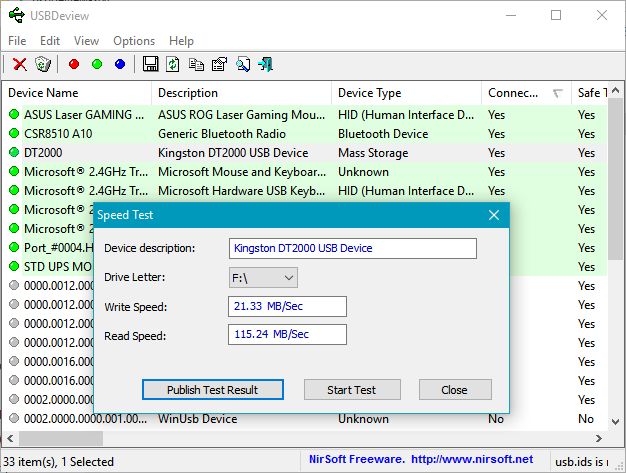
For our second round of tests, we used a tool called USBDeview. This utility shows detailed information about all the USB devices you use. For the USB storage drives that are connected to your computer, USBDeview also lets you run a quick speed test. As you can see from the screenshot below, our 16GB Kingston DataTraveler 2000 managed to achieve write and read speeds that are very close to those advertised in its official hardware specifications.
Taking into consideration the speed results we got from both CrystalDiskMark and USBDeview, it looks like Kingston focused more on the security features of the DataTraveler 2000, rather than on its speed. It's not the fastest USB memory stick that you can find but also it is not the slowest. It offers plenty of speed if you will use it mainly for transporting large files.
Product rating4/5
Verdict
The Kingston DataTraveler 2000 manages to pull off the very complex task of encrypting and protecting your data, while making it very portable, fast and easy to use on any kind of computer. With this device, Kingston proves that security doesn't necessarily mean a complicated or frustrating user experience. The DataTraveler 2000 offers military grade hardware encryption, a sturdy looking body made of metal, an easy to use physical keypad and decent read and write speeds.
The only downside that might weigh heavily on your decision of buying this flash drive is its rather expensive price tag. However, if security is paramount for you, purchasing Kingston DataTraveler 2000 is going to be a decision you won't regret.








Discussion (1)
wow, you are a former military employee…
‘I can tell you that security is very important and the
USB flash drives used by employees in such environments’
i’m astonished.
could you detail in which environments is allowed
to take out data on a usb disk ? much obliged