Many wireless routers were launched which promised compatibility with the latest wireless networking standard - 802.11ac. While this is good, it doesn't mean that all of them offer a wide coverage and a strong signal in larger apartments and homes. When you don't have the WiFi coverage you want, it is a good idea to consider buying a range extender. While you may find many range extenders on the market, very few of them offer compatibility with the 802.11ac wireless networking standard. Luckily ASUS has launched the RP-AC52 Dual-band Wireless-AC750 range extender which is capable of extending both older wireless networks running at the 2.4 GHz frequency as well as modern networks using the 5 GHz frequency and the 802.11ac standard. Learn how well it works and whether it is worth buying, from this detailed review.
Unboxing the ASUS RP-AC52 Range Extender
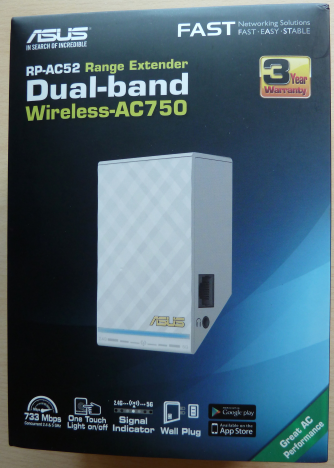
The packaging for the ASUS RP-AC52 range extender is the same as for other similar devices made by ASUS. On the box you will see the device and a bit of information about its characteristics.
ASUS RP-AC52, WPS, range, extender, wireless, network, dual-band, 802.11ac
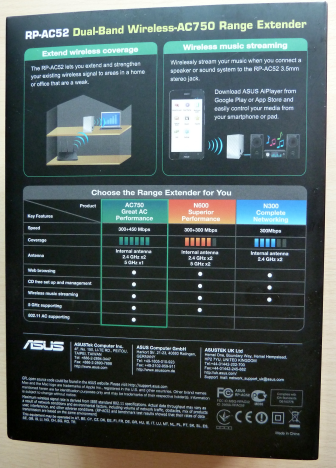
If you look on the back side of the box, you will notice that ASUS RP-AC52 is currently the top range extender from ASUS and the only one that offers support for the 802.11ac networking standard. Earlier this year we have reviewed their most affordable model - ASUS RP-N14. You can find its review here.
ASUS RP-AC52, WPS, range, extender, wireless, network, dual-band, 802.11ac
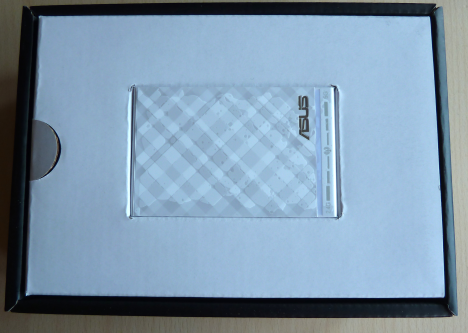
As soon as you open the box, you will immediately see the device.
ASUS RP-AC52, WPS, range, extender, wireless, network, dual-band, 802.11ac
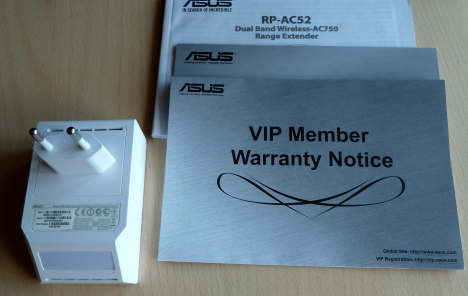
Beneath it, you will also find the warranty and the manual in several different languages.
ASUS RP-AC52, WPS, range, extender, wireless, network, dual-band, 802.11ac
Now let's take a look at what this range extender has to offer in terms of specifications.
Hardware Specifications
If you look carefully on the front of the device, you will see that it has visual signal indicators for both the 2.4 Ghz wireless network and the 5 GHz network. That's because it offers support for all modern networking standards, including IEEE 802.11ac, which works only in the 5 GHz spectrum. The maximum theoretical bandwidth offered by this range extender is 300 Mbps for the 2.4 GHz wireless network and 433Mbps for the 5 GHz wireless network. Obviously, this device has two antennas - one for each operating frequency.
The front side of the device works also as a touch panel for turning On and Off the different features that it offers. But more on that later in this review.
ASUS RP-AC52, WPS, range, extender, wireless, network, dual-band, 802.11ac
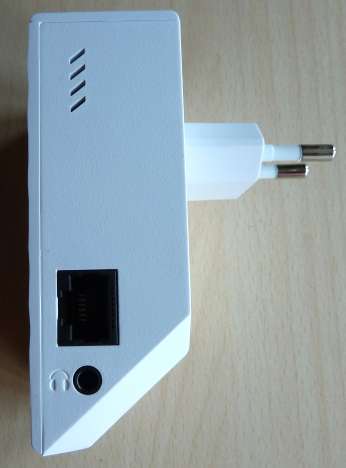
On one side of the device you will find an Ethernet port that you can use to connect the device to the router and use it as an access point or another network device to the range extender.
Near the Ethernet port you will find an audio jack which can be used to connect headphones or speakers, so that you can listen to Internet radio, directly from ASUS RP-AC52.
ASUS RP-AC52, WPS, range, extender, wireless, network, dual-band, 802.11ac
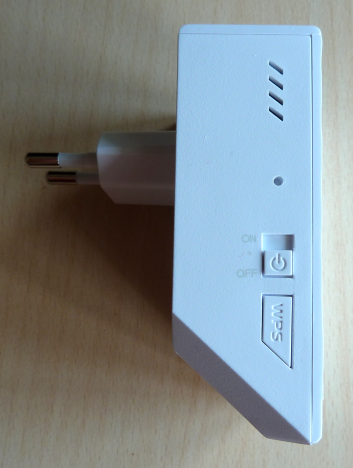
On the other side you will find the button for turning the device on and off, as well as the WPS button for quickly connecting the range extender to the router.
ASUS RP-AC52, WPS, range, extender, wireless, network, dual-band, 802.11ac
You can find the full list of hardware specifications here: ASUS RP-AC52 specifications.
To add a commercial inside your article, use this:
Setting Up & Using the ASUS RP-AC52 Range Extender
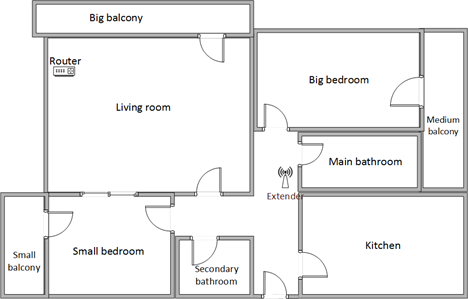
Below you have a diagram of how our test apartment is set up. It is a reasonably large apartment and, if you don't have very good router, the wireless coverage can get rather weak in rooms like the kitchen or the medium balcony which are far away from it. You can see that we have placed the router in the living room and the range extender in the hallway. The router that we used is ASUS RT-AC56U, which we have reviewed here.
ASUS RP-AC52, WPS, range, extender, wireless, network, dual-band, 802.11ac
The quickest way for setting up the ASUS RP-AC52 range extender is to use WPS. Make sure that this feature is turned on on your router and then press the WPS button on the range extender. In a couple of seconds it will automatically set itself up. If you don't know what WPS is, we recommend that you read this article: Simple Questions: What is WPS (Wi-Fi Protected Setup)?.
Open a web browser and go to https://repeater.asus.com or to the IP address that was assigned to the repeater.
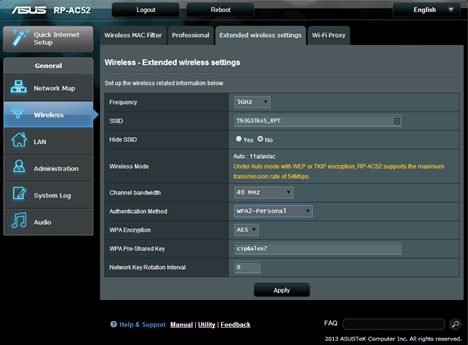
Setting up the repeater takes little time due to the fact that there are few parameters to configure and the defaults it provides are good. However, don't hesitate to go through all the configuration menus and learn more about what this device has to offer.
ASUS RP-AC52, WPS, range, extender, wireless, network, dual-band, 802.11ac
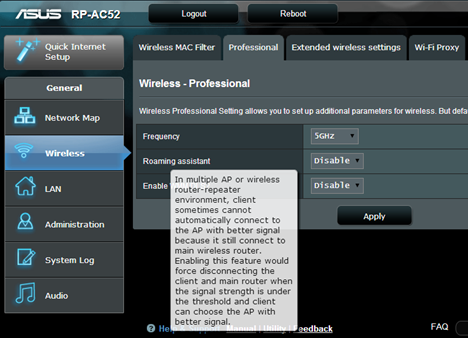
One interesting setting that we discovered is the Roaming assistant. When enabled, the repeater will disconnect devices that have weak wireless signal and allow them to connect to the router which should provide better signal strength in those locations. If you are using an ASUS router like the ASUS RT-AC56U, the router will have the same feature available and using it on both the repeater and the router makes for a better experience. For example, as you walk around the house with your tablet, it will get disconnected when it wireless signal is weak so that it can connect to the device offering the best wireless signal in that area.
ASUS RP-AC52, WPS, range, extender, wireless, network, dual-band, 802.11ac
In terms of language support, ASUS RP-AC52 has its user interface available in only 11 languages, which is fewer than ASUS routers provide.
ASUS RP-AC52, WPS, range, extender, wireless, network, dual-band, 802.11ac
All-in-all we were pleased by the set up process. It was quick and painless and it allowed us to use the range extender in a matter of minutes.
During our 1 week-long testing of the ASUS RP-AC52 range extender, we have used the latest firmware version that was available - 1.0.1.0p.
We had no issues when using this device. We were able to connect all our devices to it, from laptops to our Surface Pro 2 and our smartphones (both with Windows Phone and Android). The network sharing features in Windows worked well and we were able to share and transfer files and folders with the devices that were connected to the range extender. Using the Homegroup feature was also a breeze.
Performance in Benchmarks
In our test setup we have used an ASUS RT-AC56U router which we have reviewed here. We took our old measurements for the cheaper ASUS RP-N14 range extender which we have reviewed here and we compared them with the measurements made for ASUS RP-AC52. All our measurements were performed using a Surface Pro 2 device.
We started by measuring the wireless signal strength in all the rooms where we use our wireless devices. For this task we have used a tool named inSSIDer. Since this is a dual-band repeater, we measured the signal strength for both 2.4 and 5GHz wireless networks.
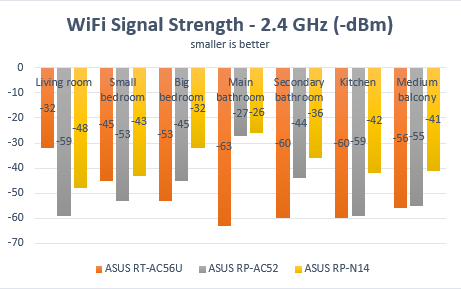
Below you can see the signal strength in each room of our test apartment for the 2.4 Ghz wireless network. In the rooms closer to the router (the living room and the small bedroom) the range extender delivered a weaker signal, which is normal. As we went further away from the router, the range extender managed to improve the signal strength from as little as 2% (in the kitchen) to as much as 57% in the main bathroom. Unfortunately, the improvements delivered were weaker than that of the cheaper single-band model - ASUS RP-N14.
ASUS RP-AC52, WPS, range, extender, wireless, network, dual-band, 802.11ac
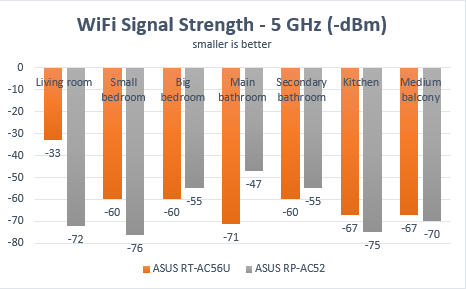
Then we measured the signal strength for the 5 GHz wireless network. The range extender delivered good improvements in the rooms that were both far away from the router and close to the range extender, like the big bedroom or the main bathroom. However, in the rooms that were both far from the router and the range extender, the range extender was not capable of delivering better signal for the 5 GHz WiFi network. As you will see later on in our measurements, in those rooms the range extender wasn't capable of delivering faster transfers either. Therefore, we recommend that you set it up so that it is close to the rooms or areas where you really need better wireless coverage, in order to maximize your gains.
ASUS RP-AC52, WPS, range, extender, wireless, network, dual-band, 802.11ac
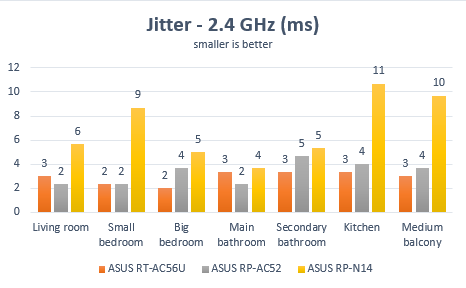
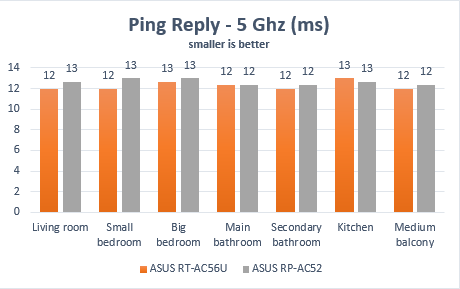
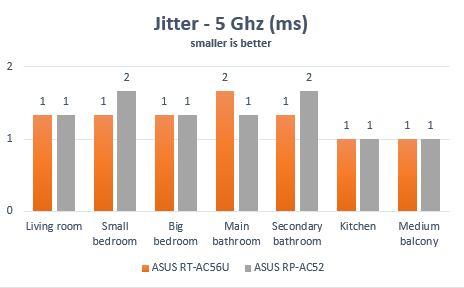
For the next set of measurements, we have used PingTest. It is a test that evaluates the quality of your network. It measures packet loss (which was 0% in all of our tests), the average ping and the jitter, which is the variance in measuring successive ping tests. Having a jitter that's low is great as it signals that your network connection is constant.
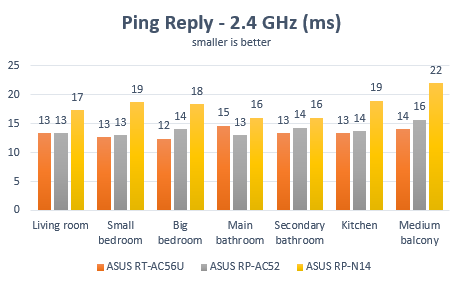
First, let's take a look at our results for the 2.4 GHz wireless network. As you can see from the graph below, ASUS RP-AC52 did not manage to improve the ping reply when compared to the router we have used. However, it did deliver better ping replies than the cheaper model - ASUS RP-N14.
ASUS RP-AC52, WPS, range, extender, wireless, network, dual-band, 802.11ac
In terms of jitter, ASUS RP-AC52 managed to deliver improvements across the board when compared to its more affordable brother - ASUS RP-N14. In some rooms like the medium balcony, which is the room that is farthest away from the router, it delivered improvements as high as 60%.
ASUS RP-AC52, WPS, range, extender, wireless, network, dual-band, 802.11ac
Then we performed the same measurements for the 5 GHz wireless network. As you can see in the graphic below, ASUS RP-AC52 did not manage to deliver any improvements when compared to the router, not even in the rooms that are further away from the router.
ASUS RP-AC52, WPS, range, extender, wireless, network, dual-band, 802.11ac
Below you can see the jitter from room to room, when using the 5GHz wireless network. The good news is that the ASUS RP-AC52 delivered good results across the whole apartment.
ASUS RP-AC52, WPS, range, extender, wireless, network, dual-band, 802.11ac
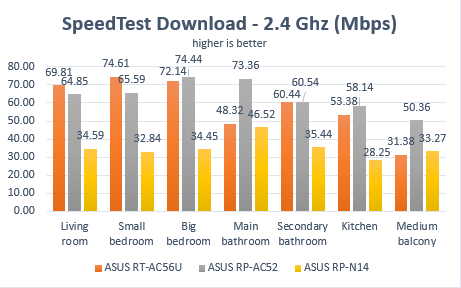
Now, let's see whether the measurements above translate into improved download and upload speeds? To evaluate this, we have used SpeedTest.
First, we measured the download speed for the 2.4 GHz wireless network. As you can see in the graph below, ASUS RP-AC52 has improved the download speed a lot more than its more affordable brother, the difference being as high as 105% in some rooms.
ASUS RP-AC52, WPS, range, extender, wireless, network, dual-band, 802.11ac
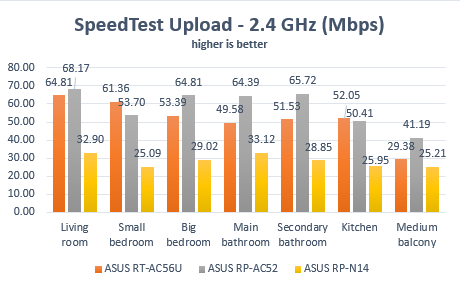
In terms of upload speeds, the picture remains the same and ASUS RP-AC52 delivers great improvements across the board.
ASUS RP-AC52, WPS, range, extender, wireless, network, dual-band, 802.11ac
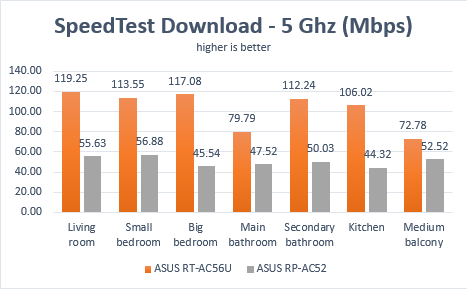
Then we measured the download speed when using the wireless network running at 5 Ghz frequency. As you can see in the graph below, the range extender did not manage to deliver better speeds than our router ASUS RT-AC56U. We found it worrying that the download speed delivered for the 5 Ghz wireless network was generally smaller than that for the 2.4 GHz wireless network.
ASUS RP-AC52, WPS, range, extender, wireless, network, dual-band, 802.11ac
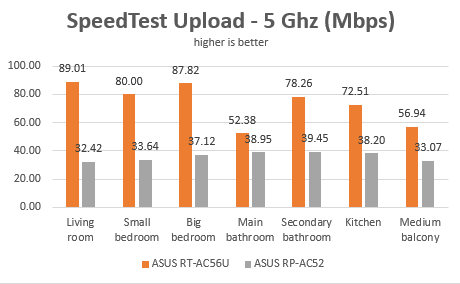
Below you can see the upload speeds that were measured in each room, when using the 5GHz wireless network. Again, the router outperformed the range extender in every room. The good news is that the upload speed delivered by the range extender was higher than that of the 2.4 GHz wireless network.
ASUS RP-AC52, WPS, range, extender, wireless, network, dual-band, 802.11ac
ASUS RT-AC56U delivered good performance, especially when using the 2.4 GHz wireless network. We were not that pleased though with its performance when using the 5 Ghz wireless network as we were expecting faster downloads.
To add a commercial inside your article, use this:
Special Features
The ASUS RP-AC52 range extender includes the following extras:
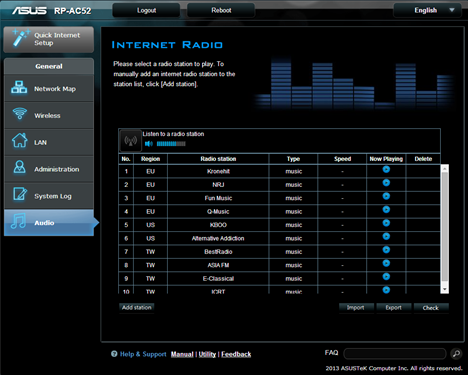
It has a 3.5mm stereo audio port audio port where you can plug in a speaker, a stereo system or an earphone. You can use that port to listen to radio online. This feature can be turned on from this device's configuration menus.
ASUS RP-AC52, WPS, range, extender, wireless, network, dual-band, 802.11ac
You can also use the ASUS AiPlayer app to perform music streaming from an Android or iOS device to the range extender.The app can play many popular formats for music files: mp3, wav, flac and acc. Unfortunately, ASUS AiPlayer is not available for Windows 8.1 or Windows Phone.
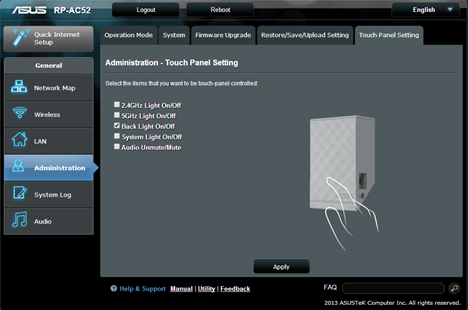
The area where the ASUS logo is found on the range extender works as a touch controller. You can set this touch controller as an On/Off switch for different things: the network light, the backlight on the device, the system light or for the audio stream.
ASUS RP-AC52, WPS, range, extender, wireless, network, dual-band, 802.11ac
Product rating4/5
Verdict
There are not that many people using the modern 802.11ac wireless networking standard in their homes and there are even fewer who need a range extender for those wireless networks. That's why we consider that this device is not for everyone. It meets very specific needs for people with modern routers and large homes. ASUS RP-AC52 does a good job, especially when extending a 2.4 GHz wireless network in your home. It is capable of extending also the 5 GHz wireless network that's using the 802.11 ac networking standard. However, the network connection won't be as fast as you might expect it to when using this spectrum. Hopefully, its performance when using the 5 GHz frequency will be improved with further firmware updates.






























Discussion (1)
Thanks for review. I have got AC52 and was thinking to replace with cheaper N14. But seems download speed is much better.