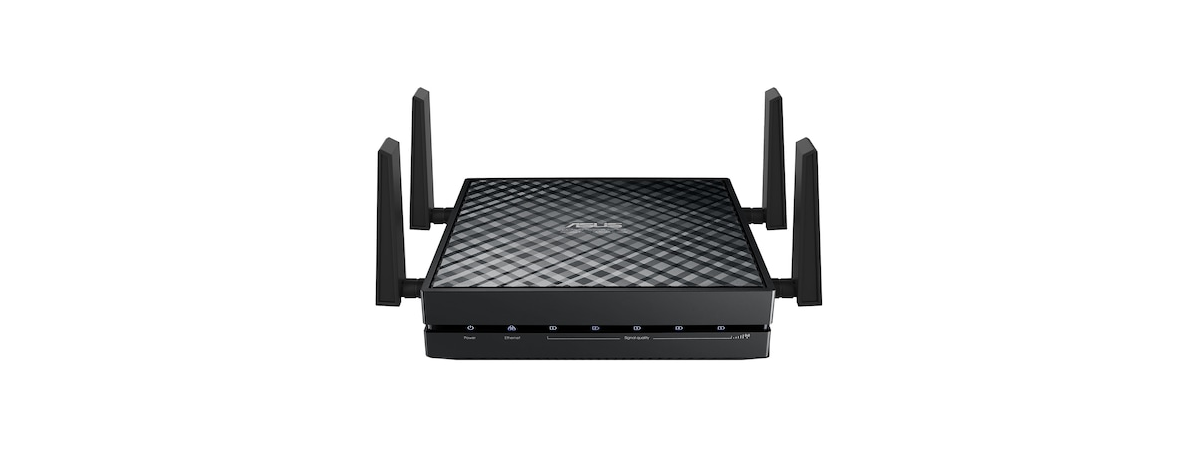
ASUS has recently launched a new home networking device: the EA-AC87 Media Bridge/Access Point. This device is very versatile and can be used as an advanced range extender for 802.11ac and 802.11n wireless networks running at 5GHz or as an access point. Also, it is the first device of its type to be focused only on very fast 5GHz wireless networks. As you can imagine, when ASUS shared the news about this device with us, we were curious to get our hands on it and test it. Here's what we have learned about it after a week of testing:
Unboxing The ASUS EA-AC87 Media Bridge/Access Point
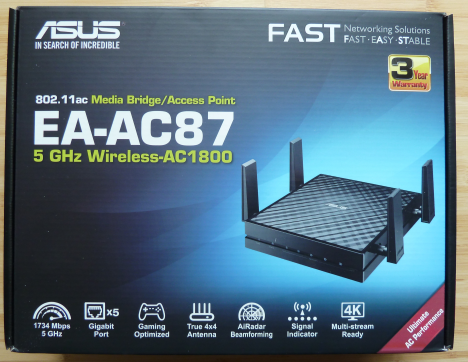
The packaging used by ASUS for this device is the same as for all their networking devices. You can see a picture of the device and a really good summary of its impressive specifications. It boasts impressive speeds like wireless transfers at 1734 Mbps, 4K video playback and more.
ASUS, EA-AC87, Media Bridge, Access Point, review
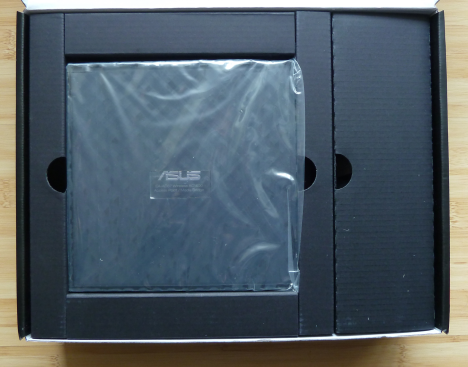
When you open the box, you immediately see the device, while its accessories are hidden in nicely arranged pockets.
ASUS, EA-AC87, Media Bridge, Access Point, review
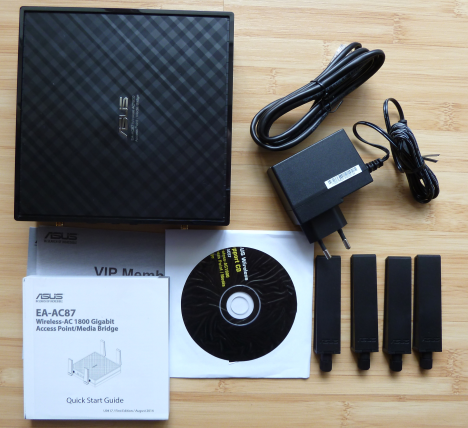
The package contains the following elements: the media center/access point, four antennas, the charger, a network cable that's 1.5 meters long (4.9 feet), the quick start guide, a CD with software utilities and the manual, the warranty and other leaflets.
ASUS, EA-AC87, Media Bridge, Access Point, review
Hardware Specifications
The first thing that you should keep in mind about this device is that it works only with wireless networks in the 5GHz spectrum. Therefore, if you don't have new devices with support for the 802.11ac and 802.11n wireless networking standards, it might not be that useful. You should try ASUS EA-N66 instead, which is a dual-band access point/media bridge.
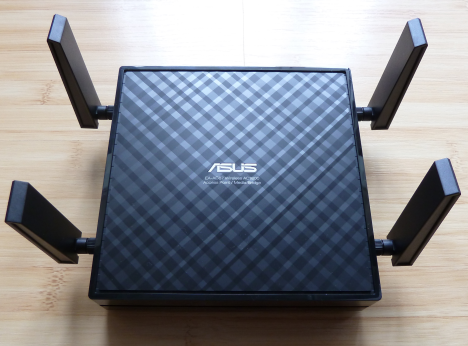
ASUS EA-AC87 has four dipole antennas which, at least in theory, should provide really good coverage.
ASUS, EA-AC87, Media Bridge, Access Point, review
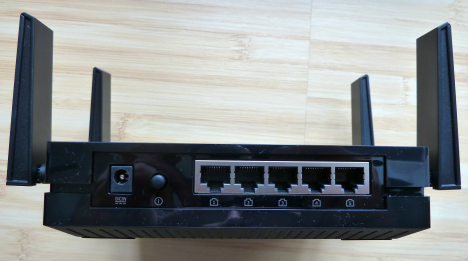
On the back of the device there are 5 Ethernet gigabit ports, so that you can also connect desktop PCs or devices which don't work with the 5 GHz wireless spectrum.
ASUS, EA-AC87, Media Bridge, Access Point, review
As you expect, ASUS EA-AC87 has support for WPS connections and modern security standards like WPA2-PSK and WPA-PSK.
Its dimensions are 160 x 160 x 40 mm (Width x Depth x Height). That's 6.2 x 6.2 x 1.5 inches. ASUS EA-AC87 weighs 480 grams or 16.9 ounces.
The full set of specifications of this device can be found here: ASUS EA-AC87 specifications.
Setting Up & Using The ASUS EA-AC87 Media Bridge/Access Point
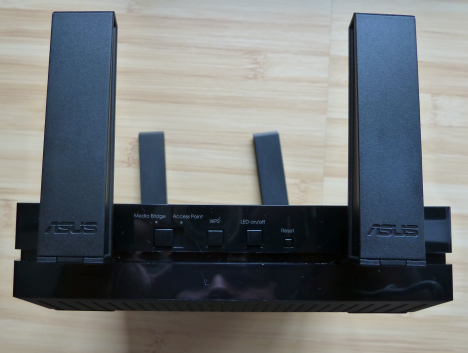
Connecting the ASUS EA-AC87 via WPS is extremely easy and it involves just a few button presses. In less than a minute, the device is connected to your wireless network and can act as a media bridge, extending your network. Before you turn it on, all you have to do is set the Media Bridge/Access Point switch to the appropriate position.
ASUS, EA-AC87, Media Bridge, Access Point, review
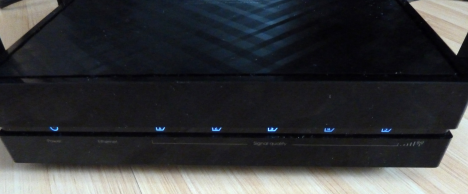
Once the device is turned on and connected to your network, its LEDs on the front are lit and you can start configuring it using its web interface.
ASUS, EA-AC87, Media Bridge, Access Point, review
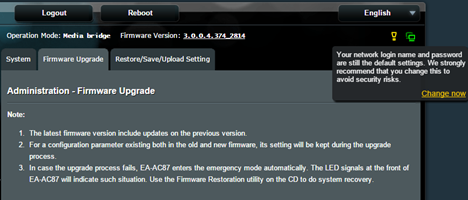
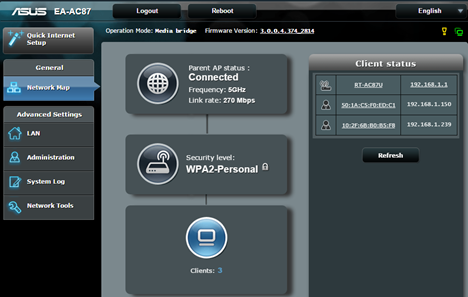
The user interface used for ASUS EA-AC87 is the same used for all networking devices made by ASUS. We like it and we find it very friendly and easy to use. A big plus is the fact that the device warns you that you should change the default login name and password, so that you secure your network properly.
ASUS, EA-AC87, Media Bridge, Access Point, review
The user interface for the ASUS EA-AC87 media bridge/access point is available in 21 languages, which is great.
ASUS, EA-AC87, Media Bridge, Access Point, review
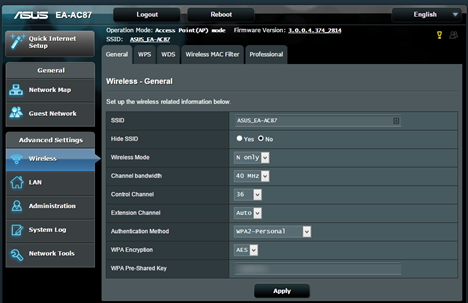
When the device is set as a media bridge, it automatically clones your wireless network and its configuration: name, password, etc. You can't set it to use a different network name when you use it like this.
However, if you set it to work as an access point, then you can set a different network name and password, as well as different security options than the network that's broadcast by your router.
ASUS, EA-AC87, Media Bridge, Access Point, review
We did not encounter any issues when we connected our devices to the wireless network that's broadcast by ASUS EA-AC87. All connections worked perfectly and we were able to use all the network sharing features that are available on our computers and devices: sharing with the Homegroup, sharing the printer, printing remotely, streaming video, etc.
In just a couple of minutes, our wireless network was set up and working well.
Wireless Network Performance
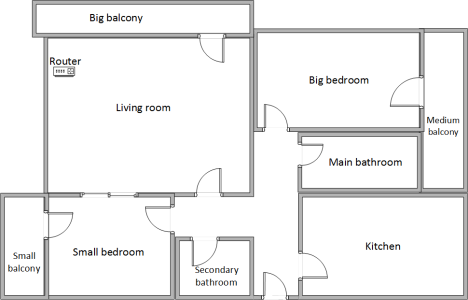
First, let's take a look at the apartment that was used in our testing and how it is set up. You can see that the router is placed in the living room.
ASUS, EA-AC87, Media Bridge, Access Point, review
The router we used was ASUS RT-AC87U, which we reviewed here. In order to be able to separate the wireless signal broadcasted by the router and ASUS EA-AC87 media bridge/access point, we used the device as an access point. We connected it to the router using the 1.5 meters (4.9 foot) long cable that's provided in its packaging and ASUS EA-AC87 was placed 1.5 meters (4.9 feet) away from the router. Our testing was done using a fast 1 Gigabit Internet connection.
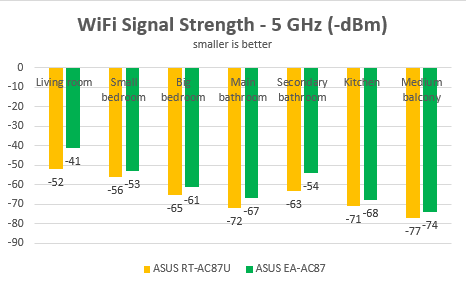
With the help of a tool named inSSIDer and our Surface Pro 3, we have measured the signal strength for the 5 GHz wireless network and recorded how it changes from room to room. As you can see, the signal strength provided by ASUS EA-AC87 is simply excellent.
ASUS, EA-AC87, Media Bridge, Access Point, review
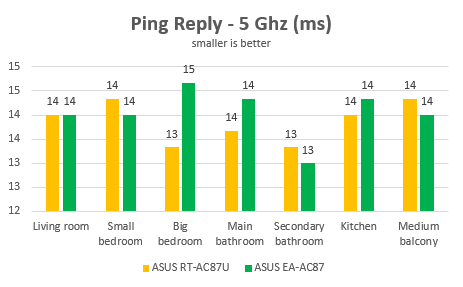
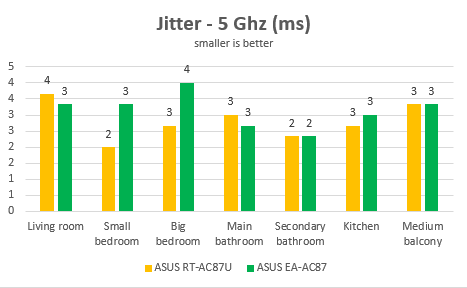
Then, we ran PingTest to evaluate the quality of the Internet connection provided by this device. As you can see in the graph below, the ping reply and the jitter (the variance in measuring successive ping tests) were great. Yes, the router was better but not by a big margin.
ASUS, EA-AC87, Media Bridge, Access Point, review
The jitter of the Internet connection provided by ASUS EA-AC87 was also excellent.
ASUS, EA-AC87, Media Bridge, Access Point, review
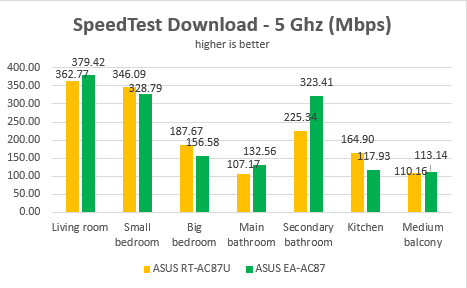
Then, we ran SpeedTest in order to measure the download and upload speeds of the Internet connection offered by ASUS EA-AC87. As you can see, this device was very fast and delivered fast downloads even in the most remote rooms of our test apartment.
ASUS, EA-AC87, Media Bridge, Access Point, review
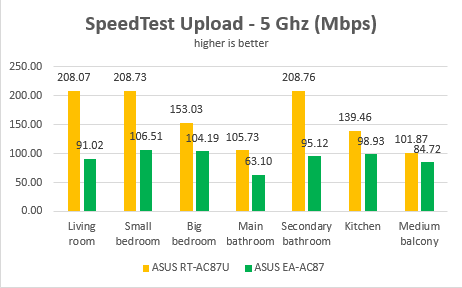
The upload speed on the Internet was also good but not great. Our test router was generally faster.
ASUS, EA-AC87, Media Bridge, Access Point, review
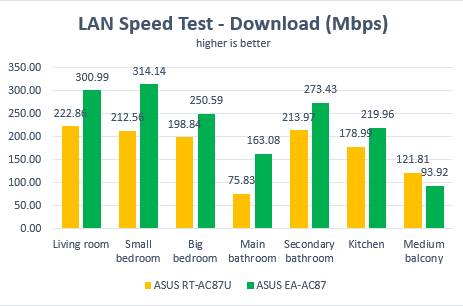
Lastly, we used LAN Speed Test Lite to measure the download and upload speeds when transferring a 350 MB file on the wireless network broadcasted by ASUS EA-AC87. We transferred this file between our Microsoft Surface Pro 3 which was connected to the wireless network and a very fast desktop computer that was connected to the same network using an Ethernet network cable. As you can see for yourself, the downloads offered by ASUS EA-AC87 are very fast in all rooms, including those which are more remote.
ASUS, EA-AC87, Media Bridge, Access Point, review
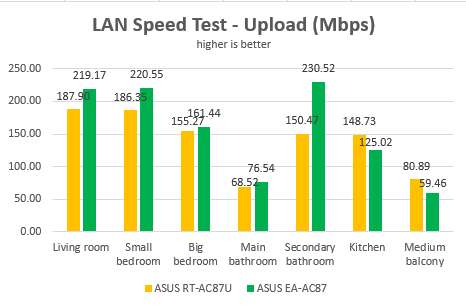
The same was true when we looked to the upload speed. It's just that the differences between the test router and ASUS EA-AC87 were smaller than when we measured the download speed.
ASUS, EA-AC87, Media Bridge, Access Point, review
ASUS EA-AC87 is a very fast media bridge/access point which is capable of delivering reliable network connections even in large apartments.
Extra Features
When it comes to extra features, ASUS EA-AC87 doesn't offer any. You get only the configuration options that you need for it to work as a media bridge/access point.
ASUS, EA-AC87, Media Bridge, Access Point, review
You have some network analysis tools like Ping, Netstat or Nslookup and that's it. We don't consider this as a minus though. This device does everything you need it to do and we did not feel the need for any extras.
Product rating5/5
Verdict
ASUS EA-AC87 is a premium media bridge/access point which offers very good performance and reliability. It is useful for people who have modern homes with new devices that work with modern networking standards like 802.11ac and 802.11n. With it, you can extend the coverage of your wireless network or you can extend the capabilities of an older router and add an additional 5GHz wireless band to your network. We consider it a very good choice for people with a generous budget, that want the best performance and the best possible coverage.
I purchased this to use as a media bridge. Installation was a breeze and the immidiate performance was amazing. However after having it now for 4-5 days, I see that it is not stable at all. Communication slows down and connected units get timeouts and eventually the unit may reboot itself or I do it manually to get the communication back again. After reboot it works fine again for some hours. Not easy to find out why this happens, because when it hangs the unit’s GUI is not accessible and https://www.digitalcitizen.life/node/1518/comments after a reboot the system log entries are cleared. I searched for new fw, but apparently ASUS has ended support for the EA-AC87… I will return this for a refund and another better one. Anyone that can recommend me one that is stable?
Ole M ·
Just forgot to mention that during the time (5 days) I have owned the EA-AC87, I needed to reboot the unit 1-2 times every day to get it working. For information, the unit is placed approx 12 meters away from my router (TP-Link C3200) and the signal in is very good (3/4 Leds). Link speed is normally on 980 Mbps. The link runs on a dedicated 5 GHz from my router on channel 52 and I have checked with Wifi Analyzer that there are not interfering Wifi AP around ch 52. Suggestions for a good and stable media bridge are appreciated.
justin ·
Hey thanks for the great review and I think this is the product for me.
I do have a question though, you mentioned that this AP is connected to the router using the 1.5m wire provided? I do not see a lan port for this? I thought all 5 lan ports in your photo are for devices, say 5 laptops that need internet connection can connect to this AP. And usually, say on a router, we have 5 usable ports, and then 1 extra which is usually made a small distance away from the 5 that connects to the internet (ie connects to router provided by ISP).
What I need in my home a “wired” access point. The lan wire connects to a lan port in my home (which connects to the isp router), the other end to the access point. This access point then broadcasts the signal.
Hence is this product suitable for me or did i read the review wrong?
Andrew ·
You can use any of the 5 ports to connect wired to your router (or other AP), so unlike older models which had a single dedicated port, on the EA-AC87 all ports work all ways.
Marie ·
Excellent article! I like the way you described everything in a step by step format. I found the information useful and helpful in deciding to use this device.

























Discussion (5)
I purchased this to use as a media bridge. Installation was a breeze and the immidiate performance was amazing. However after having it now for 4-5 days, I see that it is not stable at all. Communication slows down and connected units get timeouts and eventually the unit may reboot itself or I do it manually to get the communication back again. After reboot it works fine again for some hours. Not easy to find out why this happens, because when it hangs the unit’s GUI is not accessible and https://www.digitalcitizen.life/node/1518/comments after a reboot the system log entries are cleared. I searched for new fw, but apparently ASUS has ended support for the EA-AC87… I will return this for a refund and another better one. Anyone that can recommend me one that is stable?
Just forgot to mention that during the time (5 days) I have owned the EA-AC87, I needed to reboot the unit 1-2 times every day to get it working. For information, the unit is placed approx 12 meters away from my router (TP-Link C3200) and the signal in is very good (3/4 Leds). Link speed is normally on 980 Mbps. The link runs on a dedicated 5 GHz from my router on channel 52 and I have checked with Wifi Analyzer that there are not interfering Wifi AP around ch 52. Suggestions for a good and stable media bridge are appreciated.
Hey thanks for the great review and I think this is the product for me.
I do have a question though, you mentioned that this AP is connected to the router using the 1.5m wire provided? I do not see a lan port for this? I thought all 5 lan ports in your photo are for devices, say 5 laptops that need internet connection can connect to this AP. And usually, say on a router, we have 5 usable ports, and then 1 extra which is usually made a small distance away from the 5 that connects to the internet (ie connects to router provided by ISP).
What I need in my home a “wired” access point. The lan wire connects to a lan port in my home (which connects to the isp router), the other end to the access point. This access point then broadcasts the signal.
Hence is this product suitable for me or did i read the review wrong?
You can use any of the 5 ports to connect wired to your router (or other AP), so unlike older models which had a single dedicated port, on the EA-AC87 all ports work all ways.
Excellent article! I like the way you described everything in a step by step format. I found the information useful and helpful in deciding to use this device.