In this article we are reviewing the MSI GT76 Titan DT 9SG - a gaming laptop "behemoth" that promises to be just as good as the most powerful desktop PCs on the market. It features a desktop Intel Core i9-9900K processor that can reach speeds of 5 GHz and Nvidia's high-end Geforce RTX 2080 graphics card. Are you ready to meet this Titan? Read this review, and see if the MSI GT76 Titan DT 9SG laptop can challenge the gods of the computer world and become worthy of its name:
MSI GT76 Titan DT 9SG: Who is it good for?
The MSI GT76 Titan DT 9SG is an excellent choice if you:
Are a gamer and want to play all games with ultra quality settings
Want the best in terms of hardware
Don't mind paying a premium price for a premium device
Pros and cons
There are many good things to say about the MSI GT76 Titan DT 9SG gaming laptop:
It features one of the best desktop processors of the moment (Intel Core i9-9900K)
The graphics card can handle both 4K gaming and VR experiences (Nvidia Geforce RTX 2080)
The display on the model we tested has a high 240 Hz refresh rate, which is great for competitive gaming
The chassis is well built, with high-quality materials
Its oversized cooling system can keep the hardware cool, even in the most demanding situations
Support for Wi-Fi 6 means fast network connections
There's a good selection of ports
Showcases plenty of RGB lights, on its front, back, and keyboard
The battery is unexpectedly good considering how powerful this laptop is
Offers a lot of upgrade options (SSD, HDD, RAM)
There are also a few downsides to consider:
The display does not have support for Nvidia G-Sync
The cooling system is noisy when the fans are running at full speed
The price is not for everyone
The laptop is heavy, and it has two power adapters
Product rating5/5
Verdict
The MSI GT76 Titan DT 9SG is a monstrosity that definitely earns its Titan name. We can't really think of it as a laptop, because it is huge and tough like a tank, and appears to be working on steroids. MSI GT76 Titan DT 9SG features a desktop processor and its top of the line graphics card can handle any game at maxed visual settings. Together with the SSD setup and the large (and upgradeable) RAM, this beast can't be stopped by anything, whether you're into competitive gaming or if you need to run demanding software for video editing or CAD. If money is not something that you're concerned about, the MSI GT76 Titan DT 9SG is an excellent desktop replacement that you should consider buying.
Unboxing the MSI GT76 Titan DT 9SG
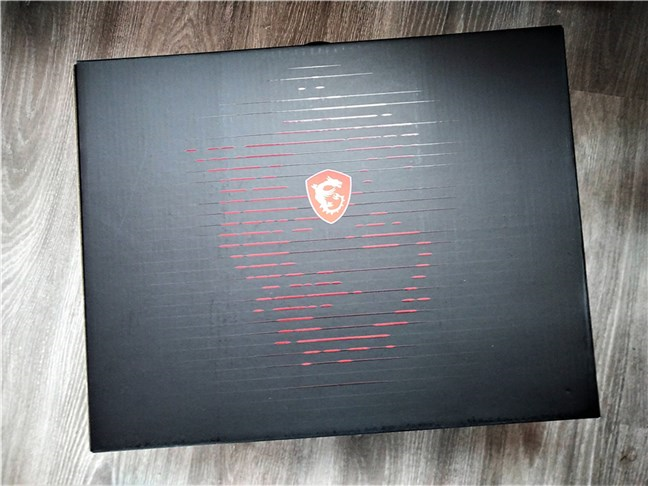
The MSI GT76 Titan DT 9SG comes in a large box, made from premium hardened cardboard. Its design is minimalist, showcasing only the MSI logo and some thin red lines.
The package of the MSI GT76 Titan DT 9SG
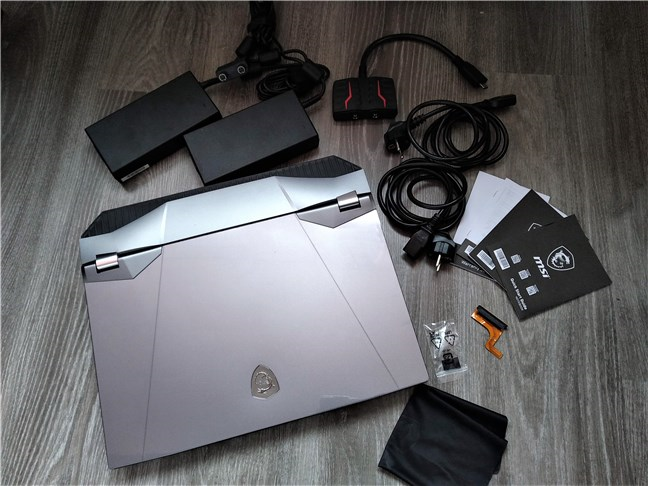
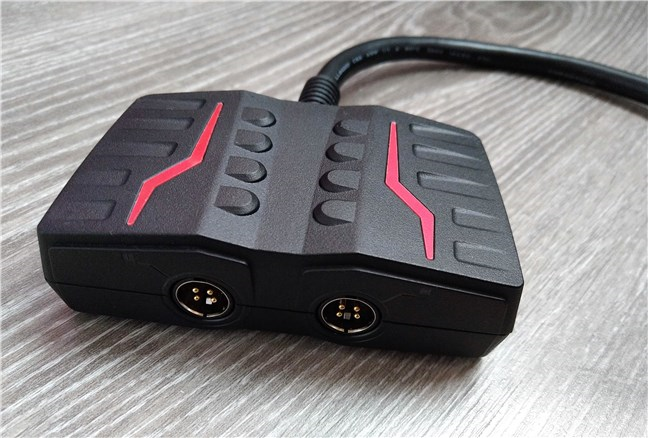
Inside the box, there's the laptop tucked inside a protective textile bag, along with two power adapters, two power cables, a power adapter converter (to which you connect the two power bricks, and its plug goes into the laptop), a cleaning cloth, a SATA adapter, useful if you want to add a hard disk drive, a few screws, the user documentation, and the warranty.
MSI GT76 Titan DT 9SG: What's inside the box
Unpacking the MSI GT76 Titan DT 9SG is a straightforward experience. Once you take everything out of the box, you can see that the MSI GT76 Titan DT 9SG looks impressive and feels like a tank. 🙂
Design and hardware specifications
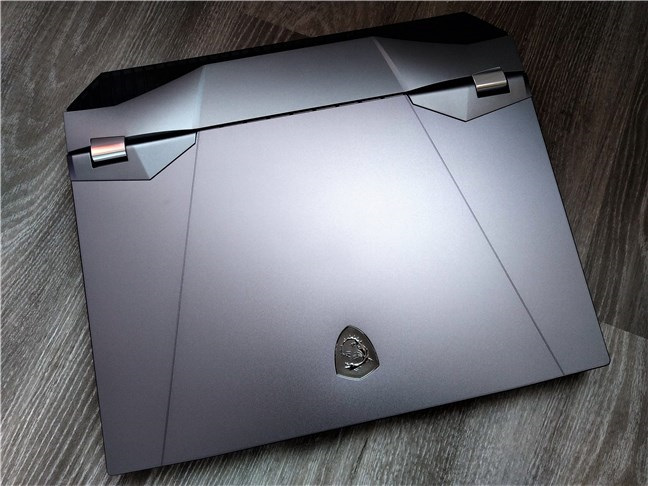
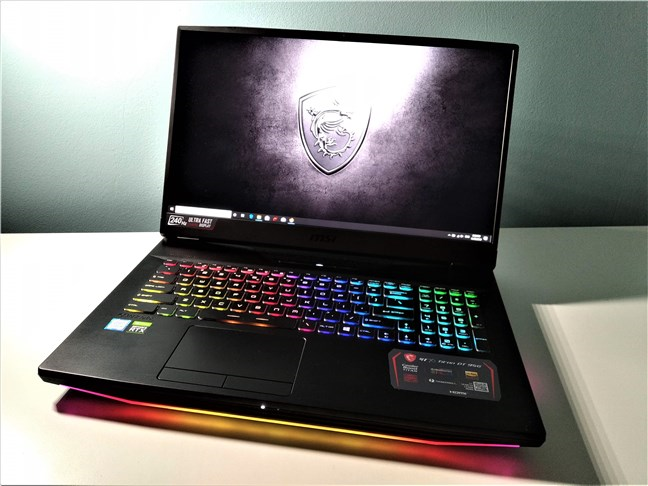
The MSI GT76 Titan DT 9SG is not a laptop for those who can't live with a BIG computing machine on their desks. This laptop is larger than life, both in terms of performance and in sheer physical size. It has 15.63 x 13 x 1.65 inches or 39.7 x 33 x 4.2 cm in size, and it weighs 9.25 pounds or 4.2 kg.
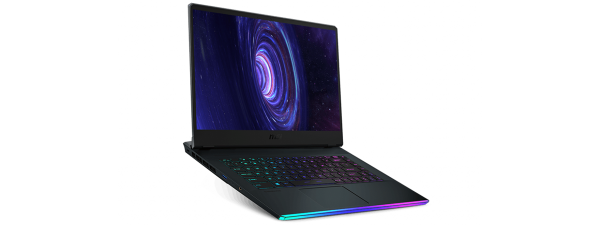
The MSI GT76 Titan DT 9SG gaming laptop
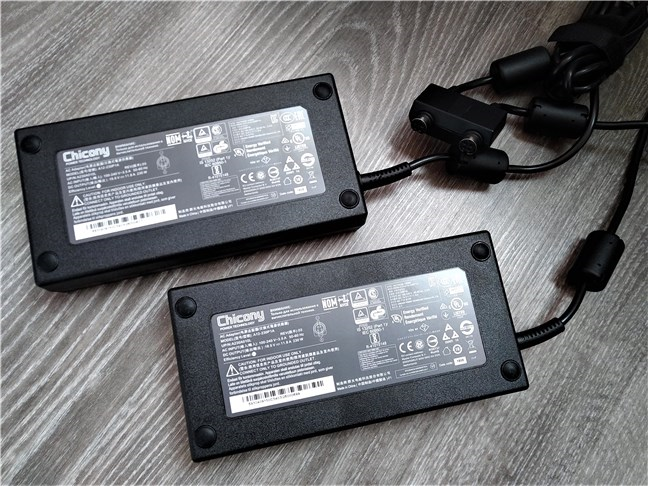
And that's without the two 230 watts power bricks, each of them weighing about 1.65 pounds (0.75 kg), thus adding another 2.3 pounds (1.5 kg) to the total weight you have to carry. That means that if you want to take the MSI GT76 Titan DT 9SG with you, you're going to have to transport at least 11.55 pounds (5.7 kg).
The MSI GT76 Titan DT 9SG has two power adapters
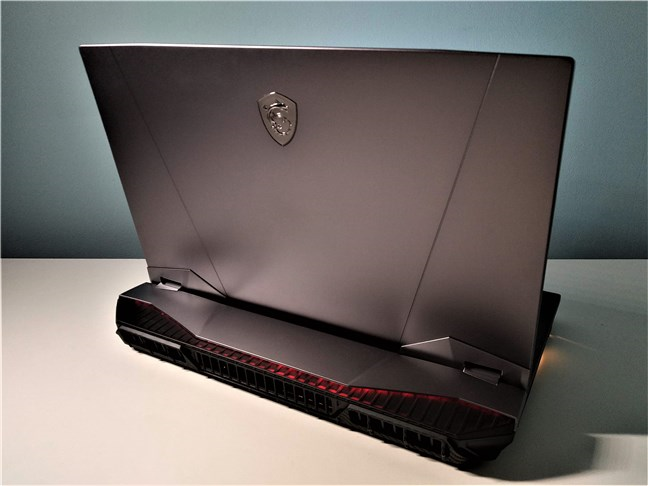
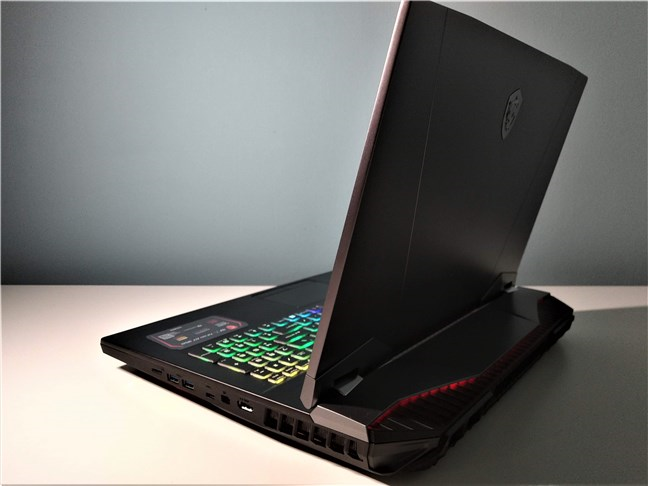
Both the size and weight are justified if you take a look at the hardware inside this laptop. It features a very powerful Intel Core i9 desktop processor and the best mobile graphics card available at this point: Nvidia Geforce RTX 2080. They run fast, and they create quite a lot of heat, so the laptop needs an efficient cooling system. To tackle this issue, MSI mounted some oversized heat pipes and coolers on the laptop, and those add a lot of weight and volume. If you're looking at the back of the laptop, you can see what we're talking about. That is where the laptop has a large protrusion with huge heat exhausts.
A view of the MSI GT76 Titan DT 9SG from the back
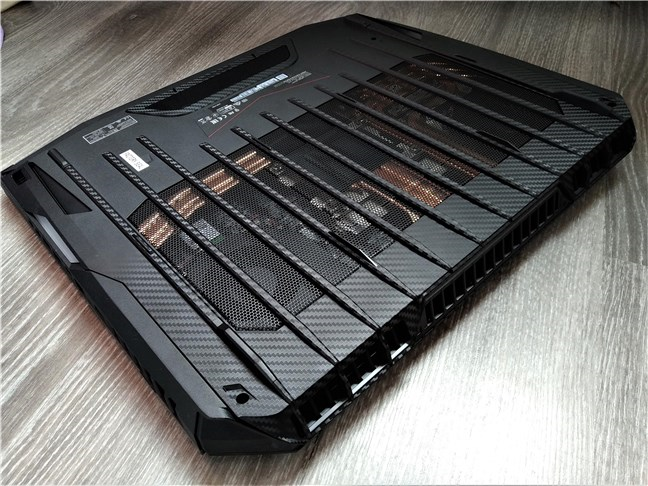
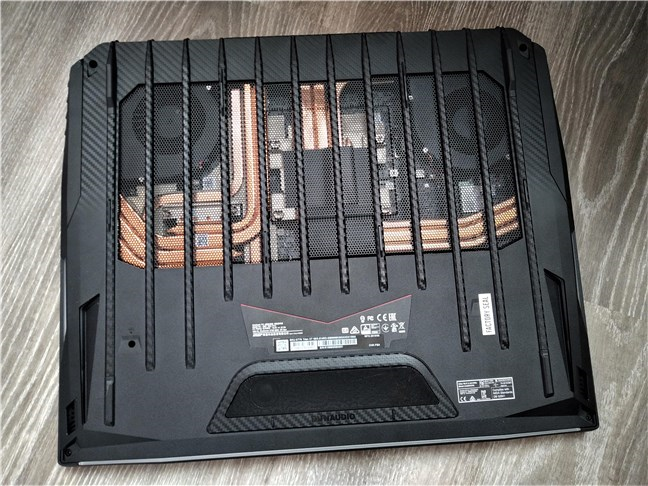
It's also worth taking a look at the bottom of the MSI GT76 Titan DT 9SG, where it has a large air grille through which you can see just how many copper heat pipes are found inside it.
The bottom of the MSI GT76 Titan DT 9SG has a large air grille
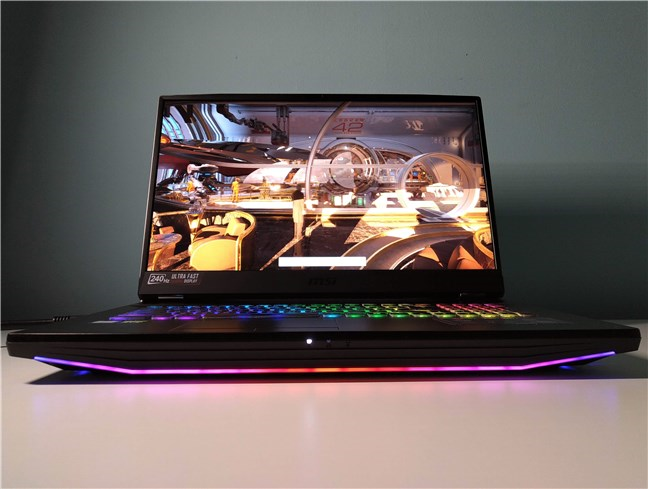
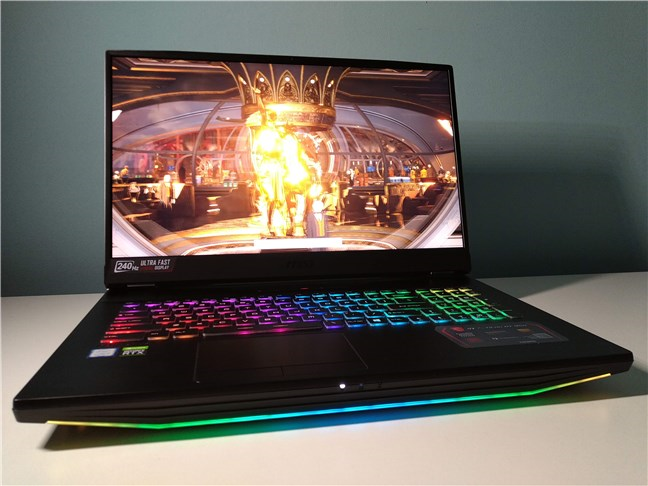
Also, regarding the design, we would like to point out that, even if the laptop uses rather subtle black and gray colors all over, there are plenty of RGB lights on it, that are going to draw a lot of attention. There are RGB lights on the front edge of the laptop, on its bumpy back, and also on its SteelSeries keyboard.
MSI GT76 Titan DT 9SG has RGB lights on the front, back, and keyboard
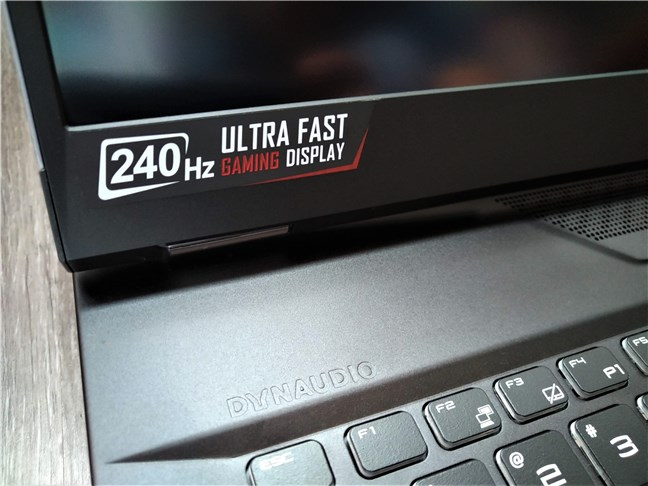
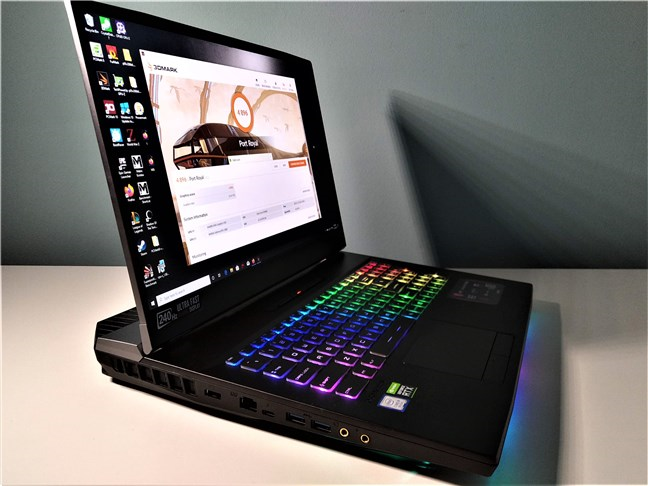
The display on the MSI GT76 Titan DT 9SG is a matte LCD with a diagonal size of 17.3 inches, built using the IPS technology which means large viewing angles, good contrast, and vivid colors. Furthermore, there are two types of IPS panels that you can choose from: one with a 4K resolution of 3840 x 2160 pixels and a 60 Hz refresh rate, and the other one with a Full HD resolution of 1920 x 1080 pixels but a much higher refresh rate of 240 Hz. We've tested the latter, which is especially recommended for competitive gameplay, because of its extreme refresh rate. The only thing missing here is the lack of G-Sync support.
MSI GT76 Titan DT 9SG can have an ultra-fast display with a refresh rate of 240 Hz
This laptop is called Titan for a reason: the hardware inside is what you'd call larger-than-life. You can equip it with various 9th Gen Intel Core processors, up to Intel Core i9. MSI doesn't enumerate all the CPU models on the laptop's specifications web page, because they differ depending on your region.
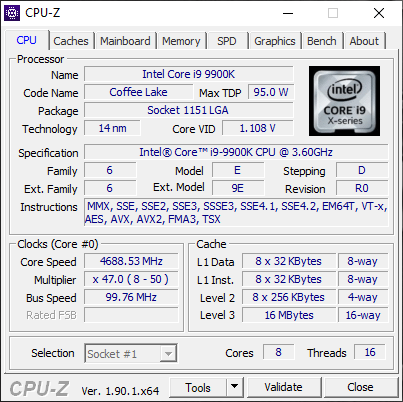
The MSI GT76 Titan DT 9SG that we tested was equipped with an Intel Core i9-9900K processor running at a base speed of 3600 MHz and at an impressive turbo speed of 5 GHz.
MSI GT76 Titan DT 9SG: Details about the processor
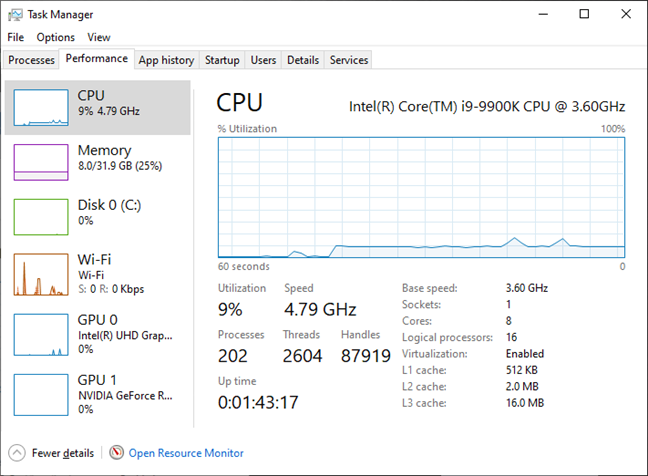
However, the CPU appears to have been limited to a maximum frequency of 4.8 GHz by the manufacturer. That's not an issue because you can manually change its configuration, as this specific CPU model has an unlocked multiplier and was designed for desktop computers, not for laptops, so it's even more impressive that MSI managed to use it in a laptop and keep it cool!
MSI GT76 Titan DT 9SG: The Intel Core i9-990K usually reaches 4.8 GHz
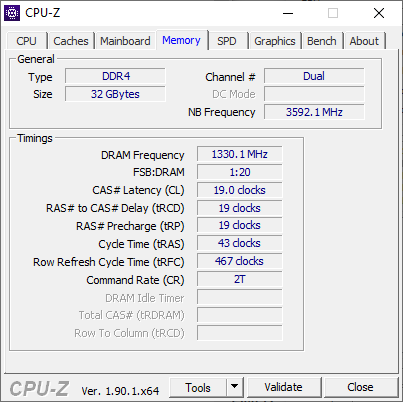
This beast of a gaming laptop supports a maximum of 128 GB of DDR4 RAM running at a frequency of 2666 MHz. To fit all that memory inside it, there are four DIMM slots that you can use: two of them are under the backplate, and the other two are found under the keyboard. The MSI GT76 Titan DT 9SG that we reviewed had 32 GB of RAM, which is more than enough for any game.
MSI GT76 Titan DT 9SG: Details about the RAM
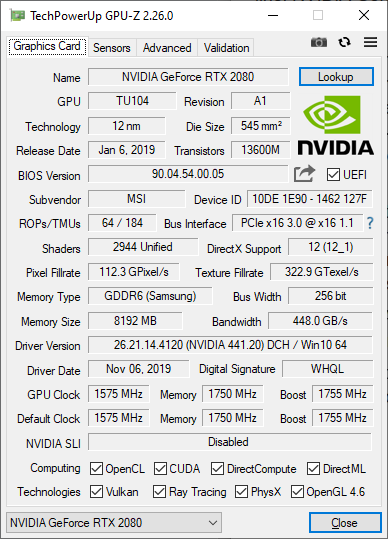
And we've arrived at the graphics cards. There are two of them on the MSI GT76 Titan DT 9SG: the onboard Intel UHD Graphics 630 that's built into the processor, and a discrete, top of the line, NVIDIA Geforce RTX 2080 with 8 GB of GDDR6 memory.
MSI GT76 Titan DT 9SG: Details about the Nvidia Geforce RTX 2080 graphics card
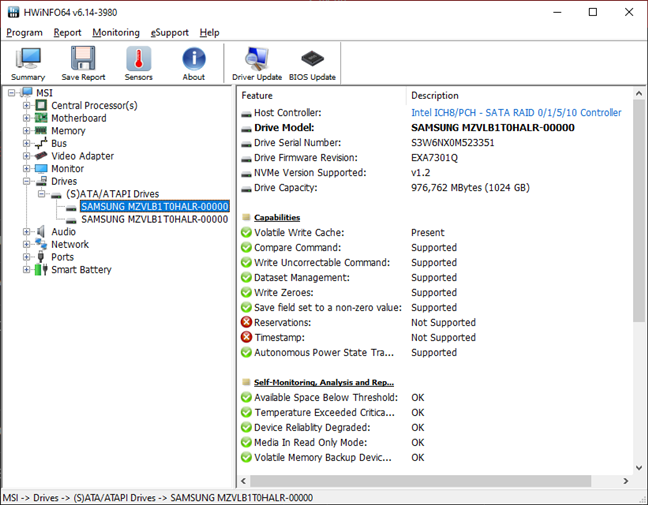
This laptop is also impressive when it comes to the storage options that it offers. It has one M.2 SSD slot with support for NVMe PCIe Gen 3, and two M.2 SSD Combo ports with support for NVMe PCIe Gen 3 and SATA. Additionally, there's yet another port available for mounting a 2.5-inch SATA hard disk drive. The sample that we tested came with two 1 TB Samsung solid-state drives in RAID 0 configuration.
MSI GT76 Titan DT 9SG: Details about the two SSDs in RAID configuration
The MSI GT76 Titan DT 9SG is also well positioned at the top of the ranking ladder in terms of network connectivity. It comes with a Killer E3000 2.5 Gigabit Ethernet card that's capable of data transfers of up to 2500 Mbps, and also with a Killer Wi-Fi 6 AX1650x 160MHz wireless network adapter that can run data transfers at up to 650 Mbps. The Wi-Fi module also offers support for Bluetooth version 5, which is useful for connecting peripherals and other Bluetooth devices such as wireless mice, keyboards, or speakers.
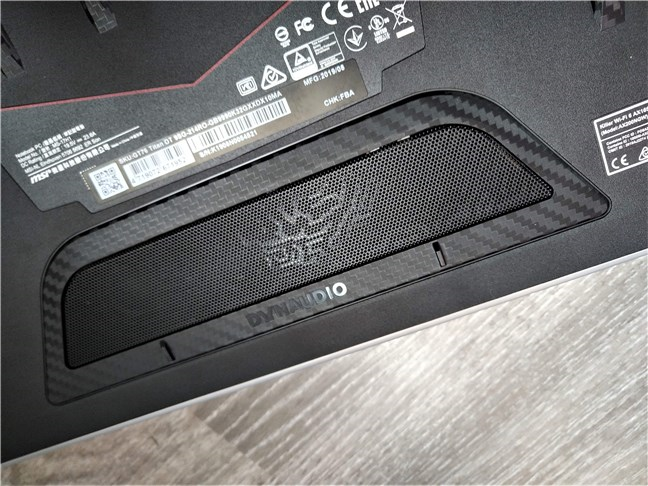
The audio is handled by a set of powerful built-in stereo speakers, each with a power of 2 watts, and a 3-watts subwoofer. The speakers are made by Dynaudio, and the software is delivered by Nahimic.
The MSI GT76 Titan DT 9SG has a 2.1 Dynaudio speaker system
Regarding ports, you get quite a few on this gaming laptop, and all of them are positioned on its left and right sides. On the left, there is one microphone port, one headphone port (HiFi / SPDIF), one USB Type-C port with support for USB3.2 Gen2, DisplayPort, and Thunderbolt 3, two USB3.2 Gen2 Type-A ports, one RJ45 Ethernet port, and the AC adapter plug.
The ports found on the left side of the MSI GT76 Titan DT 9SG
On the right side of the laptop, there's one USB3.2 Gen2 Type-C port, two USB3.2 Gen2 Type-A ports, one microSD card reader, one HDMI port with support for 4K resolution at 60 Hz, and one mini DisplayPort.
The ports found on the right side of the MSI GT76 Titan DT 9SG
When it is not connected to an electrical power source, the MSI GT76 Titan DT 9SG gets its autonomy from an 8-cell Li-Ion battery that can produce 90 watts per hour. Although this is a powerful laptop, meant as a desktop replacement rather than a portable device, it's good to see that MSI equipped it with a large battery. It's also nice to see that, although the laptop has two power adapters, they both connect to a converter, from which only one plug goes out into the laptop's power plug.
The two power adapters connect to a converter that merges their cable into one plug
Regarding the operating system, MSI delivers the MSI GT76 Titan DT 9SG either with Windows 10 Home or with Windows 10 Pro. The manufacturer's recommendation is to go with Windows 10 Pro.
For more details about the features and technical specifications of this laptop, visit GT76 Titan Specifications.
The MSI GT76 Titan DT 9SG laptop has all the specs it needs to earn its title of Titan. It's a monster laptop that can handle anything and run any game at maxed graphics quality.
On the next page of this review, we share details about the user experience, the software and apps that are bundled with the MSI GT76 Titan DT 9SG laptop, and also the results it got in our benchmarks.
Using the MSI GT76 Titan DT 9SG
Using this gaming laptop was an incredible experience, both for gaming, which is its intended purpose, and for our more mundane activities such as writing, browsing the web, virtual machines, or multimedia. There's enough power inside this machine to do anything you want. Thanks to its high-end desktop processor and high-end video card, nothing is stopping you from running even more intensive tasks such as encoding videos or creating other types of digital content.
A front view of the MSI GT76 Titan DT 9SG while running
The screen of the model that we tested has a resolution of 1920 x 1080 pixels, refreshed at 240 Hz, which makes it excellent if you're into competitive gaming. Although we're not in that league, it was a pleasure to play our favorite games (League of Legends and Metro Exodus). Even running the gaming benchmarks was satisfying. As you can see in the next section of this review, the scores we got in 3DMark, for instance, were nothing short of amazing.
Benchmarking the MSI GT76 Titan DT 9SG with 3DMark
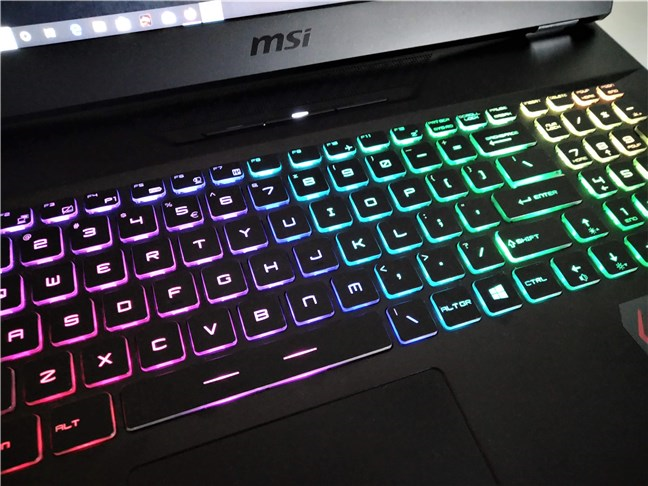
Another thing that we liked a lot was typing on the MSI GT76 Titan DT 9SG. Its keyboard is made by SteelSeries and, although it's not a mechanical one, typing on it is a fast and comfortable experience. We do believe that you can take our word for it, as we do type a lot each day. Fans of RGB lighting are also going to be excited by the keyboard, as it features per-key RGB lighting, so you can adjust it any way you like.
The MSI GT76 Titan DT 9SG has a SteelSeries RGB keyboard
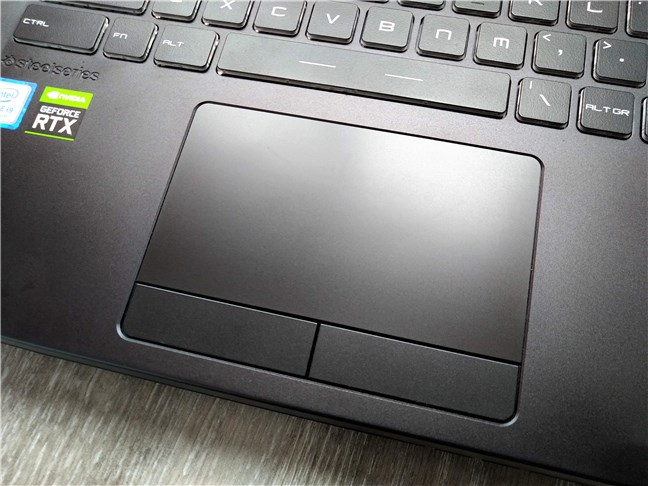
The touchpad, on the other hand, is both good and bad. We like that it's large and that its left and right-click buttons are separated from it.
However, two things about it could have been better: first, its buttons are noisy, and, secondly, there is no light around it, so you can't easily see it at night. We know that most gamers are more likely to use a mouse than rely on the touchpad, but it would have been useful to have it lit.
The touchpad found on the MSI GT76 Titan DT 9SG
One other detail that we can't overlook is the noise made by the laptop's fans. They're loud! If you are doing something that doesn't require too much processing power, such as writing or surfing on the internet, they're quiet, and you can barely hear them. However, when you're playing a game, things change. The fans spin up faster and faster until they start to sound like a sports car.
MSI GT76 Titan DT 9SG relies on 11 heat pipes and two powerful fans
Although the sound coming out of the 2.1 speaker system is of excellent quality, both powerful and loud, we preferred to use headphones when playing because of the noise made by the fans. It's the only logical thing to do. However, we do believe that gamers can live with that, as the gaming performance justifies the noisy cooling system.
The raw performance offered by the MSI GT76 Titan DT 9SG is tough to beat, and using it both for gaming and for everyday activities is an amazing experience. Except for the noisy fans, there's barely anything not to like about this gaming laptop.
Performance in benchmarks
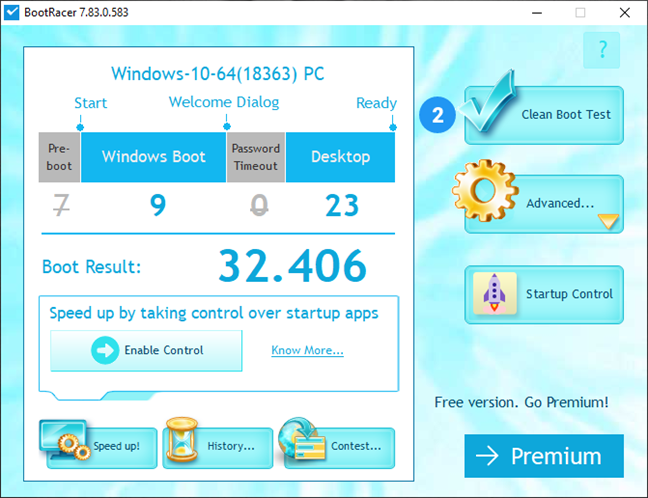
To get a better and more objective idea about how fast this gaming laptop is, we ran several benchmarks on it. We started by measuring how fast it boots, with the help of the BootRacer app. We found out that the MSI GT76 Titan DT 9SG starts in about 32 seconds.
MSI GT76 Titan DT 9SG: Boot time measured with BootRacer
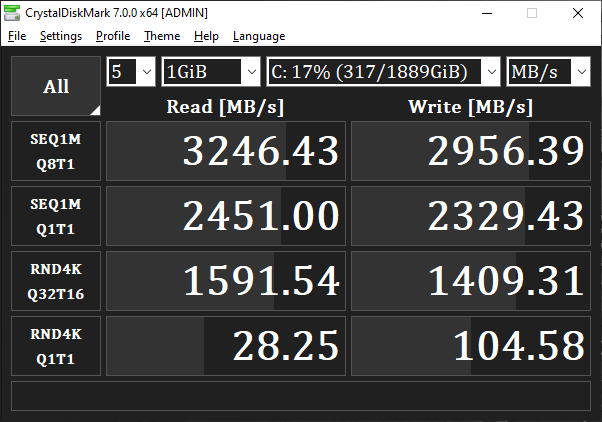
The MSI GT76 Titan DT 9SG that we tested came with two NVMe solid-state drives in a RAID 0 configuration, each with a storage capacity of 1TB. To test the performance they offer, we used CrystalDiskMark. The speeds we got from the SSDs were high, both at reading and writing data.
MSI GT76 Titan DT 9SG: Benchmark results in CrystalDiskMark
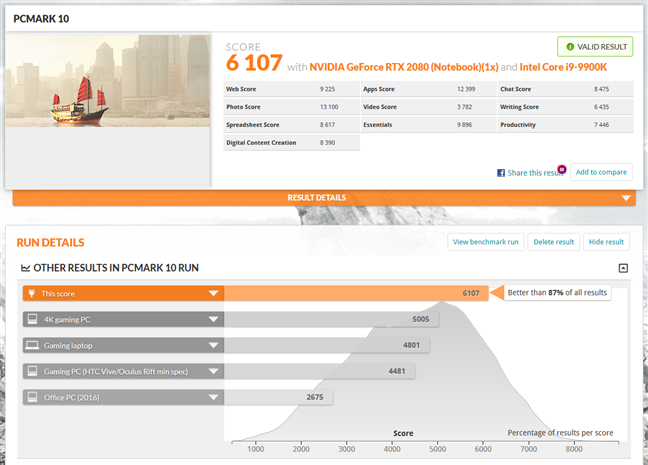
Although you're more likely to buy this laptop for playing games, you might also use it for everyday productivity tasks, at least occasionally. That's why we also tested the MSI GT76 Titan DT 9SG with the default benchmark from PCMark 10. It got a massive score of 6107 points, which shows that tasks such as working with Office, videoconferencing, browsing the web or creating digital content are nothing more than child's play for it.
MSI GT76 Titan DT 9SG: Benchmark results in PCMark 10
Next, we moved on to the gaming tests, which are the ones that you're more likely to be interested in.
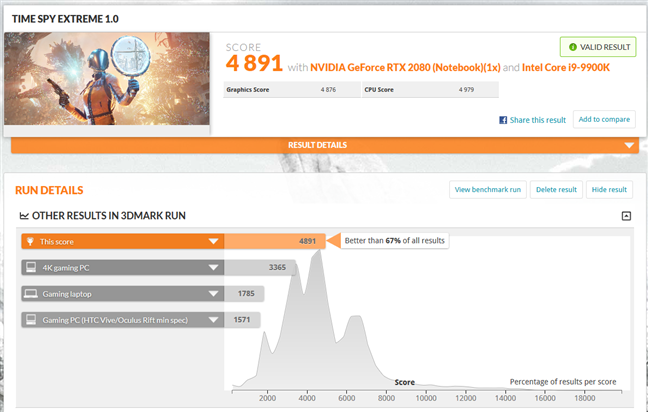
For gaming, we started with the Time Spy Extreme test from 3DMark. We got a score of 4891 points, which means that it's better than 67% of all the computers ever tested by 3DMark. As you can see in the screenshot below, the score is well above the standard score of 4K gaming PCs, and that is impressive!
MSI GT76 Titan DT 9SG: Benchmark results in 3DMark Time Spy Extreme
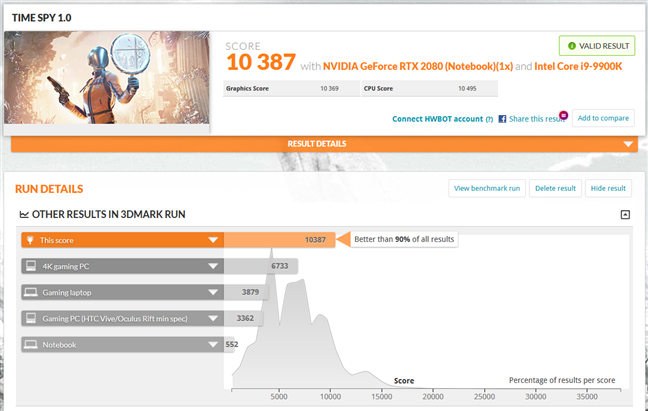
In the regular Time Spy benchmark from 3DMark, the laptop had a score of 10387 points, one of the highest we've ever seen. It's a better score than 90% of the computers evaluated by 3DMark.
MSI GT76 Titan DT 9SG: Benchmark results in 3DMark Time Spy
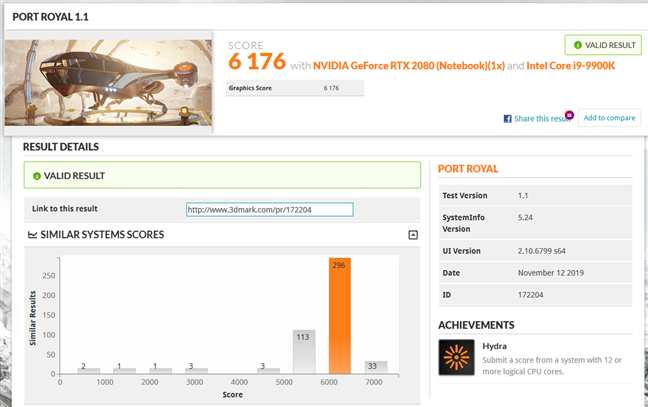
The third test we ran in 3DMark was Port Royal. The MSI GT76 Titan DT 9SG had a score of 6176, which is yet another impressive result, hard to match even by many desktop gaming computers.
MSI GT76 Titan DT 9SG: Benchmark results in 3DMark Port Royal
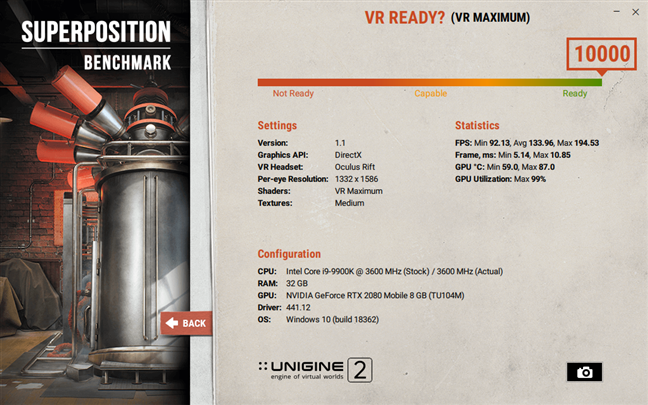
Because we wanted to see how ready the MSI GT76 Titan DT 9SG is for VR experiences, we also ran the SuperPosition VR Optimum and Maximum benchmarks, developed by Unigine. In both tests, the score obtained by this gaming laptop was 10000 points, which is the maximum possible. In other words, the MSI GT76 Titan DT 9SG can offer high-quality VR experiences.
MSI GT76 Titan DT 9SG: Benchmark results in SuperPosition VR Maximum
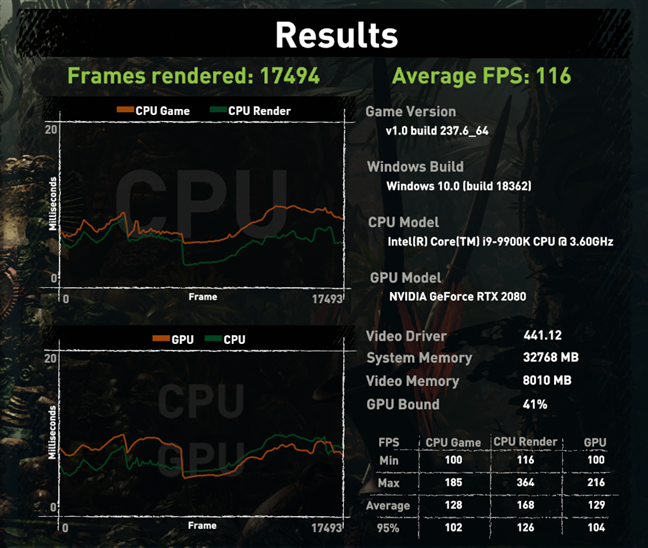
We also tested a few games: Shadow of the Tomb Raider, Metro Exodus, and World War Z. We ran the benchmarks in Full HD resolution (1920 x 1080 pixels) and with the maximum graphics quality set.
In Shadow of the Tomb Raider, using DirectX 12, we got a minimum frame rate of 100, an average of 128, and a maximum of 185. These FPS values are impressive by anyone's standards.
MSI GT76 Titan DT 9SG: Benchmark results in Shadow of the Tomb Raider
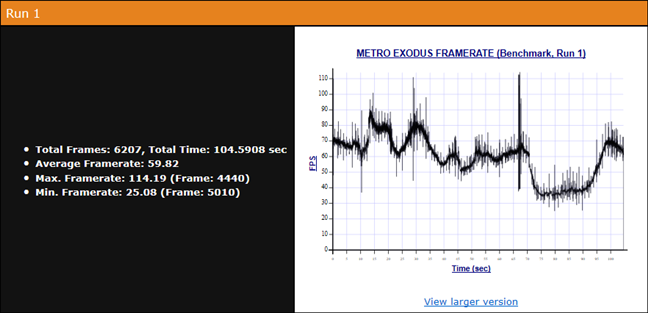
In Metro Exodus, using the RTX graphics preset, we got a minimum of 25 frames per second, an average of 60, and a maximum of 114 FPS.
MSI GT76 Titan DT 9SG: Benchmark results in Metro Exodus
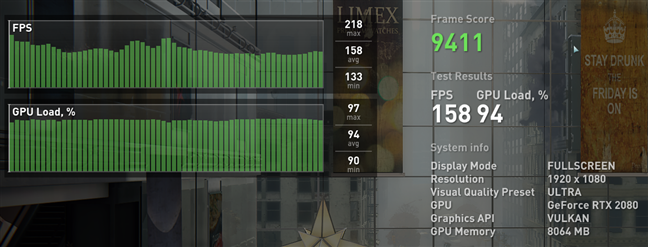
In World War Z, set to use the Vulkan API, we measured a minimum FPS of 133, an average of 158, and a maximum of 218 frames per second.
MSI GT76 Titan DT 9SG: Benchmark results in World War Z
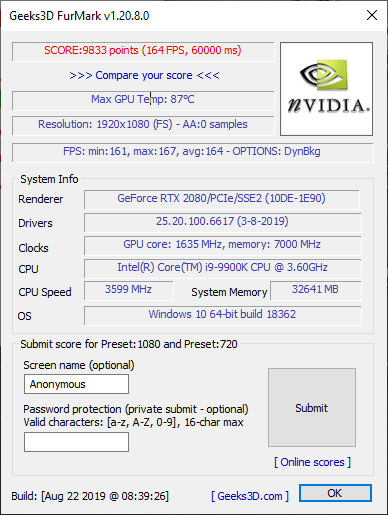
Seeing how oversized the cooling system of this laptop is, we decided to check just how efficient it is. We used the FurMark app, which told us that the video card reached a maximum temperature of 189 degrees Fahrenheit (87 degrees Celsius). You might feel like it is a lot, but, in reality, it doesn't go over the maximum temperature supported by the Nvidia Geforce RTX 2080 graphics card.
MSI GT76 Titan DT 9SG: Benchmark results and maximum GPU temperature measured in FurMark
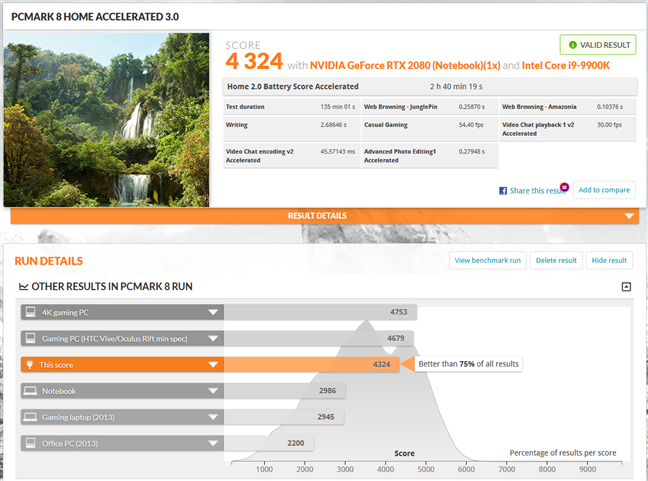
In the end, we used PCMark 8 to see how long the laptop's battery can last. The battery life is measured while running common home computing tasks such as web browsing, writing, photo editing, video chat, and casual gaming. The MSI GT76 Titan DT 9SG managed to get a battery score of 2 hours and 40 minutes, as you can see in the screenshot below.
MSI GT76 Titan DT 9SG: Benchmark results in PCMark 8 Home Battery
All the benchmarks that we ran ended up with incredibly high scores, confirming that this beast can do anything you want it to, including running games at maxed graphics settings.
Apps bundled with the MSI GT76 Titan DT 9SG
The MSI GT76 Titan DT 9SG comes with either Windows 10 Home or Windows 10 Pro. The model that we tested had Windows 10 Pro and also some additional apps. Our opinion is that many of them are useful and necessary if you want to benefit from everything that this laptop has to offer. However, there are also a few that you might not want. Here's what you get:
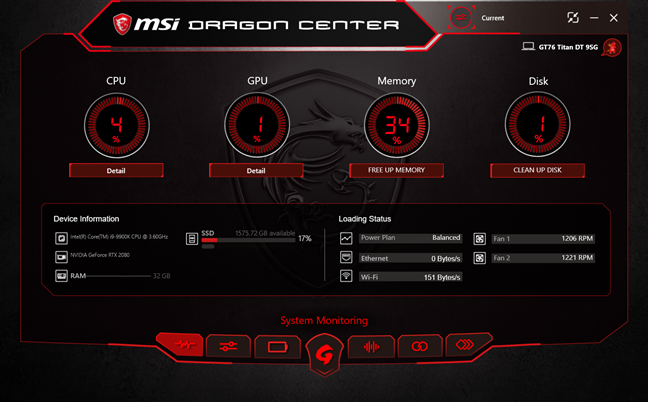
MSI GT76 Titan DT 9SG: MSI Dragon Center
Dragon Center lets you control and manage the hardware of your gaming laptop. It includes tools for monitoring the main hardware components such as processor, graphics card, RAM, storage drives, as well as tools for adjusting the power plans and performance of the laptop, calibrate its battery, and so on.
Killer Control Center can show you the status of your network connections, data transfers, and the apps that do that. It also allows you to manage and optimize wired and wireless connections so that you can get the best possible internet speed for your favorite games or apps.
MSI App Player is a freemium app that uses BlueStacks' Android emulator software to allow you to play games and run apps designed for Android, on your MSI laptop.
MSI Driver & App Center helps you download, install, and update the drivers required for your laptop to work properly. It also lets you install additional apps that MSI recommends for your laptop.
MSI Help Desk is an app designed to offer you support tools such as information about your system and access to MSI's knowledge base, as well as to allow you to contact the support teams, if you have problems with your laptop that you can't resolve on your own.
MSI Recovery Image Backup helps you create backups for your system on recovery disk, USB storage drives, or as ISO files.
MSI True Color is an app that helps you calibrate the colors on your laptop's screen, using simple preset color mode settings.
Nahimic is what you need to configure and adjust how the audio and voice recording works on your laptop.
PhotoDirector8 for MSI is a shareware app from CyberLink that gives you some editing tools for photo adjustment. However, more advanced tools such as working with layers are available only if you upgrade to a more premium version.
PowerDirector for MSI is another shareware app from CyberLink, which lets you create and edit videos.
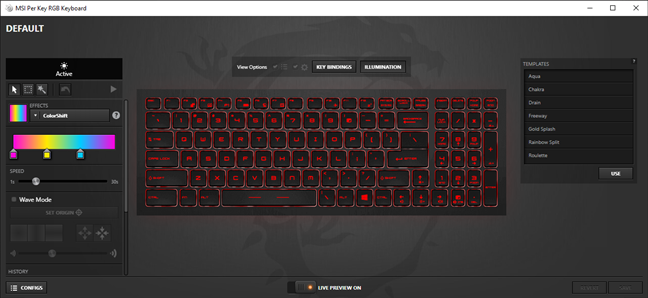
SteelSeries Engine is the software you need to be able to adjust and configure the lighting effects on your laptop's chassis and keyboard. It also helps you discover and install apps that can interact with your SteelSeries devices (aka the laptop's keyboard).
Thunderbolt Control Center lets you configure the Thunderbolt devices that you connect to your laptop.
MSI GT76 Titan DT 9SG: Configuring the lighting effect for the SteelSeries keyboard
The MSI GT76 Titan DT 9SG comes with plenty of useful and necessary apps, which you should all install and use, if you want to get the best experience from this laptop. However, there are also some apps that we can't say are either useful or required.
What do you think about the MSI GT76 Titan DT 9SG?
The MSI GT76 Titan DT 9SG is one of the most powerful gaming laptops available on the market right now, and you know that we loved it. Do you have any reason not to feel the same way? Speak your mind and tell us what you like or maybe what you don't like about it in the comments section below.


























Discussion (0)
Comments are closed.