




One big plus of the fierce competition in the smartphone market is the range of models available at every price point. It doesn’t matter if your budget is a very modest one. You can still get yourself a smartphone at about 120 USD. We haven’t reviewed such an affordable smartphone for a very long time, but now it is time to take a look at the new realme C21. Read this review and see what 120$ will get you, smartphone-wise:
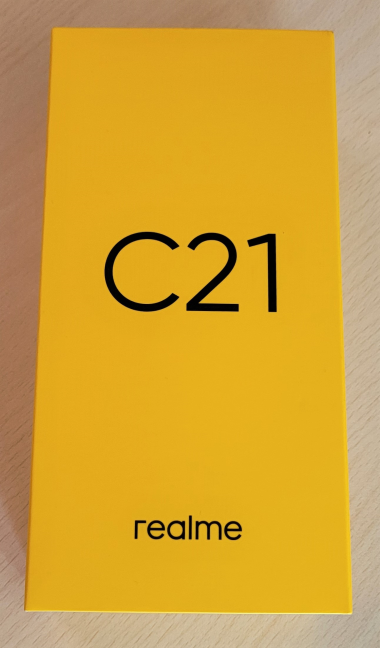
 realme c21 comes in a small yellow box
When you open the box, you see another smaller box with a welcome message on it. This smaller box contains two leaflets with information about your smartphone and how to set it up, as well as the pin for ejecting the SIM tray.
realme c21 comes in a small yellow box
When you open the box, you see another smaller box with a welcome message on it. This smaller box contains two leaflets with information about your smartphone and how to set it up, as well as the pin for ejecting the SIM tray.
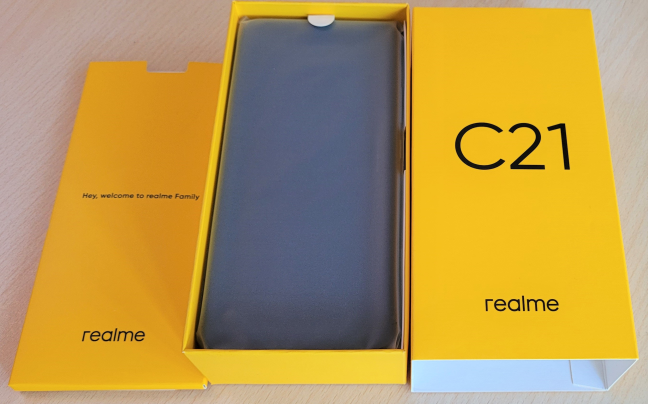
 Unboxing the realme c21
Beneath the smaller box, you see the smartphone itself in a protective bag, and beneath the smartphone you find a USB cable and a standard 10W charger, without any fast-charging support. This smartphone being so affordable, realme has cut costs to the maximum and decided not to bundle a headset. An unsurprising decision if you ask us.
Unboxing the realme c21
Beneath the smaller box, you see the smartphone itself in a protective bag, and beneath the smartphone you find a USB cable and a standard 10W charger, without any fast-charging support. This smartphone being so affordable, realme has cut costs to the maximum and decided not to bundle a headset. An unsurprising decision if you ask us.
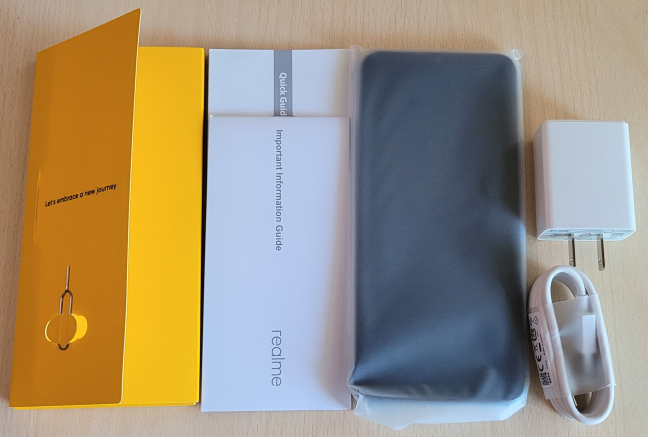
 What you find inside the box
The realme C21 is a beautifully packaged product. Its box has only the basics you need to use your smartphone, and it doesn’t include a headset.
What you find inside the box
The realme C21 is a beautifully packaged product. Its box has only the basics you need to use your smartphone, and it doesn’t include a headset.
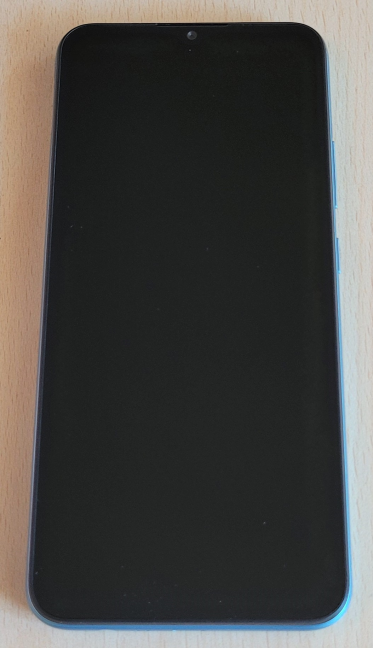
 The realme C21
The back of the smartphone is made of plastic, and it has an attractive striped texture that also helps with the grip. When you hold it in your hand, you don’t feel the smartphone slip. On the back, you find the camera system, the fingerprint sensor, the realme logo, and the phone’s only speaker.
The realme C21
The back of the smartphone is made of plastic, and it has an attractive striped texture that also helps with the grip. When you hold it in your hand, you don’t feel the smartphone slip. On the back, you find the camera system, the fingerprint sensor, the realme logo, and the phone’s only speaker.
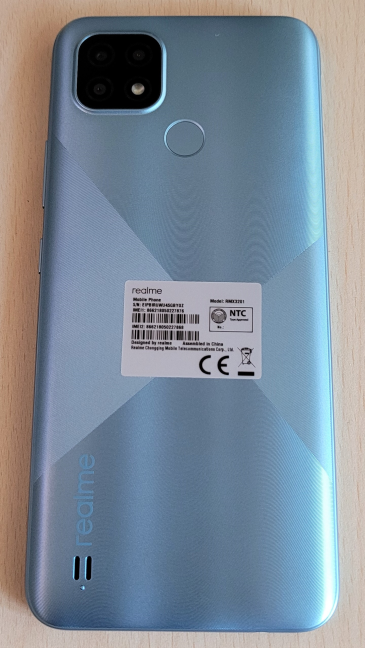
 The back of the realme C21
On the right side of the realme C21, you find the Power button and the Volume rocker.
The back of the realme C21
On the right side of the realme C21, you find the Power button and the Volume rocker.
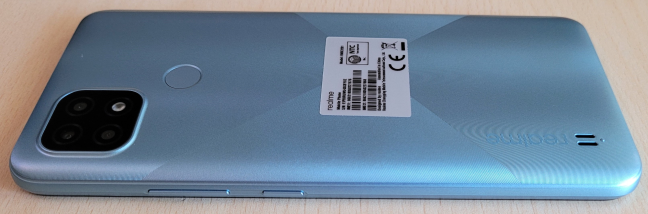
 The buttons on the right
On the left side, there’s only the SIM tray.
The buttons on the right
On the left side, there’s only the SIM tray.
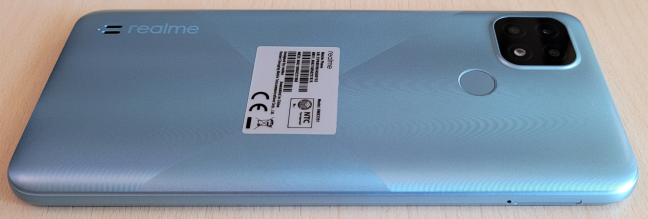
 The SIM tray is on the left
On the top bezel, there is no jack or port.
The SIM tray is on the left
On the top bezel, there is no jack or port.
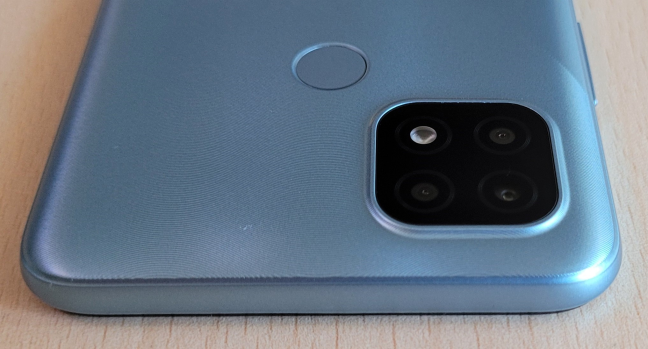
 The top bezel
On the bottom bezel, you find the microUSB 2.0 port, the microphones used for taking phone calls and noise reduction, and the audio jack.
The top bezel
On the bottom bezel, you find the microUSB 2.0 port, the microphones used for taking phone calls and noise reduction, and the audio jack.
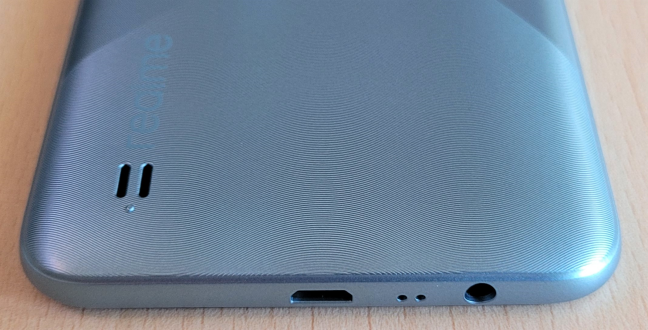
 The ports on the bottom bezel
When it comes to build quality, realme brags about this phone being the first to pass the TÜV Rheinland smartphone certification testing. The certification process involved 23 major tests:
The ports on the bottom bezel
When it comes to build quality, realme brags about this phone being the first to pass the TÜV Rheinland smartphone certification testing. The certification process involved 23 major tests:
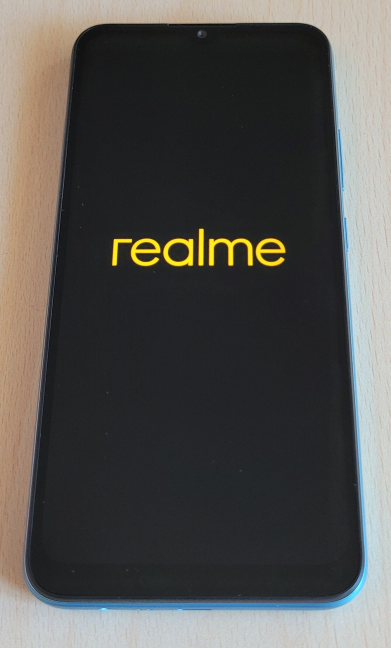
 Turning on the realme C21
The realme C21 is powered by a low-end MediaTek Helio G35 System on a Chip with four Cortex-A53 cores running at 2.3 GHz and another four at 1.8 GHz. The graphics chip is a PowerVR GE8320 that is well suited for multimedia applications but underwhelming for gaming. In terms of RAM, the realme C21 is available with both 3GB and 4GB, while the storage can be 32GB or 64 GB. We tested the variant with 4GB of RAM and 64 GB of storage, and we recommend you buy the same version to get the maximum performance possible from this phone.
Turning on the realme C21
The realme C21 is powered by a low-end MediaTek Helio G35 System on a Chip with four Cortex-A53 cores running at 2.3 GHz and another four at 1.8 GHz. The graphics chip is a PowerVR GE8320 that is well suited for multimedia applications but underwhelming for gaming. In terms of RAM, the realme C21 is available with both 3GB and 4GB, while the storage can be 32GB or 64 GB. We tested the variant with 4GB of RAM and 64 GB of storage, and we recommend you buy the same version to get the maximum performance possible from this phone.
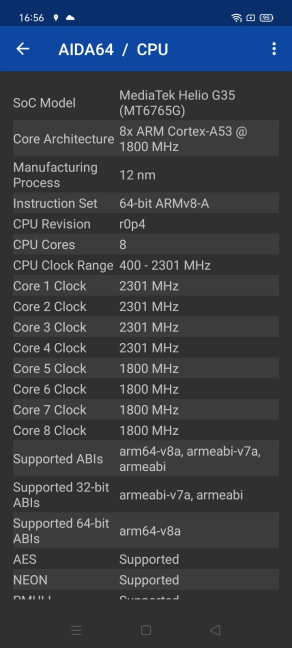
 The SoC inside the realme C21
Luckily, the storage can be increased with the help of a microSD card. Also, an upside is that you can use the phone with two SIM cards and a microSD card simultaneously. We expect many users to appreciate this feature.
The SoC inside the realme C21
Luckily, the storage can be increased with the help of a microSD card. Also, an upside is that you can use the phone with two SIM cards and a microSD card simultaneously. We expect many users to appreciate this feature.
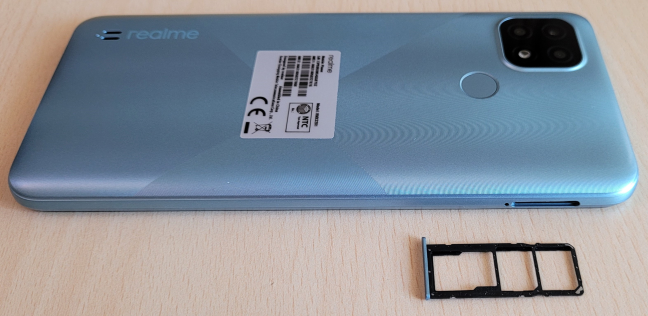
 realme C21 takes two SIMs and a microSD card
The non-removable Li-ion battery has a generous capacity of 5000 mAh, charging at 10W. As expected for a phone at this price range, there is no support for wireless charging built-in.
The realme C21 has a wide selfie camera in the middle of the screen with 5 Megapixels and an aperture of f/2.2. The main camera system on the back has three cameras:
realme C21 takes two SIMs and a microSD card
The non-removable Li-ion battery has a generous capacity of 5000 mAh, charging at 10W. As expected for a phone at this price range, there is no support for wireless charging built-in.
The realme C21 has a wide selfie camera in the middle of the screen with 5 Megapixels and an aperture of f/2.2. The main camera system on the back has three cameras:
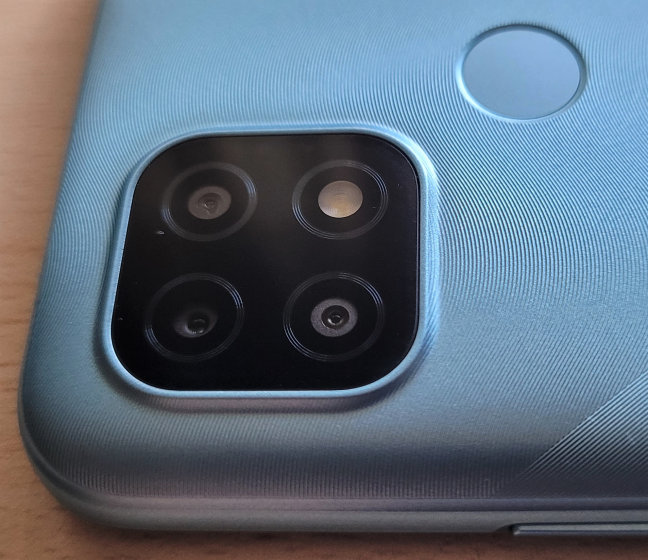
 The main camera system on the realme C21
One issue is that the realme C21 works only with older wireless network standards like Wi-Fi 4. There’s no support for using Wi-Fi on the 5 GHz band, only the 2.4 GHz frequency. In our view, this is a significant limitation, and realme should have provided Wi-Fi 5 connectivity. Obviously, for a smartphone this affordable, there is no 5G mobile connectivity either.
The main camera system on the realme C21
One issue is that the realme C21 works only with older wireless network standards like Wi-Fi 4. There’s no support for using Wi-Fi on the 5 GHz band, only the 2.4 GHz frequency. In our view, this is a significant limitation, and realme should have provided Wi-Fi 5 connectivity. Obviously, for a smartphone this affordable, there is no 5G mobile connectivity either.
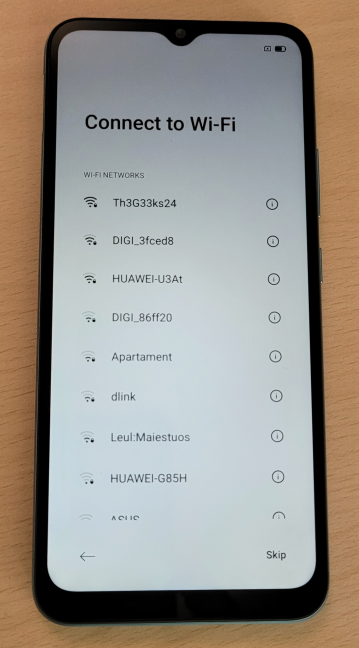
 realme C21 connects only to Wi-Fi 4
However, realme C21 does have Bluetooth 5 support, GPS, FM-radio support (if you buy yourself a headset). Also, it features a microUSB 2.0 port instead of a USB-Type C. In terms of sensors, it includes the following: an accelerometer, a fingerprint sensor, a proximity sensor, a light sensor, and a compass. Unfortunately, NFC support is lacking.
If you want more details about all the features and hardware specs, visit this page: realme C21 Specs.
Read the second page of this review for details about the smartphone experience offered by the realme C21, its cameras, operating system, and bundled apps, as well as its performance in benchmarks.
realme C21 connects only to Wi-Fi 4
However, realme C21 does have Bluetooth 5 support, GPS, FM-radio support (if you buy yourself a headset). Also, it features a microUSB 2.0 port instead of a USB-Type C. In terms of sensors, it includes the following: an accelerometer, a fingerprint sensor, a proximity sensor, a light sensor, and a compass. Unfortunately, NFC support is lacking.
If you want more details about all the features and hardware specs, visit this page: realme C21 Specs.
Read the second page of this review for details about the smartphone experience offered by the realme C21, its cameras, operating system, and bundled apps, as well as its performance in benchmarks.
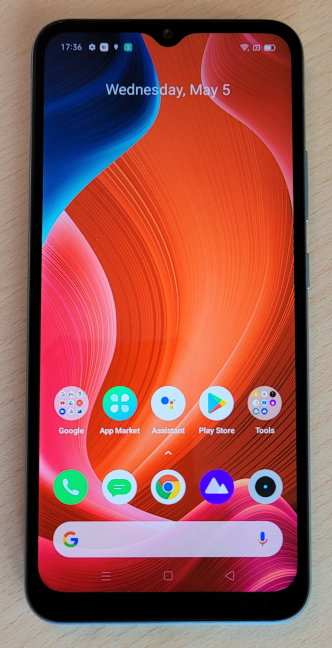
 The display on the realme C21
The Realme v1 user interface is stock Android with a few changes, especially to how the Settings are organized. Finding your way around should not be a problem though.
One downside is that many of the apps that are preinstalled with the realme C21 load ads regularly. But, if you spend some time uninstalling most of them, this shouldn’t be a problem.
The display on the realme C21
The Realme v1 user interface is stock Android with a few changes, especially to how the Settings are organized. Finding your way around should not be a problem though.
One downside is that many of the apps that are preinstalled with the realme C21 load ads regularly. But, if you spend some time uninstalling most of them, this shouldn’t be a problem.
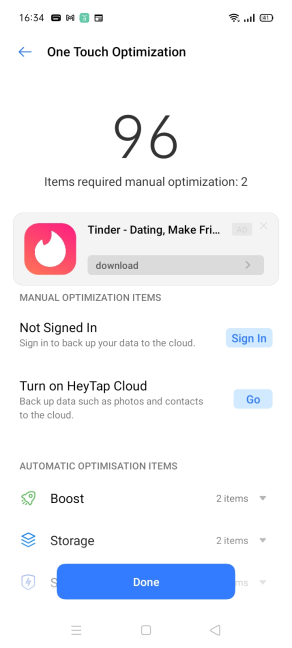 Many preinstalled apps have ads
Gaming is a disappointing experience on the realme C21 unless you stick to light-casual games that don’t have complex graphics. Otherwise, you are in for very long loading times, low visual details, and quite a bit of stuttering when the action becomes more intense.
Many preinstalled apps have ads
Gaming is a disappointing experience on the realme C21 unless you stick to light-casual games that don’t have complex graphics. Otherwise, you are in for very long loading times, low visual details, and quite a bit of stuttering when the action becomes more intense.
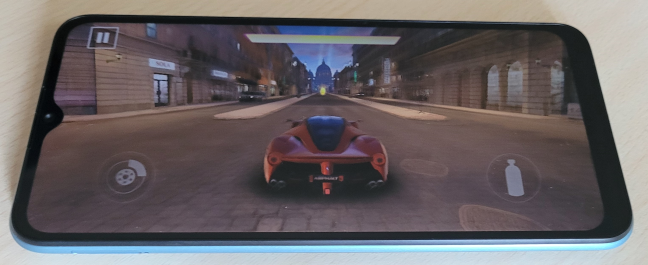
 Playing games on the realme C21
The mono speaker does its job adequately. It is not a great choice for listening to music or watching movies, and you are better off using a headset. We noticed that the high-frequency sounds tend to be too high pitched when setting the volume to the maximum. Voice calls work reasonably well using the built-in speaker, but don’t expect to hear the other person when you are far from your smartphone.
The phone calls I made on the realme C21 were clear for both parties, but my voice was perceived as more high-pitched than when using other phones. A pleasant surprise is that the noise reduction feature works well, especially when talking on the phone indoors. The signal reception was good too, and we did not encounter any problems in our few days of testing.
Playing games on the realme C21
The mono speaker does its job adequately. It is not a great choice for listening to music or watching movies, and you are better off using a headset. We noticed that the high-frequency sounds tend to be too high pitched when setting the volume to the maximum. Voice calls work reasonably well using the built-in speaker, but don’t expect to hear the other person when you are far from your smartphone.
The phone calls I made on the realme C21 were clear for both parties, but my voice was perceived as more high-pitched than when using other phones. A pleasant surprise is that the noise reduction feature works well, especially when talking on the phone indoors. The signal reception was good too, and we did not encounter any problems in our few days of testing.
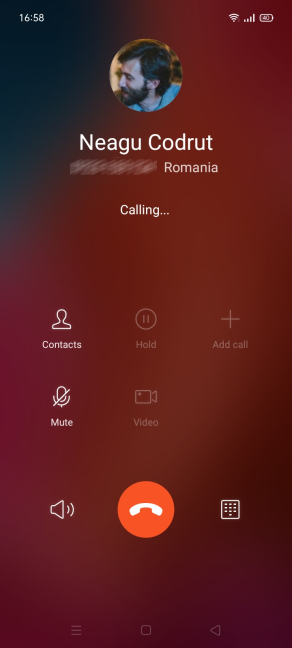 Taking calls on the realme C21
The options for unlocking your smartphone work reasonably well, without being fast. Both the fingerprint sensor and the facial recognition do their job reasonably well, and that’s about it. Battery life is stellar on the realme C21 and one of its main selling points alongside the meager price. This smartphone doesn’t have any problems, lasting for two days on a single charge.
Taking calls on the realme C21
The options for unlocking your smartphone work reasonably well, without being fast. Both the fingerprint sensor and the facial recognition do their job reasonably well, and that’s about it. Battery life is stellar on the realme C21 and one of its main selling points alongside the meager price. This smartphone doesn’t have any problems, lasting for two days on a single charge.
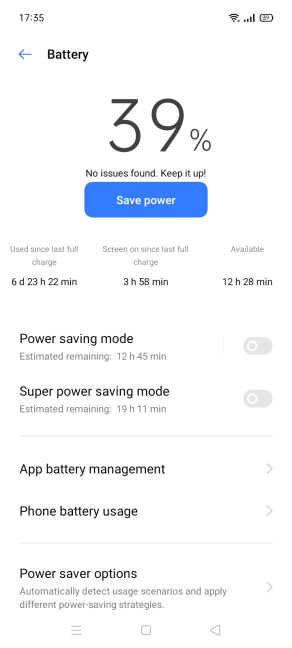 Battery stats for the realme C21
The charging time is on the slow side, since there’s no fast charging available on the realme C21. In 30 minutes, the battery charged from 0 to 22%, while a full charge took place in about 2 hours and 48 minutes.
Performance-wise, the realme C21 doesn’t break any records, and it doesn’t even try. It may sometimes be slow but does what you ask it to. Overall, it is an adequate smartphone that covers the basics at a price everyone can afford.
Battery stats for the realme C21
The charging time is on the slow side, since there’s no fast charging available on the realme C21. In 30 minutes, the battery charged from 0 to 22%, while a full charge took place in about 2 hours and 48 minutes.
Performance-wise, the realme C21 doesn’t break any records, and it doesn’t even try. It may sometimes be slow but does what you ask it to. Overall, it is an adequate smartphone that covers the basics at a price everyone can afford.
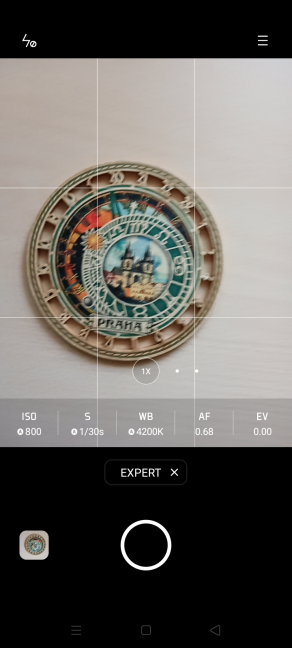 realme C21 has a Pro mode
Pictures tend to have oversaturated colors at all times, including in good lighting conditions. Also, the color balance needs some improvement, and night pictures have quite a lot of noise. Using the zoom means details get lost, and you get a lot of graininess. The macro camera is not usable, as it has many focus problems, and the resulting pictures are of very low quality. We would have preferred only one camera on the back of this smartphone that was a bit more capable, instead of three, which are underwhelming. The selfie camera is decent at best, but we noticed some focus issues, especially in low-light situations. To get a better perspective of the picture-taking capabilities of the realme C21, take a look at the gallery we embedded below:
Recording videos works at 1080p and 30 frames per second, but it is evident that the cameras lack image stabilization. Here is a landscape we filmed, in which we also zoomed in to show you how this impacts the quality of the picture you get:
Here’s also a video with cars moving around:
Notice how the cables on the top side of the video suffer from a sort of “bleeding” effect and have unnatural colors.
The realme C21 has low-end cameras, and this is evident, including in good lighting conditions. Considering its very low price, we didn’t expect it to do anything other than take some pictures and record some basic videos, and this phone does all these things.
realme C21 has a Pro mode
Pictures tend to have oversaturated colors at all times, including in good lighting conditions. Also, the color balance needs some improvement, and night pictures have quite a lot of noise. Using the zoom means details get lost, and you get a lot of graininess. The macro camera is not usable, as it has many focus problems, and the resulting pictures are of very low quality. We would have preferred only one camera on the back of this smartphone that was a bit more capable, instead of three, which are underwhelming. The selfie camera is decent at best, but we noticed some focus issues, especially in low-light situations. To get a better perspective of the picture-taking capabilities of the realme C21, take a look at the gallery we embedded below:
Recording videos works at 1080p and 30 frames per second, but it is evident that the cameras lack image stabilization. Here is a landscape we filmed, in which we also zoomed in to show you how this impacts the quality of the picture you get:
Here’s also a video with cars moving around:
Notice how the cables on the top side of the video suffer from a sort of “bleeding” effect and have unnatural colors.
The realme C21 has low-end cameras, and this is evident, including in good lighting conditions. Considering its very low price, we didn’t expect it to do anything other than take some pictures and record some basic videos, and this phone does all these things.
 Apps preinstalled on the realme C21
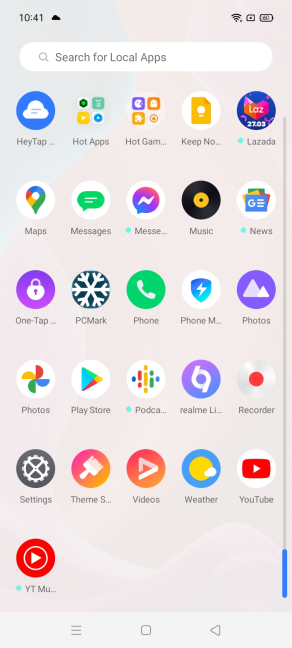
Here is the list of apps you find preinstalled on realme C21:
Apps preinstalled on the realme C21
Here is the list of apps you find preinstalled on realme C21:
 realme C21 - Geekbench score
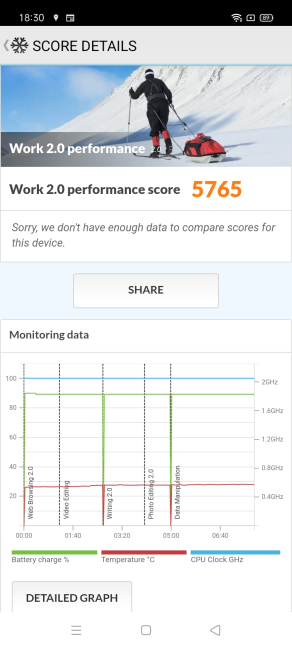
We then used PCMark for Android to measure how well realme C21 fares in productivity tasks. It scored 5765 points - similar to Motorola Moto E, a popular low-budget smartphone launched in 2020.
realme C21 - Geekbench score
We then used PCMark for Android to measure how well realme C21 fares in productivity tasks. It scored 5765 points - similar to Motorola Moto E, a popular low-budget smartphone launched in 2020.
 realme C21 - PCMark score
In the 3DMark benchmark app, we ran the Sling Shot Extreme – OpenGL ES 3.1 test. This smartphone rendered an average of 2.20 frames and 1.40 frames, respectively, and it had a score of 463 points. These are meager results that show that realme C21 was not made with any kind of mobile gaming in mind.
realme C21 - PCMark score
In the 3DMark benchmark app, we ran the Sling Shot Extreme – OpenGL ES 3.1 test. This smartphone rendered an average of 2.20 frames and 1.40 frames, respectively, and it had a score of 463 points. These are meager results that show that realme C21 was not made with any kind of mobile gaming in mind.
realme C21 - 3DMark score
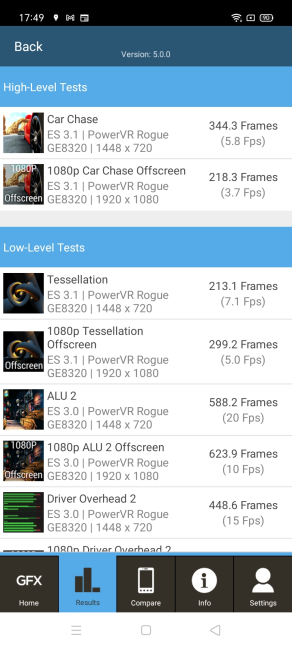
The Car Chace and 1080p Care Chace Offscreen tests from GFXBench confirmed the same story. This smartphone could render only 5.8 fps and 3.7 fps, respectively.
 realme C21 - GFXBench scores
To evaluate the autonomy offered by realme C21, we used PCMark’s Work 2.0 battery life test with the display brightness set to auto. The battery lasted 18 hours and 26 minutes, an excellent result. This smartphone’s battery will not have any problems lasting for two days on a single charge in regular everyday use.
realme C21 - GFXBench scores
To evaluate the autonomy offered by realme C21, we used PCMark’s Work 2.0 battery life test with the display brightness set to auto. The battery lasted 18 hours and 26 minutes, an excellent result. This smartphone’s battery will not have any problems lasting for two days on a single charge in regular everyday use.
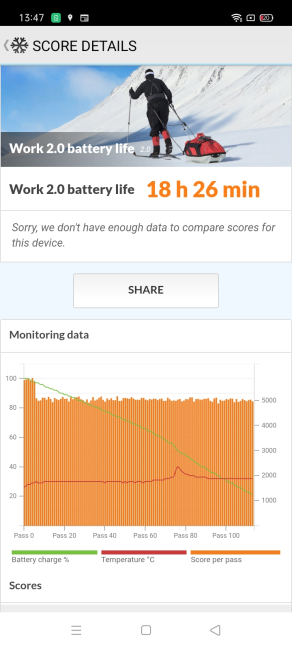 realme C21 - Work 2.0 battery life test
The benchmarks we ran confirmed that realme C21 offers adequate performance for general productivity tasks and excellent battery life.
realme C21 - Work 2.0 battery life test
The benchmarks we ran confirmed that realme C21 offers adequate performance for general productivity tasks and excellent battery life.
realme C21: Who is it good for?
This smartphone is a solid choice for:- People who want a smartphone at a very low price
- Users who need a smartphone that can last for two days on a single charge
- People who want a durable smartphone
Pros and cons
There are many good things about the realme C21:- Very low price
- Solid build quality, certified by TÜV Rheinland
- Excellent battery life
- You can use two SIM cards and a microSD simultaneously
- Fast unlocking (fingerprint sensor and face recognition)
- The screen’s brightness is underwhelming outdoors
- It comes with Android 10 instead of Android 11
- No headset included in the box
- Dated connectivity options: only Wi-Fi 4, no NFC, no USB-Type C, etc.
Verdict
It is tough to give a verdict for a smartphone this affordable. At 120$, the manufacturer had to make many compromises to keep some degree of profitability. Therefore, don’t expect any spectacular things from the realme C21. For its meager price, it is a reasonably well-balanced smartphone that shines in the battery and build quality departments. You won’t have to charge it every day, it is competent as long as you don’t run demanding apps and games, and the build quality is certified by TÜV Rheinland for its durability. If your budget is very limited, realme C21 offers a good bang for your buck.Unboxing the realme C21 smartphone
The realme C21 smartphone comes in a small yellow cardboard box with a minimalistic look. On the top and the sides, you see only the name of the smartphone you just bought. There are some stickers with information about the hardware inside this device, its IMEI number, serial number, and other details on the bottom of the box.Design and build quality
The realme C21 is a standard-looking 6.5-inch smartphone with rounded corners. It has the following dimensions 6.50 x 3.01 x 0.35 inches or 165.2 x 76.4 x 8.9 mm. It is slightly larger and heavier than the realme 8 5G that we recently tested: realme C21 weighs 6.70 oz or 190 grams vs. 6.5 oz (185 grams) of the realme 8 5G. This smartphone is available in two colors: Cross Blue and Cross Black. We tested the blue variant.- ten daily use test scenarios, such as drop, wear and tear
- seven extreme environment test scenarios, including super extreme temperature, extreme humidity, voltage fluctuation, button life, static electricity, and air pressure
- six component reliability test scenarios.
Hardware specifications
The display uses an IPS LCD panel, with a peak brightness of 400 nits and 720x1600 pixels. The screen to body ratio is 80.8%, and the density is 270 ppi. If you want to know more about ppi and what it means, read: What is PPI and does it matter?.- A primary wide camera with 13 Megapixels, f/2.2 aperture, a 5P lens, and 4x digital zoom.
- A 2MP macro camera with an aperture of f/2.4 and a 3P lens.
- A depth of field 2MP camera, with an aperture of f/2.4.
The smartphone experience on the realme C21
Using the realme C21 is a decent experience, as long as you don’t use demanding apps or try to run the latest games. The phone doesn’t feel fast, and the general speed with which it does things is reasonable. But, sometimes, you do notice some slugginess. To be honest, from a smartphone this affordable, performance was not something we expected, and neither should you. The screen has a resolution high enough for a pleasant web browsing experience or for checking your social media feeds, but outdoor visibility is underwhelming. We often had to manually set the brightness to the maximum to use the phone in direct sunlight. And even then, the experience wasn’t exactly satisfying. We believe that the realme C21 is a phone best used indoors.The camera experience on the realme C21
The Camera app is the same as on all the other realme smartphones. It doesn’t have fewer features. It even includes the same Pro mode as you get on more expensive smartphones from the same brand. However, the camera system is mediocre at best. Considering the low price of the realme C21, it couldn’t be otherwise.Android 10 and bundled apps
The realme C21 comes with Android 10 preinstalled and Realme’s version 1.0 custom user interface. In contrast, more expensive smartphones from realme come with Android 11 preinstalled and Realme 2.0 UI. However, this strategy was expected for a smartphone with such a low price, as many manufacturers use it. We’ve asked realme about their plans for software updates, and we were told that realme C21 would get Android 11 at some point in the future. Also, this smartphone is expected to receive Android updates for two years.- App Market - realme’s alternative for the Google Play store. It seems to be aimed at Asian markets more than western ones.
- Calculator - a useful app for making calculus, converting units, or exchange rates.
- Clone Phone - realme’s app for moving your data from another smartphone to your brand new device.
- Compass - your standard compass app that helps you identify the true magnetic north, measure the angles of different surfaces, etc.
- File Manager - a basic file management app that helps you organize files and folders on your smartphone.
- Game Center - an alternative to Google’s Play Games portal.
- Game Space - an app for managing installed games, boosting gaming performance for them, and managing in-game screen captures.
- Hey Fun - another game store. We don’t understand why there are so many on this phone.
- HeyTap Cloud - an app for backing up files and data from your smartphone to the cloud.
- Hot Apps & Hot Games - shortcuts to promoted apps and games chosen by realme.
- Lazada - a mobile shopping app for Asian customers.
- Music - basic media player for music files stored locally on your phone. Unfortunately, the app is filled with ads.
- Phone Manager - your basic smartphone management app that is useful for cleaning up storage, app management, and more.
- realme Link - you can set up a Realme account, link it with your smartphone, and access realme’s services.
- Recorder - a simple app for making audio recordings with your smartphone.
- Themes Store - an app for downloading and installing visual themes for your smartphone. Some of them look great.
- Videos - a useful video player for your smartphone.
Performance in benchmarks
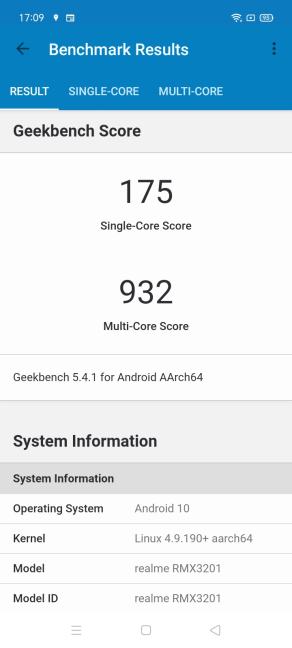
We ran several benchmarks on the realme C21 to see what you get in terms of performance and how it compares to other smartphones. This being an ultra-budget smartphone, we didn’t expect to be impressed. First, we ran Geekbench. It got 175 points in the Single-Core tests and 932 in the Multi-Core tests. As expected, these scores place the realme C21 at the bottom of the hierarchy.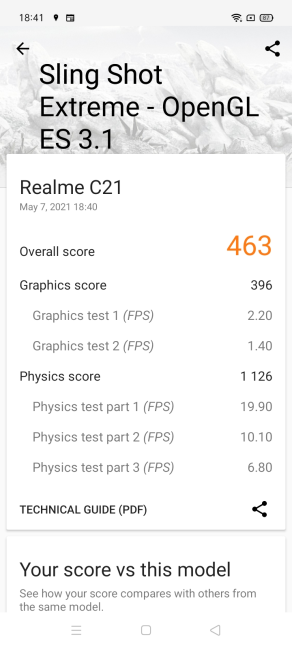


Discussion (0)
Comments are closed.