



If you skipped AppleCare when buying an iPhone, iPad, or Mac, you still have a second chance. Apple allows eligible devices to enroll in AppleCare+ after purchase, as long as you act within the allowed window and the device meets condition requirements.
At the time of writing, AppleCare+ can usually be added within 60 days of purchase for most devices. The steps below show the easiest ways to add Apple’s extended warranty using your device, a browser, or Apple Support.
Check AppleCare Eligibility And Coverage Window
Every Apple device includes a standard one-year limited warranty and 90 days of technical support. AppleCare+ extends coverage and adds accidental damage protection, but only if the device qualifies.
- The device must be within the AppleCare+ enrollment period.
- The device must be in good working condition.
- Remote or in-store diagnostics may be required.
If the device shows existing damage, Apple may require a repair before AppleCare+ can be added.
Add AppleCare After Purchase On iPhone Or iPad
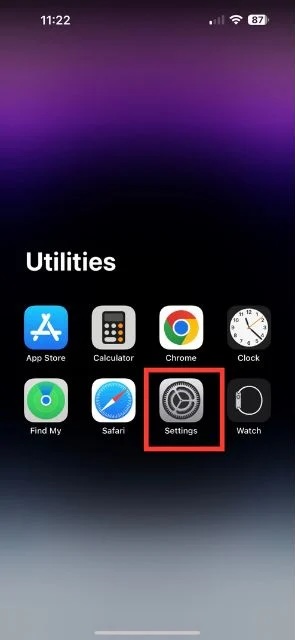
The fastest way to add AppleCare+ for an iPhone or iPad is directly from the device’s Settings app.
- Open Settings.
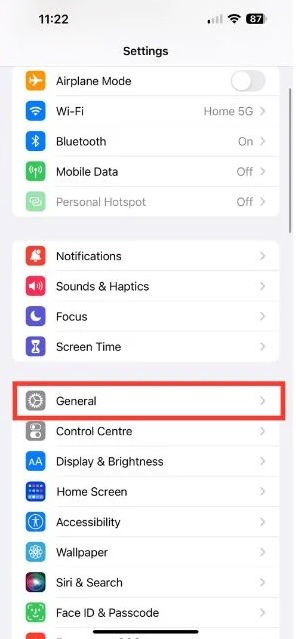
- Tap General.
- Select About.
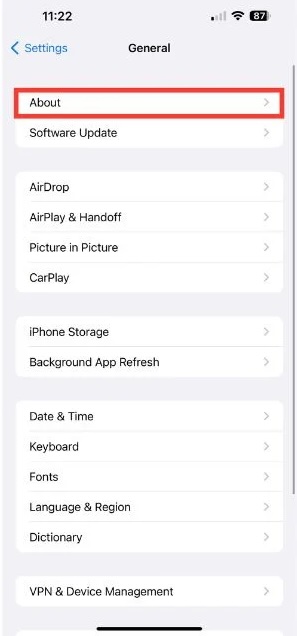
- Tap AppleCare+ Coverage Available.
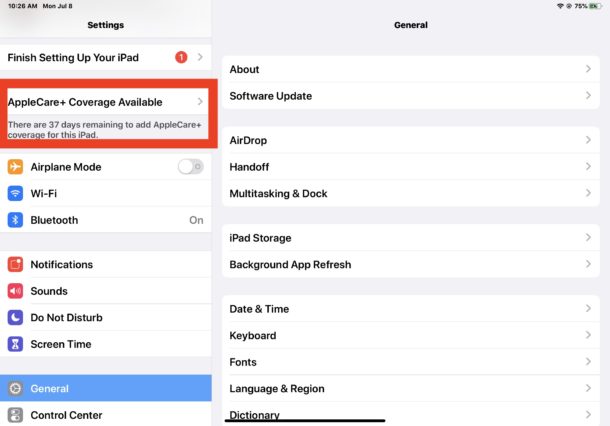
- Follow the on-screen instructions to complete the purchase.
If the option does not appear, the device may be outside the eligibility window.
Add AppleCare After Purchase On Mac
Mac users can enroll in AppleCare+ through system settings and Apple’s support site.
- Click the Apple menu and choose About This Mac.
- Select More Info.
- Open the Support section.
- Choose AppleCare+ and continue in your browser.
- Sign in with your Apple ID and run the required diagnostics.
Once approved, you can select an AppleCare+ plan and complete payment.
Buy AppleCare+ From Any Browser
You can also add AppleCare+ from any computer or phone using a web browser. This method works even if you do not have the device nearby.
- Open a browser and go to Apple’s AppleCare purchase page.
- Sign in with the Apple ID linked to the device.
- Enter the device serial number if prompted.
- Run the remote diagnostic check.
- Select an AppleCare+ plan and complete checkout.
Add AppleCare+ Through Apple Support Or Retail Store
If online enrollment fails, Apple Support can help verify eligibility and complete the process.
- Contact Apple Support by phone.
- Schedule an appointment at an Apple Store.
- Bring proof of purchase and the device.
- Complete in-person diagnostics if required.
This option is useful if eligibility status is unclear.
Can You Buy AppleCare After Damage?
AppleCare+ cannot be added to a damaged device unless it is repaired first. Apple or an Apple Authorized Service Provider must complete repairs.
Once the device is restored to good condition and passes diagnostics, AppleCare+ enrollment may still be possible if the eligibility window has not expired.
Troubleshooting Common Problems
If AppleCare+ does not appear as available, the enrollment window may have closed. Devices purchased outside official channels may also require manual verification.
If diagnostics fail, ensure the device is updated and connected to Wi-Fi before retrying.
Tips
- Check AppleCare eligibility as soon as possible after purchase.
- Keep your receipt or proof of purchase.
- Run diagnostics on a stable internet connection.
- Consider AppleCare+ if you travel frequently or use the device daily.
FAQ
What is AppleCare+?
AppleCare+ is Apple’s extended warranty plan that adds accidental damage coverage and longer technical support.
How long after purchase can I add AppleCare+?
Most devices allow enrollment within 60 days of purchase.
Does AppleCare+ cover accidental damage?
Yes, AppleCare+ includes limited accidental damage coverage with service fees.
Is AppleCare+ transferable?
AppleCare+ stays with the device and can transfer to a new owner.
Summary
- AppleCare+ can be added after purchase if the device is eligible.
- Enrollment usually must happen within 60 days.
- You can add AppleCare+ from the device, a browser, or Apple Support.
- Damaged devices must be repaired before enrollment.
Conclusion
Missing AppleCare at checkout does not mean you have lost your chance. If your iPhone, iPad, or Mac still qualifies, adding AppleCare+ after purchase is straightforward and provides long-term protection and peace of mind. Checking eligibility early ensures you do not miss the enrollment window.


Discussion (0)
Be the first to comment.