




Many people want to know how to set up an Apple Watch without an iPhone, especially users who prefer Android or want the watch to operate independently. At the time of writing, Apple requires an iPhone for the initial activation and pairing of every Apple Watch. A brand-new Apple Watch cannot be set up, activated, or paired for the first time without using the Watch app on an iPhone.
However, Apple does offer a feature called Family Setup, which lets someone use an Apple Watch without owning an iPhone personally. The initial activation still happens on an iPhone, but after setup, the watch can function on its own using Wi-Fi or cellular. This is the only fully supported way to use an Apple Watch without being the owner of an iPhone.
All Apple Watch models require the Watch app on an iPhone for the initial pairing process. The “Set Up Manually” option may appear during activation, but it does not bypass this requirement. It only refers to manually entering the pairing code during the normal iPhone setup workflow.
Once the Apple Watch is paired and activated, it can work away from the iPhone with Wi-Fi or cellular, but it cannot complete the first-time setup alone.
- No Apple Watch model can be activated from the watch itself.
- No Android phone can pair with or activate an Apple Watch.
- The Apple Watch Setup page on the web cannot activate a watch.
The only partial exception is Family Setup, which still requires an iPhone in the household.
How Family Setup Allows Use Without Owning An iPhone
Family Setup lets a parent or guardian use their own iPhone to set up an Apple Watch for someone who does not have an iPhone. The Apple Watch then works as a standalone device with its own phone number and Apple ID.
Requirements For Family Setup
- An iPhone 6s or later running a supported version of iOS
- An Apple Watch Series 4 or later (GPS + Cellular) or Apple Watch SE
- A Family Sharing group with the user added as a family member
- An Apple ID for the person who will use the watch
- Wi-Fi access and, for standalone calling, a cellular plan
How To Set Up An Apple Watch With Family Setup
If you’re setting up the Apple Watch for someone who does not have their own iPhone, follow these steps:
- Turn on the Apple Watch and place it near the iPhone that will manage it.
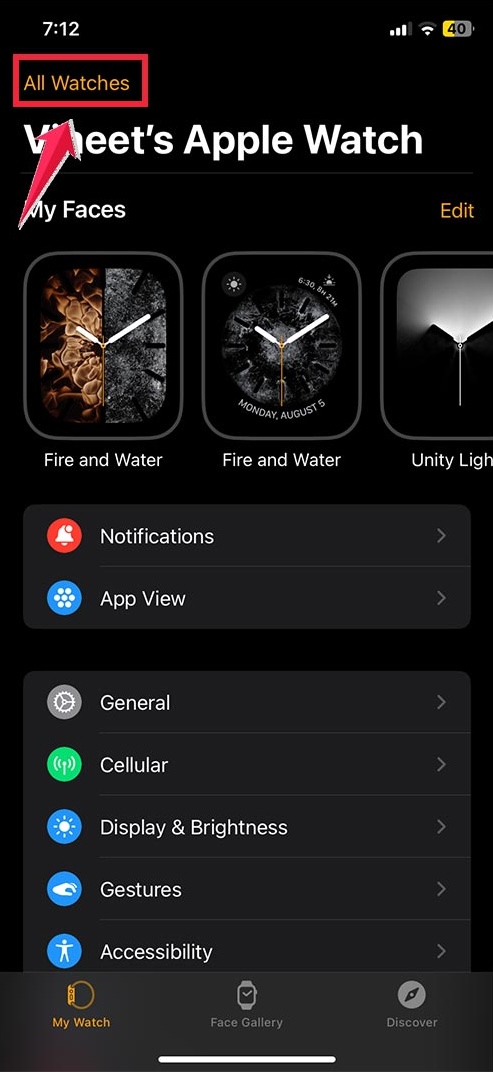
- Open the Watch app on the iPhone.
- Select “All Watches.”
- Tap “Add Watch.”
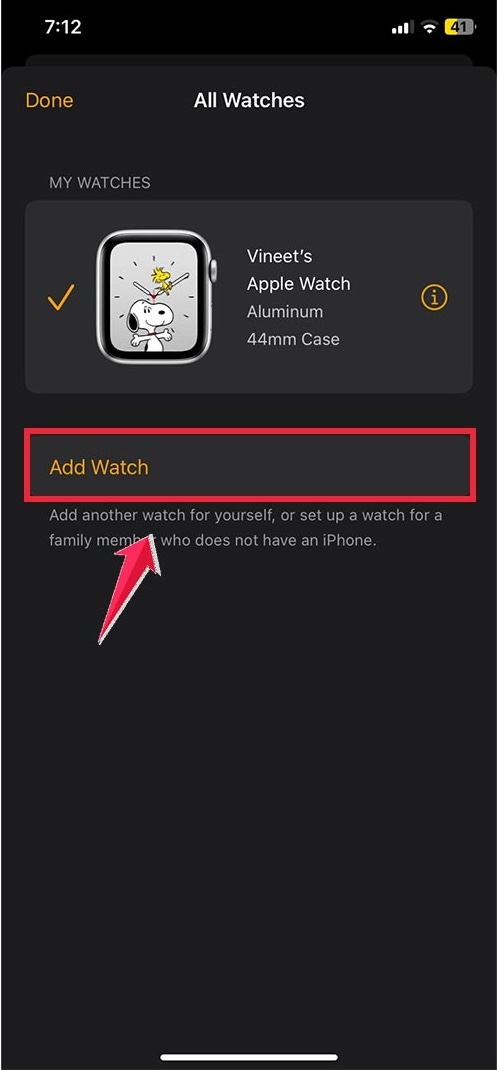
- Choose “Set Up For A Family Member.”

- Follow the on-screen instructions to pair the watch.
- Sign in with the child or family member’s Apple ID.
- Configure cellular (if available), location settings, Schooltime, and shared controls.
After Family Setup is complete, the Apple Watch can function without staying near the iPhone that configured it.
What You Can Do On An Apple Watch Without An iPhone
Once the watch is paired through Family Setup or regular setup, it can operate independently using Wi-Fi or cellular. These features work without the iPhone nearby:
- Make and receive calls on cellular models
- Send and receive Messages using iMessage or SMS (cellular models)
- Use Siri for voice commands and quick actions
- Download and use watchOS apps
- Track workouts, steps, heart rate, and activity
- Use Apple Pay if properly configured during setup
- Stream music and podcasts with Wi-Fi or cellular
- Share location with family through Find My
These capabilities make the Apple Watch useful even without carrying an iPhone, as long as the device was properly set up beforehand.
Common Misconceptions About Apple Watch Setup
“You Can Activate An Apple Watch With Wi-Fi Alone”
This is incorrect. Wi-Fi allows the watch to work after activation, not during the initial setup.
“You Can Set Up An Apple Watch Using A Website”
Apple does not offer any browser-based activation or pairing tool for Apple Watch.
“You Can Pair An Apple Watch With An Android Phone”
This is not possible. Even after setup, Android devices cannot sync notifications, apps, messages, or health data with an Apple Watch.
Who Should Use Family Setup
Family Setup is ideal for people who want to use an Apple Watch without owning an iPhone, including:
- Children without smartphones
- Seniors who want health and safety features
- Users who carry an Android phone but want a standalone Apple Watch for fitness or cellular calling
Tips
- Use Family Setup if the watch will belong to someone without an iPhone.
- Choose a cellular model (Series 4 or later) for the most independent Apple Watch experience.
- Preconfigure Apple Pay, Schooltime, and emergency settings during setup.
- Keep the managing iPhone updated to avoid setup errors.
- Enable Find My to track the watch’s location and share safety notifications.
- Set up a strong passcode for security, especially for children or seniors.
FAQ
- Can I set up an Apple Watch without an iPhone?
No. Every Apple Watch requires an iPhone for the initial activation and pairing.
- Can I use an Apple Watch with an Android phone?
No. Apple Watch cannot pair with or sync data to any Android device.
- Does Wi-Fi setup work for activation?
No. Wi-Fi helps after activation, but it cannot complete the first-time setup.
- What is the only method to use an Apple Watch without owning an iPhone?
Family Setup, but you still need an iPhone in the household to perform the setup.
- Which models support Family Setup?
Apple Watch Series 4 or later (GPS + Cellular) and all Apple Watch SE cellular models.
- Can the Apple Watch work on its own after setup?
Yes, with Wi-Fi or cellular, it can make calls, send messages, run apps, use Siri, track fitness, and more.
Summary
- A new Apple Watch cannot be activated or paired without an iPhone.
- Family Setup allows someone without an iPhone to use an Apple Watch after initial setup.
- Only certain cellular Apple Watch models support Family Setup.
- After activation, the watch can work independently using Wi-Fi or cellular.
- Android devices cannot pair with or activate an Apple Watch.
Conclusion
While you cannot set up an Apple Watch without an iPhone, you can use the Apple Watch independently after it has been activated. Family Setup is the only official method that allows someone to use an Apple Watch without personally owning an iPhone, and it provides access to most key features through Wi-Fi or cellular.
If your goal is to use an Apple Watch without carrying or owning an iPhone, Family Setup provides the only supported and secure way to make that happen.



Discussion (0)
Be the first to comment.