




If you have a Cash App referral code from a friend and want to redeem it for a bonus, the process works differently than older guides suggest. At the time of writing, the only reliable way to enter a Cash App code is through the Invite Friends section, which is the same area where you share your referral link.
Cash App no longer shows a separate Enter Code box for most users. Instead, the Invite Friends menu automatically registers referral codes when you access a referral link or receive an invite from another person. This guide explains the current method that YouTube creators demonstrate and removes outdated instructions that no longer apply.
How Cash App Referral Codes Work
A Cash App referral code connects a new user to the person who invited them. Once the new user signs up through the invite link or enters the code during onboarding, Cash App tracks the referral and unlocks the bonus requirements. After the new user completes those requirements, both users receive a reward.
Secondary keywords integrated naturally include Cash App referral code, redeem Cash App code, and Cash App invite code.
Step 1: Install Cash App And Create Your Account
- Download Cash App from the Apple App Store or Google Play Store.
- Open the app and enter your phone number or email address to receive a login code.
- Enter the code to sign in or finish creating your account.
- Set up your profile with your name and basic identification information.
Step 2: Link Your Debit Card Or Bank Account
- Tap the profile icon in the top right corner.
- Select the option to add a bank account or debit card.
- Enter your bank or card details to complete the link.
- Confirm the connection by entering your PIN or verification code.
This step is required before Cash App can activate a referral reward.
Step 3: Use Your Friend's Referral Link
This is the part that confuses most people. YouTube guides show that Cash App now uses invite links to apply referral codes automatically. When you tap the link your friend sends you, Cash App detects the code and attaches it to your account.
- Ask your friend to open Cash App.

- Have them tap the Invite Friends button.

- They will tap Copy Link.
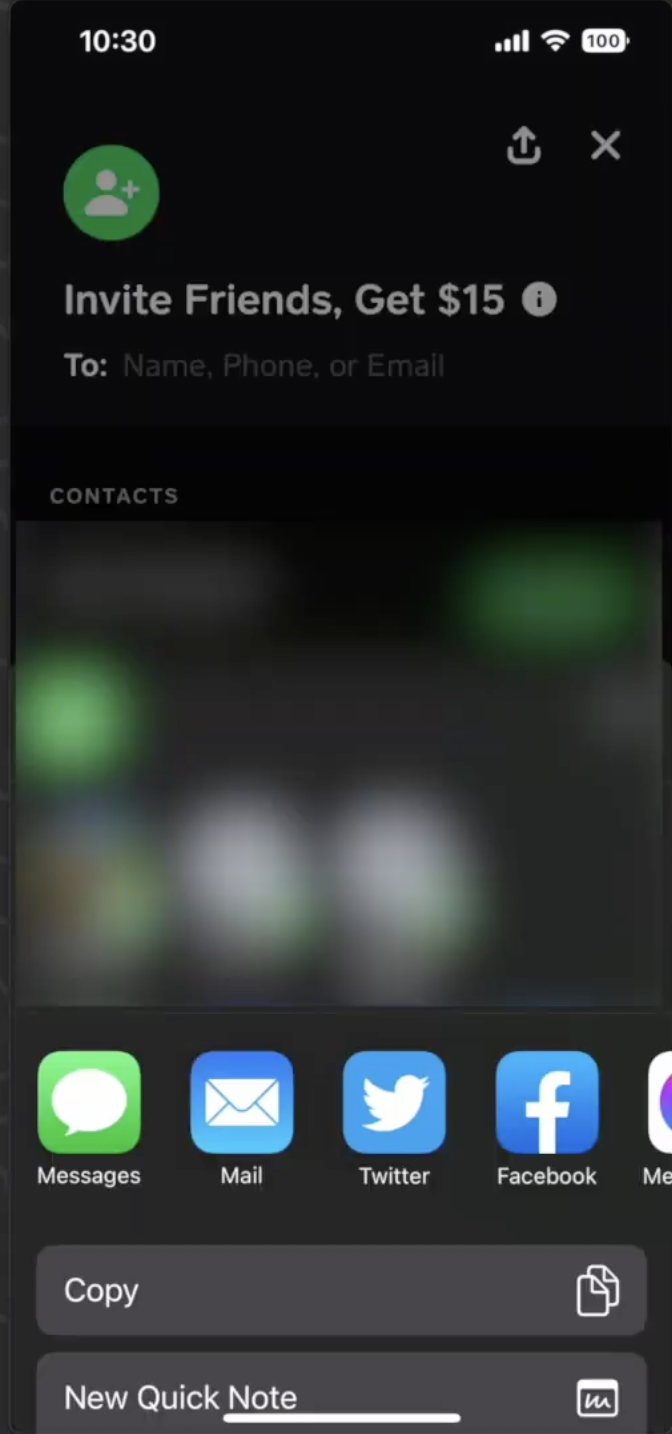
- They will send that link to you through text or your preferred messaging app.
- You must tap that link on your phone to activate their referral code.
You do not type the code manually anymore. The link performs the referral automatically.
Step 4: Confirm That Your Referral Code Was Applied
- Open Cash App after tapping your friend’s link.
- Tap the profile icon.
- Select the Earn or Rewards section if it appears.
- Look for a message showing that you are eligible for a referral bonus.
If you see bonus instructions, your friend’s code is successfully attached to your account.
Step 5: Complete The Bonus Requirements
Cash App usually requires a qualifying action before it releases your referral bonus. Requirements may vary, but the most common one is sending a small payment to another user.
- Review the bonus instructions shown in the Earn or Rewards menu.
- Complete the required task, which often includes sending a minimum payment such as five dollars.
- Wait for Cash App to process the referral bonus once you finish the task.
Both you and your friend receive the reward when the requirement is completed.
Step 6: Check Your Bonus After Completion
- Open Cash App and tap the Activity tab.
- Look for the referral reward entry in your history.
- Confirm that the bonus has been added to your Cash App balance.
If the bonus does not appear yet, Cash App may still be verifying the task. Processing times vary depending on the requirement.
Troubleshooting If The Code Does Not Apply
- You must be a completely new Cash App user or the code will not register.
- You must tap your friend’s invite link before you make your first qualifying transaction.
- You must complete all instructions in the Earn section to unlock the reward.
- If you created an account without tapping the link, you must delete the app, remove your number from Cash App, and start over.
Conclusion
The correct way to put in a code on Cash App now relies on using a referral link instead of manually typing the code. Cash App applies the referral automatically when you tap the Invite Friends link sent by someone else. After linking your payment method and completing the bonus requirement, your reward appears in the Activity section.
This updated process reflects how Cash App handles referral codes at the time of writing and avoids outdated instructions. Use the steps above to redeem your Cash App invite code successfully and unlock your bonus without confusion.


Discussion (0)
Be the first to comment.