




If you use Cash App to send and receive money, ordering a Cash App Card gives you a physical Visa debit card you can swipe in stores, use online, and at many ATMs. Knowing exactly how to order a new Cash App card helps you get a free card the first time and request a fast replacement if you lose or damage it.
At the time of writing, you order or replace a Cash App Visa debit card directly inside the app, not on a website or by phone. You can pick from several Cash App card designs, customize some styles for a small fee, and get a standard replacement card for free when something goes wrong.
This guide explains how to order a new Cash App Card, how to order a replacement card, what you need before you apply, and what to do if the Cash Card order option does not appear on your device.
What A Cash App Card Is
The Cash App Card, often called the Cash Card, is a physical Visa debit card that connects to your Cash App balance instead of a traditional bank account. You use it anywhere Visa cards are accepted in the United States, including most retail stores, online shops, and many ATMs.
Since the Cash Card pulls money straight from your Cash App balance, you should always double-check your available funds before you swipe, tap, or withdraw cash. Ordering the card is free, and you can also use a virtual Cash App debit card inside the app while you wait for the plastic card to arrive.
Requirements Before You Order A New Cash App Card
Before you follow the steps to order a Cash App Card, make sure your account meets these basic requirements.
- You are at least 18 years old and use Cash App in the United States.
- Your Cash App account shows your real name, date of birth, and mailing address.
- You installed the latest version of the Cash App on your phone.
- You verified your identity inside Cash App so you can unlock the Cash Card feature.
- You have a stable internet connection to complete the Cash Card order flow.
If you do not see any option related to a Cash App debit card, you should verify your identity and update the app first, then try again.
How To Order Your First Cash App Card
When you order a Cash App Card for the first time, you use the Money tab and Cash Card section inside the app. The exact wording on the button can vary, but the flow stays similar.
- Open Cash App on your phone and sign in.
- Tap the Money tab or Cash Card tab, depending on your app layout.
- Select the card image at the top and tap Get Cash Card or Get Your Free Card.
- Tap Continue to start the Cash App Card order process.
- Choose a standard or custom Cash App card design.
- Enter and confirm your legal name for the card.
- Confirm your mailing address and contact details.
- Review any custom design fee and submit the order.
After you complete these steps, Cash App confirms the order and shows an estimated delivery date. You usually receive the new Cash App debit card within about ten business days, and you can use the in-app virtual card for online purchases while you wait.
How To Order A Replacement Cash App Card
If you lose your Cash Card, if someone steals it, or if it arrives damaged, you can order a replacement from the same Cash Card area.
- Open Cash App
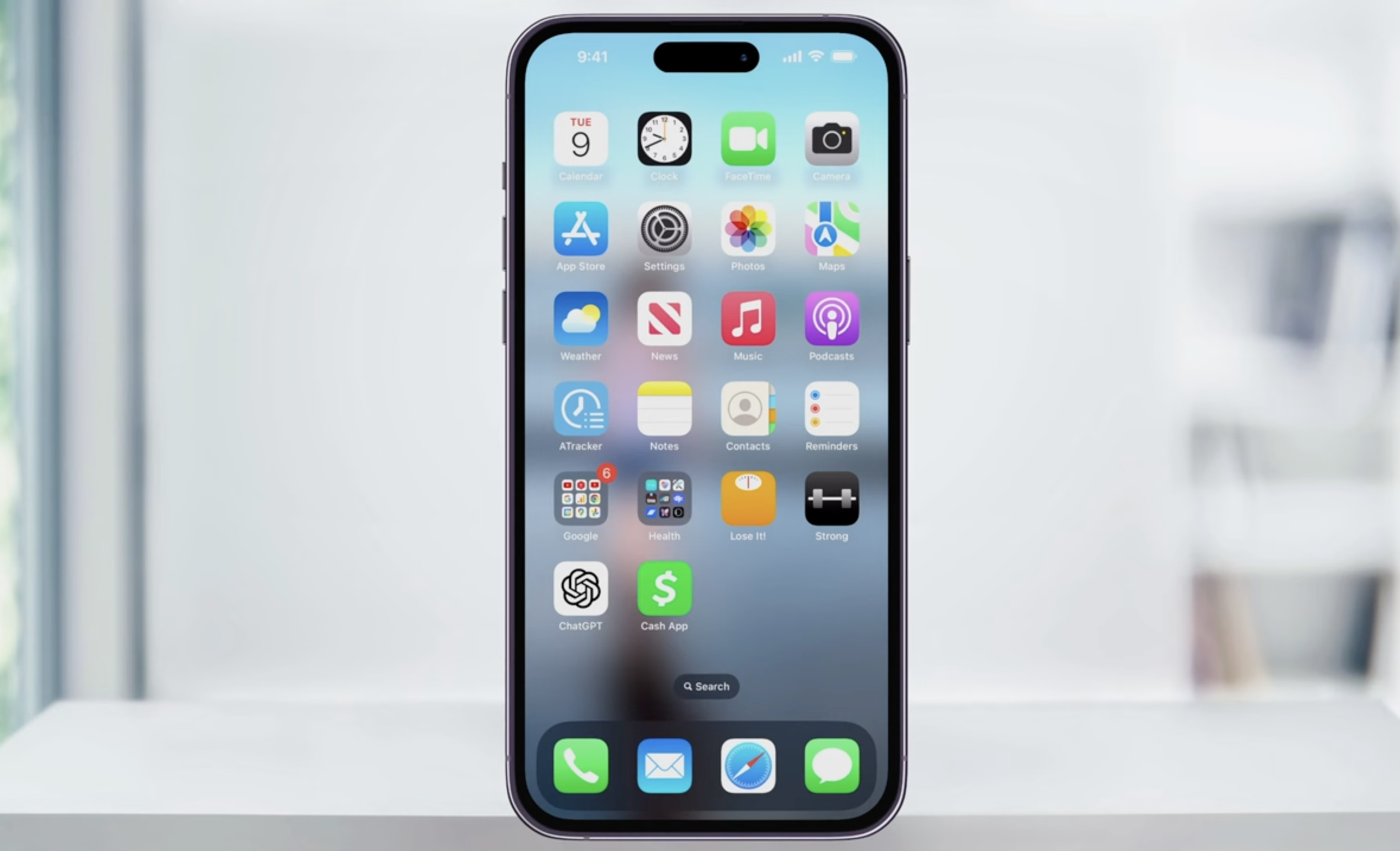
- Tap the card icon at the bottom.
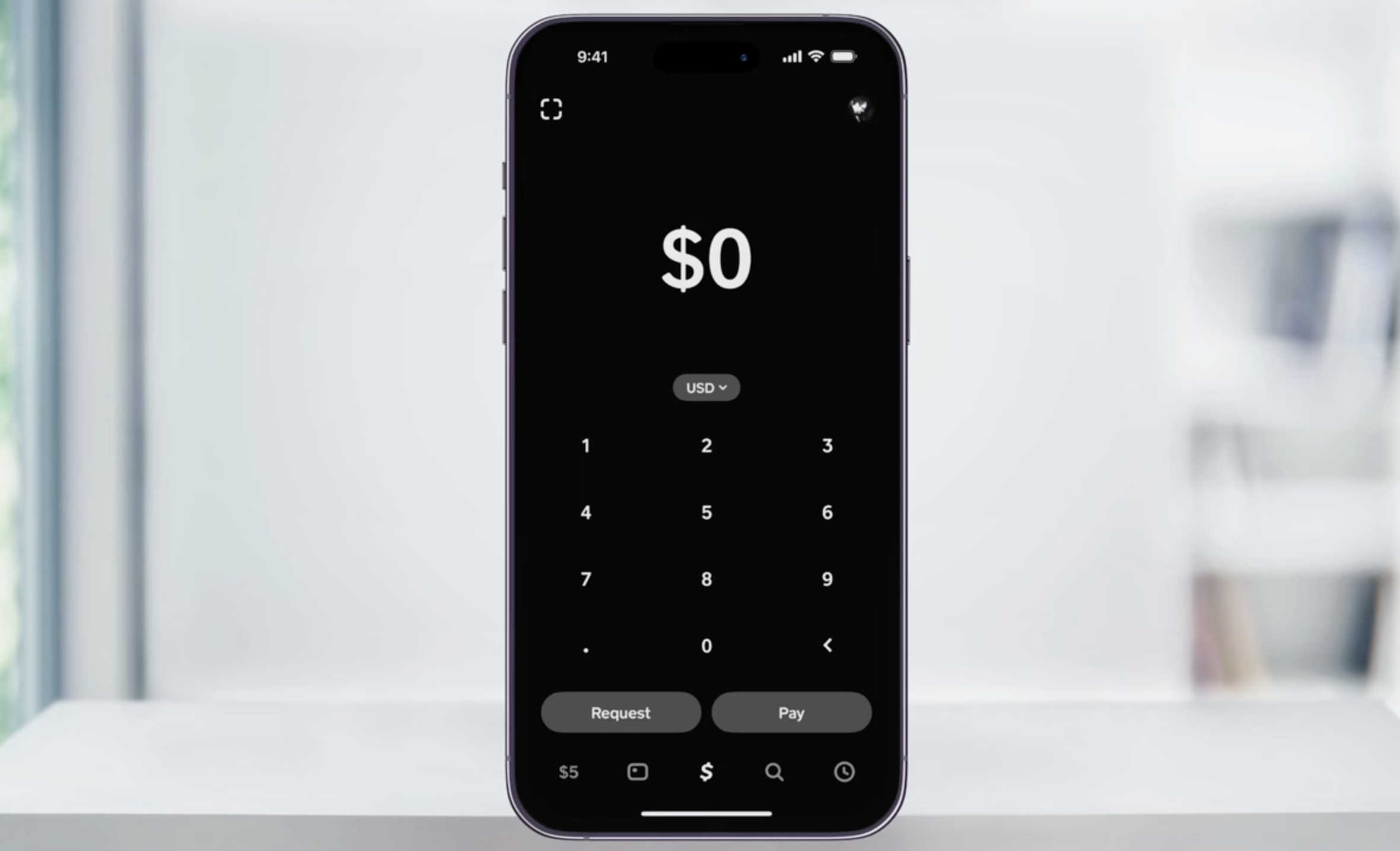
- Tap Design a new Card

- Choose a card and tap Personalize Card.
- Tap Order Card
- Follow the prompts to order a new Cash App Card to your confirmed mailing address.
Cash App usually sends a standard replacement Cash Card for free, while a new custom design may come with a small fee. You keep the same Cash App account and balance, and only the physical debit card changes.
How To Customize Your Cash App Card Design
When you order a new Cash App Card online inside the app, you can pick from default designs or pay a one-time fee for a custom style. Custom options change over time, but they usually include different colors, emojis, and the ability to draw on the card.
- Start the Cash Card order or replacement flow in the app.
- On the design screen, swipe through available Cash App card designs.
- Pick a free standard style or choose a paid custom option if you want something unique.
- Add stamps, emojis, or a simple drawing if Cash App offers those tools for your design.
- Confirm the final look and agree to any extra design fee before you continue.
Your Cash App Visa debit card then arrives with the design you chose, so take a moment to check spelling and layout before you submit the order.
How Long A New Cash App Card Takes To Arrive
After you place your Cash App Card order, the app usually quotes a delivery window of up to ten business days in the United States.
- Standard Cash Card delivery often takes a few business days, but delays can push it closer to the full window.
- Holidays, bad weather, or address problems can slow your new Cash App card order.
- You should track any email updates from Cash App in case they need you to confirm details.
If your Cash Card still has not arrived after the time Cash App quotes, you should contact support through the app and confirm your mailing address before you request another card.
How To Activate Your New Cash App Card
You cannot swipe your new Cash App debit card until you activate it. Cash App lets you activate with the QR code on the letter or with the CVV printed on the card.
- Open Cash App and tap the Cash Card icon.
- Choose Activate Cash Card.
- Allow camera access and scan the QR code on the Cash Card mailer, or choose Use CVV Instead.
- Enter the CVV and expiration date if you activate without the QR code.
- Wait for the confirmation message that your new Cash App Card is ready to use.
Once you activate the card, you can use it at stores, online, and ATMs as long as you have enough money in your Cash App balance to cover each transaction.
Troubleshooting Cash App Card Order Problems
Sometimes the option to order a new Cash App Card does not appear, or your card never shows up in the mail. A few quick checks usually solve these issues.
- No Cash Card Tab: Update the Cash App, verify your identity, and make sure you use a U.S. account.
- Wrong Address: Open your profile settings and correct your mailing address before you reorder.
- Card Stuck In Transit: Wait through the full delivery window, then contact Cash App support if the card still has not arrived.
- Card Not Working After Activation: Confirm you activated the right Cash App Visa debit card and that your account shows an available balance.
- Lost Replacement Card: Use the Cash Card support menu again to lock the missing card and request another replacement.
If you still struggle with a Cash App card replacement or new order, you should reach out to Cash App support directly through the app instead of searching for phone numbers on the web, since many unofficial support numbers belong to scammers.
Conclusion
Ordering a new Cash App Card or replacing an old one takes only a few taps once you know where to look. You start in the Money or Cash Card tab, pick Get Cash Card or the replacement option, choose your design, confirm your address, and wait for the free Cash App debit card to arrive.
By following these steps, you understand how to order a new Cash App card, how to customize it, and how to handle lost or damaged cards without disrupting your everyday spending. Once your Cash App Visa debit card arrives and you activate it, you can use your Cash App balance almost anywhere that accepts Visa.


Discussion (0)
Be the first to comment.