




The Creeper is one of the most recognizable creatures in Minecraft, known for its green body and pixelated design. If you’ve wanted to sketch your own Creeper, this step-by-step guide will help you draw it accurately - on paper or a tablet.
Step 1: Gather your drawing tools
Grab a pencil, eraser, ruler, and paper. For digital drawing, use a tablet with layers and a square or pixel brush. Having the right tools ready keeps your lines clean and symmetrical.
Step 2: Sketch the basic shapes

Start with a large cube for the head and a tall rectangular prism for the body. Keep lines light so you can refine proportions before adding detail.
Step 3: Add the Creeper’s head details

Inside the head, draw two square eyes near the top and a larger pixel-style mouth centered below. Even spacing helps match the in-game look.
Step 4: Outline the body and legs
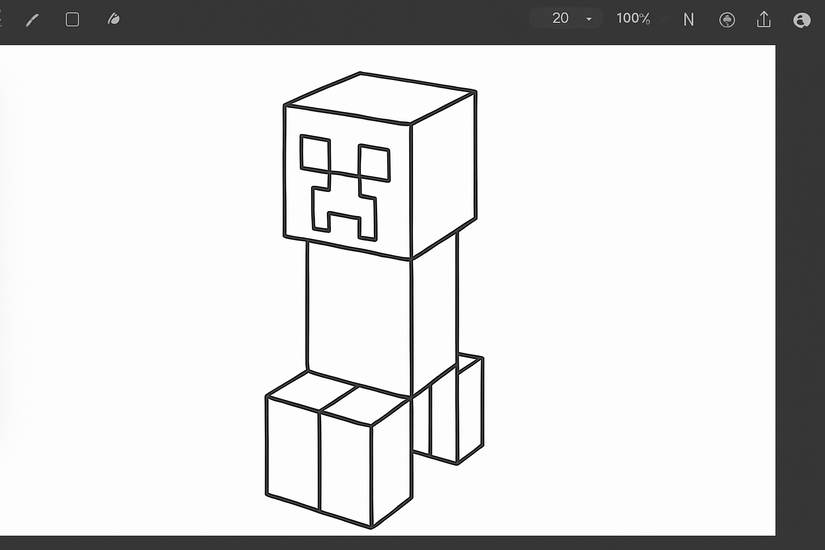
Add four evenly spaced rectangular legs beneath the body. The Creeper is perfectly symmetrical, so double-check spacing and angles.
Step 5: Add pixel-style shading
Lightly map a grid of small squares over the body to simulate pixels. Alternate light and dark greens to create the textured effect Minecraft uses.
Step 6: Color your Creeper

Fill with light, medium, and dark greens. Use black for the eyes and mouth. On tablets, separate layers for outline, color, and shading make edits easy.
Step 7: Add depth and shadow
Shade one side slightly darker and add a ground shadow beneath the legs. Soft blending or layer opacity creates a subtle 3D effect.
Step 8: Finalize the drawing
Trace final lines in a darker tone and erase guides. Add background elements like grass blocks or a path to finish the scene.

Drawing a Creeper digitally
Create three layers: outlines, base colors, and shading/texture. Use a square or pixel brush to preserve the blocky look, and lock transparency when shading.
For the best result, use a printable 16×16 grid to place pixels accurately. This is helpful for kids and beginners who want even proportions and alignment.
Creeper drawing variations
- Chibi Creeper: Shorter body, larger head, and softer corners for a cute style.
- Exploding Creeper: Add sparks, debris, and motion lines for an action pose.
- 3D Creeper: Slightly tilt the head cube and add stronger side shadows.
Tips for better results
- Practice drawing cubes before adding details.
- Keep a consistent pixel size to avoid uneven textures.
- Once confident, try other mobs to build skills.
- Use at least three green tones for pixel variation.
- Keep one consistent light direction across head and body.
- Blend lightly or reduce brush opacity for smooth digital gradients.
FAQs
How long does it take to draw a Creeper? A quick sketch takes about 15 minutes. Detailed shading and a background may extend it to an hour.
Can I draw a Creeper on my phone or tablet? Yes. Use layers, a pixel brush, and grid guides. Most mobile apps support these tools for precise results.
How do I make my Creeper look 3D? Darken one side, add a light ground shadow, and slightly angle the head cube to suggest depth.
Summary
- Gather tools or set up your drawing app.
- Sketch a cube head and a rectangular body.
- Add the pixel face and four legs.
- Apply pixel-style shading with three green tones.
- Finish with shadows, outlines, and a simple background.
Conclusion
You now know how to draw a Minecraft Creeper from rough sketch to final color. Keep practicing, experiment with variations, and build scenes to make your Creeper drawings stand out.


Discussion (0)
Be the first to comment.