




Downloading the Walmart app on your iPhone is quick and direct. If you are facing issues with the download it might be due to location restriction or phone settings. This guide will help you scale all barriers and ensure you have the app on your phone.
Before you start:
- Make sure you are signed in with your Apple ID and have a stable internet connection.
- Confirm you have at least 500 MB of free storage and an iPhone running a supported iOS version.
- If you travel, check your App Store country/region. Availability can change by region.
- Only install the app from the App Store
1) Download the Walmart app from the App Store
Open the App Store on your phone and tap the Search icon. Type walmart and tap Return. Tap the app with the correct logo and with Walmart as the developer name.

Now, tap the Get button and authenticate with Face ID, Touch ID, or your Apple ID password. When the installation is done, tap the Open button
2) Can’t find the app in the App Store?
If the search does not show Walmart, your Apple ID country may not list the app. Check Settings > General > Language & Region to confirm regional settings. Now, check if the Walmart app is available in your country on the official website.
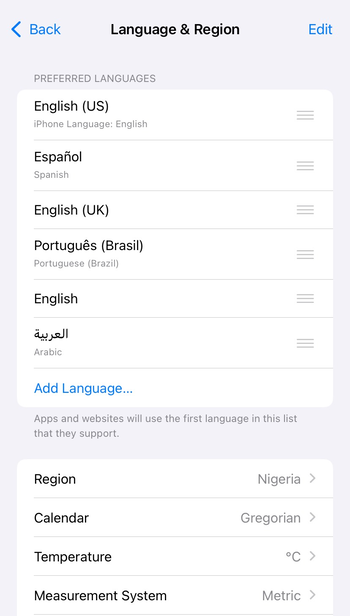
If you are a traveler or expat, changing the App Store country/region may be required and has billing trade-offs.
Tip: The Walmart app is only available in the US, Canada, and some of the countries where the company operates.
3) Troubleshooting common Walmart iPhone app download issues
- App won't download: If you found the app but it fails to download, start by freeing up storage, resolve payment verification prompts, restart, re-sign, and retry
- Can't find the app in App Store: Change App Store region/country, and remove screen time or MDM restrictions. Note that changing the region might also require you to change iPhone language.
Pro tips to keep using Walmart on your iPhone
- Keep the app updated
- Instead of changing locations, you can simply use the official website from anywhere
- For quick navigation, use the VoiceOver option
- To fix persistent issues, uninstall and reinstall the app.
FAQs
Why isn’t Walmart showing in my App Store search? It is usually a region mismatch or a temporary App Store issue. Confirm your App Store country and try again later.
Do I need a US Apple ID to install the app? Availability varies by country. If the app is not in your region, a US App Store account may be required.
Why does Apple ask for a payment method on a free app? Apple sometimes needs a verified payment method for account security and purchases elsewhere.
How do I update the Walmart app manually? Open App Store > Profile and look for Walmart under Available Updates. Tap Update.
Can I use Walmart without installing the app? Yes. Use walmart.com in Safari for browsing, orders, and tracking.
Conclusion
The fastest path is simple: open App Store, search Walmart, tap Get, then Open. If the app does not appear or install, check region, Screen Time, and storage first, then restart and retry on Wi-Fi or cellular.
Most readers resolve this in under 10 minutes. If you are blocked by work management or a region lock, use walmart.com in Safari as a temporary solution, then fix billing or country settings and install later.


Discussion (0)
Be the first to comment.