



Do you have an Amazon Gift Card that you want to use for buying Steam games or Steam Wallet Cards? Do you want to buy a Steam Gift Card from Amazon? Both scenarios are possible, but some things are a bit more complicated than you would expect. Here’s how it all works:
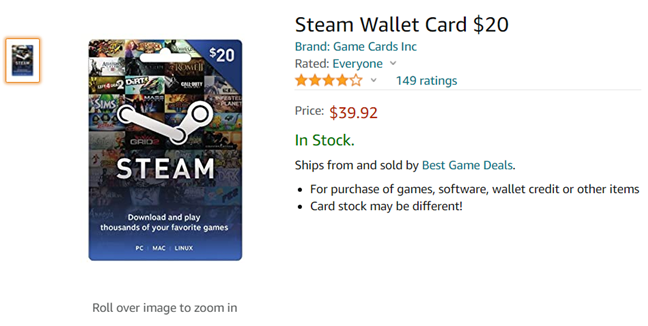
 You can find Steam Wallet Cards on Amazon
Here are some direct links where you can find Steam Wallet Cards:
Some Steam Gift Cards are sold by Valve directly (the company behind Steam) at better prices but for most of the year, are unavailable for sale. Click on this link to see if they’re back on sale again: Steam Gift Card - $20.
When you buy a Steam Wallet Card from Amazon, you receive a physical product similar to the one pictured below. To redeem your credit, scratch to see the activation code on its back. Then, read the next section of this article.
You can find Steam Wallet Cards on Amazon
Here are some direct links where you can find Steam Wallet Cards:
Some Steam Gift Cards are sold by Valve directly (the company behind Steam) at better prices but for most of the year, are unavailable for sale. Click on this link to see if they’re back on sale again: Steam Gift Card - $20.
When you buy a Steam Wallet Card from Amazon, you receive a physical product similar to the one pictured below. To redeem your credit, scratch to see the activation code on its back. Then, read the next section of this article.
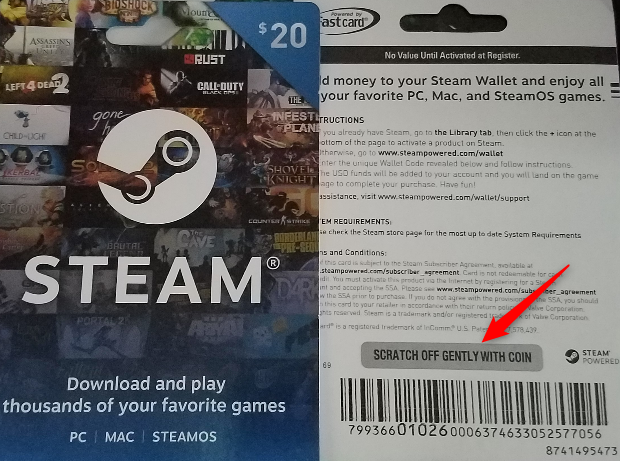
 Scratch the code for your Steam gift card
Before buying a Steam Wallet Card from Amazon, keep in mind these pros and cons:
Scratch the code for your Steam gift card
Before buying a Steam Wallet Card from Amazon, keep in mind these pros and cons:
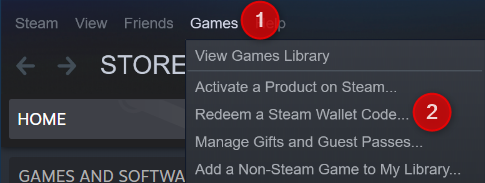
 Go to Games > Redeem a Steam wallet code
Paste or type the code on the redeem page, and click or tap Continue to add it to your Steam account.
Go to Games > Redeem a Steam wallet code
Paste or type the code on the redeem page, and click or tap Continue to add it to your Steam account.
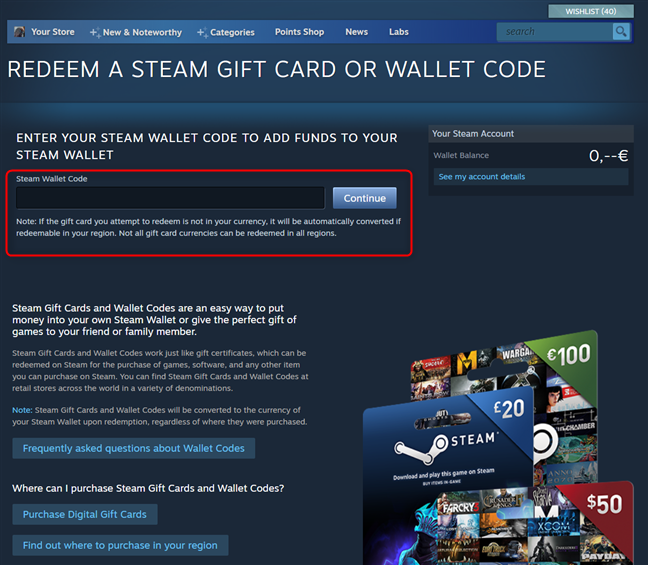
 Enter your Steam wallet code
The Steam Gift Card or Wallet credit is added to your Steam account. If you never used Steam credit on your account before, you may be prompted to enter your address to determine the correct currency. Once all is done, you can purchase any game on Steam.
Enter your Steam wallet code
The Steam Gift Card or Wallet credit is added to your Steam account. If you never used Steam credit on your account before, you may be prompted to enter your address to determine the correct currency. Once all is done, you can purchase any game on Steam.
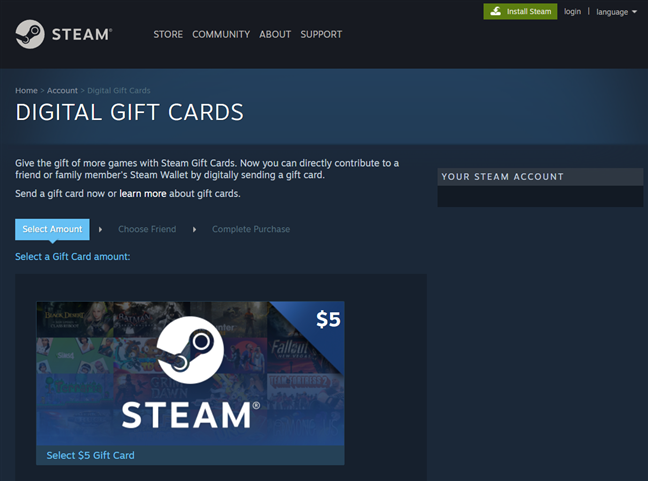
 Buying digital gift cards is done directly from Steam
To buy a digital Steam Gift Card, go to this page on Steam: Digital Gift Cards.
Buying digital gift cards is done directly from Steam
To buy a digital Steam Gift Card, go to this page on Steam: Digital Gift Cards.
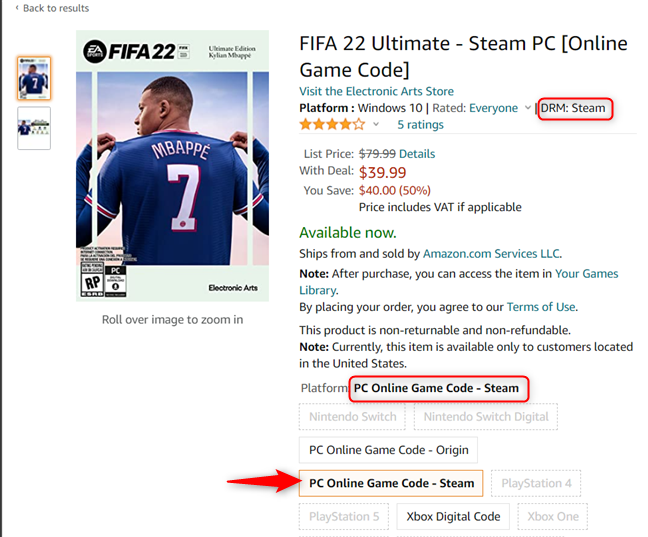
 FIFA 22 Ultimate - The Steam version can be bought from Amazon
There are several pros and cons to buying Steam games from Amazon:
FIFA 22 Ultimate - The Steam version can be bought from Amazon
There are several pros and cons to buying Steam games from Amazon:
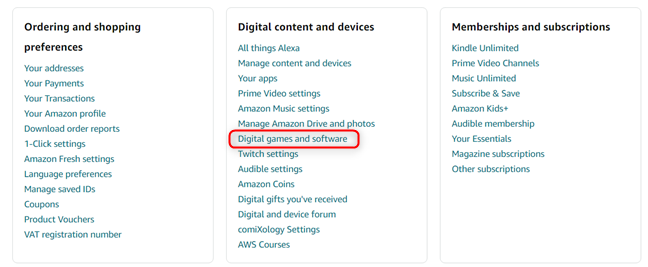
 Go to Digital games and software in your Amazon account
Look through the list of items you ordered, find the Steam game that interests you, and look for the Activation Code or Activation Key highlighted below. Copy this activation key and open the Steam app on your PC.
Go to Digital games and software in your Amazon account
Look through the list of items you ordered, find the Steam game that interests you, and look for the Activation Code or Activation Key highlighted below. Copy this activation key and open the Steam app on your PC.

 Copy the activation code for your Steam game
Go to “Games -> Activate a Product on Steam.”
Copy the activation code for your Steam game
Go to “Games -> Activate a Product on Steam.”
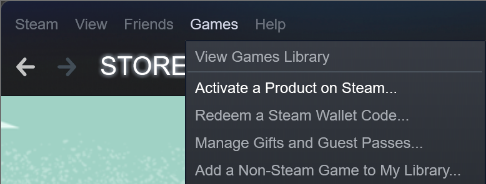
 Go to Games > Activate a Product on Steam
The Steam product activation wizard opens, informing you that you need a product code. Click or tap Next.
Go to Games > Activate a Product on Steam
The Steam product activation wizard opens, informing you that you need a product code. Click or tap Next.
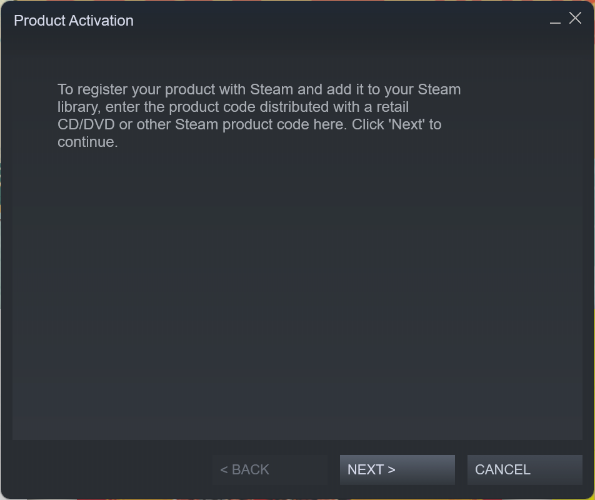
 The Steam Product Activation wizard
Read the Steam Subscriber Agreement, click or tap Next and you’re asked to enter the product code. Paste the activation code/key from Amazon, click or tap Next, and then Finish.
The Steam Product Activation wizard
Read the Steam Subscriber Agreement, click or tap Next and you’re asked to enter the product code. Paste the activation code/key from Amazon, click or tap Next, and then Finish.
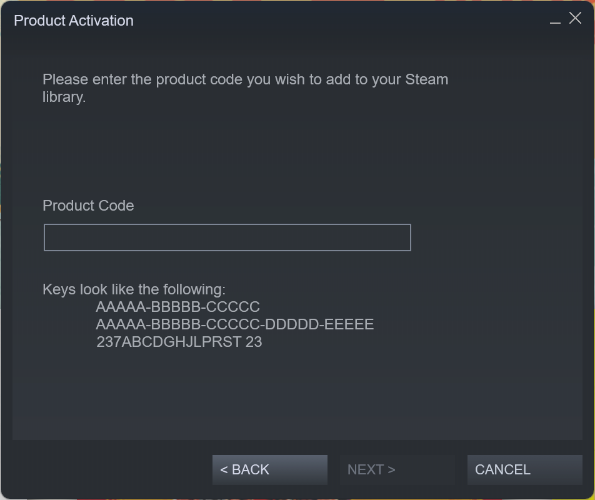 Enter the Activation Code/Key for your game
The game you bought from Amazon is now in your Steam library and can be installed on your PC.
Enter the Activation Code/Key for your game
The game you bought from Amazon is now in your Steam library and can be installed on your PC.
How to buy Steam Gift Cards or Steam Wallet Cards from Amazon
If you have an Amazon gift card and you want to “convert it” to a Steam gift card, you can do that by buying a so-called “Steam Wallet Card” from Amazon. Unfortunately, these Steam Wallet Cards are physical cards sold by third parties on Amazon. They’re not digital Steam Gift Cards, and they’re usually more expensive than the gift card value you purchase.- PROS: Steam Wallet Cards do not typically have country restrictions and can be redeemed worldwide. You can use them to convert your Amazon gift card balance to buy ANY game from Steam, which is fantastic.
- CONS: It takes time for the Steam Wallet Card to be shipped to your address. You must wait for days until it arrives. Also, you pay more than the value you purchase. Steam Gift Cards are not sold by Amazon, as Steam games are, but by third parties who want to make a profit. If you have an Amazon gift card that you want to use for Steam games, we recommend buying Steam games directly from Amazon. Read on to learn how.
How to redeem the Steam Wallet Card or Gift Card
If you have received a physical Steam Wallet Card or a digital Steam Gift Card, copy the corresponding code from it. Then, open the Steam app on your PC, login and go to “Games -> Redeem A Steam Wallet Code.”But wait, where can I buy digital Steam Gift Cards?
Unfortunately, you can’t find digital Steam Gift Cards on Amazon or anywhere else other than Steam. The advantages of buying digital Steam Gift Cards are that they are sent instantly and don’t cost more than their value. You can also buy a gift card as small as $5 up to a very generous $100.How to buy digital Steam games from Amazon
Suppose you have an Amazon Gift Card or credit on your Amazon account. In that case, you can use it to buy digital Steam games from Amazon, which are delivered to you instantly. This way, you “convert your Amazon gift card” into Steam games. The idea is that the Amazon Gift Card should be applied to your Amazon account before buying games. Once that is done, go to Amazon.com or the Amazon site in your country, search for the name of the game you want to buy, and add “Online Game Code” or “PC Code Steam” after your keywords. Amazon will show you the results. Keep in mind that not all games on Amazon are available as digital Steam codes. However, some of them are, like the FIFA 22 Ultimate - Steam PC [Online Game Code]. As you can see in the screenshot below, the DRM mentioned is Steam, and the platform is PC Online Game Code - Steam. The game you want to buy must have similar wording and references to Steam. When you buy it from Amazon, you receive the activation code that you can paste into Steam.- PROS: You can buy and download a game in minutes, the only limitation being your internet connection speed. Also, you can convert your Amazon Gift Card balance into a Steam game.
- CONS: The problem is that you get access to a limited portfolio of Steam games. Usually, only major titles can be found on Amazon, sold with the Steam DRM. Many indie titles are sold exclusively on Steam and cannot be bought from Amazon.
How to activate the games you bought from Amazon on Steam
After you buy the Steam game you want, it gets added to your Amazon account as an activation code and a digital order. It can be accessed by opening your Amazon Account homepage and going to “Digital content and devices-> Digital games and software.”
Discussion (3)
Steam gift cards are expensive on amazon, buy a gamestop giftcard instead then go exchange it at gamestop for a steam gift card. (I’ve done it, it works.)
Why not just guy a visa gift card? On Amazon? It would be a little cheaper.
Steam gift cards are sold in the Amazon marketplace so the cost of the card will exceed its face value in most cases. Cheaper to just buy it retail for face value.